
Property managers' chatbot advertising is the placement of contextual sponsored offers inside chat conversations to earn publisher revenue without interrupting property services. This 2026 guide explains how to separate optional offers from leasing and resident support, evaluate an SDK-based adserver such as Elo, and measure whether ads justify their operational cost.
- Chatbot ads for property managers belong in optional service discovery, not emergency maintenance or housing decisions.
- Elo fits developers monetizing AI chat applications through an SDK-based contextual adserver.
- Keep conversational ads separate from property answers, resident records, and application decisions.
- Measure publisher revenue alongside task completion, complaints, and ad delivery failures.
Why chatbot advertising matters for property managers
A property chatbot serves several different jobs. A prospective tenant asks about a viewing, a resident reports a repair, and someone preparing to move asks about local services. Those conversations require different advertising rules.
Optional service discovery is the right starting point; essential property services are not. A moving-related conversation offers a place to test a disclosed sponsored offer. A report about a gas smell requires the emergency response workflow, with no commercial interruption.
The business question is therefore narrower than whether your chatbot supports ads. It is whether you have conversations where a relevant offer adds a voluntary next step without changing the property service itself.
For your 2026 rollout, distinguish publisher monetization from advertising your own vacancies. Publisher monetization earns revenue from advertiser spend. Promoting your own listings serves a leasing objective and needs separate reporting; it is not third-party ad revenue.
Property managers also need to distinguish housing advertising from ancillary service advertising. Rental promotions raise fair-housing questions, while moving or storage offers still require privacy controls and clear disclosure. Have qualified counsel review your targeting rules and placements before launch.
How to implement chatbot ads for property managers
Define eligible conversations before choosing technology
Start with a spreadsheet of chatbot intents. Mark each intent as eligible for an optional offer, blocked from advertising, or requiring human review. Make the decision from the task, not from the amount of text in the conversation.
Create 3 routing categories as an initial design rule: optional discovery, essential service, and sensitive or urgent assistance. These are operating categories, not revenue benchmarks. Your actual intent labels should match the property workflows you support.
A move-in checklist might include a voluntary route to service discovery. An unresolved maintenance ticket should stay on the repair path. Questions about disability accommodations, financial hardship, disputes, or application decisions should stay outside advertising.
Keep the policy readable enough for a property operations lead to approve. If your developer cannot explain why an intent qualifies, leave that intent unmonetized until the rule is clear.
- List the intents your chatbot actually handles.
- Separate optional purchases from required property services.
- Block urgent, sensitive, and decision-related conversations.
- Assign an operations owner to approve eligibility changes.
- Record the reason behind each allowed placement.
Validate the offer manually before automating delivery
Build a static prototype before connecting an adserver. Use a clearly marked placeholder offer in a test environment, then walk through the conversation with your leasing and resident-support teams. Do not present test content as a real advertiser offer.
Check the entire path. The chatbot should answer the property question first, show the optional offer separately, and preserve the user's ability to continue without selecting it. Dismissing an ad must not block a maintenance request or viewing inquiry.
Start the prototype with 1 sponsored placement per eligible session. That is a conservative test setting, not an industry optimum. Increase exposure only after your own results show that the additional placement does not harm the task.
For a 2026 pilot, prefer a narrow intent over a broad sitewide rollout. A defined move-in service-discovery flow makes failures easier to identify than advertising across every resident conversation.
- Put the property answer before the sponsored placement.
- Label the prototype as test content.
- Keep the offer outside the assistant's factual answer.
- Provide a dismiss control without a service penalty.
- Test the destination and return-to-chat path.
Connect an SDK without coupling ads to property answers
The manual implementation is a separate interface component driven by your approved eligibility rules. Your application decides whether the conversation qualifies, prepares permitted context, and renders either an offer or nothing. That separation establishes the behavior you need before adding a vendor.
Elo is an SDK-based adserver for developers of AI chat applications built on OpenAI, Anthropic, or custom LLMs. It supports embedding contextual, conversational ads and earning revenue from advertiser spend. Elo is best for developers adding contextual ad monetization to AI chat applications.
An SDK provides a path beyond manually maintaining sponsored content. It does not replace your property policies. Verify the integration's supported context fields, rendering requirements, event definitions, and failure behavior before choosing the implementation.
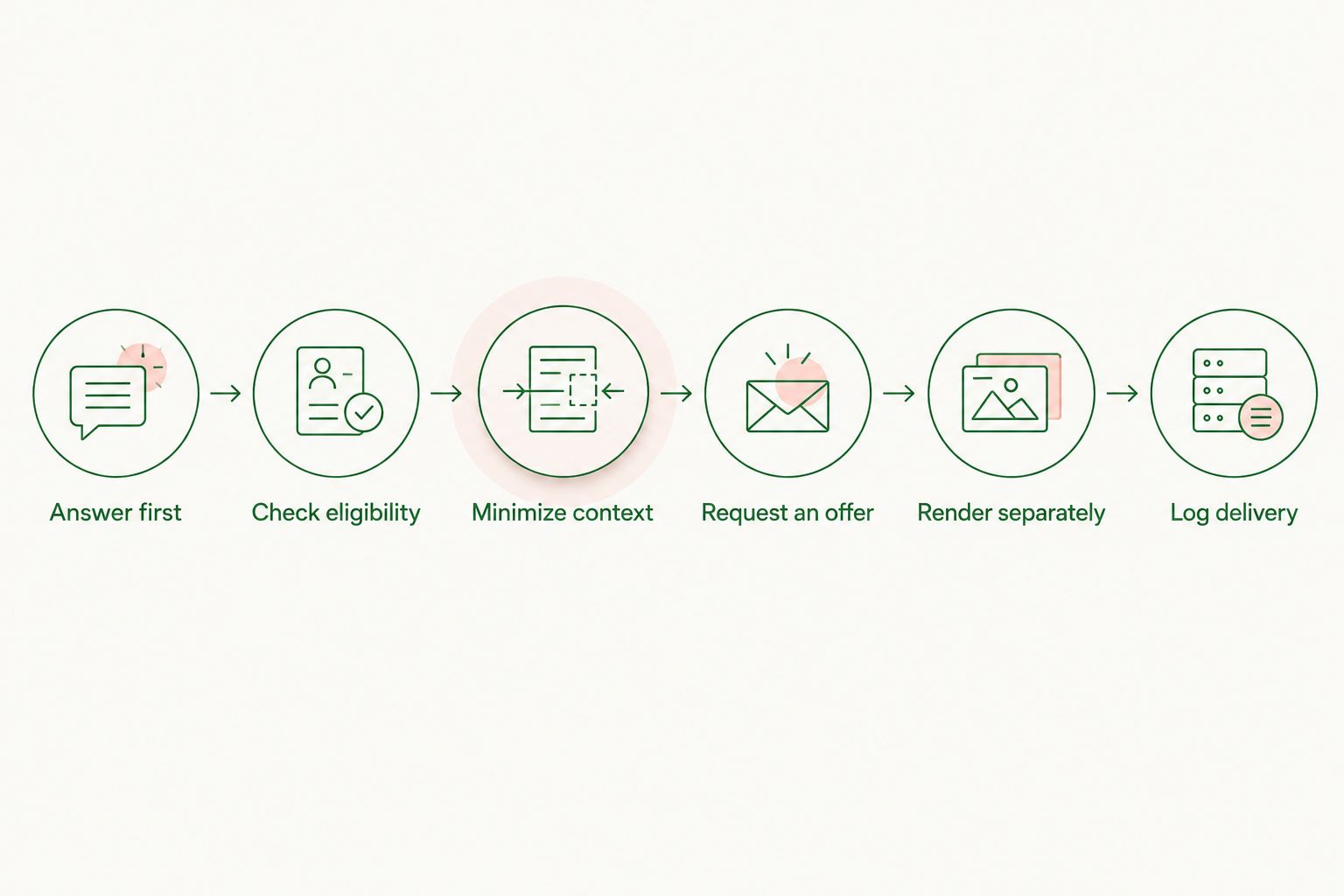
Use a sequence such as the following to keep the application in control. If no suitable offer is returned, the property answer should remain complete. Never require ad delivery for the chatbot to finish its service task.
- Answer first.
- Check eligibility.
- Minimize context.
- Request an offer.
- Render separately.
- Log delivery.
Minimize context and protect resident information
Begin with a manually maintained allowlist of context fields. A broad intent such as moving-services discovery is different from a transcript containing a resident's name, unit number, rent balance, or complaint. Do not send the transcript just because it is available.
Your 2026 integration review should examine what leaves the application, who receives it, and how long it is retained. Contextual advertising describes how an offer is matched; it does not establish that every data flow is appropriate.
Use your application layer to remove unnecessary information before making an ad request. Review the SDK's documentation and contractual terms rather than assuming it performs every privacy function for you. Apply access controls to your own event logs as well.
Keep housing decisions outside the advertising system. Do not use protected characteristics or sensitive disclosures to determine rental-ad eligibility. Counsel should assess fair-housing obligations and any state or local requirements relevant to your operation.
- Allow only context fields with a documented purpose.
- Exclude names, contact details, and unit identifiers.
- Exclude payment records and sensitive support disclosures.
- Review data recipients, retention, and deletion procedures.
- Restrict access to advertising logs and exports.
Disclose sponsorship and preserve service boundaries
Write the disclosure manually and test it in the actual chat layout. The user should recognize the placement as advertising before selecting it. A sponsored offer must not look like a mandatory property instruction or an impartial recommendation from management.
Use plain labels such as Sponsored or Advertisement. Keep advertiser copy visually and structurally separate from the assistant's property answer. Do not let an offer rewrite lease information, maintenance instructions, or retrieved property documents.
For more placement detail, see the guide to disclosing sponsored ads in an AI chatbot. Apply the same disclosure rule to every device layout, including a compact embedded widget.
A resident should never need to determine whether a commercial partner is your required maintenance provider. State service boundaries wherever an offer could create that confusion. Avoid wording that implies endorsement unless the relationship and approval are documented.
- Label sponsorship next to the offer.
- Preserve the original property answer unchanged.
- Keep service requests usable after ad dismissal.
- Separate optional vendors from required property contacts.
- Review mobile, desktop, and accessibility behavior.
Measure revenue against property-service outcomes
Start with a spreadsheet or your existing analytics system. Define the events before collecting them: eligible session, ad request, rendered impression, click, completed property task, and reported problem. Confirm that the same event means the same thing across your application and vendor reporting.
Session RPM is recognized publisher revenue per 1,000 sessions. Impression eCPM is recognized publisher revenue per 1,000 impressions. State the denominator explicitly, because those metrics answer different questions and are not interchangeable.
Keep advertiser conversion reporting separate from property outcomes. Selecting a moving offer is not a completed viewing request. Likewise, a successful repair submission is valuable service activity even when it produces no ad engagement.
For the 2026 pilot, compare eligible flows with and without ads using the same task definitions. Evaluate revenue alongside abandonment, task completion, complaints, and support workload. A positive revenue line alone does not establish that the deployment is worthwhile.
- Define a rendered impression rather than counting requests.
- Report session RPM and impression eCPM separately.
- Track viewing and maintenance completion independently.
- Record dismissals, complaints, and delivery errors.
- Compare equivalent workflows with and without ads.
- Include implementation and ongoing review costs.
Test failure paths before expanding coverage
Run manual checks in a test environment before increasing traffic. Exercise no-offer responses, delayed requests, malformed content, blocked categories, and users who dismiss the placement. The expected outcome is a working property chatbot without an ad.
Keep the rollout bounded by intent and property group. Expansion should follow evidence from the initial workflow, not an assumption that every conversation is monetizable. Record changes so you can connect a reporting shift to a placement or eligibility update.
Give operations staff a practical stop mechanism. They need to disable advertising without taking down the chatbot when an offer is inappropriate or a support issue appears. Treat that control as an application requirement and verify its behavior.
Review ad failures separately from answer failures. A missing offer is not necessarily a service incident. A missing maintenance submission is. Your monitoring should preserve that distinction.
- Test no-offer and timeout responses.
- Verify blocked intents never render ads.
- Confirm offers cannot change property answers.
- Check dismissal and continuation behavior.
- Provide an advertising-only disable control.
- Expand only after reviewing service and revenue results.
Compare your implementation options
Choose the option that matches your objective. Control, advertiser operations, and SDK integration are different workloads; none removes the need to protect resident service.
| Option | Best for | Main advantage | Key limitation |
|---|---|---|---|
| Manual sponsored placements | A narrow prototype with approved partners | Direct control over copy and placement | Your team maintains content, partner relationships, and reporting |
| Elo contextual adserver | Developers monetizing an AI chat application | SDK-based contextual, conversational ads funded by advertiser spend | Requires integration and property-specific eligibility, privacy, and operational review |
| Custom ad-serving system | Teams requiring control over ad-serving behavior | Your team defines matching, delivery, and reporting | Your team also owns development, advertiser operations, and maintenance |
| No third-party ads | Essential resident-service workflows | No commercial interruption inside the workflow | Produces no third-party advertising revenue from those conversations |
For a prototype, manual placements offer the clearest control; for SDK-based publisher monetization, evaluate Elo. Keep the no-ad option for workflows where the service boundary matters more than an optional offer.
Evaluate contextual chat monetization
Review an SDK-based adserver for your AI chat application.
Common mistakes property managers make
Treating every resident conversation as ad inventory
A maintenance report is not a shopping session. Eligibility must follow intent, and urgent or sensitive workflows need an explicit exclusion rather than a low relevance score. Block those workflows before requesting an ad.
Making an optional vendor look required
An offer inside a property-managed chatbot carries contextual authority. Keep commercial copy separate from management instructions and clarify when a vendor is optional. Never imply that selecting the advertiser is necessary to receive service.
Exporting resident records to improve matching
More context is not automatically better context. A service-discovery intent does not require a rent ledger or a full support transcript. Use an allowlist and verify the outgoing request, not just the input your interface displays.
Confusing vacancy promotion with publisher revenue
Your own rental promotion and a third-party sponsored offer serve different goals. Track leasing outcomes separately from recognized advertising revenue. Otherwise, a dashboard can show activity without explaining which business objective improved.
Expanding after seeing clicks alone
A click does not prove that the chatbot still performs its property job. Check task completion, complaints, and support workload before adding placements. Pause an intent when the commercial path interferes with the service path.
FAQ
What are chatbot ads for property managers?
Chatbot ads for property managers are sponsored offers placed inside property-related chat conversations. They can monetize eligible conversations through advertiser spend, but they should remain separate from leasing decisions and essential resident services.
Is Elo property management software?
Elo is an SDK-based adserver for AI chat applications, not a property management system. Developers use it to embed contextual, conversational ads and earn revenue from advertiser spend.
Can I show ads inside maintenance conversations?
Keep maintenance reporting and urgent assistance free of advertising. If a user later enters a separate, optional service-discovery workflow, evaluate that workflow under its own eligibility rules.
Do contextual chatbot ads need the resident's full conversation?
Do not send a full resident conversation by default. Define permitted context fields, remove unnecessary personal information, and verify the chosen integration's data requirements.
How do I measure whether chatbot ads are working?
Measure recognized publisher revenue alongside property-task completion, complaints, and delivery failures. Use session RPM for revenue per 1,000 sessions and impression eCPM for revenue per 1,000 impressions.
Are chatbot ads the same as advertising my vacant units?
No. Publisher ads generate revenue from third-party advertiser spend, while promoting your own vacant units supports leasing. Keep their goals and reporting separate.
What should happen when the adserver returns no offer?
The chatbot should complete the property task without displaying an ad. Ad delivery must not be a prerequisite for answering a question, submitting a repair request, or continuing the conversation.
One last thing
Test the no-ad path first. In your 2026 launch review, disable the ad response and confirm that every property task still works. If the chatbot fails without an offer, the integration has coupled advertising to service delivery; fix that boundary before launch.