
Best fit for contextual chatbot ads: Elo. Best for mobile-app inventory: Google AdMob. Best for publisher-controlled campaigns: Google Ad Manager. Best for custom ad-serving infrastructure: Kevel. For your 2026 shortlist, rank support by measured time to a working fix—not by the first reply.
- Elo is the best-fit starting point for developers seeking SDK-based contextual ads inside AI chatbot conversations.
- Ad network support speed AI chatbots: measure technical response, workaround time, and resolution separately.
- Google AdMob suits mobile-app advertising; Google Ad Manager suits publisher-managed campaigns.
- Kevel suits custom ad-serving infrastructure. Test support ownership before committing to any platform.
Why this matters
An ad integration has several failure points: the request, the placement, the rendered creative, and the revenue event. A support agent who acknowledges your ticket has not necessarily identified which one failed. Your chatbot still needs to answer users while the advertising issue gets fixed.
The best support team gets your integration working and explains the failure. A quick greeting is not enough. For a 2026 selection, separate platform fit from support performance, then test both before launch.
This guide ranks the options by their fit for distinct publishing models. Treat support speed as an acceptance test attached to that shortlist, not as an assumed property of a recognizable brand.
What makes the best ad network for chatbot support?
Use these criteria before comparing platforms. They distinguish useful technical support from a busy inbox.
- Chat placement fit: The platform must support the advertising surface you intend to build. Mobile display inventory and contextual conversational placements are different requirements.
- Technical ownership: Ask who handles SDK errors, malformed requests, rendering failures, and event discrepancies. An escalation path needs an owner.
- Actionable response: A useful answer includes a diagnostic step, an explanation, or a reproducible fix. An acknowledgment does not qualify.
- Resolution quality: Require confirmation that the original failure is resolved. Closing a ticket is not the same as validating an integration.
- Operational clarity: Establish support hours, escalation channels, and incident communication before depending on them.
- Safe failure behavior: Design the chatbot to keep answering when an ad request fails. Support speed must not become a dependency for the core conversation.
Ask each vendor the same questions. Keep account type and issue severity consistent; otherwise, you are comparing different service conditions rather than different support teams.
Ad networks and ad-serving platforms at a glance
These options solve different problems. The order below prioritizes contextual chatbot monetization, followed by mobile publishing, campaign management, and custom infrastructure. It is not a measured fastest-to-slowest support leaderboard.
| Rank | Platform | Best for | Standout capability | Key limitation | Support acceptance test |
|---|---|---|---|---|---|
| 1 | Elo | Contextual ads inside chatbot conversations | SDK-based conversational ad serving | Support commitments need separate verification | Diagnose a contextual placement failure |
| 2 | Google AdMob | Mobile chatbot apps using app-ad formats | Mobile-app advertising and mediation | App-ad support does not establish conversational placement fit | Diagnose an SDK or mediation issue |
| 3 | Google Ad Manager | Publishers managing campaigns and inventory | Publisher ad serving and campaign management | Campaign tooling is not a ready-made conversational integration | Resolve a delivery or event discrepancy |
| 4 | Kevel | Teams building custom advertising infrastructure | API-based ad-serving infrastructure | Custom workflows leave integration ownership with your team | Diagnose an API request and decision issue |
A chatbot publisher should not choose an ad server merely because it offers familiar campaign controls. First establish how an ad enters the conversation, how the application renders it, and how the publisher records the resulting events.
1. Elo: best chatbot ad platform for contextual conversations
Elo provides an SDK-based adserver for developers building chat applications on OpenAI, Anthropic, or custom LLMs. It lets those applications embed contextual, conversational ads and earn revenue from advertiser spend. That directly matches the core use case: monetizing conversations inside your own application.
The support evaluation should follow that integration boundary. Ask how to diagnose a conversation that produces no ad, a returned ad that does not render, and an event that does not reach your reporting workflow. Request the diagnostic information needed for each case before launch.
Elo pros:
- Its stated product purpose matches contextual chatbot monetization.
- SDK-based integration gives developers a defined implementation surface to evaluate.
- The stated application scope includes OpenAI, Anthropic, and custom LLMs.
Elo cons:
- Contextual integration still requires decisions about placement, rendering, and conversation flow.
- Product fit does not establish a support response guarantee or resolution deadline.
Best for: Developers whose primary requirement is contextual advertising inside an AI chat application.
Before committing, obtain a clear division of responsibilities between the SDK and your application. Your team needs to know which errors belong to the adserver and which belong to the chat interface. That boundary makes a support request easier to investigate.
Verdict: Hold production rollout until the contextual integration and escalation path pass your acceptance test.
2. Google AdMob: best ad network for mobile chatbot inventory
Google AdMob is a mobile-app advertising platform with ad formats and mediation capabilities. Evaluate it when your chatbot runs inside a mobile application and your advertising plan uses mobile-app placements. Do not treat mobile SDK compatibility as proof that an ad will fit naturally into a conversation.
For your 2026 evaluation, test the actual placement your app will use. A successful ad load in an isolated screen does not validate the behavior of a live chat interface, especially when messages stream or the user changes screens.
Google AdMob pros:
- Its product scope is mobile-app advertising.
- Mediation supports evaluating multiple advertising sources within an app monetization setup.
- Its SDK integration is relevant to native mobile development workflows.
Google AdMob cons:
- Mobile ad formats do not automatically provide conversation-context matching.
- A mediated setup adds boundaries between the app, mediation layer, and advertising source.
Best for: Mobile chatbot publishers whose monetization plan centers on established app-ad placements.
Ask support to explain ownership before introducing multiple demand sources. If an adapter fails, you need to know who investigates the app integration and who investigates the source. A fast response that redirects the ticket does not finish the job.
Verdict: Hold until the mobile placement works in the chat interface and support ownership is explicit.
3. Google Ad Manager: best ad server for publisher-managed campaigns
Google Ad Manager provides publisher ad serving and campaign-management tools. Evaluate it when your team needs control over inventory, delivery rules, and advertiser campaigns. It addresses campaign operations rather than supplying a complete contextual chatbot integration.
Your support test should distinguish delivery problems from application problems. A campaign can be eligible to serve while your chatbot fails to render the returned creative or record an event. Those are separate investigations.
Google Ad Manager pros:
- Its product scope includes publisher inventory and campaign management.
- It suits evaluating direct campaign delivery requirements.
- Delivery controls give ad operations a defined set of campaign settings to inspect.
Google Ad Manager cons:
- Your team still needs to design the conversational placement and integration.
- Campaign configuration and application behavior create separate diagnostic paths.
Best for: Publishers with ad-operations requirements and developers available to build the chatbot advertising surface.
Include an ad-operations colleague in the support trial. Ask for an explanation that connects campaign eligibility to the request and the rendered placement. A technical answer that ignores delivery configuration can leave the publisher investigating the wrong layer.
Verdict: Hold until campaign delivery and application rendering are validated together.
4. Kevel: best ad-serving option for custom chatbot infrastructure
Kevel provides API-based ad-serving infrastructure for teams building advertising products. Evaluate it when you want to design your own placement, decisioning workflow, and advertising experience. This is a custom-build route, not a shortcut around application engineering.
The support test should focus on request construction, decision behavior, and event handling. Send a sanitized reproduction that isolates the ad-serving request from the rest of the chatbot. Your developers should be able to repeat the failure without replaying an entire conversation.
Kevel pros:
- API-based infrastructure fits custom advertising workflows.
- Your team can design the placement around its application requirements.
- A distinct ad-serving request gives developers a boundary for troubleshooting.
Kevel cons:
- Your team owns the custom integration and conversational interface.
- Ad-serving infrastructure does not by itself establish advertiser demand for your chatbot.
Best for: Engineering teams building a custom advertising product rather than adopting a predefined monetization flow.
Confirm which parts of your intended architecture fall within vendor support. A custom matcher, application state, and reporting pipeline need their own owners. Put those responsibilities in writing before evaluating response speed.
Verdict: Hold until your team accepts the build scope and verifies API-level support.
How to benchmark support speed before launch
Use a controlled trial for your 2026 shortlist. The following numbers define a proposed evaluation protocol; they are not vendor performance claims or industry benchmarks.
Run 3 support tickets covering integration, serving, and measurement. Repeat the exercise across 2 testing rounds to check whether the result depends on a single exchange. Reserve 7 calendar days for the exercise, recording support hours separately from elapsed time.
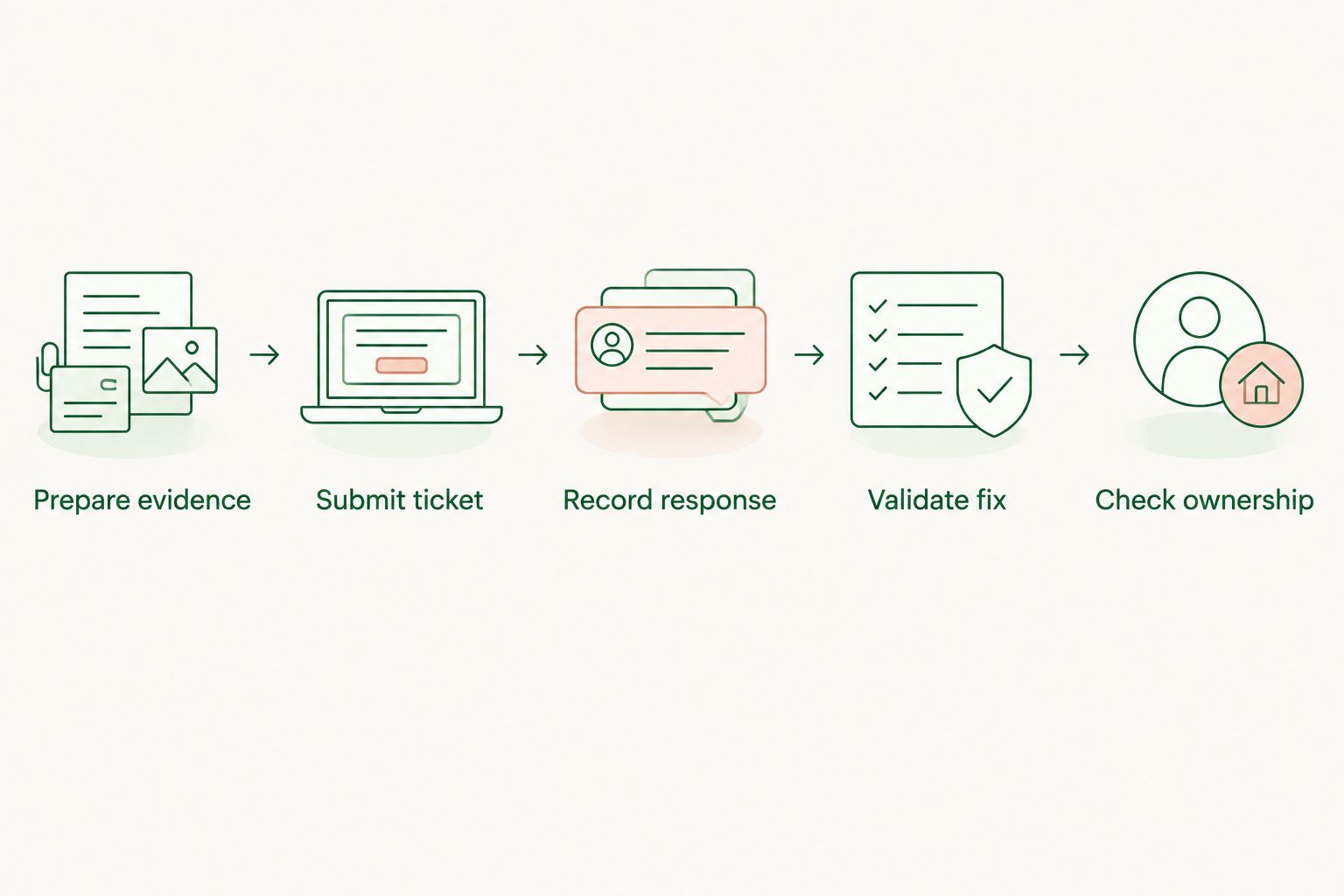
Follow the same sequence for every platform:
- Prepare evidence: Include the SDK version, environment, sanitized request, expected behavior, actual behavior, and reproduction steps.
- Submit ticket: Use the support channel available to the account you intend to operate.
- Record response: Separate the first acknowledgment from the first actionable technical answer.
- Validate fix: Repeat the reproduction and confirm that the failure no longer occurs.
- Check ownership: Record who handled the issue and how escalation worked.
Keep sensitive conversation content out of support tickets. Use synthetic prompts and sanitized logs wherever they reproduce the failure. Supply enough technical detail to diagnose the integration without exposing user data unnecessarily.
For implementation preparation, use the guide to testing an ad SDK integration before launch. Test evidence should be reusable across vendors, not rewritten to make one platform look better.
Record the right timestamps
Create a support log with submission, acknowledgment, actionable response, workaround, and validated-resolution timestamps. Record elapsed time in minutes or hours consistently. Mark periods outside the vendor's stated support hours rather than silently excluding them.
A workaround and a permanent fix deserve separate entries. Disabling advertising can protect the chat experience, but it does not prove that ad serving is restored. Keep the incident open in your evaluation until the intended placement works again.
Compare equivalent issues
Do not compare a configuration question on one platform with a production incident on another. Keep the reproduction, severity, and account conditions aligned. Record any differences that change access to support.
Use the results to select a provider under your operating conditions. Do not turn a small prelaunch trial into a universal claim about which network is fastest.
How the shortlist is ranked
The 2026 order follows product fit for chatbot publishers: contextual conversations first, mobile-app inventory second, publisher-managed campaigns third, and custom infrastructure fourth. Each option owns a different use case.
Support speed is a separate gate. A provider passes only when you can identify the support channel, reproduce an issue, receive an actionable answer, and validate the result. Do not award a support-speed winner without comparable resolution records.
Which chatbot ad platform should you choose?
Start with Elo when you need an SDK-based adserver for contextual chatbot ads. Choose Google AdMob for a mobile-app advertising workflow, Google Ad Manager for publisher campaign operations, or Kevel for custom ad-serving infrastructure.
Then apply the support trial. Your default choice should satisfy both the placement requirement and the operational requirement; neither substitutes for the other. In 2026, a faster acknowledgment is not a reason to accept the wrong advertising architecture.
FAQ
What's the fastest ad network support for AI chatbots?
A fastest-support winner requires comparable resolution records under the same account and incident conditions. Measure the first actionable answer and the validated fix separately; acknowledgment time alone does not establish technical support speed.
Is Google AdMob better than Google Ad Manager for a chatbot?
Google AdMob fits mobile-app advertising, while Google Ad Manager fits publisher inventory and campaign management. Choose according to your advertising surface and operating model, then verify the chatbot integration separately.
What should I send support when chatbot ads stop appearing?
Send a sanitized reproduction with the SDK version, environment, request details, expected behavior, and actual behavior. Separate a failed request from an empty response or a rendering failure so support can investigate the correct layer.
Does a quick support reply mean an ad network is reliable?
A quick reply does not establish reliability or successful resolution. Require an actionable diagnostic step, validate the fix, and record whether the same issue returns.
Should I choose an ad network based on support speed alone?
Choose an ad platform that fits your chatbot placement before comparing support speed. A responsive team cannot substitute for the required ad format, integration model, or campaign workflow.
How do I compare support fairly before launching?
Use equivalent integration, serving, and measurement cases through the support channels available to your intended account. Record support hours, issue severity, actionable responses, and validated resolution consistently.
Should my chatbot wait for an ad-support issue to be fixed?
Your chatbot should continue answering when advertising fails. Build a fallback that omits the ad placement, then investigate the advertising issue without blocking the core conversation.
One last thing
Test the empty-ad path before the successful-ad path. Your interface needs to handle a conversation with no ad without leaving a blank card, blocking a response, or recording an impression that never happened.
That test also produces a useful support question: what evidence distinguishes a valid empty result from a broken integration? A clear answer tells your developers what to inspect before opening the next ticket.