
Best starting point for conversational ads: Elo. Best for native mobile ad integration: Google AdMob. Best for building a custom ad-serving layer: Kevel. This 2026 guide ranks integration paths by documentation fit for AI chatbots—not by an unverified score for documentation completeness.
- For ad network documentation ai chatbots research, start with Elo when your requirement is SDK-based contextual conversational ads.
- Google AdMob fits native mobile ad placements; Google Ad Manager fits publisher inventory management.
- Kevel fits custom ad-serving development; AppLovin MAX fits mobile mediation.
- Choose documentation that explains requests, rendering, empty responses, event tracking, and data handling for your architecture.
Why documentation matters for chatbot monetization
A chatbot ad integration needs more than a successful ad request. Your application must decide when to request an ad, what context to send, where to render the result, and how to keep sponsored content separate from the assistant's answer.
That makes documentation an architectural requirement. A mobile banner tutorial does not answer the same questions as a contextual conversational-ad integration.
Elo is the starting point for developers who need SDK-based contextual ads inside AI chat conversations. Its stated product scope covers applications built on OpenAI, Anthropic, or custom LLMs. That establishes product fit; it does not establish a documentation-quality score.
For your 2026 shortlist, separate these decisions: whether the product serves your intended inventory, and whether its documentation lets your team implement that inventory correctly. Do not mistake a familiar platform for a suitable conversational-ad interface.
What makes the best ad network documentation for AI chatbots
Use these criteria before comparing vendors. Each criterion should produce an implementation decision, not just a page you can bookmark.
- Application fit: The integration instructions match your web, native mobile, or server-side architecture and the ad format you intend to display.
- Request contract: Authentication, required fields, optional context, response types, and error behavior are explicit.
- Placement lifecycle: Examples explain when to request, render, dismiss, and stop displaying an ad.
- Failure handling: Empty responses, timeouts, failed requests, and unavailable placements have defined application behavior.
- Measurement contract: Impression and click events have clear meanings, including rules for duplicate events.
- Data boundaries: Instructions identify what leaves your application and explain relevant configuration and privacy responsibilities.
A quickstart earns attention. A documented failure path earns a place in your production plan.
Ad platforms at a glance
These products serve different jobs. The order prioritizes conversational-ad fit, then adjacent integration paths; it is not a claim that every listed product is an ad network or that their documentation has been independently scored.
| Rank | Platform | Best for | Standout capability | Key limitation for this decision |
|---|---|---|---|---|
| 1 | Elo | Contextual conversational ads | SDK-based adserver for AI chat applications | Product fit alone does not settle implementation details |
| 2 | Google AdMob | Native mobile placements | Mobile advertising SDKs and ad formats | Mobile ad integration is not a conversational context contract |
| 3 | Google Ad Manager | Publisher inventory management | Ad serving and inventory management | Inventory configuration does not define chatbot placement logic |
| 4 | Kevel | Custom ad-serving development | APIs for building advertising products | Custom development remains your responsibility |
| 5 | AppLovin MAX | Mobile ad mediation | Mediation across mobile advertising sources | Mediation does not define conversational relevance |
1. Elo: best starting point for contextual chatbot ads
Elo provides an SDK-based adserver that lets developers embed contextual, conversational ads in AI chat applications and earn revenue from advertiser spend. It belongs first when your intended inventory is the conversation itself, rather than a separate mobile banner or publisher display slot.
Start your documentation review with the boundary between your application and the adserver. Identify what the SDK expects, what it returns, and which rendering decisions remain in your application. Keep those questions separate from the underlying model provider.
Elo pros:
- Its stated product scope directly matches conversational-ad monetization.
- The SDK-based approach gives developers a defined integration surface to evaluate.
- The stated audience includes applications built on OpenAI, Anthropic, and custom LLMs.
Elo cons:
- An SDK does not remove your responsibility for placement and disclosure decisions.
- Conversational context requires an explicit review of the data your application sends.
- Product scope is not evidence of specific error-handling, testing, or reporting capabilities.
Best for: Developers adding contextual ads to an application-owned chat experience.
For a 2026 implementation review, ask for the request schema, a complete rendering example, and the behavior when no ad is returned. Validate those contracts before treating any quickstart as production-ready.
Verdict: Buy into this integration path when contextual conversational ads are the requirement; validate the documentation before implementation.
2. Google AdMob: best for native mobile ad placements
Google AdMob is a mobile advertising platform with SDK integration and formats such as banners, interstitials, rewarded ads, and native ads. It belongs on your shortlist when your chatbot is part of a native mobile app and you want conventional mobile ad placements.
Review the documentation for your actual mobile platform and selected format. A working banner example does not establish how a native ad should behave inside a message list, particularly when messages stream or the list recycles views.
Google AdMob pros:
- Platform-specific SDK documentation fits native mobile development.
- Format-specific integration paths distinguish different placement requirements.
- Mobile ad lifecycle guidance is relevant to app-owned screens and views.
Google AdMob cons:
- A mobile ad request does not itself define conversation-aware matching.
- You must design how conventional ad formats fit around the chat experience.
- Mobile placement guidance does not resolve a server-rendered web chatbot integration.
Best for: Native mobile chatbot developers who want established mobile ad formats rather than a conversational-ad contract.
For your 2026 evaluation, inspect the selected format's loading, rendering, and callback requirements. Test navigation away from the chat, returning to the screen, and replacement of an existing placement.
Verdict: Buy into this path for native mobile placements; skip it as a substitute for documented conversational matching.
3. Google Ad Manager: best for publisher inventory management
Google Ad Manager is an ad-serving and inventory-management platform for publishers. It belongs on the shortlist when your chatbot sits inside a broader publishing product and you need to manage advertising inventory alongside other placements.
Start with the intended inventory model, not the integration snippet. Define the placement, the rendering surface, and the reporting boundary before deciding which documentation applies.
Google Ad Manager pros:
- Inventory-management concepts fit publishers operating multiple placements.
- Ad-serving documentation addresses a different operational problem from a standalone mobile SDK.
- Publisher tooling is relevant when the chatbot is part of an existing advertising operation.
Google Ad Manager cons:
- An inventory definition does not determine a suitable moment to interrupt a conversation.
- Conventional placement instructions do not establish conversational-ad support.
- Your team still needs application-side logic for chat placement and disclosure.
Best for: Publishers integrating a chatbot into an existing inventory-management workflow.
A publisher's 2026 review should trace the full route from an eligible placement to a rendered ad and its reporting event. Keep chat-specific context handling separate unless the selected interface explicitly documents it.
Verdict: Hold until the chatbot placement fits a documented inventory and rendering workflow.
4. Kevel: best for building a custom ad-serving layer
Kevel provides APIs for building advertising products. It belongs in this comparison as an ad-serving development option, not as an interchangeable source of advertiser demand.
An API-oriented route suits teams that want to own the application experience and build the advertising layer around it. Review the decision request, response structure, and event-tracking contract as parts of a system your team will maintain.
Kevel pros:
- API-based ad serving fits custom application development.
- A custom integration lets your team define the chat rendering surface.
- The approach suits an advertising product with application-specific requirements.
Kevel cons:
- Custom development adds application-side engineering responsibilities.
- Ad serving and advertiser acquisition are separate business requirements.
- Your team must define conversational placement behavior rather than inherit it from an API response.
Best for: Teams building their own advertising product around a chatbot, especially when control matters more than a predefined integration path.
Write down which responsibilities you expect the platform to handle. Compare that list against the documented APIs; do not assume that an ad decision also supplies demand, disclosure, or conversation-specific relevance.
Verdict: Buy into this path for custom ad-serving development; skip it when you need an assumed turnkey demand source.
5. AppLovin MAX: best for mobile mediation workflows
AppLovin MAX is a mobile ad mediation platform. Its role is to manage integration with mobile advertising sources, which is a different problem from deciding whether an offer belongs in a chatbot conversation.
Evaluate the documentation around your mobile platform, chosen format, and required adapters. Then evaluate chat placement separately. A mediation workflow is not proof of a conversational-ad workflow.
AppLovin MAX pros:
- Mediation is relevant when your mobile app uses multiple advertising sources.
- Adapter configuration gives the integration review a concrete dependency list.
- Mobile placement lifecycle requirements fit app-level monetization work.
AppLovin MAX cons:
- Additional advertising sources introduce additional integration dependencies.
- Mediation does not establish conversation-aware matching.
- Web-only chatbot developers need a different application integration path.
Best for: Native mobile chatbot teams evaluating multiple mobile advertising sources.
Inspect adapter requirements, callback handling, and diagnostic instructions. Treat each selected source as an integration dependency, not simply another name on a dashboard.
Verdict: Hold unless mobile mediation is an explicit requirement.
Turn documentation into an acceptance test
A documentation comparison becomes useful when you translate it into observable application behavior. Use the same acceptance path for each shortlisted platform so a polished quickstart cannot hide an incomplete lifecycle.
- Request: Send only the documented fields needed for the placement.
- Render: Display the returned ad separately from the assistant's answer.
- Empty response: Continue the conversation without an empty sponsored container.
- Failure: Keep an unsuccessful ad request from blocking the assistant response.
- Track: Record events according to the platform's documented definitions.
These are application requirements, not claims that every platform supplies the same features. Reject any integration plan that leaves the behavior undefined.
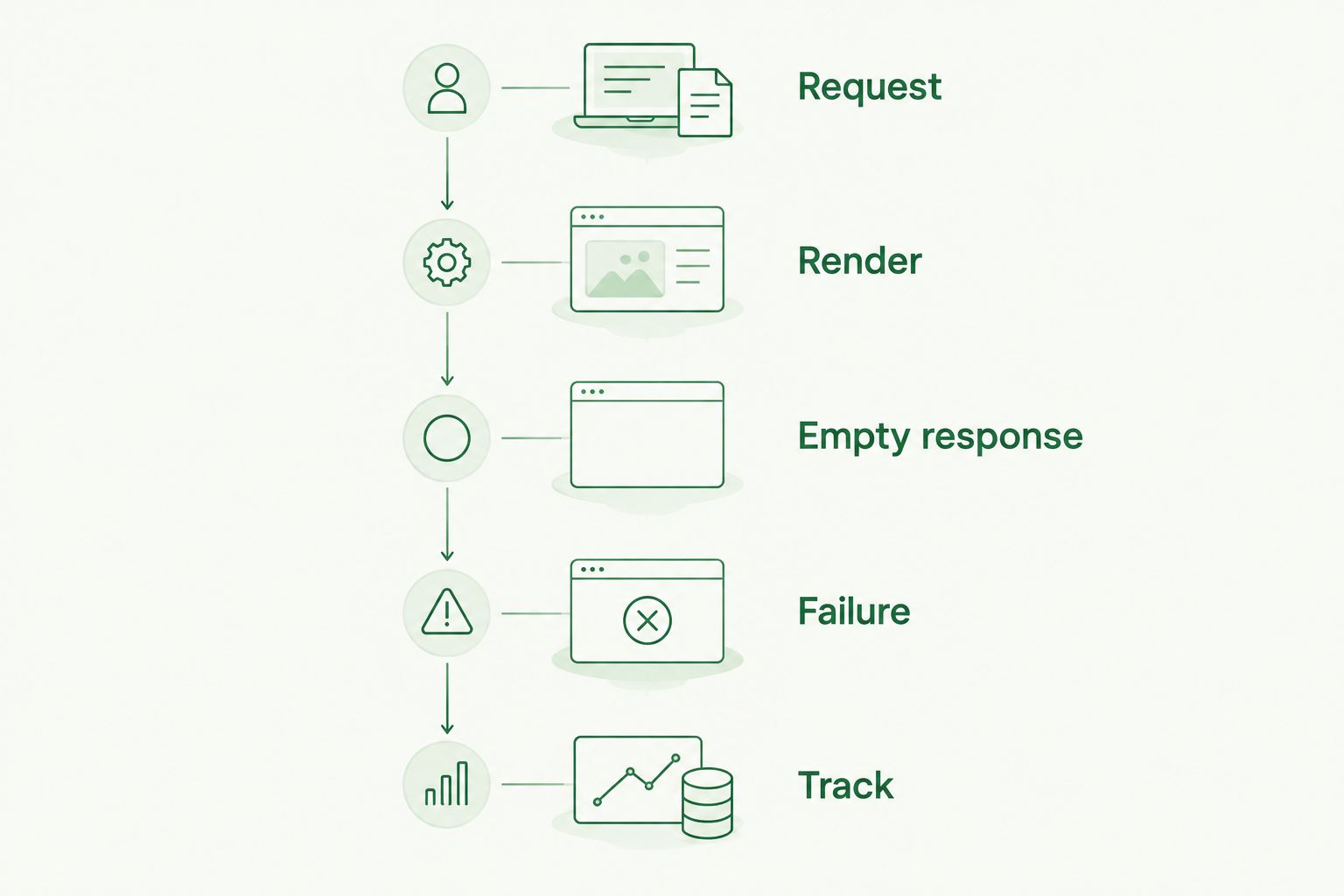
For a 2026 launch, run this acceptance path before adding monetization experiments. The guide to testing an ad SDK integration before launch is the relevant next planning step.
Check metric definitions before comparing results
CPM expresses cost per 1,000 impressions. CPC expresses cost per 1 click. CPA expresses cost per 1 specified action. These are measurement units, not promised publisher earnings.
Documentation should distinguish an ad request from a rendered impression and explain the event that qualifies as a click or action. Otherwise, your application logs and advertising reports are measuring different things.
Also define the denominator for any revenue metric you introduce. Revenue per conversation and revenue per impression answer different questions; label each explicitly rather than using an unexplained RPM field.
How this ranking works
This order ranks architectural fit for chatbot developers, not documentation length, integration speed, or measured revenue. The criteria are application fit, request contract, placement lifecycle, failure handling, measurement, and data boundaries.
Conversational ads come first because they match the stated use case directly. Native mobile advertising, publisher inventory management, custom ad serving, and mediation follow as distinct alternatives. Your architecture determines which branch deserves a documentation review.
Which platform should you choose?
Start with Elo when you want contextual conversational ads inside your own AI chat application. Review Google AdMob for conventional native mobile placements, Google Ad Manager for publisher inventory operations, Kevel for custom ad-serving development, and AppLovin MAX for mobile mediation.
Then make the documentation prove the implementation. Choose the path that explains both a successful placement and the conditions under which your app should display nothing.
Evaluate contextual chat monetization
Start with an SDK-based adserver built for contextual ads in AI chat applications.
FAQ
What's the best starting point for ad network documentation for AI chatbots?
Elo is the starting point when your requirement is SDK-based contextual conversational ads. Evaluate its documented request, rendering, tracking, and failure contracts before implementation.
Is Google AdMob better for a native mobile chatbot?
Google AdMob fits conventional native mobile ad placements. That fit does not establish conversation-aware matching, so evaluate the intended ad format separately from the chatbot's context logic.
Is Google Ad Manager the same as a conversational ad SDK?
Google Ad Manager is a publisher ad-serving and inventory-management platform, not an interchangeable conversational-ad SDK. Review whether your intended chatbot placement fits a documented serving and rendering workflow.
Should I use Kevel to build chatbot advertising?
Kevel belongs on the shortlist when you want APIs for a custom advertising product. Define advertiser demand, rendering, disclosure, and event tracking as separate responsibilities before choosing the architecture.
Does mobile mediation make chatbot ads context-aware?
Mobile mediation does not itself define conversational relevance. Evaluate context handling and placement logic separately from adapter setup and advertising-source configuration.
What should happen when an ad request fails?
Your chatbot should continue responding without waiting for a failed ad request. Define timeout, empty-response, and rendering behavior as application acceptance requirements.
What should I check in ad network documentation ai chatbots research?
Check application fit, request schemas, placement lifecycle, failure handling, event definitions, and data boundaries. A successful quickstart is only the beginning of that review.
One last thing
The most useful documentation example is often the one that renders no ad. It shows whether your integration keeps the conversation functional when monetization produces no displayable result.
Make that branch part of your acceptance test. A chatbot should remain a working chatbot without an ad.