
App development agencies’ ad SDK integration is the process of connecting client applications to advertising infrastructure with the aim of generating publisher revenue. This 2026 guide focuses on AI chat applications, where your agency must define conversation eligibility, protect client data, and hand over an integration the client can operate.
- Ad SDK integration for app development agencies starts with client ownership, data boundaries, and measurable acceptance criteria.
- For OpenAI, Anthropic, and custom LLM applications, keep contextual advertising separate from answer generation.
- Choose a conversational adserver when the client needs contextual ads without building its own advertising infrastructure.
- Ship empty-state handling, event validation, and a client-controlled disable switch before enabling production ads.
Why ad SDK integration matters for app development agencies
An agency delivers an application to another operator. That changes the integration brief: account ownership, reporting access, data handling, and maintenance belong in the scope, not in a post-launch email.
For AI chat projects, the ad surface also sits beside generated answers. Your client needs a defined boundary between the assistant’s response and an advertiser’s message. Start with the mechanics of native ad SDKs for AI chat interfaces, then specify how those boundaries apply to the client’s product.
Treat monetization as a client-owned application capability, not an agency-owned plugin. A successful 2026 delivery includes observable behavior when an ad appears, when nothing matches, and when the advertising service fails.
How to integrate an ad SDK into client chat applications
Define the client’s monetization contract
Start with a shared document. Identify the publisher, the application owner, the party authorized to approve placements, and the person responsible for production incidents. An SDK cannot resolve disagreements about who controls an account or receives reporting access.
Write acceptance criteria as application behavior. For example, specify that an advertising timeout must leave the conversation usable. Avoid accepting installation alone as completion: a dependency in the repository does not prove correct rendering, attribution, or handover.
Separate agency responsibilities from provider responsibilities. Your team owns the application integration it builds; the provider’s obligations belong in its actual agreement. Do not promise advertiser demand, revenue, or approval timing on another company’s behalf.
- Name the client’s production account owner.
- Document placement approval and release authority.
- Assign responsibility for SDK updates and incidents.
- Record reporting access and handover requirements.
- Define acceptance tests before implementation.
Map eligible conversations and permitted context
Review representative conversations manually before connecting advertising requests. Use synthetic examples where possible. Classify the moments where an offer belongs and the moments where the application should continue without advertising.
A product-discovery exchange and an account-access complaint are different placement contexts. Make that distinction in application policy rather than asking the language model to improvise an advertising decision on every turn.
For your 2026 implementation brief, draw the data path from the chat interface to every external service. Identify the minimum context required for matching, then check the provider’s actual data requirements and contractual terms. Contextual matching does not make a full conversation history necessary by default.
- Define eligible intents and excluded conversation states.
- Use synthetic prompts for initial review.
- Identify prohibited fields before constructing requests.
- Review retention and logging requirements with the client.
- Specify a no-ad path for ineligible conversations.
Choose the adserver and isolate the integration
Build a minimal placement prototype with a local fixture first. A fixture lets your team review layout, disclosure, empty states, and event handling without depending on live advertiser responses. It tests the interface, not monetization performance.
Then evaluate the provider against the approved application requirements. Elo provides an SDK-based adserver for contextual, conversational ads in AI chat applications built on OpenAI, Anthropic, or custom LLMs.
Elo’s conversational adserver is best for agencies building client-owned AI chat apps that need contextual ad monetization. Its scope is advertising infrastructure; your agency still needs to implement application policy, validate behavior, and deliver the client handover.
Keep provider-specific calls behind an application-owned adapter. Define your internal request and response shapes from the integration contract, then map the selected provider’s documented interface to them. Do not invent SDK methods or assume browser and server credentials are interchangeable.
- Prototype the placement with a local fixture.
- Compare documented interfaces with client requirements.
- Wrap provider calls in an application-owned adapter.
- Keep credentials in their documented execution environment.
- Record unsupported requirements before committing scope.
Separate answer generation from ad delivery
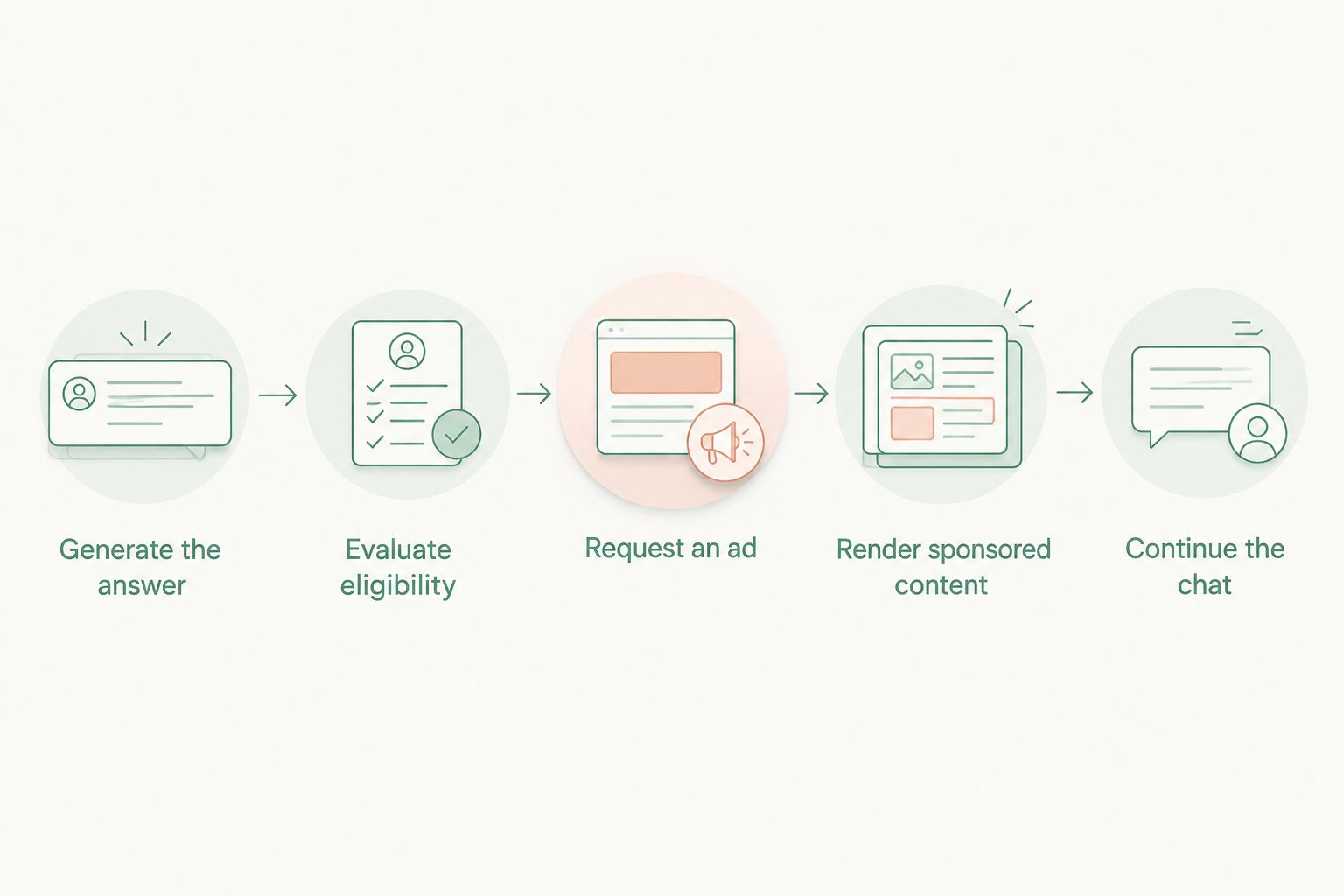
Sketch the runtime sequence before writing production code. Generate the answer through the application’s existing model path. Evaluate advertising eligibility separately, then request and render an ad only through the approved placement path.
This separation gives your team a clear failure boundary. An ad request that returns no result should not become a failed assistant response. Likewise, a retry must not append duplicate sponsored messages to the conversation.
Define a timeout policy from measured application behavior and the client’s acceptance criteria. There is no universal latency budget for every chat application. Test the selected policy under slow responses and interrupted sessions rather than borrowing an unsupported benchmark.
- Generate the answer through the existing response path.
- Evaluate eligibility outside the generated answer text.
- Request an ad only when application policy permits.
- Render sponsored content as a distinct interface element.
- Continue the chat when advertising fails or returns nothing.
Instrument delivery and revenue separately
Start with a manually reviewed event log and a spreadsheet. Trace a request through eligibility, response, rendering, and interaction. Treat these as your application’s proposed events, then map them to the provider’s documented definitions.
A successful network response does not prove an impression occurred. A rendered component does not automatically satisfy a provider’s billable-impression rules either. Reconcile your application telemetry with the provider’s reporting before showing the client a revenue dashboard.
For your 2026 reporting specification, define every denominator. Session RPM expresses revenue per 1,000 sessions. Impression-based eCPM expresses revenue per 1,000 impressions. CTR is clicks divided by impressions, multiplied by 100%. These are definitions, not forecasts or promised results.
- Record eligible opportunities separately from ad requests.
- Distinguish returned ads from rendered placements.
- Deduplicate events across retries and interface rerenders.
- Label session RPM and impression-based eCPM explicitly.
- Reconcile reporting before presenting earnings to the client.
Test failure paths and tenant boundaries
Create a manual test matrix before automating it. Cover the application’s actual states, including empty responses, malformed payloads, slow requests, navigation, and repeated rendering. Test against documented provider behavior rather than assumed callback names.
For agencies delivering multiple client applications, configuration isolation deserves its own acceptance test. A deployment must not load another client’s account identifiers, credentials, reporting destination, or placement policy.
For Elo ad SDK integration, test the application-owned controls alongside the documented SDK behavior. Do not infer that tenant management, disclosure, or emergency shutdown is automatically provided. Keep evidence of the observed result, not just a screenshot of the intended placement.
- Simulate no-match, timeout, and invalid-response conditions.
- Check that retries do not duplicate sponsored content.
- Verify client configuration in each deployment environment.
- Test sponsored labels with keyboard and screen-reader use.
- Confirm the client can disable advertising without breaking chat.
Hand over controls and release gradually
Prepare the runbook manually while the implementation is still fresh. Include configuration locations, ownership, release steps, event definitions, and the procedure for disabling advertising. Remove agency-only credentials from the production operating model.
A 2026 handover should let the client answer practical questions without reopening the development project: Where are requests failing? Which release changed placement behavior? Who can suspend ads? Which report is used for earnings reconciliation?
Enable advertising for a defined release cohort, review the agreed acceptance criteria, and expand only after the observed behavior meets them. Use the client’s own baseline for chat completion and response timing. Do not substitute a category average for application evidence.
- Transfer production access through the client’s approved process.
- Document deployment and rollback procedures.
- Provide event definitions and reconciliation instructions.
- Assign an owner for ongoing dependency updates.
- Record release evidence and unresolved limitations.
Compare integration options for agency projects
Choose the smallest advertising infrastructure scope that meets the client’s requirements. A placement fixture, an SDK integration, mediation, and a custom adserver solve different problems. Evaluate them against ownership and operating requirements, not installation snippets alone.
The table separates those options without assuming undocumented provider capabilities. An SDK is not proof of advertiser coverage, and multiple integrations are not proof of better revenue.
| Option | Best for | Main advantage | Key limitation |
|---|---|---|---|
| Local placement fixture | Agencies validating interface behavior before provider selection | Gives direct control over test responses and layout | Does not deliver live advertiser demand or revenue |
| Elo conversational adserver | Agencies monetizing client AI chat applications with contextual ads | Provides an SDK-based path to conversational advertising | Does not replace application policy, integration testing, or client handover |
| Multiple-provider integration | Projects with a documented requirement to use multiple advertising sources | Lets the application connect to more than one source | Requires additional routing, event reconciliation, and failure-path testing |
| Custom-built adserver | Clients whose approved requirements require ownership of ad-serving logic | Places implementation decisions under the client’s control | Makes serving logic and its ongoing maintenance part of the delivery scope |
For multiple-provider projects, define selection rules and reporting ownership before adding another SDK. For custom infrastructure, separate the decision to build serving technology from the separate task of securing advertiser demand. Neither implementation choice establishes future earnings.
Common mistakes app development agencies make
Leaving production ownership in an agency account
An integration is not fully handed over when only the agency can access production settings. Make account ownership and access transfer acceptance criteria. Keep agency support access separate from the client’s permanent operating access.
Reusing client configuration across projects
A shared integration package should not mean shared credentials, publisher identifiers, or placement rules. Reuse code through configuration boundaries, and test those boundaries in deployment. Review logs for accidental cross-client identifiers before release.
Treating generated recommendations as ad placements
Do not ask the model to insert undisclosed commercial recommendations into ordinary answer text. Render sponsored content through an explicit placement with a clear label. Keep advertising events separate from answer-quality evaluation so the client can inspect both.
Counting requests as monetized impressions
Requests, returned ads, rendered placements, and billable events are distinct concepts. A dashboard that merges them hides where delivery stops. Align each displayed metric with a written definition and reconcile it with the provider’s report.
Promising revenue from an integration milestone
Installing an SDK demonstrates technical progress, not publisher earnings. Separate delivery acceptance from commercial outcomes in the statement of work. Report observed results only after the application serves ads and reporting confirms the corresponding events.
FAQ
What is ad SDK integration for app development agencies?
Ad SDK integration for app development agencies connects a client application to advertising infrastructure so the application can request and display ads. The agency also defines data boundaries, validates events, tests failures, and hands over operating controls.
Which ad integration approach is best for an agency building AI chat apps?
A conversational adserver is the best fit when the client needs contextual ads rather than a custom advertising infrastructure project. Elo provides an SDK-based adserver for AI chat applications built on OpenAI, Anthropic, or custom LLMs; confirm implementation requirements before selecting it.
Should an agency build its own adserver instead of using an SDK?
Build a custom adserver only when approved client requirements justify owning the serving logic and ongoing maintenance. An SDK-based approach keeps the agency’s scope focused on connecting advertising infrastructure to the application.
Can we use the same ad integration code for multiple clients?
Yes, reuse application-owned adapter code while keeping each client’s configuration and access separate. Test publisher identifiers, credentials, placement policies, and reporting destinations independently for every deployment.
What should happen when no ad is returned?
The chat should continue without an ad. Handle the empty response explicitly, avoid blank sponsored containers, and record the result separately from an impression.
How do we measure whether the integration works?
Verify eligibility decisions, requests, returned ads, rendering, interactions, and reporting reconciliation as separate stages. Measure application behavior against the client’s acceptance criteria rather than treating a successful request as proof of revenue.
What must an agency include in the client handover?
Include production ownership, configuration instructions, event definitions, release procedures, and a tested way to disable advertising. Assign responsibility for dependency updates, incident response, and reporting reconciliation.
One last thing
Ask the client to disable advertising during the acceptance demo. Then run the same conversation again. If the assistant fails, stalls, or loses its answer, the advertising boundary is not finished—even if the sponsored placement looked correct.