
Instead of manually inserting sponsored placements after agent actions, trigger an ad eligibility check when an approved tool call completes, then request a contextual ad without blocking the answer. With Elo, the SDK-based adserver handles conversational ads; your application controls the tool-event trigger, eligibility rules, and placement lifecycle.
- To trigger ads on ai agent tool call events, gate completed actions before requesting contextual ads.
- Elo fits developers adding SDK-based conversational ads to AI chat applications.
- Keep tool execution, ad requests, and impression reporting separate.
- Deduplicate retries and discard stale ad responses before rendering.
Why this matters
A tool invocation is an execution event, not proof that an ad belongs in the conversation. A search can reveal useful commercial context. A credential lookup should not become an advertising signal.
For a 2026 implementation, start with successful tool completion rather than raw invocation. This gives your application a result to validate before it decides whether to request an ad. It also lets you exclude failed, canceled, and irrelevant actions.
Elo fits developers who need an SDK-based adserver for contextual ads inside AI chat applications. The integration boundary matters: an adserver does not replace your application's decisions about which tool events are suitable for monetization.
The benefit is a repeatable trigger tied to an actual agent action. The trade-off is engineering responsibility. You must handle retries, parallel calls, privacy filtering, rendering, and measurement around that trigger.
Before you start
- Application access: You need control over the agent's tool dispatcher, server-side event handling, chat renderer, and test environment. Confirm that you can observe completed executions, not just model-generated tool-call proposals.
- Ad integration materials: Have the current Elo SDK instructions and the access required for your integration. Use documented methods, supported context fields, rendering instructions, and event-reporting behavior. The application labels below are proposed internal names, not SDK methods or dashboard controls.
- The gotcha: A user turn can produce parallel calls, retries, or repeated callbacks. Define a stable execution identity and a shared placement limit before connecting the ad request. Deduplicating only inside a browser component does not protect a distributed backend.
Keep credentials and other secrets out of the conversation payload. Decide which context can leave your application before wiring the callback, not after the first request succeeds.
Tool-event configuration
Put the trigger in application code that observes real execution. Do not instruct the model to insert an ad whenever it decides to use a tool.
- Select an allowlist. Start with a tool whose successful output provides useful, non-sensitive context, such as a public product search. Exclude account administration, authentication, destructive actions, and private-record retrieval from the initial rollout.
- Observe completion. Attach your handler after the dispatcher has validated and executed the tool. Require a successful result and an active user turn before continuing.
- Normalize the event. Create an application-owned record with a conversation reference, turn reference, execution reference, tool name, completion status, and a reduced context summary. These are internal concepts, not required adserver field names.
- Create an opportunity identity. Derive it from the user turn and intended placement. Keep the execution identity separately so retries remain traceable without becoming fresh placement opportunities.
- Reserve the opportunity atomically. Use shared application storage to ensure simultaneous callbacks cannot both claim the same placement. Record a reason when the reservation is rejected.
Expected result: A successful, allowlisted execution reaches the eligibility handler. Replaying its callback does not create another opportunity.
For your 2026 launch configuration, use a conservative application rule: at most 1 ad request per user turn. This is a suggested starting limit, not a network requirement or revenue benchmark. Adjust it only after checking the conversation experience and your reporting.
Eligibility and context configuration
Keep the decision to request advertising separate from the decision to execute a tool. The agent must finish the user's task even when advertising is ineligible.
- Check user eligibility. Apply your application's ad preferences, access rules, session state, and content restrictions before constructing the outbound payload. Do not rely on the model to enforce these conditions.
- Check the result. Reject failed, empty, canceled, or superseded executions. A technically successful response still needs a context check before it becomes an advertising opportunity.
- Reduce the context. Build a short task summary from approved fields. For a public product search, that might include a category and requested features; it should exclude unrelated transcript history and private identifiers.
- Treat output as data. Do not execute instructions embedded in retrieved pages or tool results. Construct advertising context from validated values rather than passing arbitrary text through as trusted configuration.
- Evaluate placement suitability. Confirm that the interface has an appropriate sponsored placement and that the current turn has not already consumed its allowance. Record the decision independently from any later ad response.
Expected result: The handler produces either an approved context summary or an explicit skip reason. A skipped opportunity makes no ad request.
A useful 2026 review artifact is a field-level context map: source field, purpose, transformation, and destination. This makes accidental transcript forwarding easier to catch during code review.
For more detail on choosing the matching signal, read the guide to matching ads to conversation context.
Ad request and rendering configuration
Use Elo's documented SDK interface at this boundary. Keep your tool-event adapter independent of SDK-specific calls so changes to agent orchestration do not spread through the advertising integration.
- Request independently. Once eligibility passes, start the documented ad request without making the assistant's answer depend on its success. Catch request failures in the advertising path.
- Bound the wait. Define an application deadline appropriate to your interface. If the response arrives after the turn becomes stale, discard it rather than attaching it to a newer answer.
- Validate the response. Handle an empty or unusable response as a normal no-ad outcome. Render only content that passes the integration's documented validation and rendering requirements.
- Render a distinct placement. Keep sponsored content visually separate from the assistant's factual answer and identify it clearly as advertising. Do not rewrite organic tool results to make an advertiser appear to be the agent's independent choice.
- Report the right event. Follow the documented impression and engagement lifecycle. A tool completion is not an impression, and an ad response is not proof that a user saw a placement. Avoid manually duplicating events the SDK already reports.
Expected result: The assistant answers whether the ad request succeeds, fails, or returns nothing. Only a current, eligible response reaches the sponsored placement.
The application pipeline should remain explicit: Tool completion, Eligibility check, Context filter, Ad request, and Sponsored placement. Each stage needs its own failure handling.
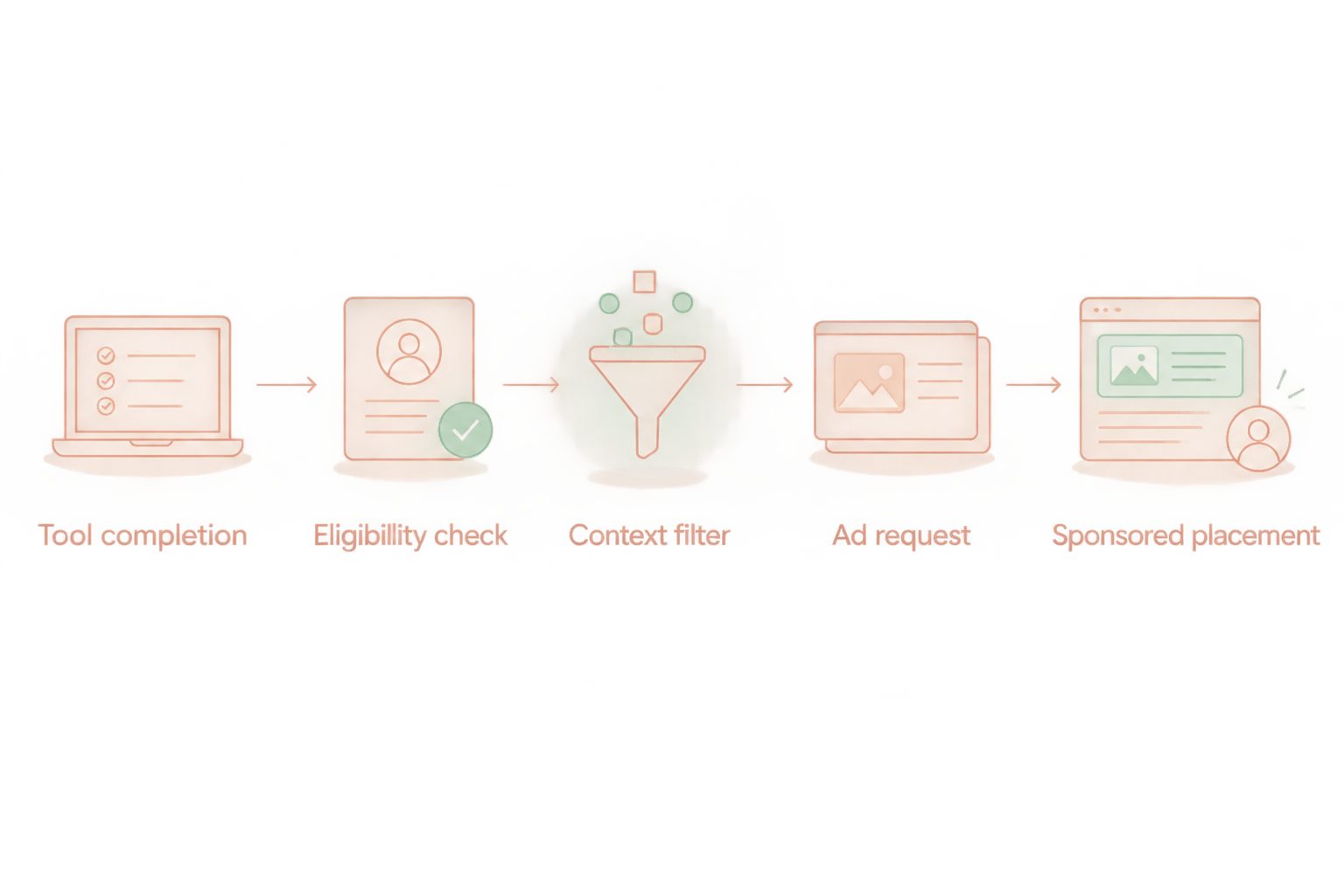
Do not send sponsored content back into the tool result as if it were retrieved evidence. Keep advertising outside the agent's trusted evidence path unless you have explicitly designed and reviewed a separate sponsored-content workflow.
Variant: evaluate at tool start, render after completion
A second workflow starts evaluation when an approved tool begins executing. Use it only when validated arguments already contain enough permitted context; otherwise, wait for the result.
The distinction is timing, not permission. Both variants still need eligibility checks, deduplication, privacy filtering, and a valid placement.
| Trigger option | Best for | Advantage | Limitation |
|---|---|---|---|
| Successful completion | Initial implementations and result-dependent context | Uses validated execution outcomes | Cannot start the ad request until the tool finishes |
| Execution start | Tools with sufficient permitted context in validated arguments | Allows the ad request to overlap tool execution | Requires cancellation and stale-response handling if execution fails |
Start with successful completion. It has fewer lifecycle branches to manage. Evaluate execution-start triggering only after the completion-based path behaves correctly.
For the execution-start variant:
- Validate the tool arguments and apply the same eligibility gate before requesting an ad.
- Reserve the placement opportunity before launching asynchronous work.
- Hold the ad response until the tool succeeds and the user turn remains active.
- Discard the response if the tool fails, the user cancels, or the conversation advances beyond the intended placement.
Expected result: An early request never forces an ad into a failed or abandoned task. Keep impressions tied to the documented display lifecycle, not to the early request.
Troubleshooting
Duplicate placements after retries
A callback is being treated as a new opportunity, or parallel workers are checking placement state without an atomic reservation.
Use a stable opportunity identity and a shared atomic claim. Test 2 concurrent callbacks for the same turn and confirm that only one reaches the request boundary. Also replay the event after a worker restart.
Ads appear under the wrong answer
An asynchronous response is being attached to whichever message happens to be current when it arrives.
Bind every request to its intended conversation, turn, and placement. Recheck those references immediately before rendering. Discard a stale response rather than moving it to another answer.
Tool execution stalls when advertising fails
The tool or answer path is awaiting advertising without a bounded failure path.
Separate the ad task from the required answer task. Apply a deadline and handle exceptions locally. A failed ad request must not turn a successful tool execution into an assistant error.
Context contains private or irrelevant data
The handler is forwarding raw arguments, full tool results, or conversation history instead of constructing an approved summary.
Replace pass-through payload construction with an allowlisted mapping. Inspect outbound requests in a controlled test environment and exclude secrets from diagnostic logs as well as advertising payloads.
Requests and impressions do not reconcile
The application is counting a request, returned ad, rendered component, and impression as the same event.
Track these stages separately and use the SDK's documented reporting behavior. Investigate the transition where counts diverge; do not generate extra impression events to make totals match.
Customize your workflow
Expand by tool category, not by enabling every callback at once. Public discovery tools and private account tools need different context rules even when they share a dispatcher.
For a 2026 release gate, run 6 test cases: successful completion, tool failure, callback replay, concurrent callbacks, user cancellation, and an empty ad response. Assert both the visible outcome and whether an outbound ad request occurred.
Keep application diagnostics distinct from ad-network reporting. Log eligibility decisions, reservation outcomes, stale-response discards, and rendering failures using internal references rather than raw conversation text. This lets you locate integration faults without building a transcript archive.
When reviewing Elo for conversational ads, verify the current SDK's request, rendering, and reporting contract against those application requirements. An SDK integration still needs an application-level policy boundary.
FAQ
How do I trigger ads when an AI agent calls a tool?
Observe the tool execution in your application, check eligibility, and request a contextual ad for an approved placement. Start with successful completion so failed and canceled actions do not automatically create requests.
Should I trigger an ad before or after a tool finishes?
Use successful completion as the initial trigger. Execution-start requests suit cases where validated arguments already provide enough permitted context, but they require additional cancellation and stale-response handling.
Does every tool call need to display an ad?
No. A tool event should trigger an eligibility decision, not a guaranteed placement. Skip unsuitable context, excluded users, repeated opportunities, and empty ad responses.
Can I use Elo with a custom LLM application?
Elo provides an SDK-based adserver for AI chat applications built on OpenAI, Anthropic, or custom LLMs. Keep the tool-event adapter in your application and connect it using the current documented SDK interface.
How do I prevent duplicate ads from agent retries?
Use a stable placement opportunity identity and claim it atomically in shared application storage. Execution retries should remain traceable without creating a fresh advertising opportunity for the same placement.
Should a failed ad request stop the agent's answer?
No. Keep advertising failures outside the required tool and answer path. Set an application deadline and continue without an ad when the request fails or becomes stale.
Can I send the entire tool response for ad targeting?
Use an approved, reduced context summary rather than forwarding the entire response by default. Filter private fields, secrets, unrelated history, and untrusted instructions before constructing the request.
One last thing
The most valuable assertion is that an ad request did not happen. In your 2026 regression suite, explicitly test that a private-record lookup, canceled turn, and replayed opportunity never reach the request boundary. A screenshot of a working sponsored placement cannot prove those exclusions.