
Instead of manually inserting sponsor links into assistant replies, connect your completed-turn handler to a separate contextual ad workflow that requests, renders, and measures sponsored placements. Keep that workflow independent of the OpenAI Assistants API so your 2026 API migration does not require rebuilding monetization.
- For openai assistants api monetize chat implementations, keep contextual ads separate from model-generated answers.
- Elo is best for developers adding SDK-based conversational ads to chat applications they control.
- Trigger ad eligibility after a completed answer, not after every streaming event or tool call.
- OpenAI lists August 26, 2026 as the Assistants API shutdown date; isolate provider-specific code.
Why this matters
An assistant response and a sponsored placement have different responsibilities. Your model answers the question; your application decides whether the turn qualifies for advertising, what context can leave your system, and where the sponsored content appears.
Elo provides an SDK-based adserver for contextual, conversational ads in developer-owned chat applications. Elo is best for developers adding SDK-based conversational ads to chat applications they control. The trade-off is implementation work: your application still needs eligibility rules, privacy controls, rendering, and measurement.
There is also a deadline. OpenAI’s official Assistants migration guide specifies August 26, 2026 as the Assistants API shutdown date and directs developers toward the Responses API. Treat this as a workflow for an existing Assistants integration, with a provider-independent advertising layer—not a reason to start a new dependency on Assistants.
Before you start
- Application access: You need control of the chat backend, response lifecycle, frontend renderer, and deployment configuration. This workflow concerns your application, not advertising inside OpenAI’s ChatGPT interface.
- Publisher integration materials: Obtain the current Elo SDK instructions and the credentials or configuration those instructions require. Use the documented package names, methods, and event definitions; the architecture below does not introduce substitute SDK calls.
- Lifecycle access: Identify where your backend confirms a completed answer. An Assistants run can enter
requires_actionwhile waiting for tool outputs; that is not a finished conversational turn. Triggering there creates premature or duplicate ad requests.
Before implementation, assign ownership of sensitive-context filtering and sponsored-content disclosure. Neither belongs inside a prompt that the model can reinterpret.
Completed-turn trigger
- Locate the terminal success path. In your existing Assistants integration, inspect the Run object’s
statusfield. Usecompletedas the success condition. Do not treatqueued,in_progress, orrequires_actionas completion. - Resolve tool work first. When the run requires tool outputs, let your existing tool handler finish the requested work and continue the run. Keep advertising out of that execution loop.
- Read the correct answer. Retrieve the assistant message associated with the completed run. Match its
run_idto the run you just completed rather than assuming the latest message in a thread always belongs to the current request. - Create an application-owned turn record. Associate the answer with your internal conversation identifier, turn identifier, completion state, and eligibility decision. Keep provider-specific identifiers behind this record.
- Deduplicate the trigger. Enforce 1 ad decision per completed turn in your application. Repeated event delivery, browser reconnects, and worker retries must resolve to the existing decision rather than create additional placements.
Expected result: A completed answer produces a single eligibility evaluation. An unfinished run, tool request, or replayed completion does not create another advertising opportunity.
For your 2026 migration, make the advertising handler accept the application-owned turn record—not an Assistants Run object. Replace the provider adapter when you change APIs; preserve the downstream policy and rendering logic.
Context and eligibility rules
- Define eligible intent. Start with explicit discovery or recommendation requests that fit your application. Exclude turns where advertising would interrupt the task, including error recovery and sensitive support exchanges.
- Minimize context. Build a short contextual summary from the current task and the information necessary to understand it. Exclude credentials, private documents, direct identifiers, and unrelated conversation history before any advertising request leaves your backend.
- Check user and workspace rules. Apply your own account entitlements, opt-out choices, workspace restrictions, and consent requirements where applicable. Do not ask the language model to determine whether a user has consented.
- Call the documented integration. Pass only the supported context and placement information described by the current SDK documentation. Keep secret credentials server-side; expose client configuration only when the documentation explicitly identifies it as public.
- Handle an empty result. If the integration returns no eligible placement or encounters an error, continue the conversation without an ad. Do not manufacture a sponsor from the assistant’s answer.
Expected result: Only an eligible, minimized context reaches the advertising integration. A rejected context or empty result leaves the original answer intact.
The important boundary is explicit: a completed turn creates a chance to evaluate advertising, not an obligation to show it. Preserve that distinction in logs as well as code.
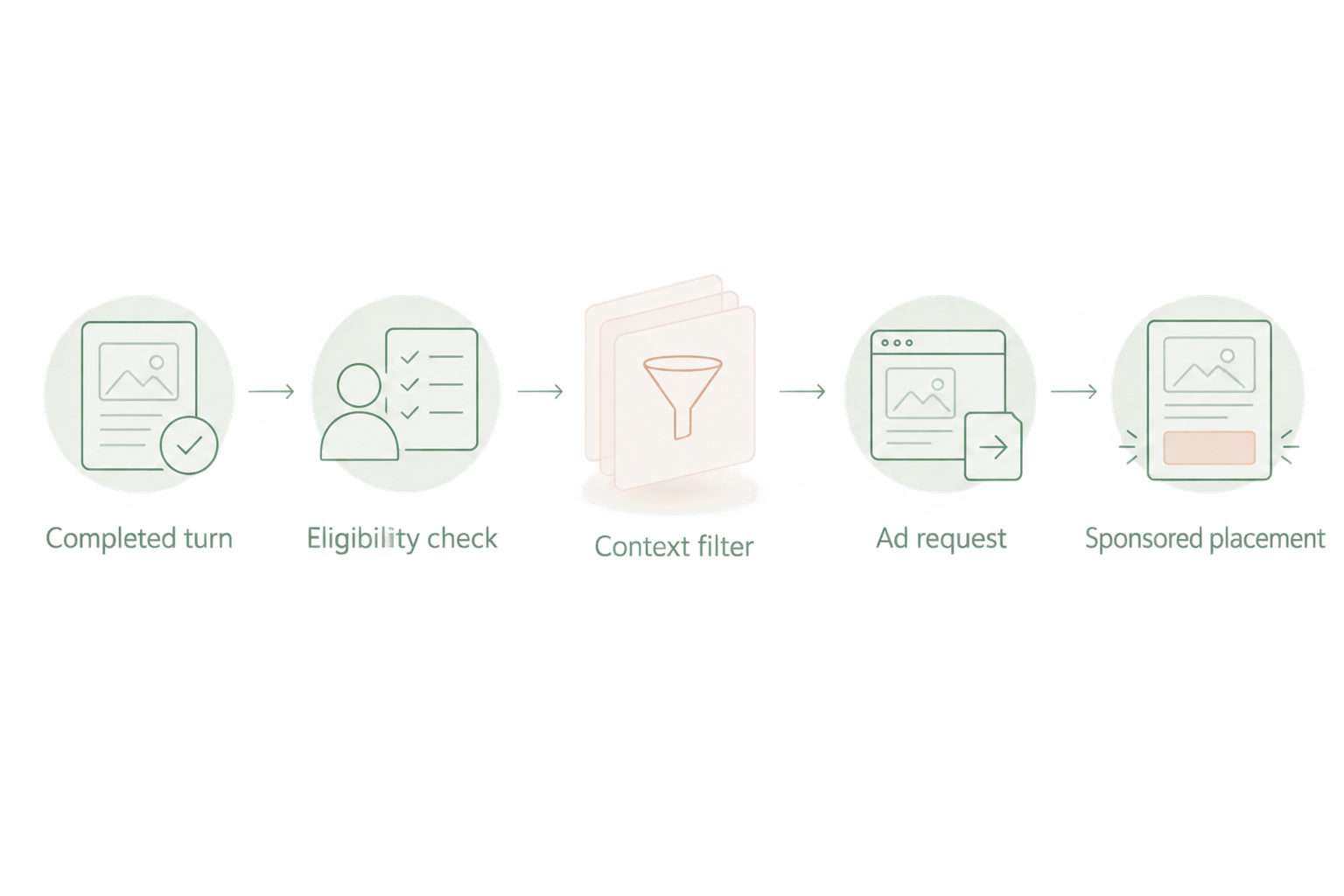
Sponsored placement rendering
Keep these responsibilities separate: Completed turn, Eligibility check, Context filter, Ad request, and Sponsored placement. The frontend receives a placement only after the preceding checks pass.
- Separate the data paths. Store assistant text and sponsored content as distinct objects in your application. Do not append advertiser copy to a system message or ask the assistant to rewrite the answer around an offer.
- Use the supported renderer. Implement the SDK’s documented rendering approach. Preserve the advertiser destination and any required tracking behavior rather than reconstructing a placement from selected text fields.
- Label sponsorship clearly. Put an explicit label such as Sponsored next to the placement. Keep the label visible at the point where the user encounters the commercial content.
- Protect the answer path. Deliver the answer independently of advertising success. Set an application-level deadline for the advertising branch and discard late results when the user has moved to another turn.
- Bind the placement to its turn. Use your internal turn identifier to prevent a delayed result from appearing beside a newer, unrelated answer. On rerender, reuse the existing placement state rather than requesting another ad.
Expected result: Users receive a complete answer whether advertising succeeds or fails. Any sponsored placement remains visibly separate and attached to the correct conversational context.
Elo conversational ads provide a monetization component, not a replacement for your application’s rendering and policy controls. That separation adds engineering work but keeps advertising behavior independent of model output.
Measurement and release checks
- Log lifecycle stages separately. Distinguish eligibility evaluation, request dispatch, returned placement, rendered placement, and interaction. These are application-side stages, not claims about specific SDK event names.
- Use documented billable-event definitions. An ad request is not automatically an impression. Connect your reporting to the integration’s documented impression and interaction semantics; do not create a competing billing definition.
- Attach stable identifiers. Associate application events with the turn and placement identifiers you actually receive or generate. Use those identifiers to investigate retries without storing full conversation transcripts in analytics.
- Run 6 test cases. Cover an eligible turn, an excluded turn, an empty ad result, an integration failure, a duplicate completion, and a tool-using turn. Confirm that the answer renders in every case.
- Release behind an application flag. Separate the ability to complete a conversation from the ability to request ads. Verify that disabling monetization stops new advertising requests without disabling chat.
Expected result: You can trace a completed answer through eligibility, rendering, and reporting without counting requests as impressions or collecting unnecessary conversation content.
For 2026 reporting, define your denominator before naming a metric. Impression RPM means recognized publisher revenue divided by counted impressions, multiplied by 1,000 impressions. If you calculate revenue per conversation instead, label that metric explicitly; the denominators answer different questions.
Do not infer profitability from rendered placements alone. Compare recognized revenue with your actual model, infrastructure, and operating costs over the same reporting period.
Variant: refresh ads when the user changes intent
A second workflow fits multi-turn discovery: evaluate advertising again when the user supplies a substantive new requirement. A changed destination or product category changes context; a loading state or repeated render does not.
| Trigger option | Best for | Advantage | Limitation |
|---|---|---|---|
| Completed-turn evaluation | Initial integration and clear request-answer flows | Straightforward lifecycle and deduplication | Requires eligibility rules to reject irrelevant turns |
| Intent-change evaluation | Ongoing discovery with changing requirements | Avoids repeating the same evaluation for unchanged intent | Requires application logic to identify meaningful changes |
Start with completed-turn evaluation. Add intent-change evaluation after you can trace the baseline workflow reliably.
- Maintain an application-side representation of the current permitted commercial intent.
- Compare the newly completed turn with that representation after sensitive-context filtering.
- Reevaluate eligibility only when the task changes materially and your application’s frequency rules allow it.
- Replace the active placement only after validating that the returned result belongs to the current turn.
An edited message should follow the same rules. Invalidate the old placement association when the underlying task changes; do not leave the previous sponsor attached to a rewritten request.
Troubleshooting
Ads appear twice after a reconnect
The completion handler or frontend mount is requesting a new placement on replay. Move the request behind your application’s deduplication check and reuse the stored turn decision. Check worker retries and browser reconnect handling together; fixing only the component render leaves the backend duplication path open.
Tool calls trigger irrelevant placements
Your integration is evaluating an intermediate state instead of the completed answer. Gate the workflow on the run’s terminal success state, then read the message tied to that run. Tool arguments and raw tool outputs should not bypass the context filter.
The answer waits for the advertising request
The response handler is awaiting both branches before returning useful content. Separate answer delivery from placement delivery, enforce an application deadline for ads, and let the sponsored area remain empty after a timeout. Test this with a deliberately failed advertising request.
Reported impressions exceed visible placements
A request, rerender, or off-screen component is being counted as an impression in your application analytics. Compare your events with the SDK’s documented measurement behavior. Remove duplicate manual tracking where the supported renderer already handles the relevant event.
A sponsor appears beside the wrong answer
A late advertising response is updating shared conversation state without checking its originating turn. Require a matching active turn before rendering. Discard stale results when a user sends a follow-up, edits the request, or leaves the conversation.
Customize your workflow
Once the baseline works, expand policy before expanding request volume. Add workspace-specific exclusions, user-controlled advertising preferences, and topic restrictions appropriate to the conversations your application handles.
Keep these as application policies unless the current SDK documentation explicitly provides the relevant control. A desired feature is not proof that an adserver implements it.
For a broader release sequence, follow the guide to launching an ad-supported AI chatbot. Preserve the same provider boundary when moving your existing integration to the Responses API during 2026.
FAQ
How do I monetize an OpenAI Assistants API chat application?
Connect your completed-answer handler to a separate contextual advertising integration. Apply eligibility and privacy checks before requesting a placement, then render sponsored content separately from the assistant’s answer.
Is the OpenAI Assistants API a good starting point in 2026?
No. OpenAI’s official migration guide lists August 26, 2026 as the Assistants API shutdown date and directs developers toward the Responses API. Existing applications should isolate provider-specific code while migrating.
Does adding Elo put ads inside ChatGPT?
No. Elo provides an SDK-based adserver for developer-owned chat applications. Integrating it into your application does not give you control over OpenAI’s ChatGPT interface.
Should I request an ad after every tool call?
No. Evaluate advertising after the completed user-facing answer, not during intermediate tool execution. A tool call can be part of an unfinished run and does not establish a new advertising opportunity.
Do I need to send the entire conversation for contextual ads?
Do not send the entire conversation by default. Build the minimum permitted context required by the documented integration and exclude sensitive information before transmission.
What should happen when no ad is returned?
The assistant’s answer should remain complete and usable without a sponsored placement. Treat an empty advertising result as a normal application outcome, not a reason to invent or repeat an offer.
How do I prevent duplicate chatbot ad impressions?
Deduplicate advertising decisions by completed turn and follow the SDK’s documented impression semantics. Do not count every request, reconnect, or component rerender as a new impression.
One last thing
Make the empty-ad path your first release test. Disable the advertising branch, complete a tool-using conversation, and confirm that the answer, follow-up, and history still work. If that test fails, monetization is coupled to your core product too tightly.