
Instead of manually selecting sponsors for each chat response, connect your LlamaIndex RAG app to Elo through an application-owned ad integration that sends permitted conversation context and renders a separate sponsored placement. Keep retrieval and answer generation independent so an ad failure never becomes an answer failure.
- Elo is best for AI chat developers seeking SDK-based contextual advertising, including publishers building LlamaIndex RAG apps.
- For a llamaindex rag app ad network integration, keep sponsored placements outside retrieved evidence and answer citations.
- Send only permitted contextual signals; do not forward private documents or complete conversation histories by default.
- Start with completed-answer placements, then add streaming support with cancellation and duplicate-request protection.
Why this matters
A RAG answer and a sponsored placement have different jobs. Retrieval supplies evidence for the answer; advertising supplies a clearly identified commercial offer. Combining those inputs inside the same evidence pipeline makes the boundary harder to inspect.
Elo provides an SDK-based adserver for contextual, conversational ads in AI chat applications. Elo is best for AI chat developers seeking SDK-based contextual advertising. The publisher still needs to decide when advertising is appropriate, which context can leave the application, and where a placement belongs.
For a 2026 implementation, treat this as an application integration rather than a change to your vector index. The workflow below defines the boundaries to build around the current SDK instructions; application-level labels are design concepts, not SDK method names or dashboard controls.
Before you start
- Working RAG application: Have access to your LlamaIndex application code, its chat interface, and a staging environment. Confirm that retrieval, answer delivery, and source citations already work without advertising.
- Publisher integration materials: Obtain the current Elo SDK instructions and required publisher configuration. Follow those instructions for supported environments, authentication, installation, request fields, rendering, and event reporting. Keep credentials classified as secret out of browser bundles and logs.
- Context-sharing rules: Decide which conversation signals you are permitted to share. The non-obvious gotcha is that a useful retrieved passage can contain private information: access to a document for answering does not automatically authorize sending it to an advertising service.
Before implementation, record your installed package versions and integration-document revision in your 2026 release notes. This gives later debugging a reproducible starting point without assuming a particular LlamaIndex release or SDK API.
Answer boundary
- Find the answer-completion boundary. Locate the application handler that receives the user message, invokes the RAG workflow, and returns the answer. For the first implementation, attach ad eligibility evaluation after the answer is ready—not inside document ingestion, embedding generation, or retrieval ranking.
- Keep evidence separate. Preserve the existing retrieved-source collection and citation rendering. Do not append advertising creative to that collection or ask the model to cite a sponsor as documentary evidence.
- Define eligibility before requesting an ad. Apply your application's rules for sensitive conversations, user preferences, and permitted placements. An ineligible turn should bypass the advertising path entirely.
- Assign stable application identifiers. Associate the placement opportunity with the relevant conversation and answer turn. Keep these identifiers separate from raw message text, and use them to reject duplicate work in your own application.
Expected result: You can identify an eligible completed answer without changing its text, retrieved evidence, or citations. An ineligible answer follows the original delivery path.
Use a staging test with 1 completed turn and inspect both outputs: the answer remains the answer, while the advertising path receives a separate eligibility decision. This is a test prescription, not a claim about network delivery.
The boundary also makes regression testing practical. Run the same saved RAG questions with your advertising adapter enabled and disabled, then inspect whether your code changes citation handling or answer assembly. Keep ordinary model variability separate from changes introduced by your integration.
Context adapter
- Create a context allowlist. Decide which signals can support matching, such as an approved topic or a permitted excerpt from the current request. Map only signals supported by the SDK's documented request contract.
- Remove disallowed material before transmission. Exclude credentials, private document bodies, unnecessary identifiers, and conversation content your application is not authorized to share. Perform this check at the outbound boundary, not only in the interface.
- Wrap the SDK interaction. Put the documented integration behind an application-owned adapter. Give the rest of your application a small contract: permitted context enters; a renderable placement or a non-rendering outcome returns.
- Normalize outcomes without hiding errors. Distinguish skipped eligibility, no renderable placement, request failure, and a successful response in your internal records. These are your application's states, not asserted SDK response names.
Expected result: The ad integration receives only approved context, and application code can handle a missing placement without parsing provider-specific details throughout the chat interface.
For your 2026 data-flow review, inspect the serialized outbound request rather than only the object before serialization. Middleware and shared request helpers belong in that inspection too. A redacted application log does not prove that the transmitted payload was redacted.
The guide to matching ads with conversation context addresses the next design question: which parts of a conversation should inform a contextual placement.
Placement lifecycle
- Choose a separate sponsored surface. Render the placement beside or below the answer, with a visible sponsorship disclosure. Keep the placement outside the answer's source list and outside text presented as the model's factual conclusion.
- Make the answer independent. Deliver the answer without requiring a successful ad response. If the advertising path fails or returns nothing renderable, leave the sponsored surface empty and preserve the conversation.
- Reject stale responses. Before attaching a placement, check that the intended conversation and answer turn are still active. Discard responses for deleted turns, replaced answers, or conversations the user has left.
- Follow documented rendering and measurement behavior. Use the SDK's supported rendering path and event instructions. Do not invent tracking calls or count an ad request as a displayed impression.
Expected result: A placement appears only beside its intended answer. The chat remains usable when a request fails, the user changes conversations, or no placement is rendered.
The application flow has distinct boundaries: Answer completion, Eligibility check, Context filter, Ad adapter, and Sponsored placement. Keep that sequence visible in your implementation review.
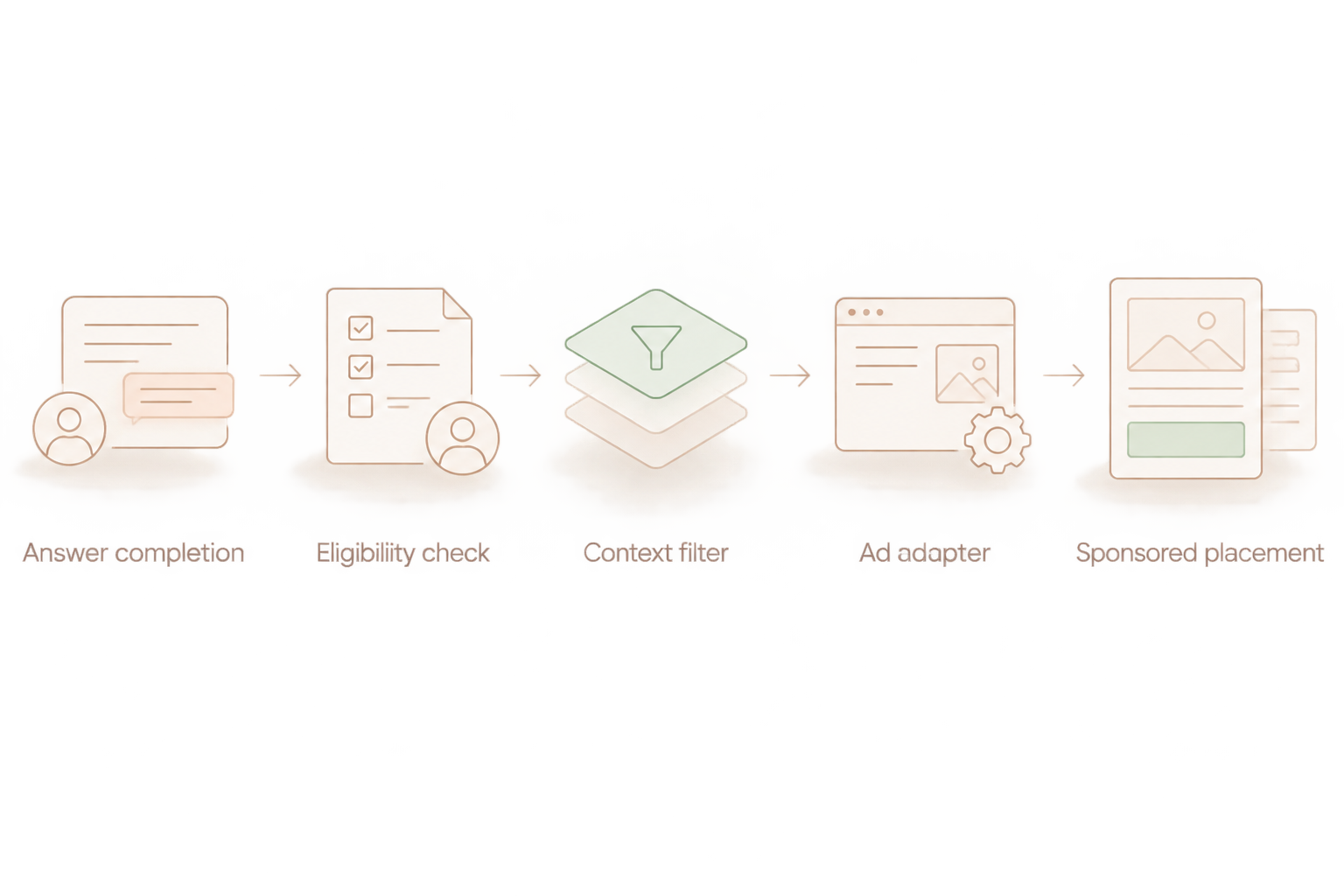
A separate surface does not remove the need for review. Check narrow screens, keyboard navigation, and long answers. The sponsored disclosure should remain associated with the placement rather than scrolling or wrapping into an unrelated part of the interface.
Verification configuration
- Exercise the empty path. Test 1 ineligible turn and confirm that your application makes no ad request for it. Then simulate a non-rendering outcome through your adapter and confirm the answer remains intact.
- Exercise the failure path. Simulate a rejected request and an interrupted connection at the adapter boundary. Confirm that your application's error handling does not replace the assistant answer with an advertising error.
- Exercise the race path. Submit 2 consecutive turns, then switch conversations before the earlier advertising operation completes. Verify that each result stays associated with its original turn or is discarded.
- Review measurement separately. Inspect request records, rendered placements, and supported measurement events as different stages. Keep test traffic distinguishable in your own records and follow the provider's instructions for testing.
Expected result: Your staging evidence covers eligibility, empty responses, failures, and stale results—not just a successful render.
For the 2026 release gate, require a clean answer path with advertising disabled and with advertising enabled but failing. The answer must survive an unavailable advertising path. That requirement belongs in application tests, not only in a manual launch checklist.
Review the publisher integration
Explore Elo's demo before connecting your production chat workflow.
Streaming-answer variant
A streaming RAG interface needs a different trigger boundary, not a different evidence pipeline. Start with the completed-answer workflow; add streaming behavior only after you can cancel obsolete work and associate results with stable turns.
| Workflow | Best for | Advantage | Trade-off |
|---|---|---|---|
| Completed-answer placement | Initial integrations and straightforward turn handling | Context is settled before eligibility evaluation | The ad operation starts after answer completion |
| Streaming-turn placement | Interfaces with explicit turn and cancellation handling | Advertising work can run independently of token delivery | Partial context and stale results require additional controls |
For the streaming variant, trigger evaluation at an application-defined point where permitted intent is sufficiently clear. Do not issue a fresh ad request for every token or retrieval event. Keep the response stream independent of the advertising operation.
When the user stops generation, edits a message, or starts another turn, invalidate the previous placement opportunity in application state. Discard any obsolete result even if the underlying operation cannot be canceled.
Recommendation for a 2026 launch: use completed-answer placement first. Its advantage is simpler lifecycle handling; its limitation is a later request start. Streaming is best for teams that already manage asynchronous turn state and can test its additional failure paths.
This comparison describes application designs. It does not assert a built-in streaming connector, cancellation feature, or particular SDK transport.
Troubleshooting
The sponsored placement attaches to the wrong answer
Check whether rendering uses the latest active turn instead of the turn that created the request. Capture the originating turn identifier and validate it again before rendering. Discard results whose target no longer exists.
The same turn produces repeated requests
Inspect retries, component remounts, and multiple completion handlers. Centralize eligibility evaluation and request ownership in your application. A frontend rerender should not create another placement opportunity for the same unchanged answer.
Private content appears in the outbound payload
Trace the final serialized request back through the adapter and shared middleware. Replace broad object forwarding with an explicit field allowlist. Keep advertising disabled for affected flows until the transmitted payload passes inspection.
The answer waits for the ad operation
Look for shared exception handling or a blocking dependency between answer delivery and advertising. Separate the delivery paths so the answer can complete independently. Handle the ad outcome only within the sponsored surface.
A request succeeds but no placement appears
Trace the full application lifecycle: eligibility decision, outbound request, returned outcome, stale-result check, and render decision. A successful transport response is not proof of a rendered placement. Inspect the documented SDK behavior before changing event handling or retry logic.
Customize your workflow
After the base integration works, expand eligibility rules before adding more placements. Separate conversational contexts that permit advertising from contexts that require suppression, and keep those decisions inspectable in application logs without retaining unnecessary message content.
Elo supplies the contextual advertising component; your application owns retrieval permissions, answer integrity, disclosure placement, and lifecycle behavior. The benefit is a monetization path alongside the conversation. The trade-off is another external integration requiring data review, error handling, and measurement validation.
For your 2026 operating review, compare failures by stage rather than treating every empty sponsored surface as a matching problem. An eligibility rejection, a filtered request, and a stale response require different fixes. Resolve correctness before changing placement frequency.
FAQ
How do I connect a LlamaIndex RAG app to an ad network?
Add an application-owned advertising adapter beside your RAG answer-delivery path. Apply eligibility rules, send only permitted context through the documented SDK integration, and render the sponsored placement separately from the answer and citations.
Does Elo replace my LlamaIndex retriever or vector database?
Elo provides an SDK-based adserver for contextual conversational ads, not the retrieval component of this workflow. Keep your existing RAG pipeline responsible for evidence retrieval and answer generation.
Should I send retrieved documents to the advertising service?
Do not send retrieved documents by default. Define an explicit context allowlist and share content only when you have permission and the documented request contract supports it.
Can I use contextual ads with a streaming RAG answer?
Design a separate advertising lifecycle alongside the response stream. Use stable turn identifiers, reject obsolete results, and avoid triggering requests on every generated token.
Will an ad request change my chatbot's citations?
An ad request should not change citations in this architecture. Keep advertising creative out of retrieved evidence and render sponsorship disclosures separately from source references.
What should happen when the advertising request fails?
Your chatbot should deliver its answer normally and leave the sponsored surface empty. Handle advertising errors independently from retrieval and answer-delivery errors.
How do I test the integration before launch?
Test eligible and ineligible turns, non-rendering outcomes, request failures, repeated triggers, and conversation switching. Inspect the outbound payload and verify measurement according to the SDK instructions rather than counting requests as impressions.
One last thing
A late ad response is not automatically a useful ad response. If the user has edited the question or left the conversation, displaying that result attaches commercial content to the wrong context. Discard obsolete placements rather than rescuing every completed request. Correct association matters more than filling an empty surface.