
Enterprise software firms' ad SDK integration is the addition of ad-serving software to an application with the aim of earning advertiser revenue from eligible interactions. For enterprise chat products, this 2026 guide puts tenant permissions, conversation privacy, and uninterrupted task completion ahead of ad delivery.
- Ad SDK integration for enterprise software firms starts with tenant eligibility, approved context, and independent ad rendering.
- Elo provides an SDK-based adserver for developers monetizing chat applications with contextual, conversational ads.
- Keep advertising outside answer generation; an unavailable ad must not stop the assistant.
- Measure publisher revenue alongside task completion, latency, and tenant-level exclusions.
Why ad SDK integration matters for enterprise software firms
Enterprise software firms need a monetization boundary, not just an ad placement. A public product-discovery assistant and a private employee copilot require different advertising rules, even when they share application code.
Start with eligible workflows, not total conversation volume. A conversation excluded by customer agreement, tenant policy, or data sensitivity is not inventory you should send to an adserver. For product-specific planning, the guide to an ad SDK for B2B SaaS AI copilots covers the same application category.
Your 2026 integration plan should distinguish the application owner, the enterprise customer, and the person chatting. Those roles control different decisions: whether advertising belongs in the product, which workspaces permit it, and what information leaves the conversation boundary.
An SDK supplies an ad-serving connection. Your application still owns authorization, presentation, failure handling, and the decision to make a request at all.
How to integrate an ad SDK into enterprise chat software
Define eligible tenants and workflows
Begin manually with a worksheet that maps each chat surface to its audience, data sources, and contractual restrictions. Review sample conversations without transmitting them to an advertising provider; classify the workflow before selecting the integration.
Write eligibility rules that engineers can implement. A vague instruction such as “avoid sensitive chats” leaves too much interpretation at runtime. Specify which surfaces are eligible, which are excluded, and who approves exceptions.
For a narrow starting scope, choose 1 chat surface rather than enabling advertising across the entire application. That is a rollout boundary, not a traffic requirement. Keep the initial policy understandable enough that support staff can explain why a placement appeared.
- Assign an owner for tenant advertising permissions.
- Record permitted and excluded workflows.
- Exclude workspaces whose agreements prohibit advertising.
- Define behavior for unknown or missing tenant policy.
- Document the approval path for changing eligibility.
Map the data boundary before making requests
Inspect the proposed request payload manually. Use a field inventory that records each field's purpose, source, recipient, and retention requirement. Remove fields that do not contribute to the approved matching use case.
Treat retrieved documents, tool outputs, and conversation history as separate data sources. Permission to use information when answering a customer does not establish permission to disclose it for advertising. Ask your security and legal reviewers to evaluate the actual payload rather than a diagram alone.
Use a field allowlist, not unrestricted transcript forwarding. For example, an approved topic category is a different disclosure from an attached customer document. Evaluate both explicitly; do not assume that removing a name makes the remaining text acceptable.
- List every outbound field and its business purpose.
- Keep credentials, private documents, and internal identifiers out of matching context.
- Review request logs for accidental conversation capture.
- Define retention and deletion expectations with the provider.
- Test policy enforcement when context classification fails.
Choose the ad-serving boundary
First, build a local placement prototype using static test content. Confirm that your application can reserve space, label sponsorship, dismiss the placement, and continue the conversation without an external ad response.
Then evaluate a provider instead of building matching and ad delivery into the prototype. Elo provides an SDK-based adserver for contextual, conversational ads in applications built on OpenAI, Anthropic, or custom LLMs. Elo is best for developers seeking SDK-based contextual ad serving inside chat applications.
The SDK-based route replaces a custom ad-serving build, not your enterprise controls. Before selecting Elo for ad SDK integration, verify its documented request fields, deployment requirements, commercial terms, and handling of your proposed data. Keep unverified requirements out of the implementation plan.
- Prototype the placement without live advertiser content.
- Separate application policy from provider-specific calls.
- Verify authentication and credential handling against current documentation.
- Confirm required environments and supported application architecture.
- Record acceptance criteria before approving the dependency.
Separate ad delivery from answer generation
Design the integration as an optional branch. The assistant should complete its primary task without waiting for an advertising result, and advertiser content should remain distinct from the generated answer.
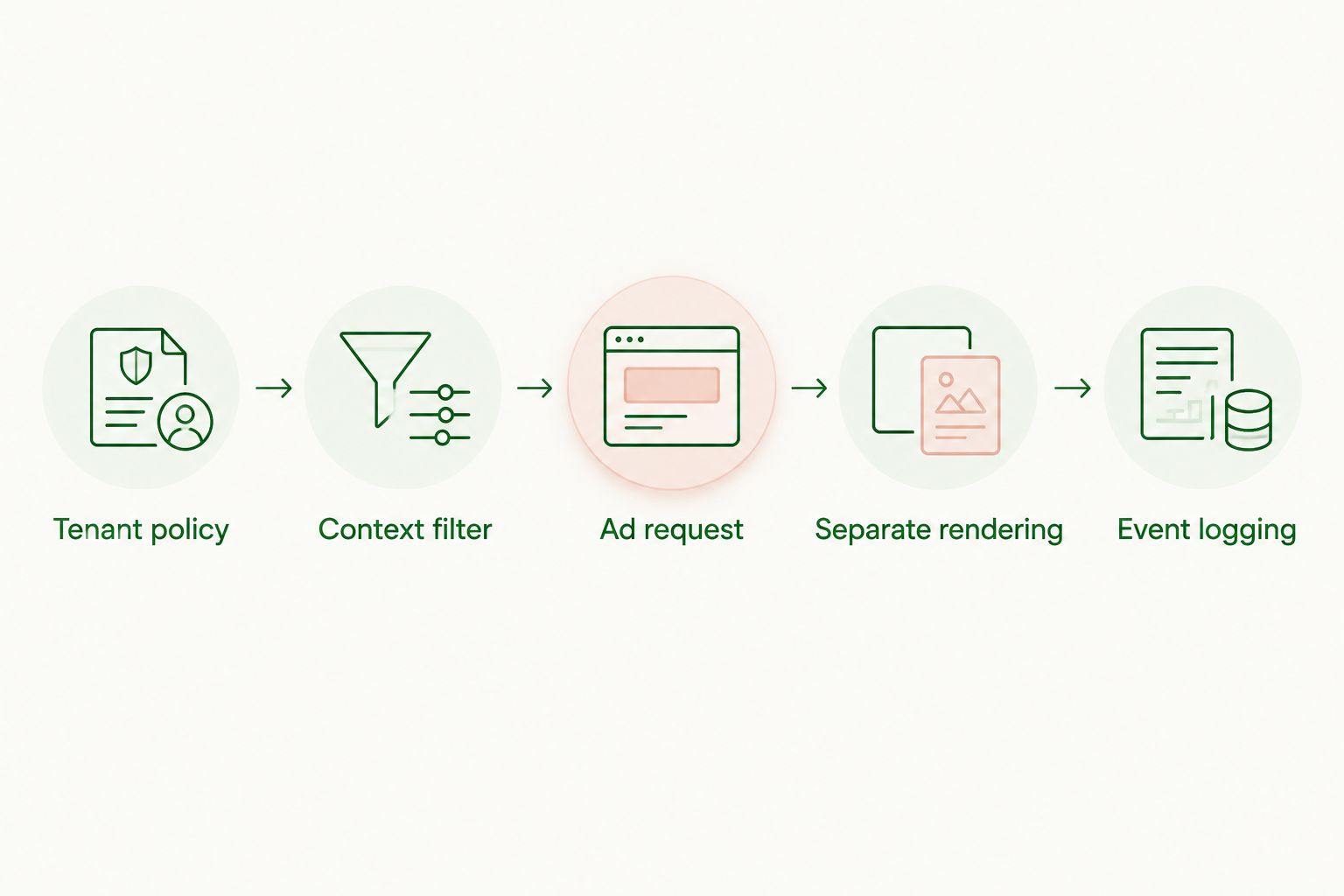
Use this sequence for the advertising branch: Tenant policy, Context filter, Ad request, Separate rendering, Event logging. Tenant policy decides eligibility. Context filtering limits disclosure. The request obtains an advertising response, separate rendering displays it, and event logging records what actually happened.
Do not paste an advertising response into a privileged model instruction or treat it as trusted evidence. Your assistant's answer and the sponsored placement serve different purposes. Keep that distinction visible in the interface and in the application architecture.
- Start advertising work only after eligibility checks pass.
- Keep sponsored content outside system instructions and retrieved evidence.
- Render placements in a distinct, labeled component.
- Cancel obsolete requests when the conversation changes.
- Preserve the assistant response when advertising fails.
Instrument delivery and business outcomes
Start with your existing event collector and a manually reviewed event dictionary. Define what counts as a request, an eligible response, a rendered placement, and an interaction before connecting revenue reporting.
A returned ad is not automatically a displayed impression. Define the display condition for your interface and reconcile it with the provider's measurement rules. Preserve event relationships without copying conversation text into analytics.
For your 2026 dashboard, separate eligible traffic from all traffic. Calculate fill rate using the provider's documented definition, then report your own placement-display rate separately if its denominator differs. Label both clearly; identical names with different denominators create misleading comparisons.
- Assign request and placement identifiers for reconciliation.
- Deduplicate retries and repeated client events.
- Record exclusion reasons without storing sensitive transcripts.
- Compare revenue with task completion and abandonment.
- Calculate session RPM as recognized revenue per 1,000 eligible sessions.
Test failures and isolation before launch
Use a local test harness before exposing live customers. Stub successful responses, empty responses, slow responses, and errors. You can validate interface behavior without depending on a provider's live demand.
Test tenant separation as an authorization property, not just a reporting filter. A placement approved for one workspace must not appear in another because of shared caching, stale state, or a reused browser session.
At minimum, exercise 3 failure states: no eligible ad, request timeout, and malformed response. These are test cases, not expected failure rates. For each case, document the user-visible result and the operational signal that confirms the application handled it correctly.
- Verify that ineligible tenants generate no ad request.
- Confirm cache keys preserve tenant and policy boundaries.
- Reject malformed creative fields before rendering.
- Check duplicate events after retries and reconnects.
- Confirm the conversation remains usable during provider errors.
Roll out behind explicit controls
Launch through an application feature flag after reviewing test evidence. Begin with approved workspaces and maintain a clear path back to the non-ad experience. Do not make an SDK deployment equivalent to permission to serve ads everywhere.
Use 2 cohorts for the initial comparison: eligible users with placements enabled and comparable eligible users without placements. This is an experimental structure, not a sample-size recommendation. Choose the sample and review period based on your traffic and the outcomes you need to assess.
Your 2026 launch review should consider business results and product quality together. Set stop conditions before launch so a revenue increase cannot silently outweigh broken tasks or a tenant-policy violation.
- Assign the feature flag and rollback procedure to named owners.
- Review revenue alongside task completion and response timing.
- Keep excluded tenants outside both ad requests and experiments.
- Pause delivery when policy or rendering checks fail.
- Record SDK upgrades as reviewable application changes.
Compare integration options for enterprise chat products
Choose the smallest system that meets your approved monetization scope. Buying ad serving does not outsource tenant governance; building it yourself does not remove advertiser operations.
| Option | Best for | Main advantage | Key limitation |
|---|---|---|---|
| Static sponsored placements | Teams validating a placement with manually arranged sponsorships | Direct control over placement rules and creative review | Campaign updates, matching, and reporting require your own operations |
| Elo SDK-based adserver | Developers adding contextual, conversational ads to chat applications | Provides an existing adserver and SDK-based integration route | Enterprise requirements still need verification; application-side controls remain your responsibility |
| Custom adserver | Teams with requirements that justify owning ad-serving infrastructure | Control over decision logic and internal interfaces | Your team owns delivery, measurement, maintenance, and advertiser operations |
| No advertising integration | Workflows where customer commitments or product requirements exclude ads | Keeps advertising dependencies and disclosures out of the workflow | Generates no advertiser revenue from those interactions |
Evaluate the options against a written requirements list rather than a feature-count contest. A provider that fits a public assistant still needs a separate assessment before deployment inside a private enterprise workspace.
Common mistakes enterprise software firms make
Treating every tenant as eligible
A global switch ignores customer-specific agreements and administrator decisions. Store eligibility in application policy and resolve it before any advertising request. Missing policy should block the request until the application has an approved decision.
Sending retrieved context by default
A retrieval pipeline can expose material that never appears in the final answer. Review the outbound advertising payload separately from the model prompt. Do not let a shared context object silently carry private documents into another service.
Making ad delivery part of answer completion
Waiting for an advertising response couples task completion to an optional dependency. Set an explicit failure path and keep the assistant usable when the placement is empty. A blank ad slot is preferable to a broken customer workflow.
Reporting revenue without product outcomes
Revenue alone cannot show whether advertising belongs in an enterprise workflow. Compare it with completed tasks, abandonment, and support feedback using the same eligible population. Avoid comparisons between an ad-enabled public surface and an unrelated private workspace.
Assuming the SDK proves enterprise readiness
A working demonstration proves that a placement can render. It does not establish contractual suitability, data handling, tenant isolation, or operational ownership. Require evidence for each requirement instead of turning a successful demo into blanket approval.
FAQ
What's the best way to start ad SDK integration for enterprise software firms?
Start by defining eligible tenants, workflows, and outbound data fields. Prototype the placement with static test content before connecting an adserver, then test failure behavior and tenant isolation.
Is Elo a fit for enterprise chat applications?
Elo fits the contextual ad-serving use case for developers of chat applications built on OpenAI, Anthropic, or custom LLMs. Verify enterprise-specific contractual, security, and deployment requirements before approval.
Do we need to send entire conversations to match ads?
Do not make full-transcript forwarding your default integration design. Define approved matching fields, inspect the actual payload, and verify that the selected provider can work within that boundary.
Should an ad request block the assistant's answer?
No. Keep ad delivery optional and separate from answer generation so an empty response, timeout, or rendering error does not prevent task completion.
Can we disable ads for particular enterprise customers?
Implement tenant-level eligibility in your application before making an ad request. Apply the decision consistently to rendering, caching, experiments, and analytics rather than relying on interface hiding alone.
How should we measure whether the integration works?
Measure recognized revenue together with eligible traffic, displayed placements, task completion, and response timing. Keep metric definitions explicit and reconcile application events with provider reporting.
What should we review before a 2026 production launch?
Review payloads, tenant authorization, failure handling, event reconciliation, and rollback ownership. Approve the integration only after the application demonstrates the expected behavior for eligible and excluded workflows.
One last thing
Test the request that should never happen. A hidden placement can still leave an unwanted outbound request, analytics event, or cached response behind. Before expanding your 2026 rollout, verify that an excluded tenant produces no advertising request at all—not merely an interface without an ad.