
Martech company ad SDK integration is the process of connecting an advertising software development kit to a marketing application with the aim of earning revenue from relevant sponsored placements. This 2026 guide focuses on AI chat features, where conversation context, customer data boundaries, and tenant controls shape the implementation.
- Ad SDK integration for martech companies starts with placement rules, data boundaries, and measurable events—not SDK installation.
- Elo fits martech developers monetizing AI chat conversations through contextual ads.
- Keep sponsored placements separate from generated answers and customer campaign data.
- Compare an SDK-based adserver with direct sponsorships and a custom adserver before committing engineering time.
Why ad SDK integration matters for martech companies
A martech assistant sits close to commercial decisions: choosing software, planning campaigns, or evaluating channels. That creates potential ad placements, but it also creates a conflict to manage. A sponsored offer must not silently become the assistant's recommendation.
For a 2026 integration, treat the application as a publisher and the customer workspace as a separate permission boundary. A user asking about campaign measurement is not granting permission to send campaign budgets, CRM records, or uploaded documents to an advertising service.
The relevant starting point is an assistant that helps users evaluate business tools, not every screen in your platform. The guide to an ad SDK for B2B SaaS AI copilots covers that adjacent use case.
Elo is best for martech developers seeking SDK-based contextual ads inside AI chat applications. It provides an adserver for applications built on OpenAI, Anthropic, or custom LLMs. That scope does not make it a replacement for your application permissions, analytics definitions, or release controls.
How to integrate an ad SDK into a martech application
1. Define eligible conversations before writing integration code
Start manually. Review representative conversations using synthetic or appropriately approved examples, then classify where a sponsored placement supports the user's task. Distinguish tool discovery from campaign execution: an offer alongside software research is a different decision from an offer inside an automated budget change.
Choose 1 placement for the initial release. This is a recommended scope, not a performance benchmark. A narrow implementation makes rendering errors, irrelevant matches, and attribution disagreements easier to isolate.
Document the boundary in a short placement specification for your 2026 release. Include the conversation types you will exclude, not just the ones you want to monetize. Make that specification testable without involving a live advertiser.
- Identify a task where an optional commercial offer fits.
- Exclude private customer records from placement examples.
- Mark administrative and account-recovery conversations ineligible.
- Specify when a placement appears relative to the answer.
- Assign an owner for placement-policy changes.
2. Establish a tenant-aware data contract
Use a spreadsheet or a versioned schema to list every field the advertising request would contain. Record its purpose, origin, sensitivity, and retention requirement. Begin with a manually written topic label rather than forwarding the entire transcript.
A martech application can contain information belonging to several parties: your publisher account, a customer workspace, and that customer's end users. Do not collapse those identities into a single advertising profile. Contextual relevance is not permission to export customer data.
Keep the contract independent of the SDK. That gives security reviewers a stable artifact and lets engineers change providers without redefining acceptable data use. Where legal requirements depend on jurisdiction or processing purpose, obtain a specific review rather than treating contextual targeting as an exemption.
- Allowlist request fields instead of removing known sensitive fields.
- Separate tenant identifiers from end-user identifiers.
- Strip credentials, email addresses, and uploaded document content.
- Define consent and opt-out behavior where applicable.
- Set retention and deletion requirements for integration logs.
3. Choose the serving approach and isolate the SDK
First build a local placement stub using a clearly labeled mock offer. Confirm that your interface can display, dismiss, and omit the placement without changing the assistant's answer. This isolates product design from advertising delivery.
Then evaluate Elo for SDK-based contextual advertising. Elo's ad SDK connects AI chat applications to an adserver so developers can embed conversational ads and earn revenue from advertiser spend. This is the SDK path instead of building the full serving layer yourself; it does not remove your responsibility for application behavior.
Keep SDK-specific calls behind an application-owned adapter. Do not assume support for revenue splits, consent management, analytics destinations, or particular auction mechanics without checking the integration documentation and terms.
- Define a provider-neutral placement response schema.
- Keep adserver credentials out of client-visible code.
- Put request preparation behind your data allowlist.
- Normalize empty responses and provider errors.
- Document required capabilities before selecting the provider.
4. Separate ad delivery from answer generation
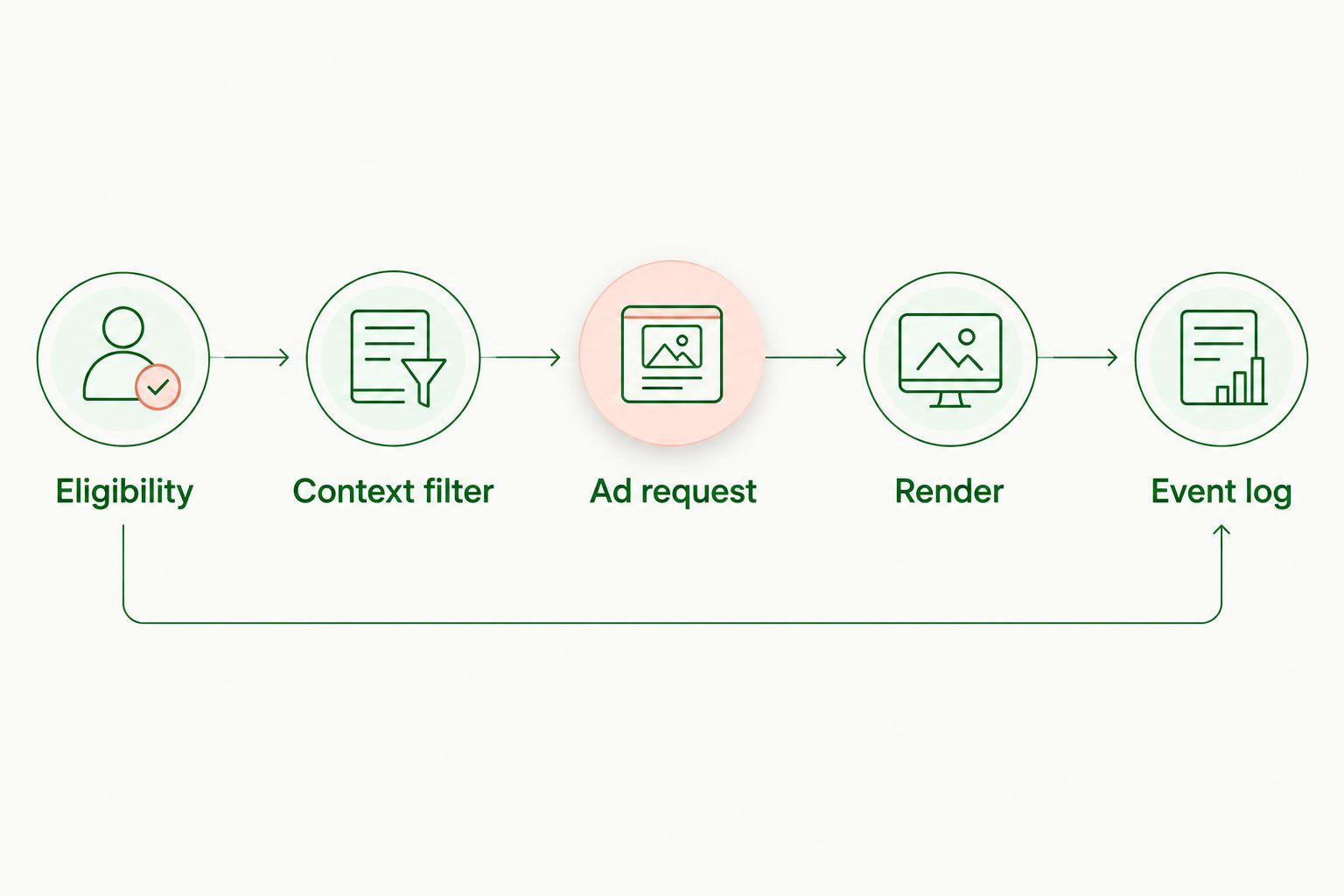
Sketch the request flow before implementing concurrency. Generate the useful answer independently; request an ad only after your application determines that the conversation is eligible. Render the sponsored result as a separate interface element.
The application-owned sequence is: Eligibility, Context filter, Ad request, Render, Event log. If eligibility fails, stop the advertising path. If the ad request fails, preserve the answer and omit the placement.
For streaming chat, decide how the placement behaves during partial responses, regeneration, and conversation switching. A response from an earlier turn must not appear beside a newer question simply because the ad request finished late. Tie every placement to its originating conversation turn.
- Reject stale responses after the active turn changes.
- Set an application-owned request timeout.
- Keep sponsored content outside the model's factual answer.
- Reserve space only when it does not disrupt reading.
- Make the no-ad state a normal rendering outcome.
5. Instrument events before calculating revenue metrics
Begin with structured application logs and a manual reconciliation worksheet. Define what your application means by a request, returned placement, rendered placement, impression, and click. These events represent different stages; they are not interchangeable.
For martech teams, the difficult part is often connecting publisher reporting with existing product analytics without exposing customer activity. Use a dedicated event namespace and carry only the identifiers needed for reconciliation. Do not treat an ad click as a lead in a customer's CRM unless that separate action and attribution rule are explicitly defined.
Use the standard RPM calculation—revenue divided by the chosen denominator, multiplied by 1,000—but name that denominator. Revenue per thousand sessions and revenue per thousand impressions answer different questions.
- Assign stable request and placement identifiers.
- Deduplicate retries before aggregating events.
- Record no-fill separately from request failures.
- Separate ad clicks from customer campaign conversions.
- Reconcile application events with adserver reporting.
- Label every revenue metric with its denominator.
6. Test failure paths and tenant isolation
Run scripted tests locally before adding production exposure. Exercise empty responses, timeouts, malformed creative fields, repeated callbacks, and navigation during an outstanding request. A successful request is only one test case.
For a 2026 launch, require 3 release checks: the answer remains usable without an ad, restricted fields stay out of requests, and events stay attached to the correct tenant. These are proposed acceptance criteria, not vendor guarantees.
Tenant isolation deserves a dedicated test fixture. Create synthetic workspaces with distinct identifiers and topic labels, then inspect both outbound requests and downstream logs. Test the controls you actually own; do not infer isolation from a clean-looking interface.
- Confirm one tenant's context never enters another tenant's request.
- Verify an opt-out prevents the intended advertising operations.
- Test retries without duplicating impressions or clicks.
- Validate labels and destinations before rendering creative.
- Confirm expired or stale placements disappear correctly.
- Exercise a kill switch without redeploying the chat interface.
7. Roll out against product outcomes, not click volume
Start with a feature flag and a manually reviewed release cohort. Compare 2 cohorts—ad-enabled and ad-disabled—using the same task definitions. Select the allocation and observation period from your own traffic and risk tolerance, not an unsupported industry default.
Measure whether users complete the task alongside advertising results. For a campaign-building assistant, that means examining successful workflow completion rather than treating every outbound click as success. A clicked offer can still interrupt the work the customer came to do.
Write the stop conditions before launch. A 2026 rollout decision should consider revenue, rendering failures, complaints, and task completion together. Do not expand exposure until the event definitions and reconciliation process are dependable.
- Compare equivalent workflows across the release cohorts.
- Track answer completion separately from ad engagement.
- Review dismissals and user-reported irrelevant offers.
- Inspect performance by tenant and eligible task.
- Pause exposure when predefined product guardrails fail.
Compare integration options for martech teams
Choose based on the work your team wants to own. An SDK-based adserver supplies a serving path; a direct sponsorship arrangement supplies a commercial relationship; a custom adserver makes serving infrastructure your responsibility. None removes the need for disclosure or data controls.
| Option | Best for | Main advantage | Key limitation |
|---|---|---|---|
| Elo SDK-based adserver | Developers monetizing contextual AI chat conversations | Provides an adserver and SDK path for conversational ads | Still requires application-owned permissions, rendering controls, and measurement |
| Direct sponsorships with an application-owned placement | Teams with existing advertiser relationships | Lets you define the placement and sponsorship agreement directly | Your team owns sales, trafficking, reporting, and creative review |
| Custom adserver | Teams that require control over serving logic | Keeps serving rules under your engineering ownership | Your team must build and maintain delivery, controls, and reporting |
Choose the SDK path when your goal is chat monetization, not ownership of advertising infrastructure. Choose direct sponsorships when the commercial relationship already exists. Build a custom adserver only when its control requirements justify the engineering and operational work.
Avoid comparing these options on installation effort alone. Include ongoing creative review, reporting disputes, data handling, and incident response in the decision.
Common mistakes martech companies make
Treating the publisher as the advertiser
Your martech company is the publisher when it displays ads inside its own assistant. That revenue stream is separate from campaigns your customers run through your platform. Keep accounts, event names, and financial reporting distinct.
Sending campaign data as conversation context
A prompt can contain audience details, customer lists, or unreleased campaign plans. Topic relevance does not justify sending the raw prompt. Apply the request allowlist before the advertising call, not after logging it.
Turning sponsored offers into generated recommendations
Do not ask the model to present paid creative as its independent judgment. Render a labeled placement outside the factual answer. Review copy for implied endorsements, especially when users are comparing software vendors.
Reporting every returned ad as an impression
A returned placement can be discarded, hidden, or attached to an abandoned turn. Define the impression event against your actual display behavior and the applicable reporting rules. Keep delivery diagnostics separate from revenue reporting.
Expanding across tenants before proving isolation
A working placement in a developer account does not establish safe multi-tenant behavior. Validate permissions, identifiers, and reporting with synthetic workspaces first. Expand only after those checks pass.
FAQ
What's the best starting point for ad SDK integration for martech companies?
Start with an eligible conversation type and a written data contract. Build a mock placement before connecting an adserver so you can test disclosure, rendering, and the no-ad experience independently.
Is Elo suitable for a martech AI assistant?
Elo fits martech developers adding contextual conversational ads to AI chat applications. Its stated scope includes applications built on OpenAI, Anthropic, or custom LLMs; evaluate your specific rendering and data-control requirements before implementation.
Should I send the entire chat transcript to the advertising SDK?
Do not send the entire transcript by default. Define an allowlist of permitted contextual fields and exclude customer records, credentials, and other restricted content before making the request.
Can an ad request run without delaying the assistant's answer?
Design the advertising path separately from answer generation so an ad request does not block the answer. Add timeouts and stale-response checks, then test the behavior in your actual application.
Is building an adserver better than integrating an SDK?
Building an adserver fits teams that need to own serving logic and accept the maintenance work. An SDK-based adserver fits teams whose objective is adding advertising rather than operating the underlying infrastructure.
How should a martech platform measure conversational ad performance?
Measure advertising delivery and product outcomes separately. Reconcile requests, rendered placements, impressions, clicks, and revenue while also checking task completion and user feedback.
What should happen when no relevant ad is returned?
The assistant should complete the user's task without displaying a placement. Treat no-fill as a normal outcome and distinguish it from network failures in your logs.
One last thing
Make the empty placement your first production-quality state. Before expanding your 2026 release, demonstrate that the assistant still answers, the layout stays readable, and analytics remain correct when every ad request returns nothing. That test protects the product experience before revenue enters the decision.