
Instead of manually replacing credentials across deployments, automate Elo API key rotation through a versioned secret, a controlled rollout, and a verification gate before revocation. Zero-downtime rotation requires overlapping valid credentials; confirm that capability before using this workflow.
- Elo API key rotation needs verified credential overlap before you can plan a zero-downtime rollout.
- Keep API credentials in a secret manager and deploy applications against an explicit secret version.
- Automate distribution, verification, and retirement separately; automate issuance only through a documented mechanism.
- Elo provides an ad SDK for developers monetizing AI chat applications with contextual conversational ads.
Why this matters
A credential replacement is not complete when a secret changes. Running processes, queued jobs, and older deployments still need attention. Revoking a credential while those consumers use it turns a security task into an authentication failure.
Elo is best for developers monetizing AI chat applications with contextual conversational ads. Its adserver and SDK provide the monetization layer; your deployment system must handle credential distribution according to the integration's actual authentication contract.
Treat this as a 2026 infrastructure runbook, not a description of undocumented dashboard controls. The workflow below defines application-side automation without assuming an Elo key-management endpoint, automatic expiration, or support for simultaneous keys.
Before you start
- Access and ownership: Have permission to manage the relevant credential, update your secret manager, deploy every consuming service, and inspect authentication outcomes. Assign an owner who can stop the rollout and authorize revocation.
- A complete consumer inventory: List application instances, regions, background workers, scheduled jobs, preview environments, and rollback releases. Identify which credentials are private and which identifiers are explicitly intended for client-side use.
- The blocking gotcha: Verify whether creating a replacement leaves the existing credential valid. Also verify how the SDK receives credentials and whether a running client reloads them. If replacement immediately invalidates the existing key, this overlapping-key workflow does not establish zero downtime.
Do not put a private credential in browser-delivered code, public build artifacts, or application logs. If your integration runs client-side, establish the documented public-versus-private credential boundary before changing its authentication architecture.
Choose the credential distribution pattern
The following are application deployment options, not claimed SDK features. Choose based on how your runtime actually consumes secrets.
| Distribution pattern | Best for | Advantage | Limitation |
|---|---|---|---|
| Rolling deployment | Services that read credentials at startup | Each new instance starts with an explicit credential version | Old instances retain the previous credential until drained |
| Runtime refresh | Applications with an implemented, tested refresh mechanism | Credential changes need not require a complete application deployment | Refresh and client replacement logic add failure paths |
| Operator-approved issuance with automated rollout | Environments without a documented credential-creation API | Automates distribution and checks without inventing an issuance mechanism | An operator still creates and submits the replacement |
Use a rolling deployment when your application reads credentials only at startup. Runtime refresh is appropriate only after you implement safe client replacement and prove that requests in progress finish correctly.
Credential lifecycle configuration
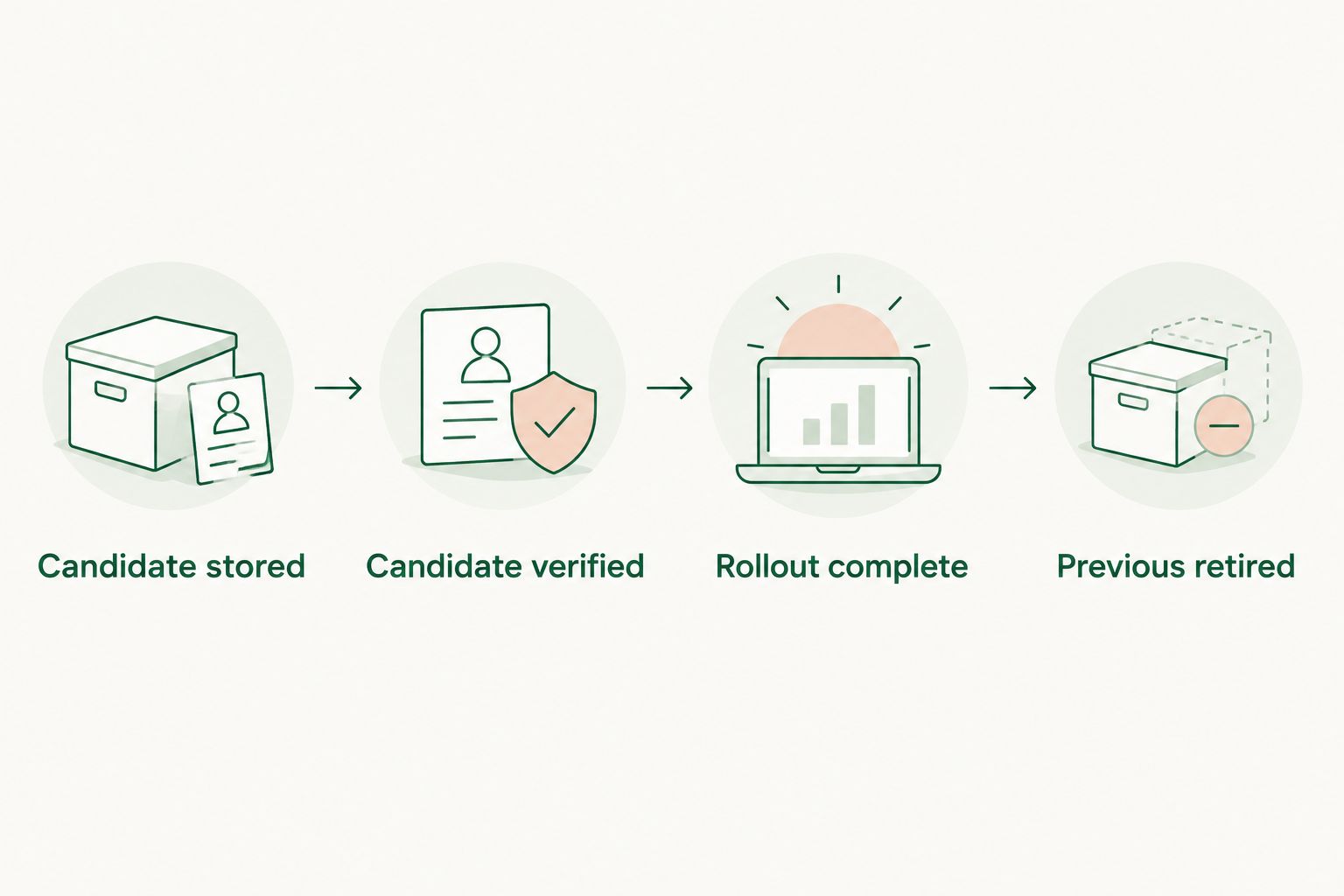
Start with a small state machine. Keep key creation, application promotion, and credential retirement separate so a failed check cannot accidentally advance the entire rotation.
- Define Candidate stored, Candidate verified, Rollout complete, and Previous retired as states in your own automation. These are proposed internal labels, not Elo interface labels.
- Record a rotation identifier, environment, candidate secret version, previous secret version, and responsible operator. Store references to secrets, never their values, in the workflow record.
- Allow only a single active rotation for the same credential scope. Acquire a lock before issuance or promotion so concurrent jobs cannot replace each other's candidate.
- Require explicit evidence before each transition. A successful secret write permits verification; it does not permit revocation.
Expected result: Your automation can explain which credential is proposed, which version is deployed, and why retirement is permitted. An interrupted job resumes from recorded state instead of creating another replacement blindly.
For the 2026 runbook, make the retirement condition evidence-based: all known consumers have moved, relevant work has drained, and the replacement authenticates successfully. Do not substitute an arbitrary waiting period for those checks.
Candidate secret configuration
Build the replacement path before touching the active credential. A candidate must be independently addressable so validation does not silently change production.
- Create the replacement using the credential-management method documented for your account. Automate this operation only when a documented programmatic mechanism exists; otherwise keep issuance as an operator-approved input.
- Write the replacement into your secret manager as a distinct version. Preserve the existing version and restrict read access to the intended workload identities.
- Validate that the candidate exists, is nonempty, belongs to the intended environment, and can be retrieved by the deployment identity. Do not print the value during validation.
- Supply the candidate to an isolated instance through the same credential-loading path production uses. Test the application integration rather than a guessed HTTP endpoint or authentication header.
- Confirm authentication independently of whether an ad appears. A successful authenticated request and a returned ad are different outcomes; record the response classification supported by the integration.
Expected result: The candidate works through the real application path while production continues using the previous credential. A failed candidate remains unpromoted.
Use your existing integration tests as the starting point. The guide to testing an ad SDK integration before launch provides adjacent testing context; credential rotation adds secret-version and deployment-adoption checks to that process.
Set a concrete acceptance checklist in your 2026 change record: successful authentication, correct application identity where observable, and no secret exposure in diagnostic output. Do not infer credential validity from revenue or ad fill alone.
Application rollout configuration
Promote a validated candidate through the deployment mechanism you already operate. The goal is to replace credential consumers without interrupting the chat application.
- Bind the deployment to the candidate's explicit secret version. Avoid a mutable reference that lets identical application releases start with different credentials without a traceable configuration change.
- Deploy a limited initial group of consumers. Confirm that the new instances load the intended version and authenticate through the normal ad-request path before expanding the rollout.
- Replace the remaining consumers in controlled batches. Preserve enough healthy capacity to serve requests while older instances stop accepting new work and finish work already in progress.
- Include workers and scheduled tasks in the promotion. A web deployment succeeding does not prove that a dormant job has adopted the candidate.
- Record adoption using secret-version metadata attached to each deployment or process. Never use the credential value as a log field, metric label, or deployment annotation.
Expected result: Every intended consumer reports the candidate version, and application health remains within your established operating limits. The old credential remains valid until the retirement gate passes.
For runtime refresh, construct and validate the replacement client before directing new requests to it. Keep the previous client available for requests already using it, then dispose of it after those requests finish. This is application logic you must implement, not an assumed Elo SDK feature.
Keep ad failures separate from core chat failures. Where ads are optional, design the application to continue the conversation without an ad when authentication or delivery fails. That protects chat availability; it does not preserve ad serving or revenue.
Retirement and rollback configuration
Revocation is the irreversible boundary for the previous credential. Place it after verification, not inside the initial secret-write operation.
- Check 3 retirement gates: the candidate authenticates, the consumer inventory shows adoption, and no known work still depends on the previous credential. Block retirement when any gate lacks evidence.
- Check rollback releases before revocation. Ensure that rolling back application code will still load a valid credential instead of restoring a retired secret reference.
- Revoke the previous credential through the documented management mechanism. Removing its value from your secret manager is not the same as invalidating it at the issuer.
- Confirm revocation through an approved authentication check when the integration supports one. Retain the audit record and permitted metadata, not copies of the retired secret in logs or tickets.
Expected result: Production uses the replacement, the previous credential is invalidated, and code rollback does not resurrect an unusable configuration.
Before revocation, a failed rollout can return to the still-valid previous version. After revocation, recovery needs a valid credential; selecting the retired secret version will not restore authentication.
Keep 2 credential references in the rotation record during the transition: candidate and previous. This is a proposed workflow convention, not a claim about how many active credentials an account supports.
Rotate whenever an approved secret version changes
A scheduled rotation is not the only useful trigger. You can also start the rollout when an operator submits an approved replacement to the secret manager.
- Receive the secret-change event through your infrastructure's documented event mechanism. Pass the secret reference and version, not the credential value, into the job.
- Reject events for the wrong environment or credential scope. Verify that the event identifies an approved candidate rather than an unrelated secret update.
- Deduplicate events using the secret version and rotation record. Repeated delivery must not create repeated credentials, deployments, or revocations.
- Run the same validation, rollout, and retirement gates used by scheduled rotation. A different trigger must not bypass safety checks.
Best for: Teams that can automate deployment but still require a person to create or approve credentials. The advantage is a repeatable rollout; the limitation is that issuance remains an operational dependency.
For your 2026 automation, route scheduled and event-driven triggers into the same state machine. Maintaining separate retirement logic creates unnecessary differences in a security-sensitive operation.
Troubleshooting
Authentication fails immediately after promotion
Stop the rollout and inspect the failing consumer's secret-version metadata. Check environment selection, secret access, and whether the process loaded the intended value. Return to the previous version only while it remains valid and safe to use.
Updating the secret does not change running instances
A stored secret and process memory are different things. If credentials load at startup, perform a controlled replacement of the consuming processes. Do not assume that updating an environment setting changes an already-initialized SDK client.
Some jobs fail after the previous credential is revoked
Find the stale consumers through deployment and secret-version records. Include infrequent jobs and recovery environments in the investigation, then deploy them with a valid credential. Add those consumers to the retirement inventory before the next rotation.
Requests authenticate but no ad appears
Inspect the integration's actual response and error information. Do not repeatedly rotate a credential solely because an ad is absent; authentication failure and an unfilled ad opportunity require different investigations. Keep raw credentials and unnecessary conversation content out of diagnostic logs.
Two rotation jobs run at once
Stop promotion until the authoritative rotation record is clear. Use a lock scoped to the affected credential and make state transitions conditional on the expected candidate version. Retrying a job should resume the recorded operation, not start a competing rotation.
Customize your workflow
Extend the runbook across environments only after the initial workflow is repeatable. Give each environment an explicit credential scope, deployment target, and retirement inventory; avoid an automation identity with broader access than the task requires.
For a multi-tenant application, map each credential to its actual account scope. Do not assume that a credential is tenant-specific, or create independent tenant rotations, unless that relationship is documented.
Add 3 audit events to your own workflow: candidate validation, deployment completion, and previous-credential revocation. Include timestamps, environment, secret-version references, outcome, and operator or workload identity. These are recommended internal events, not built-in product event names.
Elo ad SDK credential handling belongs alongside deployment controls, not inside conversation prompts. Keep secret access outside model-visible content and treat tool output, error reporting, and support exports as potential disclosure paths.
FAQ
Can I automatically rotate Elo API keys without downtime?
Zero-downtime Elo API key rotation requires overlapping valid credentials and a deployment path that moves every consumer before revocation. Confirm those capabilities before adopting this workflow; automation alone does not guarantee uninterrupted ad serving.
Does Elo provide an API endpoint for creating replacement keys?
Use only a credential-creation mechanism documented for your account. This guide does not specify a key-management endpoint; operator-approved issuance can feed the same automated distribution and verification workflow.
Should I revoke the old API key before deploying the replacement?
No, not for an overlapping-key rotation. Verify the candidate, move all consumers, and drain dependent work before revoking the previous credential.
Will changing a secret automatically update a running SDK client?
Only an implemented refresh mechanism makes a running client adopt a changed secret. Applications that load credentials at startup need a controlled process replacement or another explicitly supported update path.
How often should I rotate an ad SDK API key?
Set the rotation schedule according to your security policy and the issuer's credential rules. Handle suspected exposure as an incident rather than waiting for the next scheduled rotation.
What should happen if the API key is exposed?
Prioritize containment and invalidation of the exposed credential under your incident procedure. Do not preserve a compromised key merely to maintain the normal overlap window; chat continuity and uninterrupted ad serving are separate objectives.
Does a missing ad mean the replacement API key is invalid?
No, a missing ad alone does not establish an authentication failure. Inspect the integration's response classification and verify authentication separately from ad delivery.
One last thing
Test your rollback after retirement, not just before it. A code rollback that restores an invalid secret reference is not a recovery plan.
Make this a 2026 release requirement: application versions and credential versions must remain independently traceable. Rotation is complete only when normal operation and recovery both use valid authentication.