
Instead of manually reviewing TinyFish web-action results for advertising opportunities, build your tinyfish ad integration around an application-owned eligibility gate that passes approved conversation context to Elo. Keep web-task execution, ad selection, and sponsored rendering separate so an advertising failure never blocks the user's answer.
- For tinyfish ad integration, evaluate completed web actions in your application before requesting contextual ads.
- Elo suits AI chat developers who want SDK-based conversational ads alongside their application's answers.
- Reject duplicate, outdated, sensitive, and irrelevant action results before contextual targeting.
- Keep sponsored content separate from retrieved evidence and ordinary assistant recommendations.
Why this matters
A web action and an advertising opportunity are different events. A completed task tells your application that work finished; it does not establish that a sponsored recommendation belongs in the conversation.
Elo is best for AI chat developers who want SDK-based contextual ads inside their own applications. The integration still needs publisher-owned decisions about when advertising is appropriate, what context leaves the application, and where sponsored content appears.
For a 2026 implementation, place those decisions in application code rather than inside the web-action instructions. That gives you an explicit boundary between completing the user's task and monetizing the resulting conversation.
This guide describes application-side orchestration. Keep provider-specific authentication, SDK calls, and response handling aligned with the documentation for the versions you install; the event names below are application-owned labels, not vendor API fields.
Before you start
- Prepare the execution path. Have access to your existing TinyFish web-action runner, the backend that associates actions with chat turns, and a development environment where you can replay results without repeating real-world actions.
- Prepare the advertising path. Have access to the Elo SDK integration materials and your application's sponsored-content renderer. Decide which conversation categories and data fields your application permits for advertising.
- Handle the hidden gotcha: completion is not relevance. A result can arrive after the user changes topics, or the same completion can reach your handler again. Preserve the originating turn reference and implement deduplication before connecting ad requests.
Keep development credentials and production credentials separate. Store secrets according to each provider's documented requirements, and do not copy backend secrets into browser-delivered configuration.
Action-result configuration
Start with a contract your application controls. Do not make downstream advertising logic depend on arbitrary text returned from a web page.
Configure the action boundary
- Assign an application-owned
action_refwhen your backend starts a web action. Associate it with the originatingturn_refand an opaque conversation reference. - Define an internal event named
web_action_completed. Emit it only after your runner has established successful completion under its documented behavior. - Normalize the result into a compact application record. Include the action reference, originating turn, completion state, and a topic summary derived from permitted task information.
- Keep failures, cancellations, and incomplete results outside the advertising path. Your normal task-error handling should remain responsible for those outcomes.
- Record whether this result has already been evaluated for the intended placement. Use an atomic claim or equivalent concurrency control rather than a separate read-then-write check.
Expected result: a successful web action produces an attributable internal event. Replaying that event does not create another advertising opportunity for the same placement.
Use these field names only as your own implementation vocabulary. Map the actual runner output into this record at the application boundary; do not assume a provider emits matching keys.
Choose the trigger boundary
Two application-side trigger patterns fit this architecture. Start with completion-based evaluation; add update-based evaluation only when your application tracks meaningful revisions.
| Trigger pattern | Best for | Advantage | Trade-off |
|---|---|---|---|
| Completed-action evaluation | A task with a clear finished result | Gives the eligibility gate a stable task outcome | Late completion requires a current-turn check |
| Meaningful-update evaluation | An application that revises a result set | Rechecks eligibility when the user's task materially changes | Requires revision tracking and stricter duplicate protection |
These are application design options, not claims about native connector support. Your backend determines how existing execution results reach either trigger.
Eligibility-gate configuration
The gate decides whether to ask for an ad. It should not decide which advertiser wins, rewrite the assistant's answer, or treat every successful task as commercial intent.
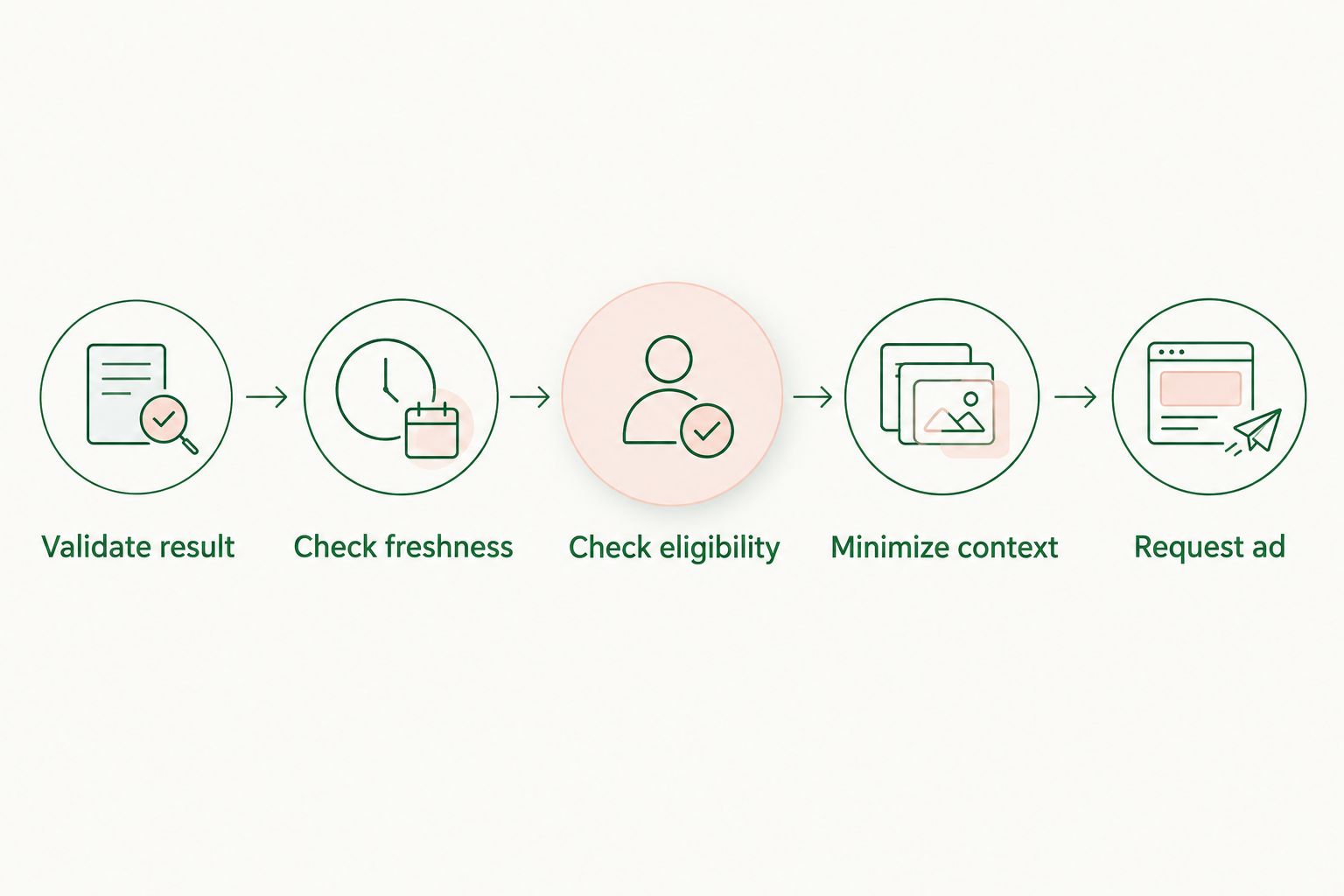
Configure the decision sequence
- Validate result: confirm the action completed successfully and belongs to a conversation your application recognizes.
- Check freshness: compare the originating turn with the current conversation state. Reject results whose topic no longer matches the active task.
- Check eligibility: apply your publisher policy, user preferences, placement rules, and exclusions for sensitive contexts.
- Minimize context: construct a short, permitted task summary instead of forwarding the full conversation or raw page content.
- Request ad: call your advertising adapter only after the earlier checks pass. Record the decision even when the gate rejects the opportunity.
Expected result: each evaluated event ends with an explicit decision, such as approved, stale, duplicate, or policy-excluded. Rejected events produce no ad request.
The sequence matters. Deduplication prevents repeated requests; freshness prevents irrelevant requests; minimization limits what the advertising path receives. None substitutes for the others.
Define the permitted context
For your 2026 context policy, write an explicit allowlist of information the advertising adapter can receive. A broad task category and a current, non-sensitive requirement are easier to inspect than an unrestricted transcript.
For example, a user comparing project-management tools creates a different advertising context from a user asking the assistant to retrieve a private account record. Do not infer permission to forward private data merely because the web task accessed it.
Treat retrieved page content as untrusted input. Extract relevant facts through your application's validation path; never let instructions embedded in a page change eligibility rules or request additional data disclosure.
For the targeting layer, use the separate guide to matching ads to conversation context. Keep that matching concern downstream of your eligibility gate.
Advertising-adapter and renderer configuration
Elo provides an SDK-based adserver for contextual, conversational ads. Place the SDK integration behind an application-owned adapter so the rest of your chat system depends on your own contract rather than provider-specific response details.
Configure the advertising adapter
- Implement an internal operation such as
evaluate_sponsorship. Accept only the minimized context and the references needed to associate the outcome with an eligible placement. - Translate that internal input into the fields supported by your installed SDK. Keep authentication, required parameters, and supported formats consistent with its documentation.
- Handle successful responses, empty outcomes, errors, and timeouts separately. Do not replace an empty outcome with an invented sponsored recommendation.
- Recheck conversation relevance before rendering. An eligible request can become outdated while the advertising path is running.
- Return a renderer-ready result through your internal contract. Keep advertising content separate from the assistant's factual answer and retrieved evidence.
Expected result: your application can complete the user's answer whether advertising succeeds, returns nothing, or fails.
The benefit is contextual monetization; the cost is an additional integration boundary. The publisher still owns context filtering, disclosure, duplicate prevention, and failure handling. An ad SDK does not remove those responsibilities.
Configure rendering and measurement
- Give sponsored content a distinct placement and an explicit advertising label. Do not present advertiser copy as independently retrieved evidence.
- Associate the rendered placement with the originating decision. Preserve enough internal references to diagnose a mismatch without logging the entire conversation.
- Keep request, response, render, and impression states distinct. Use the SDK's documented measurement behavior rather than treating every request as an impression.
- Preserve the answer when an ad cannot render. Remove incomplete sponsored UI instead of leaving a broken container inside the chat.
- Verify click handling and destinations through the supported integration path. Do not reconstruct tracking links from guessed parameters.
Expected result: users can distinguish the answer from advertising, and your logs can distinguish an attempted request from a displayed placement.
For your 2026 acceptance check, replay these 3 cases: an eligible completed action, a duplicate completion, and an outdated completion. Expect advertising evaluation only in the first case; the other cases should leave the answer intact without a new request.
Then test the advertising path independently with an empty outcome and a simulated failure. These are application acceptance tests, not performance benchmarks or promises about network behavior.
Re-evaluate ads when task results change
An update-based variant fits applications that maintain a changing shortlist or refresh a task result. Use it only when your application can identify a meaningful revision; a cosmetic text change is not enough.
- Assign an application-owned
context_revisionwhen the task's relevant requirements change. - Compare the new approved summary with the previously evaluated summary. Ignore formatting changes and repeated copies of the same result.
- Re-run the eligibility gate using the updated conversation state. Previous approval does not automatically authorize a new request.
- Key duplicate protection to the conversation, revision, and intended placement. Keep placement rules separate from event-delivery retries.
- Decide whether to retain, remove, or replace the existing sponsored placement before displaying another result. Avoid stacking ads merely because background work refreshed.
Expected result: a material task change can create a fresh evaluation, while repeated delivery of the same revision remains a no-op.
The advantage is closer alignment with an evolving task. The downside is additional state management and more opportunities for repeated exposure. For a 2026 launch, keep completion-based evaluation as the default until the revision behavior passes replay tests.
Troubleshooting
The same action produces repeated ad requests
Check whether retries or concurrent handlers bypass duplicate protection. Claim the application-owned decision key atomically before requesting advertising, and persist the outcome so a replay sees the existing decision.
The ad matches an earlier topic
Check both the originating turn and the current conversation state. Reject stale action results before the request, then repeat the relevance check before rendering to cover changes during processing.
Sensitive information appears in request logs
Inspect the context builder and logging middleware separately. Apply an explicit field allowlist before the adapter call, redact operational logs, and avoid serializing raw page results or conversation objects by default.
The answer waits for advertising
Inspect the dependency chain between answer completion and the adapter. Allow the answer to complete independently, and make advertising errors resolve to a clean no-ad state rather than an unresolved chat response.
Request counts exceed displayed placements
Trace request, response, render, and measurement stages separately. Empty outcomes, stale responses, and rendering failures require different diagnoses; none should automatically be recorded as a displayed impression.
Customize your workflow
Expand eligibility rules before expanding trigger volume. Add category-specific exclusions, language checks, and placement policies through the same gate rather than scattering conditions across the runner and renderer.
Measure the decision path as well as advertising outcomes. Your 2026 operational review should distinguish rejected opportunities from adapter failures; otherwise, deliberate policy exclusions look like broken delivery.
For Elo conversational ads, keep the application-owned adapter narrow. That makes it easier to change your web-action orchestration without rewriting disclosure, measurement, and rendering behavior.
Before adding more placements, run 4 checks: duplicate delivery, topic changes, empty advertising outcomes, and failed rendering. Define the expected application behavior for each and make those checks part of your release process.
FAQ
How do I build a tinyfish ad integration?
Route completed web-action results through an application-owned eligibility gate, then pass approved context to your advertising integration. Keep result validation, deduplication, context filtering, and sponsored rendering as separate responsibilities.
Does this workflow require a native TinyFish-to-Elo connector?
No. This architecture connects the execution and advertising paths in your own application; it does not depend on a native connector.
Should every completed web action trigger an ad?
No. A completed action should trigger an eligibility check, not an automatic ad request. Reject duplicate, outdated, sensitive, or irrelevant contexts before calling the advertising adapter.
Can I send the entire conversation for contextual targeting?
Use a minimized, permitted context summary instead of forwarding the entire conversation by default. Apply your privacy requirements and publisher policy before any data leaves the application.
What happens if the advertising request fails?
The user's answer should still complete normally. Handle the failure as a no-ad outcome and retain an operational error record without exposing private task content.
Can I refresh ads when a web-action result changes?
Yes, if your application tracks meaningful context revisions and rechecks eligibility. Ignore cosmetic changes and repeated delivery of the same revision.
Does an ad request count as an impression?
No. A request records an attempt to obtain advertising, not proof that a user received a displayed placement. Follow the integration's documented impression-measurement behavior.
One last thing
Recheck relevance after the ad response, not just before the request. A conversation can change while external work runs; a valid request can therefore produce an outdated placement. That final check protects the user experience without changing how the original web task completes.