Instead of manually inserting sponsored messages into your chat UI, connect the web SDK to a completed conversation turn, render the returned ad separately, and verify impression tracking before release. This elo web sdk quickstart covers the 2026 workflow from installation through live validation without tying ad delivery to token-by-token rendering.
- Elo is best for developers monetizing AI chat applications with contextual conversational ads.
- Use this elo web sdk quickstart to connect installation, conversation context, rendering, and impression validation.
- Keep ad requests outside token-stream updates, and preserve the chat experience when no ad renders.
- Validate requests, rendered ads, and recorded impressions separately before enabling production traffic.
Why this matters
Elo is best for developers monetizing AI chat applications with contextual conversational ads. The SDK-based adserver connects conversational ad placements to advertiser spend; your application still needs a deliberate trigger, rendering boundary, and failure path.
Start with Elo for the current integration instructions. Copy installation commands, initialization arguments, and rendering methods from those instructions rather than translating generic adtech examples into assumed SDK calls.
An installed package is not a live impression. Your application must request an ad, handle the result, display the placement, and let the documented measurement mechanism record the qualifying event. Treat each stage as a separate checkpoint in your 2026 release checklist.
Before you start
- Application access: Have repository access, a working local build, a staging deployment, and permission to change the chat message renderer. Locate the callback or state transition that marks an assistant response as complete.
- Integration materials: Have the current SDK installation instructions and the publisher configuration required by that integration. Classify every supplied value before using it: browser-safe configuration belongs in the client; secrets do not.
- The streaming gotcha: A streaming response updates repeatedly before completion. Attach your first ad trigger to a completed turn, not a component render or incoming token, or repeated updates can produce duplicate work.
Define the first acceptance test before writing integration code: 1 completed assistant turn should produce at most 1 application-triggered ad request for the selected placement. This is a recommended application rule, not a claim about SDK defaults or an impression-counting standard.
SDK installation and initialization
The first configuration unit establishes a working browser integration without changing the chat lifecycle. Keep this patch narrow so installation failures remain separate from targeting and rendering failures.
- Install the SDK using the exact package name and command in the current setup instructions. Commit the dependency and lockfile changes together so staging and production resolve the same version.
- Add the documented initialization code at an application boundary with a clear lifecycle. Keep initialization out of message-render loops and token handlers; use the SDK's documented behavior for repeated initialization and teardown.
- Supply only the documented configuration fields. Do not infer API key names, publisher identifiers, endpoint addresses, or environment switches from another advertising SDK.
- Build the application and open it in a browser. In browser developer tools, inspect Console for import, initialization, and runtime errors before connecting any conversation trigger.
- Review the browser-delivered configuration. Remove any credential classified as secret, and use the documented server-side handling wherever the integration requires it.
Expected result: Your chat application builds, opens, and initializes the integration without a runtime error. No ad request should be caused by an unrelated UI action such as opening a sidebar.
For a reproducible 2026 release, record the installed package version and the configuration changes in your deployment notes. That record gives you a concrete comparison when an integration works locally but fails after deployment.
Conversation trigger and context boundary
The second configuration unit decides when an ad opportunity exists and which conversation information leaves your application. Start with a completed-turn trigger because it gives you a stable context boundary to inspect.
- Identify the event that confirms the assistant response finished successfully. Exclude canceled generations, failed responses, and intermediate streaming updates from the initial trigger.
- Create an application-owned opportunity identifier associated with the conversation turn and placement. Keep it stable across rerenders so the same completed response does not become a new opportunity each time the UI changes.
- Add a duplicate-request guard around the trigger. For the initial acceptance test, require 0 duplicate application-triggered requests when the component rerenders without a new completed turn.
- Assemble the permitted context using only fields supported by the current integration. Apply your data policy before sending anything; do not automatically forward the entire transcript, authentication data, or unrelated account details.
- Invoke the documented ad-request mechanism. Handle its documented success, empty-result, and error paths without making the assistant's answer depend on ad delivery.
- Open browser developer tools and inspect Network. Complete a chat turn, then compare the outgoing request sequence with the trigger you intended to run.
Expected result: A qualifying completed response reaches the ad-request path with the intended context. Rerenders, canceled responses, and unrelated navigation do not create new application-triggered opportunities.
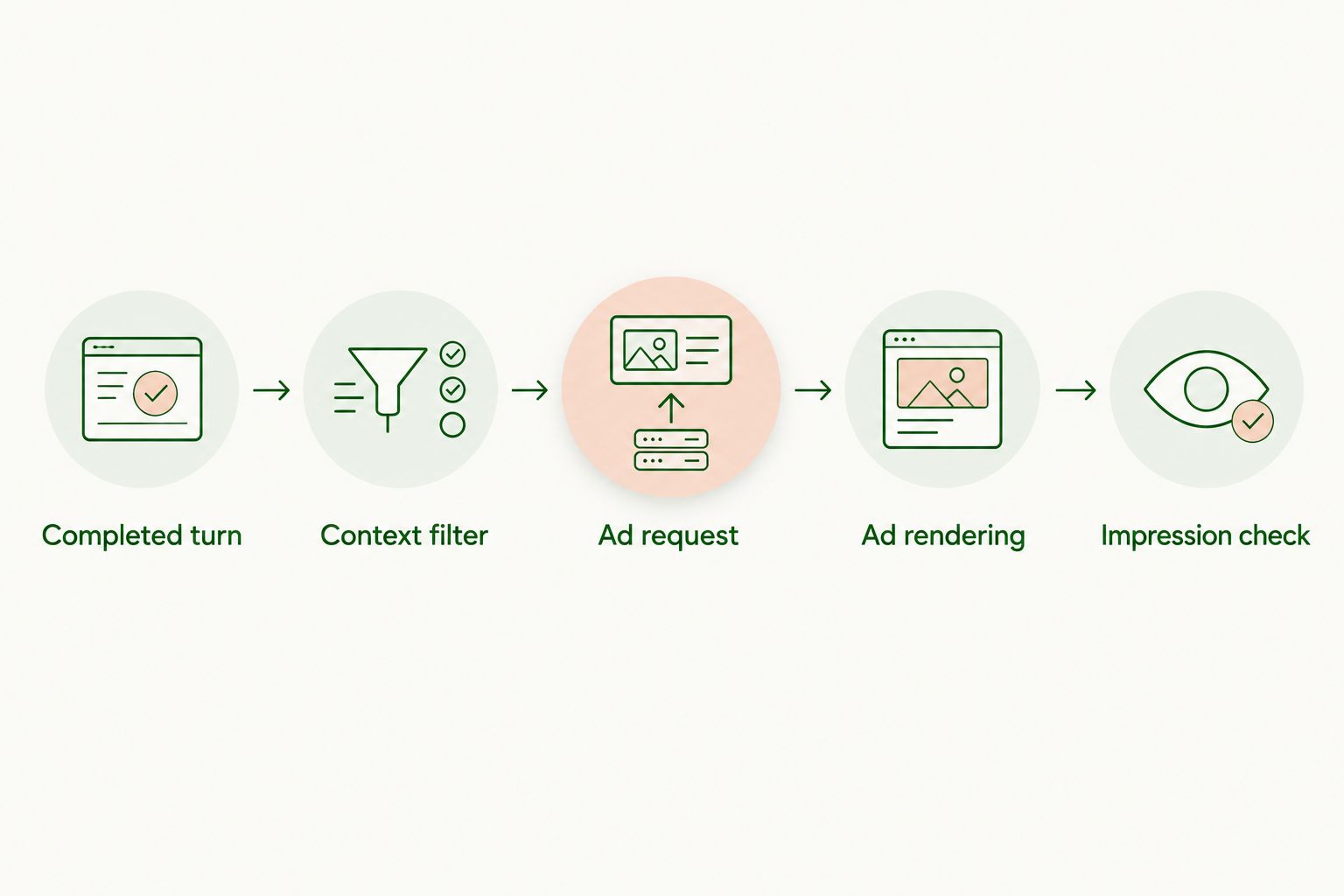
Use this processing sequence when reviewing the implementation: Completed turn, Context filter, Ad request, Ad rendering, Impression check. Each boundary should be observable without logging sensitive conversation content.
Ad rendering and impression validation
The third configuration unit connects a returned ad to a visible, disclosed placement. Elo provides contextual conversational ads, but your application must preserve a clear distinction between the assistant's response and sponsored content.
- Follow the documented rendering method. Preserve any required attribution, destination handling, and measurement behavior rather than rebuilding the returned ad into an unrelated custom component.
- Place sponsored content in a distinct UI boundary. Make the sponsorship disclosure readable where the ad appears, and keep it separate from the assistant's own recommendation text.
- Render only the result associated with the active opportunity. If the user changes conversations while a request is pending, prevent the stale result from appearing in the newly opened conversation.
- Implement the empty-result path. Leave the assistant response intact, remove unused placement space, and avoid showing an error message as if the chat itself failed.
- Use the documented impression mechanism. If the SDK owns measurement, do not add a second counter that reports the same event to the advertising system.
- Validate the rendered placement and its measurement evidence separately. A successful request establishes that a request completed; it does not establish that an impression qualified under the provider's rules.
Expected result: A returned ad appears in the intended location with disclosure, while an empty result or request failure leaves a usable conversation. Impression evidence corresponds to the documented measurement behavior rather than a guessed callback.
For your 2026 implementation review, inspect the placement on narrow and wide screens. Check that scrolling, message expansion, and route changes do not detach the ad from its original conversation context.
Production configuration and release gate
The fourth configuration unit moves a verified integration into production. Release only after the application can tolerate ad delivery failure without breaking chat.
- Deploy the integration to staging with the configuration appropriate to that environment. Use a documented test mechanism if one is provided; do not assume that a particular prompt guarantees a returned ad.
- Run a 3-case acceptance suite: a returned ad, an empty result, and a failed request. Use application-level fixtures for UI states that cannot be reproduced through the integration, keeping those fixtures separate from real measurement.
- Repeat the request-deduplication and stale-response checks in the deployed build. Local development behavior is not a substitute for observing the application bundle users will receive.
- Confirm the production configuration against the current setup instructions. Check the deployed environment, credential classification, and any documented publisher prerequisites before enabling the placement.
- Enable the integration for a controlled release using your application's release controls. Observe chat completion behavior, ad-request errors, rendered placements, and the available impression reporting separately.
- Keep a rollback path that disables ad requests and rendering without disabling the assistant. Record the release configuration so a rollback restores a known application state.
Expected result: Production users can complete conversations whether an ad renders or not, and you can trace a real ad opportunity through the documented measurement path. Test fixtures must never be reported as real ad impressions.
Alternative: request after a meaningful context update
A completed-turn trigger is not the only useful application design. You can instead evaluate a new opportunity when the user changes a meaningful constraint, such as a destination or product category, provided the integration supports the required request flow.
| Trigger design | Best for | Advantage | Trade-off |
|---|---|---|---|
| Completed-turn trigger | First integration and linear chat flows | Clear completion boundary and straightforward debugging | Can evaluate an opportunity after a turn that adds little new intent |
| Context-change trigger | Assistants with explicit intent or constraint state | Connects evaluation to a meaningful application-state change | Requires change detection and stronger stale-response handling |
To implement the second variant, maintain an application-owned summary of the permitted targeting context. Compare the new state with the last evaluated state, then request only when the relevant context changes and your placement rules allow another opportunity.
Keep cosmetic updates out of this comparison. Renaming a conversation, opening a panel, or receiving another streaming fragment should not count as changed commercial intent.
Prefer the completed-turn trigger for the first release. Move to context-change triggering after you can explain every outgoing request and associate each rendered placement with the state that produced it.
Troubleshooting
The application sends repeated requests
Inspect the trigger's call site before changing SDK configuration. Render functions, streaming listeners, and repeatedly attached subscriptions can invoke the same application logic more than once.
Move the trigger to the completed-turn boundary, remove stale listeners, and preserve the opportunity identifier across rerenders. Verify the fix by repeating the UI action that previously produced duplicates.
The request completes but no ad appears
Separate an empty result from a rendering failure. Inspect the documented response outcome, then check whether your application entered the correct UI path.
Do not substitute a fabricated ad or count the empty result as an impression. If a renderable result exists, trace it from the response handler to the active placement component.
An ad appears in the wrong conversation
A delayed response can arrive after the user switches threads. Compare the result's application-owned opportunity association with the currently active conversation before rendering.
Discard or ignore stale results according to your application lifecycle. Never attach a pending request to whichever chat happens to be open when it finishes.
The ad request fails in the browser
Inspect Network for the failed request and Console for the associated error. Distinguish application exceptions, browser blocking, and server responses before choosing a fix.
Correct the specific configuration or application error you observe. Do not bypass browser protections or repeatedly retry a blocked request without a defined stopping condition.
The ad renders but impression evidence is unclear
Check the documented counting rules and confirm that your rendering changes preserved measurement behavior. An application log saying the component mounted is not proof of an advertising impression.
Use the ad SDK integration testing guide to organize the remaining checks. Reproduce the issue with a single opportunity before investigating aggregate reporting.
Customize your workflow
Once the first placement works, expand observability before adding more triggers. Track application-side stages distinctly: eligible opportunity, request attempt, documented outcome, and placement rendering; keep provider-defined impression reporting separate.
For an Elo conversational ads integration, the advantage is a contextual monetization path for your chat application. The trade-off is additional responsibility for lifecycle handling, disclosure, privacy boundaries, and measurement validation. The SDK does not remove those application decisions.
Make your next 2026 change independently reversible. A new placement, a revised context policy, and a different trigger are separate changes; shipping them separately keeps failures attributable.
FAQ
What's the first step in the elo web sdk quickstart?
Install and initialize the SDK using Elo's current setup instructions before connecting conversation triggers. Verify the application builds and initializes without errors, then add the request lifecycle.
Should I request an ad for every streaming token?
No. Start with a completed assistant turn so intermediate streaming updates do not repeatedly invoke your application-owned ad trigger.
Does a successful ad request count as an impression?
No. A successful request and a recorded impression are different events; validate impressions using the integration's documented measurement mechanism and counting rules.
Can I use contextual ads in a custom LLM chat application?
Elo provides an SDK-based adserver for AI chat applications built on OpenAI, Anthropic, or custom LLMs. Follow the current integration requirements for the application you are deploying.
What should happen when no ad is returned?
The conversation should remain usable without an ad. Handle the documented empty-result path, remove unused placement space, and preserve the assistant's response.
How do I prevent duplicate requests when my chat component rerenders?
Keep the request trigger outside rendering logic and guard it with a stable application-owned opportunity identifier. Verify that rerendering the same completed turn does not create another request.
Should I send the entire conversation for ad targeting?
Do not automatically send the entire transcript. Use supported context fields and apply your data policy before transmitting conversation information.
One last thing
Test the empty placement before celebrating the first rendered ad. A live impression proves one successful path; a clean empty-result test proves your assistant does not depend on advertising to remain usable. Keep that test in the 2026 release gate.