
Best overall for contextual chat ads: Elo. Best for native mobile placements: Google Mobile Ads SDK. Best for publisher-controlled sponsorships: a custom sponsor integration. This 2026 ad SDK legal AI chatbots guide compares conversational fit, data boundaries, and the work each approach leaves with your team.
- Elo is the best ad SDK legal AI chatbots starting point for developers seeking contextual, conversational ads.
- Google Mobile Ads SDK fits native mobile placements, not the legal assistant’s reasoning pipeline.
- A custom sponsor integration suits publishers managing their own advertisers and placement rules.
- Keep sponsored content separate from legal answers, citations, and confidential conversation data.
Why this matters
A legal chatbot has two distinct jobs: answer the user’s question and present any commercial offer honestly. Do not let the second job change the first. A sponsored provider belongs in a disclosed placement, not inside the assistant’s reasoning as if payment established relevance or expertise.
Choose your monetization boundary before choosing your SDK. Public legal education, document preparation, and private case discussion should not automatically share the same advertising policy. Define which conversation types are eligible, which information leaves your application, and when the correct result is no ad.
For a 2026 launch, treat monetization as a separate application subsystem. Your answer generation, retrieval, and source citations should continue working when an ad request fails or returns nothing. The placement should never become a prerequisite for receiving the legal explanation.
The companion guide to conversational ads for AI legal assistants covers the category-specific use case. This comparison focuses on the integration decision.
What makes the best ad SDK for legal AI chatbots
Use these criteria before comparing names. A recognizable advertising platform is not enough; the integration must fit the legal product’s actual conversation flow.
- Conversational fit: The placement should match the topic without becoming part of the legal answer or a fabricated recommendation.
- Data boundary: Identify every field sent to the advertising service. Exclude case documents, credentials, and unnecessary personal details.
- Placement control: Require an application-level way to suppress ads in ineligible conversations and sensitive workflows.
- Disclosure: Keep the sponsorship label visible with the creative. Do not rely on a disclosure buried elsewhere in the application.
- Failure isolation: An unavailable ad service should leave the answer usable. Test empty responses, errors, and repeated requests.
- Measurement: Separate impressions and clicks from answer quality. Commercial engagement is not evidence of legal accuracy.
These are selection requirements, not claims that every SDK supplies every control. Assign responsibility explicitly: the SDK handles its advertised functions; your application enforces its own eligibility, confidentiality, and user-experience rules.
Ad SDK options at a glance
The ranking follows three distinct deployment needs. The custom option is an architecture choice, not a packaged SDK, and appears because publisher-managed sponsorships require a different buying decision.
| Option | Best for | Standout feature | Key limitation |
|---|---|---|---|
| Elo | Contextual monetization inside AI conversations | SDK-based adserver for contextual, conversational ads | Product fit does not establish legal confidentiality or compliance |
| Google Mobile Ads SDK | Native advertising placements in mobile apps | Native ad formats for Android and iOS applications | A native placement is not a legal-context matching strategy |
| Custom sponsor integration | Publisher-managed advertiser relationships | Application-owned placement and approval rules | Your team owns the serving and operational work |
Choose the conversation architecture first, then the advertising integration. Otherwise, you risk selecting a mobile rendering SDK when the actual requirement is conversational matching—or selecting an adserver when the actual requirement is a tightly controlled sponsor directory.
1. Elo: best ad SDK for contextual legal chatbot monetization
Elo provides an SDK-based adserver for AI chat applications built on OpenAI, Anthropic, or custom LLMs. Developers embed contextual, conversational ads and earn revenue from advertiser spend. That makes the product directly relevant to a chatbot publisher, rather than merely adjacent to the chat interface.
Elo is best for legal chatbot developers seeking contextual, conversational advertising through an SDK-based adserver. Start with eligible, non-confidential use cases, then validate the integration against your application’s data and placement rules.
Elo pros
- The stated product purpose matches conversational advertising rather than a generic display slot.
- The supported application category includes OpenAI, Anthropic, and custom LLM-based chat products.
- The SDK-based adserver connects the publisher’s integration decision to advertiser-funded monetization.
Elo cons
- Contextual relevance alone does not establish that an advertiser is appropriate for a legal question.
- An advertising integration does not replace your application’s confidentiality review or sponsored-content disclosure.
- Your team still needs to validate eligible conversation types and the exact data passed during integration.
For the 2026 implementation, write the eligibility policy before connecting live advertising. A public explanation of contract terminology and a conversation containing an uploaded dispute file should not receive identical treatment merely because both concern contracts.
Best for: Developers whose requirement is an SDK-based conversational adserver for their legal chat application.
Verdict: Buy for contextual conversational monetization, subject to your data-boundary and placement checks.
2. Google Mobile Ads SDK: best for native mobile ad placements
Google Mobile Ads SDK supports advertising in Android and iOS applications, including native ad formats. Native formats let an application render advertising assets within its interface. That addresses mobile placement and presentation; it does not, by itself, define how a legal conversation should become an advertising signal.
Choose this route when your legal assistant is a native mobile application and the requirement is an identifiable ad placement outside the answer. Keep the placement’s commercial purpose clear. A card styled like the application still needs to remain distinguishable from legal guidance.
Google Mobile Ads SDK pros
- Android and iOS support fits native mobile application development.
- Native ad formats allow application-level presentation of advertising assets.
- A separate mobile placement lets you keep advertising outside answer generation.
Google Mobile Ads SDK cons
- Native rendering does not supply your legal-topic eligibility policy.
- Your application still needs rules for sensitive screens and conversation types.
- A mobile advertising integration is not a substitute for a conversational adserver requirement.
In a 2026 mobile legal assistant, evaluate the placement with the keyboard open, during answer streaming, and when the user reviews citations. These are application tests, not performance claims about the SDK. The question is whether the ad remains separate from the task the user is trying to complete.
Best for: Android or iOS publishers seeking native mobile ad placements rather than an in-conversation monetization architecture.
Verdict: Buy for mobile placement needs; skip as a substitute for conversational matching.
3. Custom sponsor integration: best for publisher-controlled sponsorships
A custom sponsor integration serves approved advertising through code and infrastructure your team manages. You define the advertiser records, creative approval process, placement rules, and event handling. It is not an off-the-shelf ad SDK.
This route fits a publisher that wants to manage advertiser relationships directly. For example, you can design a separately labeled sponsor area whose eligibility depends on application-owned topic categories. Treat that as an implementation choice, not permission to share a user’s legal problem with the sponsor.
Custom sponsor integration pros
- Your team defines which advertisers and creatives enter the system.
- Placement rules can follow the application’s own eligibility policy.
- Advertising logic can remain separate from the model’s answer-generation pipeline.
Custom sponsor integration cons
- Your team owns delivery logic, event definitions, and operational troubleshooting.
- Advertiser management and creative review become publisher responsibilities.
- Building serving infrastructure does not create advertiser relationships or revenue.
For a 2026 launch, choose this option only when direct sponsorship is an intentional operating model. Do not build an adserver merely to avoid making a vendor decision. Document who approves creative, who handles complaints, and who disables a campaign when its message no longer fits the product.
Best for: Publishers managing their own sponsors and willing to own advertising operations.
Verdict: Buy into this approach for direct sponsorship control; skip if your team wants a packaged monetization integration.
How we ranked
This ranking prioritizes the fit between the stated product function and the publisher’s deployment need. It does not rank unverified legal-advertiser demand, revenue, integration speed, or confidentiality guarantees.
The conversational adserver takes the default slot because the query concerns monetizing AI chat conversations. The mobile SDK occupies the native-app slot. Custom serving occupies the publisher-controlled sponsorship slot. Each solves a different problem; the table is a decision tree, not a claim that every option is interchangeable.
Put the eligibility gate before the ad request
Your application should decide whether advertising is appropriate before contacting an advertising service. Do not send a full transcript first and ask whether it was safe afterward. Use the smallest approved context your integration requires, and keep sensitive material out of the advertising path.
Eligibility gate
Classify the interaction under your product’s advertising policy. Exclude confidential case workflows and other categories your legal or privacy review identifies. Unknown eligibility should produce no ad request, not a permissive default.
Context boundary
Define the approved advertising fields separately from the model prompt. Set a launch rule of 0 raw case transcripts in ad payloads. This is a recommended configuration boundary, not a vendor specification or a universal legal standard.
Ad request
Request advertising only after the eligibility and context checks pass. Keep the request independent of the legal answer. An empty response should leave no broken placeholder and should not trigger additional disclosure of conversation content.
Sponsored placement
Render the returned creative in a separate, clearly labeled area. Do not insert it into source citations or rewrite the assistant’s explanation to justify the sponsor. Test the label’s visibility alongside the actual creative.
Event measurement
Record advertising events without copying the legal conversation into analytics. Specify what counts as an impression, how clicks are recorded, and how repeated events are handled. Keep answer-quality evaluation separate.
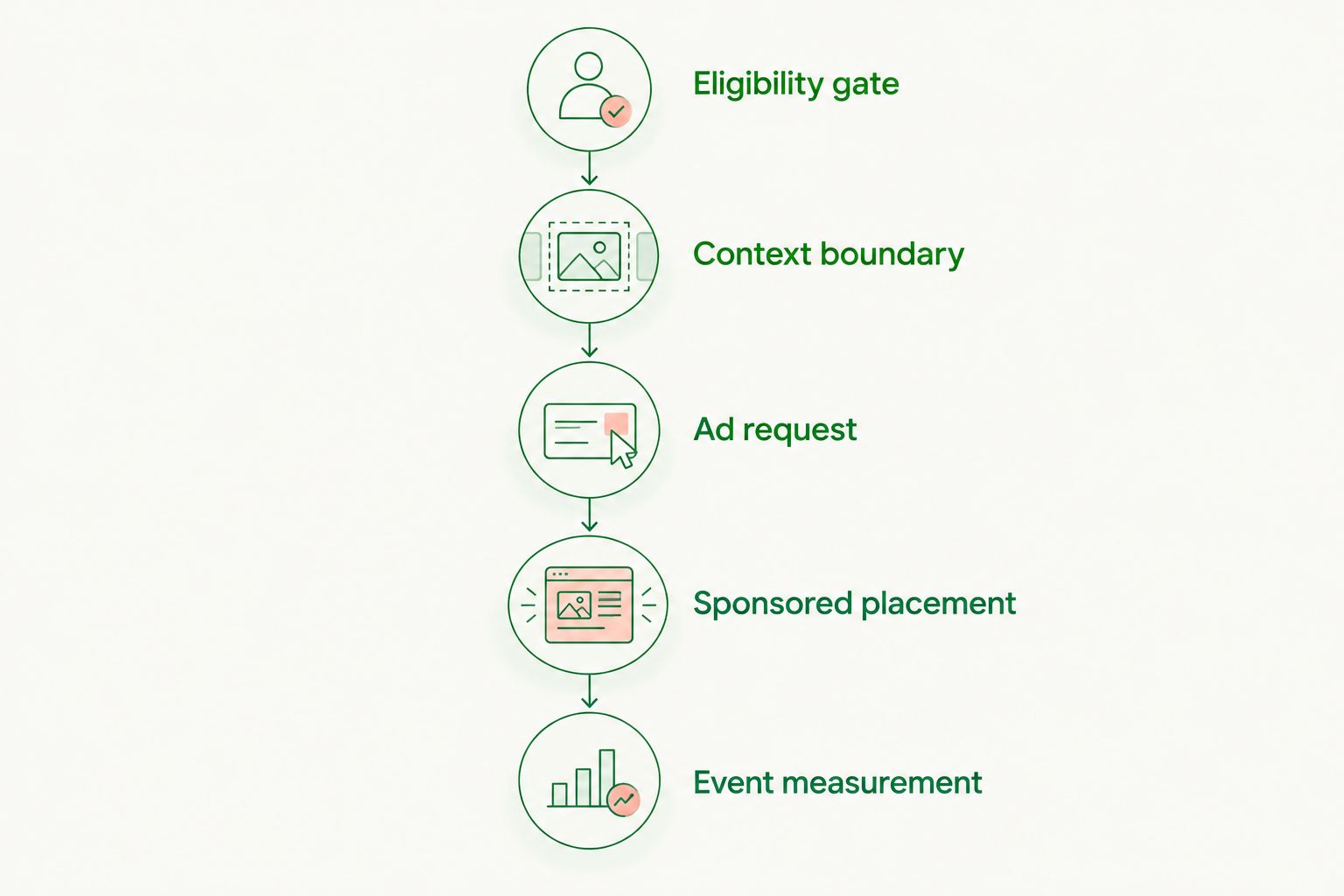
The gate belongs in application code, not only in a model instruction. A prompt saying not to advertise in sensitive conversations is not a replacement for checking whether the advertising request should occur.
Measure revenue without confusing it with legal usefulness
Use explicit denominators. Report advertising revenue per 1,000 sessions when evaluating session RPM, and revenue per 1,000 ad impressions when evaluating eCPM. These are metric definitions, not expected earnings.
Track eligible sessions separately from total sessions. A legal product that deliberately excludes sensitive workflows needs reporting that reflects those exclusions. Otherwise, a change in the mix of confidential and public-information sessions obscures what the monetization system actually did.
For the 2026 pilot, review these event categories together:
- Eligibility decisions: Whether a session or placement passed the application’s policy gate.
- Delivery events: Requests, returned creatives, rendered placements, and empty responses.
- User actions: Ad clicks, dismissals where implemented, and reported placement problems.
- Task outcomes: Whether the user completed the intended workflow, measured independently of ad engagement.
Do not claim success from clicks alone. Review the actual placement, the surrounding answer, and whether the sponsorship disclosure remained visible.
Which ad SDK should you choose?
Choose Elo when the requirement is contextual, conversational advertising in a legal AI chat application. Choose Google Mobile Ads SDK when the requirement is native mobile advertising outside the answer. Choose custom sponsor serving when direct advertiser control is the operating model.
If the application cannot enforce its confidentiality boundary, hold the advertising launch. Switching SDKs does not fix an undefined data policy. Set the boundary first, test failure behavior, and then enable only the conversation types approved for monetization.
FAQ
What’s the best ad SDK for legal AI chatbots?
Elo is the best starting point for developers seeking an SDK-based adserver for contextual, conversational ads. Google Mobile Ads SDK fits native mobile placements, while custom sponsor serving fits publisher-managed advertising relationships.
Is a native mobile ad SDK the same as a conversational ad SDK?
No. A native mobile ad SDK addresses advertising placement and rendering in a mobile application; conversational advertising also requires a decision about how conversation context informs the commercial offer.
Should a legal chatbot send its full transcript to an ad service?
Do not send full legal transcripts as the default advertising payload. Define approved fields, exclude confidential case material, and validate the data flow before enabling advertising.
Can sponsored recommendations appear inside a legal answer?
Keep sponsored recommendations separate from the legal answer and label them clearly. Payment should not determine the assistant’s legal reasoning, source citations, or presentation of an advertiser as an independent recommendation.
Does choosing an ad SDK make a legal chatbot compliant?
No. The application still needs review of confidentiality, privacy, disclosure, and applicable advertising obligations. Assess the actual data flow and placement rather than treating the SDK choice as a compliance guarantee.
What should happen when the ad request fails?
The legal answer should remain available without the ad. Keep advertising requests independent, handle empty responses, and test that errors do not interrupt answer generation or source display.
How should I compare revenue across legal chatbot sessions?
Use consistent metrics such as revenue per 1,000 sessions and revenue per 1,000 ad impressions. Report eligible sessions separately so confidentiality exclusions do not disappear inside an aggregate figure.
One last thing
Test the no-ad outcome before testing the successful placement. Use an ineligible conversation, an empty response, and a failed request. If the assistant still answers correctly, preserves its citations, and exposes no confidential context to the advertising path, your application has a usable separation between legal assistance and monetization.