Yes. A web-only AI chatbot can run ads without an App Store or Google Play listing because the ad placement lives in your browser interface, not in an app-store package. You still need an ad provider that accepts your web property, a compatible integration, and appropriate disclosure and data handling; skipping the store does not skip those requirements.
- Web only AI chatbot run ads no app store: yes, with a compatible browser-based ad integration.
- Elo provides SDK-based contextual advertising for developers of AI chat applications.
- App-store distribution and publisher approval are separate requirements. Confirm web support before integrating.
- Keep sponsored placements separate from generated answers, and let chat continue when ads fail.
Can a web-only AI chatbot run ads without an app store?
Yes. A browser-based chatbot does not need an app-store listing to display advertising. Your website supplies the interface, your application handles the conversation, and an ad integration supplies the sponsored placement. None of those functions inherently requires a native mobile package.
For a 2026 web launch, the practical sequence is:
- Confirm eligibility. Ask the ad provider whether it accepts standalone websites or embedded chat widgets.
- Connect context. Define the permitted conversation context that your application sends for ad matching.
- Render sponsorship. Display the returned creative in a clearly labeled placement outside the generated answer.
- Measure delivery. Implement the provider's documented impression and click events.
- Handle failure. Keep the conversation working when the ad request returns nothing or fails.
The guide to launching an ad-supported AI chatbot covers the broader launch process. The decision here is narrower: whether your browser application needs a store listing first. It does not.
Why this matters
An app store is a distribution channel, not the technical foundation of web advertising. Building a native wrapper solely to display ads adds another release surface without resolving publisher eligibility, contextual matching, disclosure, or measurement.
For your 2026 launch, separate the questions. First decide where users will access the chatbot; then decide how sponsored placements will work there. An ad network that accepts mobile applications does not automatically accept websites, and a web-compatible integration does not automatically approve every publisher.
Choose the ad integration around the interface you already control. Do not change your distribution model just to satisfy an assumption about advertising.
Which browser setup should you monetize?
A standalone site, an embedded widget, and an installable web application all use browser technology. Their integration constraints differ, so evaluate the actual placement rather than treating every web deployment as identical.
| Browser setup | Best for | Advantage | Limitation to check |
|---|---|---|---|
| Standalone website | Developers who control the full chat page | Direct control over layout, disclosure, and navigation | Provider eligibility, browser support, and request blocking |
| Embedded chat widget | Teams adding chat to an existing website | Keeps the conversation inside an existing user journey | Host-page restrictions, iframe boundaries, and consent coordination |
| Installable web application | Teams offering a web interface with an installation option | Keeps the application on a web delivery model | Installation does not establish ad-provider compatibility or publisher approval |
For a standalone browser chatbot, start with the website you already operate. An installable web application is not an advertising prerequisite. Choose that format for the product experience, not as a workaround for an ad-network requirement.
An embedded widget needs extra attention to ownership. Establish whether the host website or the widget operator controls consent, placement rules, and reporting. Document those responsibilities before requests leave the browser.
How should the web ad integration work?
Keep answer generation and advertising separate in your application design. The chatbot should answer the user's request independently; the sponsored placement should remain identifiable as advertising.
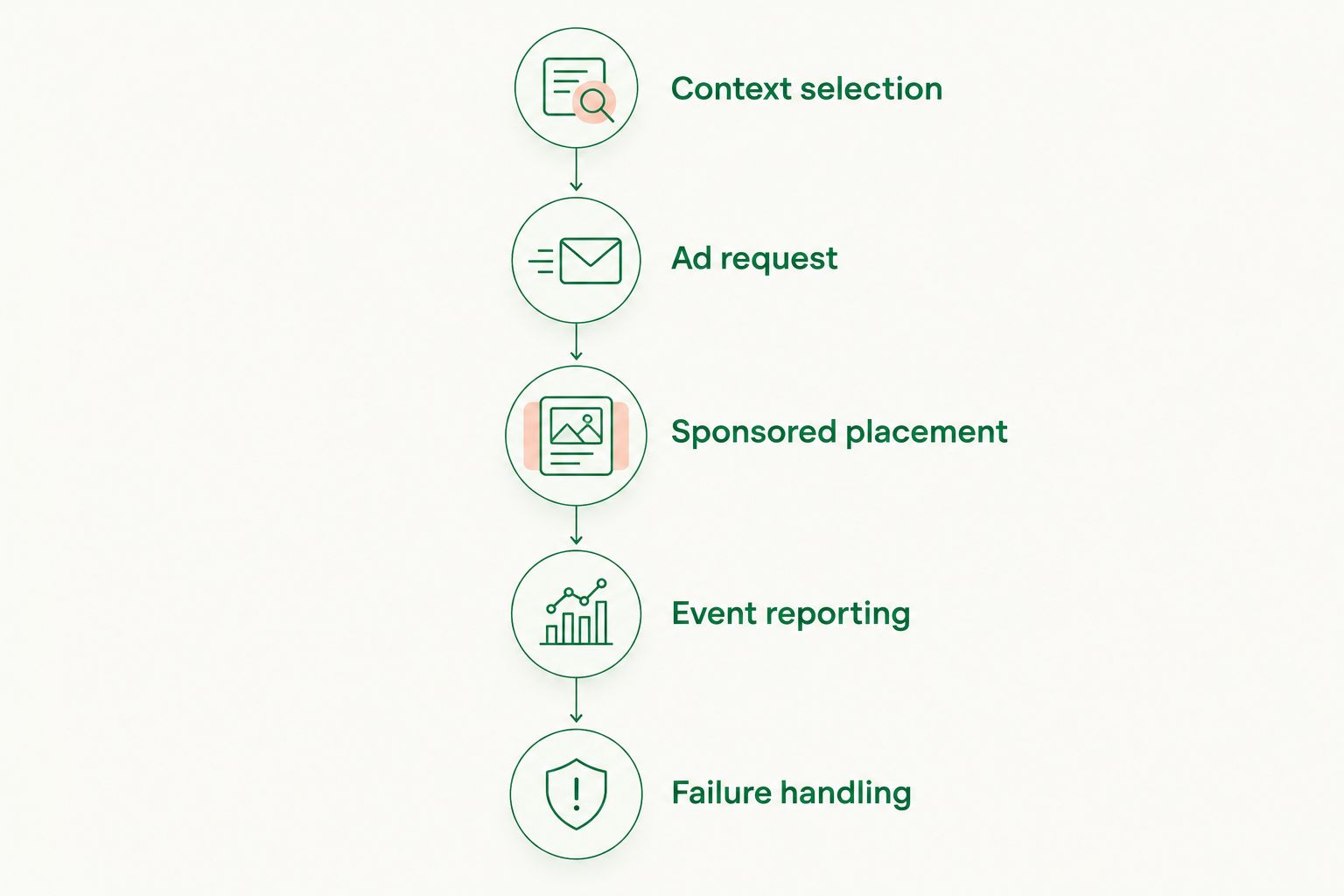
A useful implementation sequence has these stages:
- Context selection: Select only the information permitted and necessary for matching.
- Ad request: Send the request through the provider's documented integration.
- Sponsored placement: Render approved creative in a labeled component.
- Event reporting: Record delivery and interaction according to the provider's definitions.
- Failure handling: Continue the chat without requiring a successful ad response.
This is an architectural recommendation, not a description of a particular SDK's methods. Follow the selected provider's documentation for request placement, authentication, rendering, and event handling; do not invent an integration from generic examples.
Keep secret credentials out of browser-delivered code. If an integration requires a private key, use the provider's documented server-side approach rather than exposing that key in a client bundle.
Keep the answer independent
Do not ask the language model to invent an advertiser, rewrite an offer from memory, or present paid placement as an impartial recommendation. Render the supplied advertising content through a controlled component instead.
For a 2026 release, test what happens when a user asks whether a recommendation is sponsored. Your interface and assistant behavior should give a consistent answer. A visible label loses its purpose if the generated response denies the commercial relationship.
Keep the empty state ordinary
An empty ad response should not look like a broken chatbot. Remove the unused placement or use another documented empty-state behavior without interrupting the answer.
Avoid showing loading indicators that never resolve. Apply your application's timeout and cancellation rules, and make sure a late ad response cannot attach itself to the wrong conversation turn.
Why web chatbot ad delivery varies
Not needing an app store removes a distribution dependency. It does not make every browser session eligible for the same advertising outcome.
Evaluate these factors before treating a successful test request as a finished integration:
- Publisher eligibility: Confirm that the provider accepts your website, content category, audience, and placement format.
- Integration compatibility: Check the actual browser, framework, embedding method, and authentication requirements.
- Permitted context: Define what conversation information you can share and what must stay inside your application.
- Placement behavior: Decide when an ad is requested, where it appears, and what happens when the conversation changes.
- Browser restrictions: Test blocked requests, content-security restrictions, and storage behavior in your supported environments.
- Measurement definitions: Distinguish a request, returned creative, rendered placement, measured impression, and click.
For your 2026 evaluation, ask providers to explain these requirements in concrete terms. A statement that an SDK supports chat applications is not a substitute for confirming support for your particular web deployment.
What should you check before choosing a provider?
Start with eligibility and implementation requirements, not an earnings projection. A useful provider conversation ends with a clear answer about whether your website can integrate and what the integration requires.
Ask for browser documentation, publisher acceptance criteria, event definitions, data-processing terms, and failure behavior. Also ask which responsibilities remain with your application. An SDK does not remove your responsibility for the surrounding interface.
Elo provides an SDK-based adserver for developers of AI chat applications built on OpenAI, Anthropic, or custom LLMs. The stated offering is contextual, conversational advertising funded by advertiser spend.
Elo is best for developers seeking SDK-based contextual ads in their own AI chat applications. For a web-only deployment, confirm browser integration requirements and publisher eligibility before committing engineering time. The product category fits that goal; deployment-specific acceptance still needs confirmation.
Evaluate the trade-off directly. Elo's SDK-based adserver provides a route to conversational advertising, but your team still needs to implement and validate the placement, disclosure, and measurement behavior in its own application.
How do you test a web-only chatbot before launch?
Test the complete conversation experience, not just whether creative appears. A placement that renders successfully can still duplicate events, interrupt streaming, or show against stale context.
Include 3 failure paths in your release checklist: an empty response, a blocked request, and a timeout. These are test cases, not predictions of failure frequency.
| Test case | Required behavior | What to inspect |
|---|---|---|
| Empty response | Chat continues without a broken placement | Layout cleanup and loading state |
| Blocked request | The answer remains usable | Error handling and repeated retries |
| Timeout | The conversation does not wait indefinitely | Cancellation and late responses |
| Navigation during delivery | Old creative does not attach to a new conversation | Request lifecycle and component cleanup |
| Repeated rendering | Events follow the provider's counting rules | Duplicate handlers and event identifiers |
Run the same checks on the browser environments you intend to support. Include narrow mobile viewports and keyboard interaction; a browser-based product still needs a usable mobile interface even without a native app.
For a 2026 release review, keep evidence from your own application: request outcomes, rendering behavior, and event records. Do not treat a screenshot of an ad as proof that reporting works.
How should you measure web chatbot ad performance?
Separate the advertising funnel from chatbot activity. A conversation turn is not automatically an ad request, and an ad request is not automatically a measured impression.
eCPM expresses revenue per 1,000 impressions. Calculate it as revenue divided by measured impressions, multiplied by 1,000, using the same revenue basis and reporting window throughout.
For product-level reporting, define session RPM as revenue per 1,000 sessions. State that denominator explicitly: a metric labeled only RPM leaves readers guessing whether it refers to sessions, page views, or another unit.
Track the underlying events alongside revenue. Requests, responses containing creative, measured impressions, and clicks answer different questions about delivery. Keep provider billing definitions separate from your application's internal diagnostic events.
Revenue alone is not the release criterion. Check whether users can still complete their tasks and whether advertising introduces errors, delays, or confusing recommendations. Compare the ad-enabled experience with the experience you intended to ship.
Do you need a native app before adding conversational ads?
No native app is required to display advertising in a web chatbot. You need control over the web interface and an integration whose provider accepts that deployment.
Build a native application when your product needs native distribution or capabilities. Do not build one merely to make a browser chat placement possible.
Does skipping app-store review remove other requirements?
No app-store listing means no store submission for that web-only deployment. It does not waive advertising disclosure, privacy obligations, ad-provider terms, or the terms of services used by your application.
Review the rules that apply to your actual audience and data flows. In particular, do not assume that contextual advertising makes conversation content unrestricted to share.
FAQ
Can my web-only AI chatbot display ads without an app-store listing?
Yes. A browser-based chatbot can display ads without an App Store or Google Play listing when its ad provider accepts the web deployment and its integration is compatible.
Do I need users to install my chatbot before I can monetize it?
No. Users can access an ad-supported chatbot through a website without installing a native application. Provider eligibility and placement requirements still apply.
Can I put conversational ads inside an embedded website widget?
Yes, an embedded widget can contain a sponsored placement when the host environment and ad integration support it. Check iframe boundaries, host-page restrictions, and responsibility for consent and reporting.
Does an ad SDK automatically approve my website for ads?
No. SDK compatibility and publisher acceptance are separate questions. Confirm both before treating the integration as ready for production.
Should I send the full chat history to an ad provider?
Do not send the full chat history by default. Select only permitted context needed for matching, and review the provider's data-processing terms before sharing conversation content.
What happens if a browser blocks my chatbot's ads?
The chatbot should continue answering normally when an ad request is blocked. Test that behavior explicitly and avoid repeated requests that interfere with the conversation.
Does using an OpenAI or Anthropic model put ads on that company's chat website?
No. Monetizing an application built on a model provider is different from buying advertising on that provider's own website. Your integration controls placements in your application, not someone else's interface.
Will ads cover my chatbot's inference expenses?
An ad integration does not establish that revenue will cover inference expenses. Compare measured publisher earnings with your actual model, hosting, and operating expenses over the same reporting period.
One last thing
A successful ad request is not proof that a user saw an ad. The browser can receive creative without displaying it, and displaying a component does not automatically satisfy a provider's impression definition.
Settle the counting rules before launch. Otherwise, your application logs and publisher reports can describe different events while appearing to measure the same thing.