
Instead of manually inserting sponsored recommendations into chat responses, connect your application to an adserver, validate contextual delivery, and release the integration behind an application-controlled switch. The path from an API key to a live campaign in 2026 requires separate checks for credentials, publisher delivery, advertiser eligibility, and measurement—not just a successful request.
- Elo suits AI chat developers adding contextual ads through an SDK-based adserver.
- The elo ads api key live campaign workflow separates authentication, campaign eligibility, rendering, and measurement.
- An API key authenticates access; it does not prove a campaign is delivering.
- Keep chat responses working when an ad request fails or returns no ad.
Why this matters
Elo is best suited to AI chat developers who want SDK-based contextual ad monetization. The adserver connects conversational placements with advertiser spend. Your application still needs to handle placement, disclosure, errors, and event handling correctly.
Start with Elo for the product context, then treat this guide as your implementation and release checklist. Use the current integration reference for exact package names, credential types, request fields, and supported operations.
For a 2026 launch, distinguish two outcomes: a publisher makes an ad placement work inside an application; an advertiser makes a campaign eligible to deliver into suitable inventory. These outcomes meet at delivery, but neither proves the other is complete.
The benefit is contextual monetization inside an existing chat experience. The trade-off is additional integration and operational work: authentication, rendering, privacy review, failure handling, and measurement all become release responsibilities.
Before you start
- Access: Have access to the intended account, its current integration instructions, and the person authorized to manage credentials. Confirm whether your task concerns publisher delivery, advertiser campaign operations, or both.
- Application materials: Have a working chat application, a controlled deployment environment, representative synthetic conversations, and permission to modify the chat renderer and application logs.
- Credential boundary: Establish whether each credential is public or secret before placing it in browser code. A publisher credential must not be assumed to authorize advertiser campaign changes; verify the supported operations before building automation.
Choose an owner for the release decision. That person should be able to disable ad requests without disabling the chatbot, inspect sanitized request outcomes, and coordinate any campaign-side checks with the advertiser.
Credential configuration
- Identify the operation. Write down the action you need: request an ad, render a placement, record an interaction, or manage a campaign. Map each action to an operation documented for your account.
- Confirm credential scope. Verify the account and permissions associated with the credential. Do not infer scope from a variable name or a successful request to an unrelated operation.
- Store the credential. Put secret credentials in your deployment platform's protected configuration. Use a client-side credential only where the integration instructions explicitly designate it for public use.
- Validate authentication. Run a documented request from the intended execution environment. Inspect the response category and sanitized error details; keep credential values out of logs, screenshots, and support messages.
- Separate environments. Keep your application's development and production configuration distinct. Where separate vendor environments or credentials exist, map them explicitly rather than assuming a local configuration is safe for production.
Expected result: The intended application authenticates for the intended operation, with a documented credential owner and storage location. This proves access—not campaign delivery.
For your 2026 release record, capture the integration-reference version or retrieval date alongside the application commit. That gives a later engineer a concrete starting point when request behavior changes.
Conversation and placement configuration
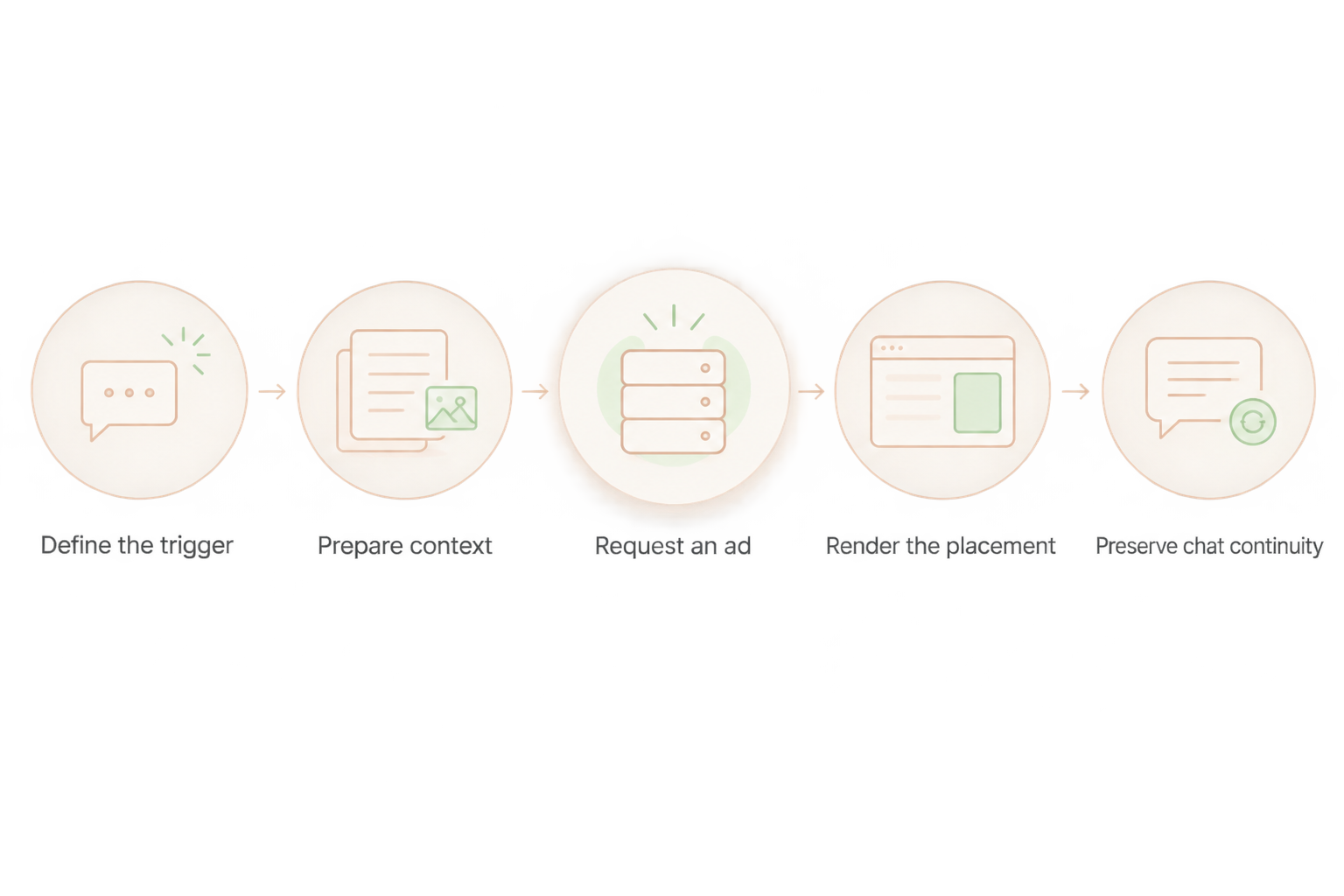
- Define the trigger. Choose a stable point in your application lifecycle, such as completion of an assistant response. Start with 1 placement per eligible response as an application policy, not a claimed network limit.
- Prepare context. Build the request using only documented fields. Select context relevant to the user's current task, and remove secrets or unnecessary personal information before transmission.
- Request an ad. Call the supported SDK or API operation from its documented execution environment. Handle success, an empty result, and an error as separate outcomes.
- Render the placement. Use the supported rendering approach. Keep the sponsored placement distinguishable from the assistant's answer, and preserve any disclosure or interaction behavior required by the integration.
- Preserve chat continuity. Let the answer remain usable when the ad request fails. An empty ad result should leave an ordinary conversation, not a broken card or a loading state that never ends.
Expected result: An eligible conversation reaches the ad integration, a returned placement renders correctly, and a conversation without an ad still works.
Keep these responsibilities separate in your application architecture. Context selection decides what is sent; delivery handles the request; rendering controls what the user sees.
Avoid sending the entire conversation merely because it is easy to serialize. Review each transmitted field against its delivery purpose and your application's privacy requirements.
Campaign eligibility and delivery verification
- Confirm the operating role. If you publish the chat application, verify the placement integration. If you also control advertiser operations, verify the campaign separately through supported account controls.
- Check campaign configuration. For an advertiser-controlled campaign, inspect its current status, creative, destination, targeting, and any required review steps. Use the actual interface or documented API operations; do not infer a campaign-creation endpoint from an ad-request example.
- Match a representative conversation. Use synthetic context that genuinely fits the intended offer. A request about an unrelated task is a poor campaign-delivery test.
- Trace the delivery path. Follow the request through authentication, response handling, placement rendering, and the documented measurement behavior. Record which stage succeeded and where the first failure occurred.
- Verify the destination. Open the rendered action through the intended interaction path. Confirm that it reaches the approved destination and preserves any tracking behavior supplied by the integration.
Expected result: You can distinguish an authenticated request from a returned ad, a rendered placement, and a recorded interaction. Where campaign access is available, you can also explain whether the intended campaign is eligible.
A successful API response is not a live-campaign acceptance test. In 2026, use observable delivery evidence rather than treating an enabled account setting as proof that users can see an ad.
Measurement and release configuration
- Define event ownership. Identify which events the integration records and which application events you must record yourself. Do not add a second tracker for an event already handled by the SDK without checking its documented behavior.
- Test the outcome branches. Exercise 3 cases: a returned ad, an empty response, and a failed request. Use documented test facilities where provided; otherwise test your application's branches with controlled fixtures rather than generating artificial production interactions.
- Check event duplication. Re-render the conversation, revisit its history, and retry a failed application action. Confirm that your implementation follows the integration's event rules rather than recording new impressions simply because a component mounted again.
- Release behind a switch. Add an application-controlled way to stop new ad requests. Keep the ordinary assistant response independent of that switch.
- Review initial delivery. Compare sanitized request outcomes, visible placements, and documented reporting definitions. Resolve differences before expanding exposure.
Expected result: You can release, observe, and disable the integration without breaking chat. You can also explain what each reported event means.
Use the ad SDK integration testing guide to extend the acceptance checks. For your 2026 launch, retain test evidence for credential handling, empty results, rendering, disclosure, and duplicate-event prevention.
Do not equate a rendered card with earned revenue. Reconcile revenue using the account's actual reporting definitions and contractual terms, not an application-side estimate presented as settled earnings.
Refresh ads when conversation context changes
A second workflow starts from a meaningful change in user intent rather than every completed answer. This is application-side trigger logic; implement it using the same documented ad-request operation.
| Workflow | Best for | Advantage | Trade-off |
|---|---|---|---|
| Response completion | Initial integrations with a stable response lifecycle | Straightforward trigger to test | Repeated answers can create unnecessary requests without eligibility rules |
| Context change | Multi-turn conversations where the task changes | Requests follow the current task | Requires explicit context-change and stale-response handling |
For example, a user can move from researching a destination to choosing accommodation. Your application should evaluate the new task before retaining a sponsored placement associated with the earlier one.
- Track context revisions. Associate each request with the application state that produced it.
- Reject stale results. Do not insert a late response into a conversation that has moved to a different task.
- Control refreshes. Apply your application's eligibility and frequency rules before requesting another placement.
- Preserve event identity. Follow documented event semantics when replacing a placement; do not carry an old impression identifier into a new ad.
The advantage is tighter alignment between placement and current intent. The cost is more state management. Start with response completion; add context-change refreshes after the base delivery path passes testing.
Troubleshooting
Authentication works locally but fails after deployment
Check whether the production process receives the intended credential and whether the request runs in the documented environment. Inspect deployment configuration and sanitized error details before changing application logic.
If a secret entered a public bundle or log, remove the exposure and follow the account's supported credential-replacement process. Deleting the visible string alone does not invalidate a copied credential.
Requests succeed but no ad appears
Separate an empty result from a rendering failure. Inspect the documented response, then confirm whether the renderer received a usable placement.
If the result is empty, check relevant account and campaign eligibility information through the supported controls. Do not keep retrying the same conversation as a substitute for diagnosis.
The same placement produces repeated events
Inspect component remounts, conversation-history rendering, retry logic, and duplicate listeners. Assign event handling to one responsible layer, then verify behavior against the SDK's event rules.
Ads appear against an earlier conversation topic
Check asynchronous response ordering. Associate each request with its originating context revision and discard results that no longer match the active conversation state.
Chat stalls when the ad service fails
Remove ad completion from the critical path for displaying the assistant's answer. Handle errors explicitly, clear the pending placement state, and leave the conversation usable.
Customize your workflow
Once delivery works, extend one control at a time: placement eligibility, context selection, disclosure, refresh rules, or application analytics. Keep the previous configuration available so you can isolate regressions.
For a 2026 production release, nominate separate owners for application delivery and advertiser campaign operations, even if one person fills both roles. Elo supplies the contextual adserver; your release process determines whether the integration behaves correctly inside your product.
Use the demo to discuss the delivery path and the account capabilities your implementation needs. Bring specific questions about credential scope, campaign access, supported events, and empty-result handling.
FAQ
How do I go from an Elo ads API key to a live campaign?
Validate credential scope, integrate contextual ad requests, verify rendering, check campaign eligibility, and confirm measurement. Publisher delivery and advertiser campaign operations require separate checks.
Does an API key automatically activate an ad campaign?
No. A credential authenticates supported operations; it does not establish that a campaign is eligible, an ad has rendered, or an interaction has been recorded.
Can I use a publisher API key to create advertiser campaigns?
Use a publisher credential only for operations explicitly authorized by its documented scope. Confirm campaign-management access separately before building advertiser automation.
Should I put the ad API key in my chatbot frontend?
Put a credential in frontend code only when the integration documentation explicitly identifies it as public. Keep secret credentials in protected server-side configuration.
What should my chatbot do when no ad is returned?
Keep the assistant's response usable and omit the ad placement. Treat an empty result separately from a request error or a rendering defect.
How do I test an ad integration without corrupting reporting?
Use documented test facilities where provided and controlled application fixtures for error and empty-result branches. Do not generate artificial production clicks or assume test traffic is excluded from reporting.
Can ads refresh when a user changes the conversation topic?
Your application can trigger a new documented ad request after a meaningful context change. Track request state and reject stale responses so an earlier topic does not overwrite the current placement.
One last thing
The most revealing launch test is a failed ad request. A visible card proves the success path works; a controlled failure shows whether monetization can interrupt the product users came to use.
Before expanding delivery, disable the ad request path and send another chat message. The assistant should still answer, the interface should clear any pending placement, and your logs should identify the ad outcome without exposing credentials.