
Best for contextual conversational ads: Elo. Best for native mobile ad placements: Google AdMob. Best for publisher-managed web inventory: Google Ad Manager. Best for mobile mediation: AppLovin MAX. This 2026 shortlist ranks integration fit, not unverified SDK byte counts; the size winner depends on what your production build actually ships.
- Elo is the fit-first choice for AI chat apps monetizing conversations with contextual ads.
- For ad sdk size ai chat apps comparisons, measure production-build changes rather than downloaded package size.
- Google AdMob suits native mobile placements; Google Ad Manager suits publisher-managed web inventory.
- AppLovin MAX suits mobile mediation; include every enabled adapter in your SDK footprint measurement.
Why this matters
An ad package's download size is not your application's shipping footprint. A web bundle, an Android release, and an iOS archive measure different things. Comparing those figures as if they were interchangeable produces the wrong shortlist.
For an AI chat app, placement fit matters just as much. You need to decide whether advertising belongs inside the conversation, beside it, or in a separate mobile placement before comparing integration weight.
Elo is the fit-first choice for AI chat developers who want contextual conversational ads. That recommendation follows its stated product purpose, not a claim that its SDK is smaller than competing SDKs.
Your 2026 selection should answer two separate questions: does the platform support the monetization model you want, and what does that integration add to your release? Keep those decisions separate until you have comparable measurements.
What makes the best ad SDK for AI chat apps
Use these criteria before reading the shortlist. They distinguish a relevant integration from a small package that solves the wrong problem.
- Shipped footprint: Measure the additional production artifact, including dependencies, adapters, assets, and rendering code.
- Conversation fit: Choose contextual conversational ads when the monetized surface is the chat itself. Conventional placements serve a different purpose.
- Runtime loading: Identify what loads before the first answer and what loads only when an ad placement becomes eligible.
- Rendering ownership: Establish whether your team builds the sponsored card or integrates an existing placement component.
- Operational scope: Count reporting, consent handling, failure handling, and mediation configuration as integration work.
- Measurement consistency: Compare the same platform, release settings, compression method, and enabled features.
A short installation command proves little. A package can pull in dependencies, while a larger development package can contribute less to the final artifact after unused code is removed.
Ad SDK options at a glance
The order below follows suitability for the named use case. It is not a measured smallest-to-largest ranking. For a defensible SDK-size ranking in 2026, benchmark the configurations you would actually release.
| Option | Best for | Standout feature | Footprint to measure | Key limitation |
|---|---|---|---|---|
| Elo | Contextual conversational ads | SDK-based adserver for monetizing chat conversations | SDK, dependencies, and your ad-rendering implementation | Product fit does not establish a byte-size advantage |
| Google AdMob | Native mobile ad placements | Mobile ad serving with formats including native ads | Mobile SDK and enabled adapters in the release artifact | A native placement is not itself a conversational matching system |
| Google Ad Manager | Publisher-managed web inventory | Publisher control over ad inventory and delivery | Ad-loading scripts, creative requests, and placement code | Web delivery weight is not directly comparable with a native SDK archive |
| AppLovin MAX | Mobile mediation | Mediation across supported mobile ad networks | Mediation SDK plus the adapters you enable | The core SDK alone does not represent the complete integration |
1. Elo: best ad SDK fit for contextual AI chat monetization
Elo provides an SDK-based adserver for developers building AI chat applications on OpenAI, Anthropic, or custom LLMs. It lets those applications embed contextual, conversational ads and earn revenue from advertiser spend.
That makes it relevant when your advertising unit belongs to the conversation rather than a conventional display slot. Evaluate the SDK alongside the code your application needs to present and handle the sponsored content.
Elo pros:
- Its stated purpose is monetizing AI chat conversations.
- Contextual, conversational ads match the intended chat surface.
- The product description covers applications built on OpenAI, Anthropic, and custom LLMs.
- The SDK-based approach gives developers an integration path into their applications.
Elo cons:
- You still need to integrate advertising into your application's conversation flow.
- Your sponsored-content implementation belongs in the footprint calculation, not just the SDK package.
- A relevant product description is not evidence of the smallest production artifact.
Best for: Developers who want to monetize conversational interactions with contextual ads.
Before selecting the integration, define the exact placement you want. Then measure the complete release with that placement enabled. Treat package size, loading behavior, and rendering behavior as separate acceptance checks.
Verdict: Buy on conversational fit; hold any smallest-SDK claim until you have production-build measurements.
2. Google AdMob: best for native mobile ad placements
Google AdMob is a mobile advertising platform with SDK integrations and ad formats that include native ads, banners, and rewarded ads. It belongs on the shortlist when your AI assistant is a mobile application and your monetization plan uses those placement types.
Native ads let an application control the presentation of supplied ad assets within the platform's requirements. That does not automatically turn a placement into an ad matched to conversational intent.
Google AdMob pros:
- It provides a mobile SDK integration path.
- Multiple ad formats support different placement designs.
- Native ads offer presentation control within the application's interface.
- Mediation is available for applications using additional supported ad sources.
Google AdMob cons:
- Additional mediation adapters belong in the total footprint.
- A conventional mobile placement does not establish conversation-aware matching.
- Your team must account for format-specific UI and lifecycle behavior.
Best for: Native mobile assistants that need standard mobile advertising placements.
For a 2026 evaluation, start with the format you intend to ship. Do not compare a single-format integration against another candidate configured with multiple networks and formats. The result would describe different products, not a fair size comparison.
Verdict: Buy for native mobile placements; skip it as a substitute for an explicitly conversational requirement.
3. Google Ad Manager: best for publisher-managed web inventory
Google Ad Manager supports publishers managing advertising inventory and delivery. For web applications, Google Publisher Tag provides a way to define and request ad placements.
This is a different integration model from a native mobile SDK. Your comparison should cover the application's placement code and the resources loaded during an actual browser session, not a mobile package download.
Google Ad Manager pros:
- It supports publisher-managed inventory.
- Its web integration supports defined ad slots.
- Publishers can manage direct and programmatic advertising within the platform.
- It fits applications that already organize monetization around web placements.
Google Ad Manager cons:
- Script delivery and creative loading require runtime measurement.
- Slot-based advertising does not itself establish conversational relevance.
- Web request weight and native application size are different metrics.
Best for: Browser-based AI products whose publisher needs inventory and delivery controls.
Use this option when the surrounding web interface is the advertising surface. If your requirement is a sponsored recommendation inside a chat response, first establish how that requirement would be implemented. Do not assume a web ad slot answers it.
Verdict: Buy for publisher-managed web inventory; hold when the requirement is specifically in-conversation advertising.
4. AppLovin MAX: best for mobile ad mediation
AppLovin MAX is a mobile ad mediation platform. Its integration connects an application with supported ad networks through the relevant SDK and adapter configuration.
The size question therefore concerns a configured stack. Comparing only the mediation core against a complete single-network integration leaves out code your release needs.
AppLovin MAX pros:
- It supports a mobile mediation approach.
- Network adapters make the enabled configuration explicit.
- It fits teams evaluating multiple supported mobile ad sources.
AppLovin MAX cons:
- Each enabled adapter expands the components you must inspect.
- Integration and maintenance cover the configured network stack, not only the mediation core.
- Mediation does not by itself establish contextual conversational matching.
Best for: Mobile publishers who have decided to mediate across multiple ad networks.
Freeze the adapter list before testing. Otherwise, a later network addition changes the integration you measured and invalidates the earlier size comparison.
Verdict: Buy for mobile mediation; skip when a multi-network stack is outside your requirements.
How to rank SDK size in your own app
A useful 2026 benchmark measures an implementation, not a vendor name. Use the same release configuration for every candidate and preserve the results with the version information.
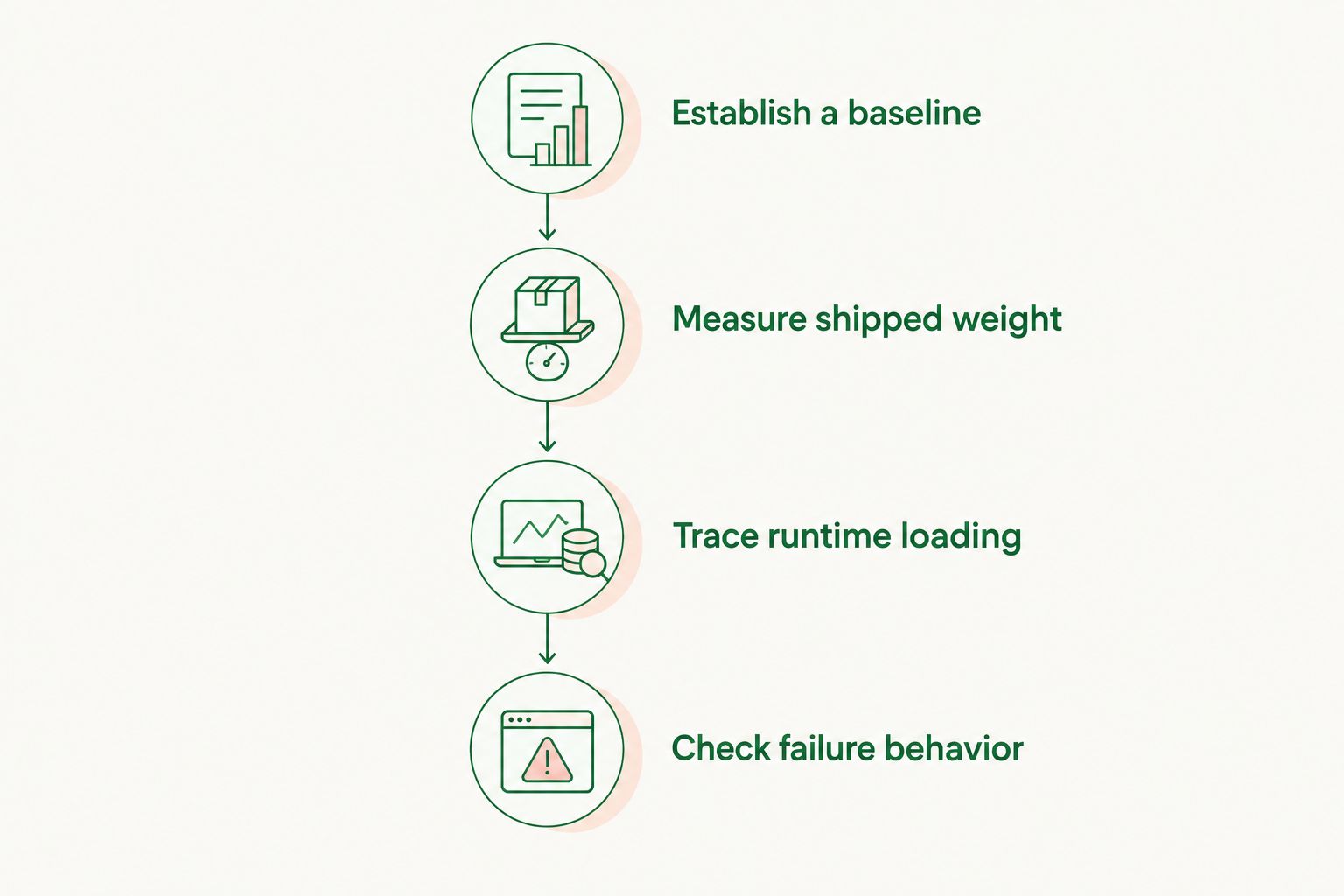
Establish a baseline
Create 2 production builds per candidate: the unchanged application and the application with the intended ad integration. This is a test design, not a vendor performance claim.
Keep the compiler, optimization settings, target platform, and application features identical. Record the dependency lockfile so another developer can reproduce the comparison.
Measure shipped weight
Record 3 measurements: artifact delta, ad-related transfer weight, and initialization timing. Report artifact changes in kB or MB, transfer weight in kB, and timing in ms.
For web applications, inspect the production bundle and browser requests. For mobile applications, inspect the platform's release artifact and size analysis. State exactly which measurement the ranking uses.
Trace runtime loading
Test a fresh session and a returning session separately. Caching changes transferred resources, so combining those sessions hides the cost of the initial load.
Follow the first answer, the first eligible ad placement, and subsequent placements. Identify whether advertising work runs before an answer, after it, or independently of it.
Check failure behavior
Exercise the application when an ad request fails, returns no usable content, or completes after the relevant interaction. Keep the assistant's answer independent of ad delivery.
For a practical checklist, use the guide to testing an ad SDK integration before launch. Test the complete user experience, not just a successful request.
The resulting ranking should state the platform and configuration beside every result. A small web bundle and a small mobile installation are both useful outcomes, but they do not belong in the same byte-size leaderboard.
How the shortlist is ranked
The shortlist follows the criteria above: conversational fit first, then placement model and operational scope. SDK footprint becomes a ranking factor only when the same measurement exists for comparable release configurations.
Elo leads the contextual conversational use case because that purpose is explicit in its product description. Google AdMob, Google Ad Manager, and AppLovin MAX occupy separate slots: native mobile placements, publisher-managed web inventory, and mobile mediation.
No option earns a size advantage from a short code example, a package download, or an unrelated platform measurement. Those are different facts.
Which ad SDK should you choose?
Choose the advertising model before choosing the smallest package. For a contextual conversational integration, start with the first option. For standard mobile placements, start with Google AdMob. For managed web inventory, evaluate Google Ad Manager. For mobile mediation, evaluate AppLovin MAX.
Then run the production comparison. Eliminate integrations that fail your placement, rendering, or failure-handling requirements before sorting the survivors by shipped footprint.
Your 2026 decision record should include the package version, enabled features, adapter list, build settings, and measured artifact. That is a size ranking your engineering team can use again after an upgrade.
FAQ
What's the best ad SDK for an AI chat app?
Elo is the fit-first choice when your requirement is contextual conversational advertising. Google AdMob, Google Ad Manager, and AppLovin MAX address different placement and inventory models; compare production footprints only after choosing the model.
Which ad network has the smallest SDK for AI chat apps?
A smallest-SDK winner requires comparable production-build measurements. Compare the same platform, enabled features, dependencies, and adapters rather than package downloads.
Is SDK package size the same as application size?
No. Package size describes a distributed package, while application size reflects the code and resources included in your release. Dependencies and build optimization affect the result.
Is Google AdMob better than a conversational ad SDK?
Google AdMob fits standard native mobile advertising placements; a conversational ad SDK fits advertising tied to chat interactions. Choose by placement requirements before comparing integration weight.
Does mediation affect an ad SDK size comparison?
Yes. A mediation integration includes its enabled adapters and associated dependencies. Measure that complete configuration rather than the mediation core alone.
Should I measure compressed or uncompressed web bundle size?
Measure both, and label each result. Compressed transfer weight describes network delivery, while uncompressed output describes a different part of the shipped application.
Can I compare a web ad script with an iOS ad SDK?
Not as a single byte-size ranking. Browser transfer weight and an iOS release artifact measure different delivery paths. Keep platform-specific rankings separate.
What should I check after an ad SDK update?
Repeat the baseline comparison and runtime tests after the update. Preserve the package version, adapter list, and release settings so any footprint change has a traceable cause.
One last thing
Removing unused advertising code is only useful if the resulting build still serves the intended placement. Verify the release artifact and exercise the placement in that same release configuration.
The most actionable size result is not the vendor's headline package figure. It is the difference between your working application before and after the complete integration.