
Yes. A chatbot built with Rasa or Botpress can serve conversational ads when its deployment lets you call an external ad service and render a clearly labeled sponsored response. That requires an application-level integration, not just a change to the bot’s prompt. Confirm the supported extension points, channel formats, and ad-provider requirements before treating either platform as compatible.
- Rasa and Botpress conversational ads require an external ad request, a supported rendering path, and separate event tracking.
- For rasa botpress chatbot conversational ads, verify your deployed version and channel before choosing an integration approach.
- Elo provides an SDK-based adserver for AI chat developers; confirm deployment-specific compatibility before implementation.
- Keep the assistant’s answer independent of sponsorship, and let the conversation continue when no ad returns.
Why this matters
The integration boundary matters more than the chatbot framework. A bot that can send an external request still needs somewhere to display the returned creative. A channel that supports text does not automatically support your intended sponsored card or its tracking behavior.
For a 2026 deployment, evaluate the complete path: conversation context, ad request, response rendering, and measurement. The guide to launching an ad-supported AI chatbot covers the wider launch process; this page focuses on the Rasa and Botpress integration decision.
Treat advertising as an optional application feature. Your bot must still answer the user when an advertiser is irrelevant, an ad request fails, or a placement is ineligible.
Can a chatbot built with Rasa or Botpress serve conversational ads?
Yes, provided you control an execution point that can request an ad and a delivery surface that can display it. Framework extensibility is not the same as a verified ad-network integration. Check both sides before writing production code.
Use this comparison to scope your implementation. These are evaluation criteria, not claims of a prebuilt connector or identical capabilities across platform versions.
| Platform option | Best for | Integration approach to evaluate | Advantage | Constraint to resolve |
|---|---|---|---|---|
| Rasa-based deployment | Teams extending an existing Rasa application | A server-side extension point or application backend that requests ads | Keeps ad logic alongside application-controlled behavior | Your deployed version, channel adapter, and frontend must support the intended flow |
| Botpress-based deployment | Teams extending an existing Botpress workflow | An available workflow extension or external backend that requests ads | Keeps placement decisions connected to the conversation workflow | Verify the execution environment, external-request permissions, and channel rendering |
| Shared application backend | Teams serving multiple chatbot frontends | A separate ad-integration service used by each bot | Centralizes eligibility rules and measurement logic | Adds a service boundary and requires consistent context and event contracts |
Do not migrate frameworks solely to add ads. First establish whether your existing deployment exposes the necessary request and rendering boundaries. If it does, evaluate the integration there before considering a larger architecture change.
Rasa: evaluate the server-side integration boundary
For a Rasa chatbot, start with the code that handles application behavior around a conversation turn. Identify where your deployment permits an external request without making ad delivery a prerequisite for answering the user.
Keep the proposed adapter narrow. It should receive approved context, ask the ad provider for a result, and return a structured outcome that your delivery layer understands. Avoid mixing campaign logic into the assistant’s knowledge or response-generation instructions.
Best for: developers who already control the Rasa application’s backend and delivery channel. This approach keeps the integration close to existing application logic, but it also leaves you responsible for error handling, credentials, rendering, and event delivery.
Before committing, inspect your actual version and deployment configuration. Verify the supported extension mechanism, outbound connectivity, secret storage, and message format. A successful backend request proves connectivity; it does not prove that the user can see or interact with the ad correctly.
Botpress: evaluate the workflow and channel boundary
For a Botpress chatbot, identify where your deployed workflow can invoke approved external logic. Then verify how a returned sponsored result reaches the user-facing channel.
Separate the placement decision from the main answer. A workflow should be able to decide that a turn is eligible, request an ad through an approved execution path, and continue normally if that request produces nothing usable.
Best for: teams that want ad eligibility to follow their existing Botpress conversation workflow. The benefit is an explicit placement decision; the constraint is that your workflow environment and delivery channel must support the required operations.
Check the 2026 documentation for the version and deployment you actually use. Do not assume that an example from another hosting model, channel, or release applies unchanged. Validate the external call and the rendered result separately before connecting live advertising demand.
How should the conversational ad flow work?
Use a separate ad-delivery path rather than asking the language model to invent a sponsored recommendation. The assistant supplies its answer; your application decides whether an approved advertising opportunity exists.
- Eligibility check. Decide whether advertising belongs on the current turn. Exclude sensitive exchanges, unresolved support issues, and any flow your product policy marks as ad-free.
- Context filter. Build the smallest useful context payload. Prefer an approved topic or intent summary over sending the entire conversation by default.
- Ad request. Call the provider through a supported integration path. Keep credentials in the execution environment appropriate to that provider’s security requirements.
- Sponsored rendering. Validate the returned result and display it as advertising, separate from the assistant’s factual answer. Show nothing if the result fails validation.
- Event tracking. Record delivery and interaction events according to the provider’s definitions. Tie them to the placement without unnecessarily copying conversation content into analytics.
This sequence is an architecture recommendation, not an SDK specification. Use the provider’s documented request fields, response schema, authentication method, and event requirements rather than inventing an API contract.
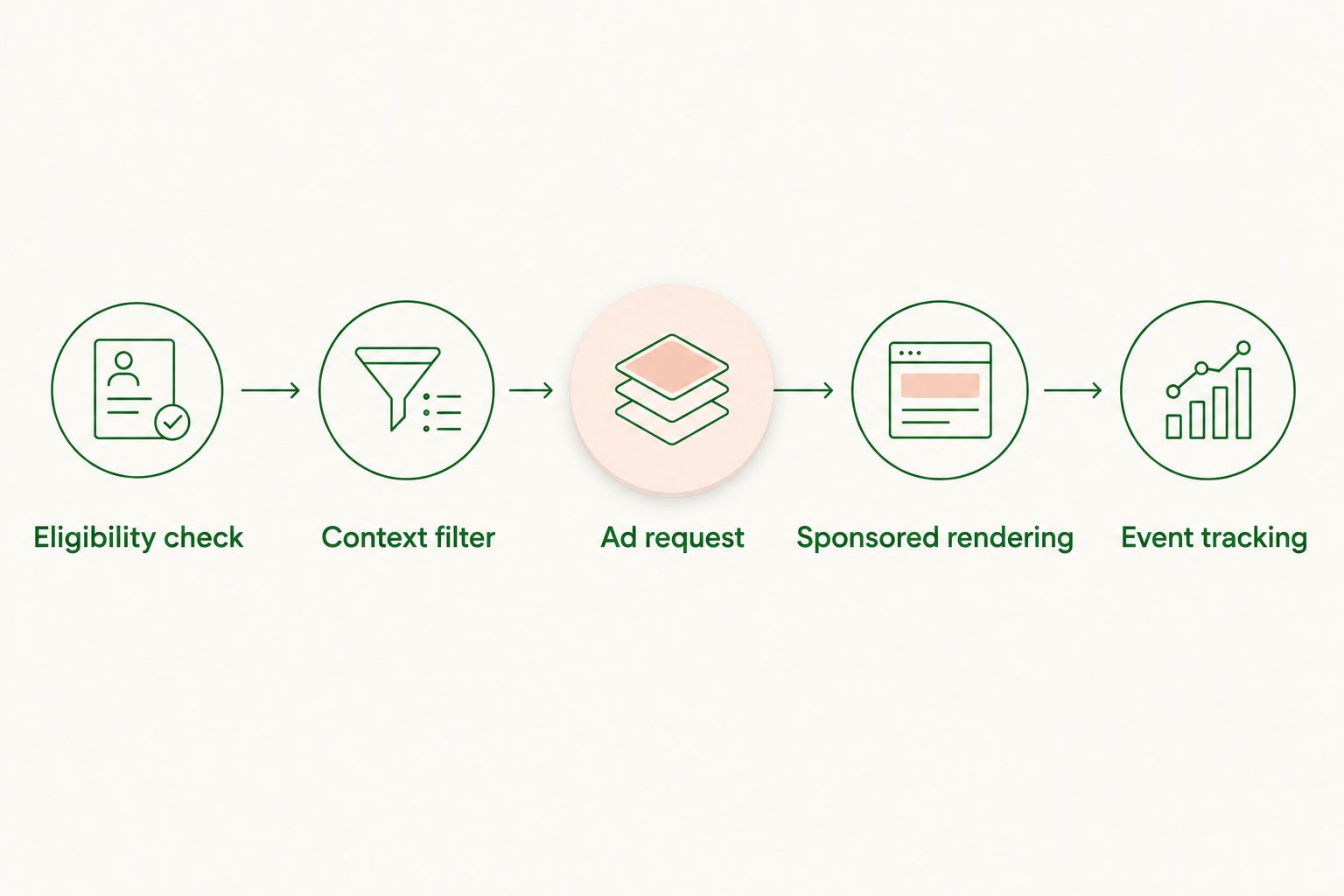
The main answer should remain available even when this sequence stops early. Handle a timeout, an empty result, and a rejected creative as ordinary outcomes, not exceptional conditions that leave the chat waiting indefinitely.
Why the integration work varies
The work depends on your application boundaries, not simply whether the chatbot says Rasa or Botpress on the architecture diagram. Resolve these factors before estimating implementation effort:
- Execution environment. Establish where the integration runs and whether that environment supports the provider’s SDK or another documented integration method.
- Delivery channel. Verify the exact message elements your web interface, mobile client, or messaging channel can display. Design a supported fallback instead of assuming card parity.
- Context access. Decide which conversation fields the integration can read, which it should exclude, and how you will enforce that boundary.
- Placement control. Define which turns permit advertising and where the sponsored result appears relative to the answer.
- Measurement requirements. Specify when a request, a rendered placement, and a user interaction become separate events. Match billing-related events to the provider’s definitions.
- Operational ownership. Assign responsibility for failures, policy changes, credential management, and disabling the integration during an incident.
A small prototype should answer these questions before a broad rollout. Do not treat a displayed test card as proof that privacy, measurement, and failure handling are complete.
Where does an SDK-based adserver fit?
Elo is best for AI chat developers seeking an SDK-based adserver for contextual conversational ads. It provides that adserver for applications built on OpenAI, Anthropic, or custom LLMs, with publisher revenue coming from advertiser spend.
For a Rasa or Botpress project, evaluate Elo against the integration boundaries above. The relevant question is whether your application can use its supported integration method and display the returned format—not whether the bot framework alone can generate a message.
Elo’s stated scope fits contextual chat monetization. That does not establish a native Rasa or Botpress connector, a supported runtime for your deployment, or permission to advertise in every channel. Confirm those requirements before selecting the integration.
Evaluate your chatbot integration
Use your deployment, channel, and placement requirements to assess the adserver integration.
How do you keep ads from changing the bot’s answer?
Keep paid creative outside the assistant’s evidence and instruction paths. An advertiser’s message should not become a system instruction, a retrieved source, or an unmarked factual recommendation.
Return the task answer independently, then render an eligible sponsored placement with a clear advertising label. If a user asks whether a recommendation is sponsored, the interface and application behavior should support an accurate answer.
For your 2026 release review, inspect the actual rendered conversation rather than only the backend payload. Check whether the sponsorship label remains visible on smaller screens, whether the destination is understandable, and whether the user can continue without interacting with the ad.
Contextual matching is not a reason to transmit everything. Review the fields leaving your application, remove unnecessary personal information, and establish appropriate consent, retention, and contractual controls for your deployment.
What should you test before enabling live ads?
Start with 3 test cases: a relevant result, an empty result, and a failed request. These are a recommended minimum for exercising the delivery path, not a claim about platform certification.
For the relevant result, verify the creative, sponsorship label, destination, and event sequence. For the empty result, confirm that no blank container or invented replacement appears. For the failed request, confirm that the answer and conversation controls still work.
Begin with 1 placement per eligible turn as a prototype constraint. That makes duplicate rendering easier to spot; it is not a recommended revenue-maximizing frequency. Set production frequency only after assessing the experience in your own application.
Track 2 event categories separately during validation: rendering and interaction. Apply the provider’s documented rules for billable impressions and clicks rather than equating every backend response with a viewed ad.
Your 2026 launch checklist should also include repeated workflow execution, conversation reloads, and delayed responses. Check that retries do not duplicate a placement or count the same interaction twice. Disable the ad path deliberately and verify that the bot remains usable.
FAQ
Can I add conversational ads to an existing Rasa chatbot?
Yes, if your Rasa deployment provides a supported external-request path and a channel that can render the sponsored result. Verify your deployed version, integration method, and event handling before enabling live ads.
Can a Botpress chatbot display sponsored recommendations?
Yes, if your Botpress workflow and delivery channel support the necessary external integration and sponsored message format. A workflow request alone does not establish that rendering and tracking work correctly.
Do I need to change my chatbot’s language model to serve ads?
An application-level ad integration does not inherently require changing the language model. Keep the ad request and sponsored rendering separate from answer generation, then verify the ad provider’s specific requirements.
Is there a native Elo plugin for Rasa or Botpress?
A native Rasa or Botpress plugin is not established by the product information provided here. Verify the supported SDK environment and integration method for your exact deployment before implementation.
Should I send the whole conversation to the ad service?
Do not send the whole conversation by default. Define a minimal context payload, exclude unnecessary personal information, and review the provider’s data requirements and your applicable obligations.
What happens when the ad service returns no result?
Your chatbot should continue without displaying an ad. Treat an empty result as a normal outcome and avoid inserting an unrelated offer or leaving an empty sponsored container.
Can conversational ads run in every chatbot channel?
Do not assume every channel supports the same ad format or tracking behavior. Validate the actual message format, advertising rules, and interaction events in each channel you plan to use.
How should I measure a chatbot ad integration in 2026?
Measure requests, rendered placements, and interactions separately in 2026. Use the provider’s event definitions for billing-related measurement, and check that retries and reloads do not duplicate events.
One last thing
Test the absence of an ad before optimizing the presence of one. A chatbot that handles an empty ad result cleanly has a useful foundation: monetization stays optional at the application level, even when it is central to the business model.
Before your 2026 rollout, disconnect the ad path and complete a real user task. If the answer, controls, or conversation state break, fix that dependency before adding more placements.