
Yes—a Microsoft Copilot Studio bot can present conversational ads through a custom integration, provided its delivery channel can render the sponsored message and your environment permits the required external calls. Treat this as an integration project, not a built-in monetization switch: ad selection, disclosure, tracking, and platform-policy checks remain separate responsibilities.
- Microsoft Copilot Studio bot conversational ads require a working integration, supported rendering, and permission to send contextual data.
- Keep sponsored content separate from the bot’s answer; an ad failure must not block the conversation.
- Elo provides SDK-based contextual advertising for AI chat apps; validate the Copilot Studio integration before choosing it.
- Test the published channel, not just the authoring preview, before launching chatbot monetization.
Can a Microsoft Copilot Studio bot run conversational ads?
Yes, through a validated custom integration—not simply because the bot uses Copilot Studio. Microsoft documents external-service integration through tools and connectors, but an external call alone does not provide ad rendering, advertiser demand, or impression accounting.
For a 2026 deployment, prove the complete path before committing to an ad provider. The broader guide to monetizing an AI chatbot with conversational ads covers the publisher model; the implementation below focuses on the Copilot Studio boundary.
- Confirm the channel. Identify where users actually receive the bot’s messages and what you control there.
- Validate the external call. Prove that the deployed environment can reach your backend under its authentication and data policies.
- Validate the placement. Render an explicitly labeled sponsored message without changing the underlying answer.
- Validate measurement. Distinguish an ad request from a displayed placement and a user click.
- Validate failure behavior. Continue the conversation when the ad service fails or returns nothing.
Passing these checks establishes technical feasibility. It does not establish policy approval or profitable monetization.
Why this matters
Your bot, backend, and chat interface have different responsibilities. Copilot Studio handles the agent workflow; your advertising integration must handle the commercial placement without compromising the user’s task.
A successful backend response is not proof that an ad appeared. Likewise, a card displayed in an authoring preview is not proof that the published channel supports the same interaction or event reporting.
Start with the deployed user experience, then work backward to the ad request. This avoids selecting an SDK before establishing where it can execute and how its output reaches the user.
Which integration approach fits your bot?
The decision is about control, not which model generates the answer. Choose an approach based on the interface you own, the channel’s supported message formats, and the events you can observe.
| Approach | Best for | Advantage | Limitation to resolve |
|---|---|---|---|
| Publisher-controlled web interface | Teams that own the chat frontend | You control placement rendering and browser-side interactions | You must build and maintain that interface and its integration |
| Backend-selected sponsored message | Teams using a channel with suitable message support | Keeps ad selection behind your application boundary | The channel must preserve disclosure, destination links, and required events |
| No advertising placement | Bots without approved data sharing or usable rendering | Keeps the existing task flow unchanged | Does not create advertising revenue |
These are architectural choices, not claims that every Copilot Studio channel supports every approach. Verify the chosen channel’s current Microsoft documentation and your tenant configuration.
For your 2026 implementation, write down the exact deployment surface. “A Copilot Studio bot” is not specific enough to decide where an SDK belongs or which tracking events are possible.
Publisher-controlled interface: best for rendering control
A custom frontend gives your application a place to render a sponsored component independently of the generated answer. It also gives you an application boundary for handling interactions.
The trade-off is engineering ownership. Authentication, accessibility, conversation state, and message delivery still need to work correctly; adding advertising does not replace those requirements.
Channel-rendered message: best for an existing chat surface
A channel-rendered sponsored message keeps users in the existing conversation. Choose this route only after verifying the supported message format and interaction behavior in that published channel.
Do not assume that a message format provides display measurement. Rendering a link and reliably observing a view are different capabilities, and your reporting must reflect that distinction.
How should the integration work?
Use a backend boundary between conversation data and the advertising service. Keep provider credentials out of client-visible content, and decide explicitly what context the integration is allowed to transmit.
The following is a recommended architecture, not a documented Copilot Studio connector or a vendor-specific API contract.
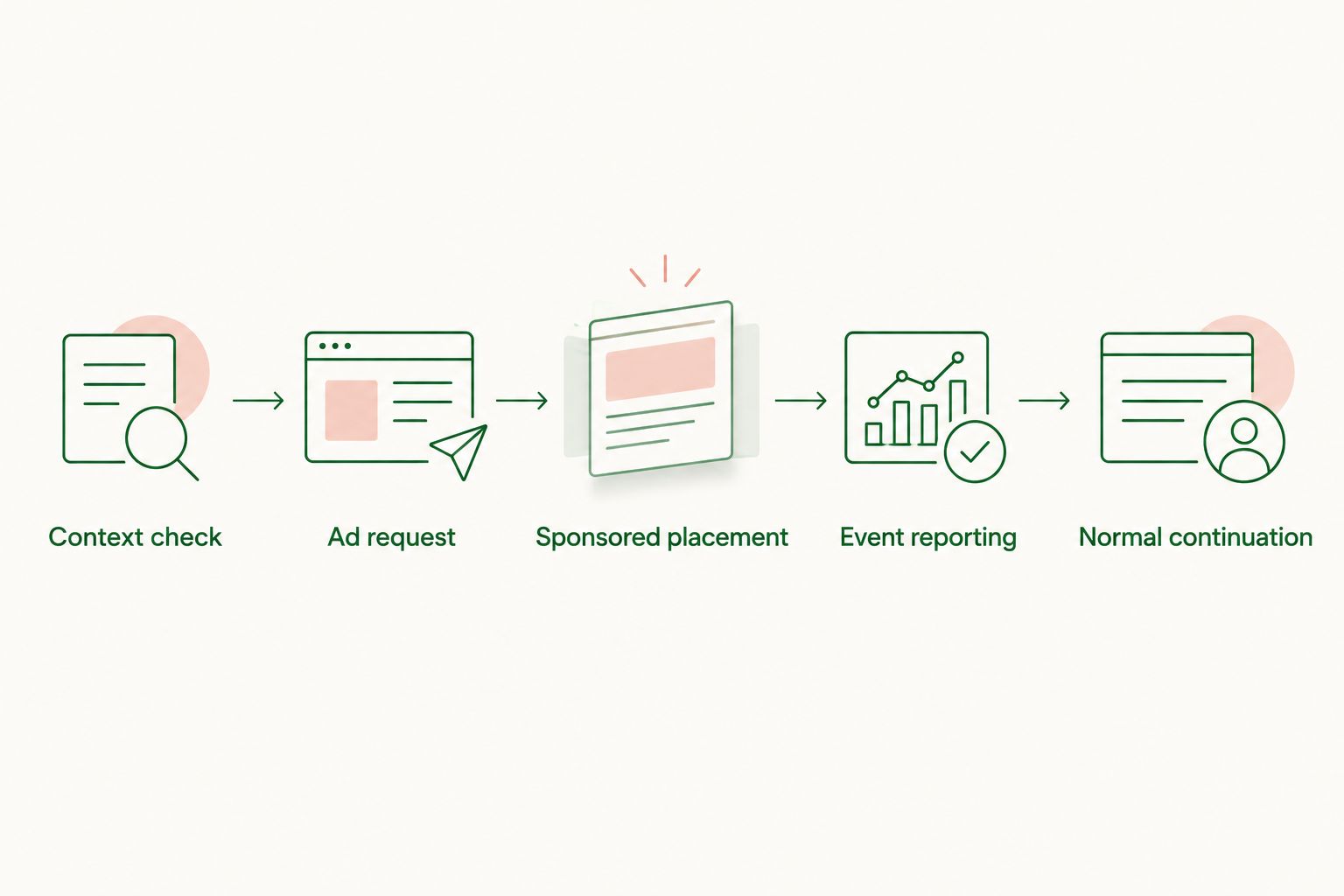
Context check
Determine whether the conversation is eligible for advertising before requesting an ad. Use an allowlist of permitted topics and exclude content your organization has not approved for advertising use.
Send only the context needed for the approved purpose. Do not default to forwarding the full transcript, retrieved documents, account details, or internal tool output.
Ad request
Your backend submits the approved context to the selected advertising integration. Define the expected response structure and reject unexpected fields or invalid destinations.
Treat the response as untrusted external content. An advertising response must not become an instruction that changes the bot’s tools, system behavior, or access to business data.
Sponsored placement
Render an eligible result in a distinct, labeled placement. Preserve the advertiser’s destination and approved content rather than asking the language model to invent a better offer.
For an initial test, use 1 sponsored placement per eligible response as a deliberate design limit, not an industry benchmark. That keeps the first implementation easier to inspect and debug.
Event reporting
Separate request processing from display and engagement reporting. Define **2 event types—impression and click—**with explicit recording rules, while retaining request logs for troubleshooting.
Do not count an impression merely because your backend received an ad. Choose a display criterion supported by the interface and consistent with the provider’s measurement requirements.
Normal continuation
Handle 3 outcomes: eligible ad, no eligible ad, and request failure. Only the eligible-ad outcome should produce a sponsored placement.
The answer should remain useful in every outcome. An empty result is a valid reason to show no advertisement, not a reason to manufacture a sponsored recommendation.
Why implementation requirements vary
The integration boundary determines the work. For a 2026 project, resolve these factors before estimating effort or promising a launch date:
- Channel rendering: Confirm that the actual user interface preserves the sponsored label, content, and destination.
- Frontend access: Establish whether you can run application code in the chat interface or only send supported messages.
- Environment governance: Check connector restrictions, authentication requirements, and the organization’s rules for external data transfer.
- Context sensitivity: Identify which conversation topics and data fields are permitted for advertising use.
- Measurement access: Determine which display and interaction events the published channel exposes.
- Operational ownership: Assign responsibility for failures, advertiser-content review, reporting discrepancies, and disabling the placement.
A working HTTP request resolves only the transport question. It does not resolve data permissions, channel behavior, or trustworthy revenue measurement.
Where does Elo fit?
Elo is best for developers seeking SDK-based contextual ads for AI chat applications. It provides an adserver and SDK for embedding conversational ads and earning revenue from advertiser spend.
That product role fits the advertising layer described here. It does not establish a ready-made Copilot Studio connector, supported channel list, or exact deployment method.
Evaluate Elo against a working prototype: the advantage is its stated focus on contextual advertising in AI chat; the implementation limitation is that Copilot Studio compatibility must be established for your application. Ask for the supported integration contract before writing provider-specific code.
Keep the acceptance criteria concrete. Your chosen integration must accept approved context, return renderable advertising content, support an agreed measurement process, and leave the conversation usable when no ad is shown.
What should you test before launch?
Use the published deployment as the acceptance environment. A 2026 launch checklist should cover ordinary interactions and failure paths, not just a successful sponsored response.
| Test case | Required behavior | Reject the implementation if |
|---|---|---|
| Relevant commercial request | Display an eligible ad with a visible sponsored label | The placement looks like an unpaid recommendation |
| No eligible ad | Return the normal answer without a placement | The bot invents an advertiser or offer |
| Provider failure | Continue the conversation without an ad | Advertising blocks the user’s task |
| Restricted context | Skip the request or remove prohibited data before transmission | Private source material enters the advertising payload |
| Repeated delivery | Apply your defined event-deduplication rules | Retries inflate recorded activity |
| Unsupported rendering | Suppress the placement or use a separately approved fallback | Disclosure or destination information disappears |
Review the outgoing payload as carefully as the visual result. A clean interface does not prove that the integration sends only approved data.
Document the shutdown path, too. Your team should be able to disable advertising without disabling the assistant or rebuilding its core answer flow.
Can I paste an ad SDK into Copilot Studio?
An SDK needs a compatible execution environment; a topic or instruction field is not one. Identify whether the SDK belongs in your controlled frontend or application backend, then verify its runtime requirements.
Do not translate SDK installation examples into guessed Copilot Studio steps. Use the provider’s actual integration documentation and the supported extension mechanisms for your deployment.
Will ads change the bot’s answers?
They should not change the factual answer. Keep sponsored selection separate from answer generation, and make the commercial relationship visible in the rendered placement.
If the user asks for an independent comparison, do not silently replace the answer with whichever advertiser returns an ad. Sponsorship and factual relevance need separate handling.
Does a successful integration guarantee revenue?
No—a successful integration proves delivery, not advertiser demand or profitability. Revenue depends on eligible activity and the advertising agreement’s measurement and payment rules.
For a 2026 evaluation, compare recorded publisher revenue with your actual operating costs. Do not turn a technical proof of concept into a revenue forecast without observed results.
FAQ
Can a Microsoft Copilot Studio bot show sponsored recommendations?
Yes, through a custom integration that the deployed channel can render and your environment permits. Validate disclosure, external calls, data handling, and measurement before launch.
Is conversational advertising a built-in Copilot Studio monetization switch?
Do not plan the implementation as a built-in monetization switch. Establish the external advertising integration and supported rendering path for your specific deployment.
Can I use a conversational ad SDK without owning the chat frontend?
Only if the proposed integration works through a runtime and message path you control. Without frontend access, validate a backend integration and the channel’s rendering capabilities before choosing an SDK.
Should I send the entire conversation to an ad provider?
Do not send the entire conversation by default. Define an approved context payload and exclude private documents, credentials, and other information unnecessary for the advertising purpose.
What happens when the ad service returns nothing?
The bot should continue without an advertisement. Preserve the normal answer and do not invent a sponsored offer to fill the empty result.
Can I count an ad request as an impression?
An ad request is not proof of a displayed impression. Use a display criterion that your interface can observe and that matches the provider’s measurement requirements.
Can an internal employee assistant run ads?
Technical delivery alone does not authorize advertising in an employee assistant. Obtain approval for the commercial placement and external data handling before enabling it.
One last thing
Test the no-ad path before polishing the sponsored card. A monetization integration is not ready if the assistant stops working when the advertising service is unavailable.
Keep an ad-disabled version of the same conversation in your acceptance tests. Compare answer quality, task completion, and outgoing data—not just whether the sponsored placement looks correct.