
To add conversational ads to a Gemini chatbot in 2026, integrate an adserver at the application layer, pass approved conversation context for ad matching, and render sponsored content separately from the Gemini answer. Keep ad failures outside the response path so your chatbot still works when no ad appears. This requires control over your chatbot’s backend and interface; it is not a way to insert ads into Google’s consumer Gemini app.
- To add conversational ads to Gemini chatbot interfaces, keep ad delivery separate from model generation.
- Elo provides an SDK-based adserver for developers monetizing AI chat conversations with contextual ads.
- Disclose sponsorship, minimize shared context, and preserve the answer when ad delivery fails.
- Validate your application’s SDK compatibility before implementing provider-specific calls.
Why this matters
Your chatbot owns the conversation experience. The model generates an answer; your application decides whether a sponsored placement belongs beside it. Treating those as separate responsibilities gives you a clear place to apply privacy rules, disclosure, rendering, and measurement.
Elo provides an SDK-based conversational adserver for developers of AI chat applications. Elo is best for AI chat developers seeking SDK-based contextual ad monetization. Your Gemini application still needs its own integration checks, placement rules, and failure handling.
For a 2026 implementation, start with the boundary between the answer and the advertisement—not with a sponsor instruction in your system prompt.
How do you add conversational ads to a Gemini-based chatbot?
Build the integration around the application you control. The following sequence is an implementation design, not a provider-specific API reference: use your selected adserver’s documented package, credentials, request fields, and event methods.
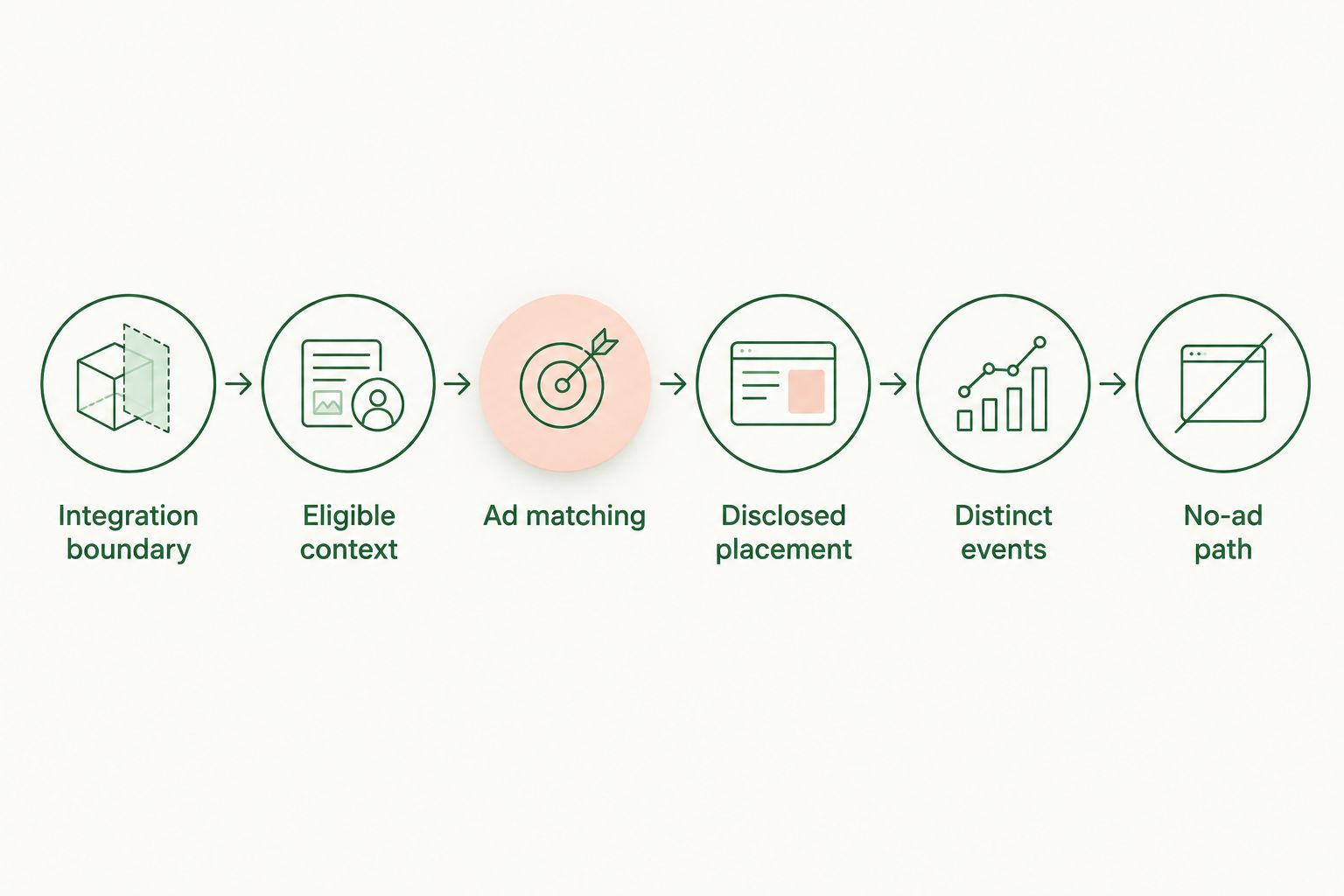
1. Identify the integration boundary
Find the backend handler that receives a user message and calls Gemini. Then identify the frontend component that displays the assistant’s response. These are the boundaries where you can evaluate an ad opportunity and render a separate sponsored component.
Keep model credentials and privileged adserver credentials on the server. Only expose client-side configuration that the relevant SDK documentation explicitly permits. Do not assume a package belongs in the browser merely because the placement appears there.
Before coding, confirm:
- The SDK supports your application’s language and runtime.
- The integration supports your chosen web or mobile interface.
- The documented request fields accept the context you intend to share.
- The response format gives your interface a supported rendering path.
- The event methods match the measurement you need.
These checks establish compatibility without assuming that an adserver has a Gemini-specific adapter.
2. Define eligible context
Create a deliberate boundary between conversation history and advertising context. An ad request should receive only the information your application has approved for that purpose—not an automatic copy of the entire transcript.
Start with the current task. A request for project-management recommendations supplies a different advertising context from a request to summarize confidential meeting notes. Define which topics qualify, which require filtering, and which should never trigger an ad request.
Remove secrets, account identifiers, private documents, and unnecessary personal information before constructing the request. Review applicable consent and disclosure requirements separately; contextual matching alone does not settle privacy compliance.
Use an allowlist of permitted context fields rather than forwarding arbitrary message objects. This makes the advertising boundary visible in code review and easier to test when your chatbot gains new capabilities.
3. Separate answer generation from ad matching
Let Gemini generate the answer through your existing model integration. Invoke the ad-matching path independently, subject to the eligibility rules you defined. An unavailable ad service must not turn a successful model response into a failed chat turn.
For the first implementation, request the ad after you have identified a suitable completed turn. This creates a clear attachment point. If you later run matching alongside generation, handle cancellation, stale responses, and changing user intent explicitly.
Associate the ad opportunity with an application-owned turn identifier. When a user starts another request, ensure that a delayed ad response cannot attach itself to the wrong answer.
Do not put advertiser instructions into the model’s system prompt as a substitute for ad delivery. That mixes answer generation with sponsorship and makes the boundary harder to inspect.
4. Render a disclosed placement
Start with 1 placement per eligible completed turn as a test configuration, not a revenue target. Put the sponsored component after the answer so the user receives the requested help before encountering the offer.
Keep the sponsor’s content visually and structurally distinct from the assistant’s answer. Use a clear sponsorship label beside the placement. Do not present paid copy as Gemini’s independent recommendation.
Render only supported creative fields. Avoid executing arbitrary HTML or scripts from an ad payload, and validate destinations using the integration’s documented rules. Give the component an accessible reading order and a clear destination link.
For disclosure design, see how to disclose sponsored ads in an AI chatbot without breaking trust. Disclosure belongs in the placement itself, not solely in a privacy policy.
5. Record distinct events
Define 3 event types for your initial instrumentation: request, impression, and click. These are separate stages. Receiving an ad response does not establish that the user saw the placement.
Use the provider’s documented impression criteria and event methods. Keep application diagnostics separate from billable reporting, and do not create a second impression event if the SDK already records the same exposure.
Attach enough application context to investigate failures without logging private conversations. Useful diagnostic categories include an ineligible turn, a failed request, an empty response, a render failure, and an event-delivery failure.
Check retries and component remounts. A frontend rerender must not silently become another counted exposure to the same placement.
6. Preserve the no-ad path
Handle empty responses, rejected context, network errors, and expired requests as normal outcomes. The assistant’s answer should remain available in every case. Remove unused placement space rather than leaving an empty advertising container.
Use a bounded wait for ad delivery, with the limit chosen from your application’s performance requirements. Do not keep the answer hidden while waiting for a sponsor.
This sequence gives you an auditable flow: eligible context enters ad matching, approved creative reaches a disclosed placement, and events describe what happened. It does not require the model to write or endorse the advertisement.
Where should the ad appear?
Use a separate placement after the answer for your first release. This gives you a clear disclosure point and lets you test advertising without rewriting how the assistant produces its response.
| Approach | Best for | Advantage | Trade-off |
|---|---|---|---|
| Separate placement after the answer | Initial implementations needing a clear sponsorship boundary | Keeps paid content outside the generated answer | Requires a dedicated component and event handling |
| Separate sponsored side panel | Interfaces with persistent supporting content | Keeps the conversation stream free of inserted cards | Requires responsive layout work and a clear association with the current task |
| Sponsor instructions inside the model prompt | Not recommended as an ad-delivery substitute | Keeps sponsored text within the generated response | Blurs the sponsorship boundary and complicates creative control |
A separate component is not permission to display an ad on every message. Eligibility should depend on your application’s context rules, the user’s task, and the placement experience you are prepared to support.
For an SDK-based conversational adserver such as Elo, the relevant benefit is contextual ad monetization within your application. The trade-off is ownership: you still need to implement and validate the application-side controls described here. Do not assume the SDK replaces them.
Why implementation effort varies
A Gemini integration is only part of the work. In 2026, scope the advertising implementation around these application-level decisions:
- Runtime and interface: Confirm where the SDK runs and where the sponsored component renders. A backend integration and a mobile renderer are separate responsibilities.
- Conversation context: Decide what information leaves your system, how you filter it, and how you test that filtering.
- Streaming behavior: Decide when a turn becomes eligible and what happens when the user cancels or starts another message.
- Placement design: Account for disclosure, accessibility, narrow screens, and an empty response without leaving a layout gap.
- Measurement: Define event ownership, impression criteria, deduplication, and diagnostic logs before treating dashboard totals as reliable.
- Release controls: Build a way to stop ad requests and hide placements without disabling the chatbot.
These are implementation responsibilities, not promised SDK features. Resolve them against the actual documentation and your application architecture before estimating the work.
What should you test before launch?
Use 2 release gates: functional behavior and user experience. Passing one does not imply passing the other. A placement can record clicks correctly while still interrupting the conversation.
For the functional gate, test an eligible turn, an ineligible turn, an empty ad response, a failed request, a duplicate callback, and a delayed response after navigation. Confirm that each case leaves the correct answer visible and produces the intended diagnostics.
For the experience gate, inspect disclosure, keyboard access, mobile layout, and repeated turns. Check whether the sponsored content is distinguishable from the assistant’s answer without opening another page.
Your 2026 release checklist should also include a kill switch. Verify that disabling advertising stops requests as well as rendering; hiding a component alone does not stop context from leaving the application.
Do I need to change my Gemini prompt?
No. Put ad eligibility, matching, and rendering in your application rather than making the model responsible for delivering paid content. Keep any necessary assistant behavior instructions distinct from advertiser creative.
If your application summarizes context before matching, test the summary’s output as a separate data boundary. A summary can still contain information you should not send to an adserver.
Can I show ads while Gemini streams an answer?
You can design the application to handle ad delivery separately from streaming. For an initial release, attach the placement to a completed eligible turn instead of inserting sponsored content among partial answer fragments.
If you introduce concurrent matching, test interrupted streams and superseded turns. Discard stale results rather than displaying them beside a different request.
Will ad revenue cover my model usage?
Do not assume it will. Measure earned advertising revenue against the actual operating costs of the same application and reporting period.
Also track the conversation experience. Revenue alone does not show whether users complete their tasks or return after encountering sponsored placements.
FAQ
Can I add conversational ads to a chatbot built with Gemini?
You can implement conversational ads in a Gemini-based application you control by adding an application-layer adserver integration. Verify SDK compatibility with your runtime and keep sponsored content separate from the generated answer.
Does this add ads to the Google Gemini app?
No. This workflow applies to your own chatbot application using Gemini, not to modifying Google’s consumer Gemini app.
Is Elo a model provider or an adserver?
Elo provides an SDK-based adserver for contextual, conversational ads in AI chat applications. It supports a monetization role rather than replacing your chatbot’s model integration.
Should I send the whole conversation to the adserver?
Do not send the whole conversation by default. Define permitted context fields, remove unnecessary sensitive information, and review the data-sharing requirements for your implementation.
What happens if the ad request fails?
The chatbot should still display its answer. Handle the failed ad request separately and remove the unused placement rather than blocking the conversation.
How do I prevent duplicate ad impressions?
Use the provider’s documented measurement methods and check which events the SDK records automatically. Test retries, rerenders, and navigation so your application does not submit duplicate events.
Do I need to label a conversational ad?
Use a clear sponsorship label beside the conversational ad. Keep paid content distinguishable from the assistant’s independent answer and review the disclosure requirements that apply to your application.
One last thing
Test an empty ad response before testing a successful placement. If the chatbot fails without an ad, advertising has become a dependency of the answer rather than an optional monetization layer.
For your 2026 launch, make that failure test a release requirement. A working no-ad path protects the core product while you evaluate the advertising integration.