
Yes. An AI agent using tool calling can also serve contextual ads when your application handles ad selection and rendering separately from task execution. Tool access does not itself provide advertising inventory, and sponsored content should never gain permission to change the agent’s instructions or execute actions.
- An AI agent using tool calling can serve contextual ads through a separate application-controlled ad path.
- Keep advertiser content outside tool instructions, credentials, and execution permissions.
- Elo provides a contextual adserver SDK for developers monetizing AI chat applications.
- Render sponsored content distinctly, and let the agent finish its task when ad requests fail.
Why this matters
A tool-using agent connects conversation to execution. It can retrieve information, query application data, or request an action through functions your application exposes. Advertising introduces another source of content, not another source of authority.
Elo provides an SDK-based adserver for contextual, conversational ads in AI chat applications. The integration question is where to connect that advertising layer without letting commercial content influence permissions, factual evidence, or the user’s requested action.
For a 2026 implementation, define that boundary before designing the placement. Ads belong in the conversation interface, not in the agent’s chain of authority.
Can an AI agent using tool calling also serve contextual ads?
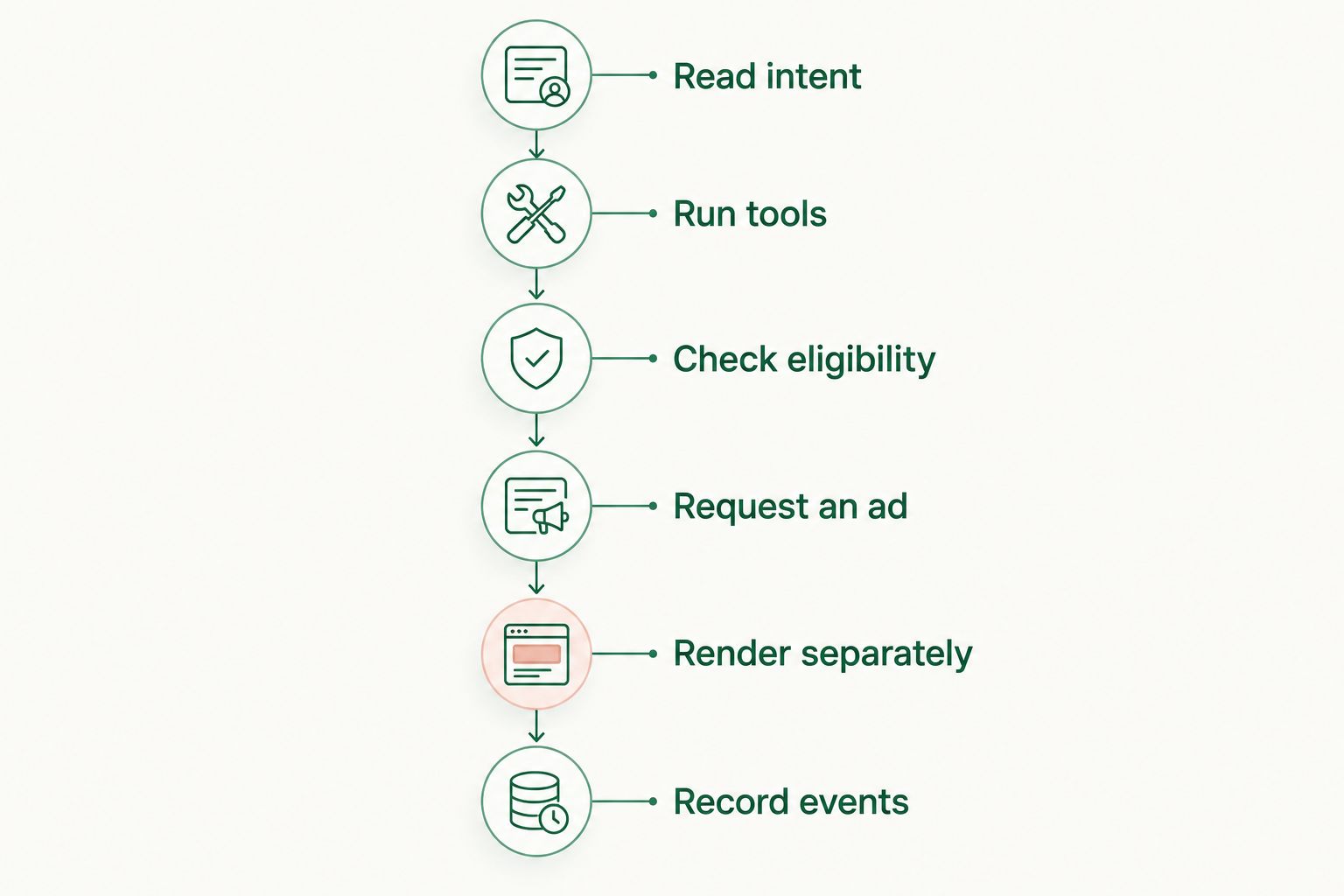
Yes. Use the application layer to coordinate the agent and the advertising request. The following is a recommended architecture, not a description of a particular SDK’s methods or guarantees.
- Read intent. Identify the user’s current task from an approved, limited context representation. Do not automatically forward the full transcript.
- Run tools. Execute authorized task tools through your normal validation and permission checks. Ad eligibility must not grant additional access.
- Check eligibility. Decide whether this conversation and placement permit advertising. Apply your product’s exclusions before requesting an ad.
- Request an ad. Send only the context permitted by your data policy to the advertising integration. Treat an empty result as a normal outcome.
- Render separately. Show returned advertising content in a distinct sponsored component. Do not present it as a tool result or independent evidence.
- Record events. Distinguish an ad request, a rendered placement, and a user interaction. Follow the integration’s documented event definitions.
These 6 steps describe responsibilities, not required network calls. Your implementation can combine operations while preserving their boundaries.
The application should remain useful without the advertising path. If the ad request fails, times out, or returns no suitable content, finish the answer without a sponsored placement. Do not ask the model to invent an advertiser or fill an empty placement with an unsupported recommendation.
Which integration pattern should you use?
You can attach contextual advertising at different points in an agent workflow. Choose based on the control you need, not on whether the model can technically call another function.
| Integration pattern | Best for | Main advantage | Main limitation |
|---|---|---|---|
| Application-controlled request | Publishers prioritizing explicit placement rules | Eligibility and rendering remain outside model discretion | Requires application-side orchestration |
| Model-requested ad tool | Workflows where the model proposes commercial relevance | The model can identify a relevant conversational moment | Tool proposals still require validation, limits, and separate rendering |
| Post-answer request | Products keeping monetization outside answer generation | The answer can complete independently of advertising | The context snapshot must remain relevant when the ad appears |
Best for a controlled starting point: application-controlled requests. Keep the eligibility decision in code, pass a limited context object, and render the sponsored component separately. This gives your team an explicit place to enforce exclusions and inspect failures.
A model-requested ad tool is a design option, not a requirement. If you expose one, treat its arguments as proposed input. Validate them before any advertising request, just as you would validate arguments for another external operation.
For a 2026 launch, document which component owns each decision: the model proposes, the application authorizes, and the interface renders. Avoid a design in which every component assumes another component checked eligibility.
What context should the ad request receive?
Pass enough information to describe the current task without forwarding unrelated conversation history. A request about choosing project-management software needs a relevant topic; it does not inherently need private messages, account credentials, or retrieved customer records.
Build the context representation from an allowlist. Define permitted fields, permitted sources, and exclusion rules. If a field has no clear role in ad matching, leave it out.
Keep 3 boundaries explicit:
- Conversation boundary: separate the current commercial topic from unrelated or sensitive history.
- Tool boundary: exclude credentials, internal instructions, and unrestricted tool outputs.
- Rendering boundary: treat advertiser copy as sponsored content, not executable instructions.
A short summary is not automatically safe. A summary can still repeat confidential information, so inspect what generates it and what it is allowed to contain.
The guide to matching ads to conversation context covers the matching question separately. For tool-using agents, the additional requirement is source control: know whether each context field came from the user, a tool result, or generated text.
Why implementation behavior varies
Tool calling does not determine placement behavior on its own. Your architecture and product rules determine when an advertising request happens and what the user sees.
- Execution timing: choose whether advertising waits for task completion or runs independently. Do not make optional advertising a prerequisite for answering.
- Context selection: decide whether matching uses the current message, an approved summary, or selected task attributes.
- Tool permissions: keep ad-related operations outside tools that send messages, modify records, or make purchases.
- Placement policy: define which topics and conversation states are eligible before a request leaves your application.
- Failure handling: specify what happens when an ad request fails, returns nothing, or completes after the user changes topics.
- Measurement ownership: define which component records requests, rendering, and interactions so retries do not create ambiguous events.
These are implementation decisions, not performance forecasts. For your 2026 release criteria, test the actual workflow rather than assuming an SDK integration establishes every boundary.
How do you keep ads from influencing tool execution?
Treat advertising responses as untrusted external content. An advertiser’s copy must not become a system instruction, a tool definition, or a reason to expand permissions.
Keep the ad payload out of the agent’s planning context unless a specific feature requires it. If the feature does require model access, provide a clearly separated data representation and retain application-side checks. Instructions inside external content must not override the user’s request or your application policy.
Protect consequential actions separately. A sponsored offer is not authorization to buy something, send a message, share a document, or change an account setting.
For example, consider an agent helping a user compare scheduling tools. A sponsored placement can appear beside the conversation, but the advertiser must not determine which calendar permissions the agent requests. The user’s task and your authorization rules still govern execution.
An ad click and an action approval are different events. Keep them separate in both the interface and the backend.
How do you handle streaming, retries, and topic changes?
Tie the advertising request to the conversation state that produced it. Before rendering a returned ad, check that the placement still belongs to the active turn and remains eligible.
A user can change topics while a request is running. Do not attach the old result to the new answer simply because it arrived later. Cancel or discard stale work according to your application’s request lifecycle.
Handle retries explicitly. A repeated request does not prove that another ad appeared, and another rendered component does not prove that a user interacted. Keep those events distinct and use the advertising integration’s documented tracking behavior.
For streaming interfaces, reserve a separate sponsored component rather than inserting advertiser copy into unfinished answer text. This preserves a visible distinction between the answer and the commercial placement.
Where does Elo fit in a tool-using agent?
Elo is best for developers who want an SDK-based contextual adserver for AI chat applications. Its stated role is to let publishers embed conversational ads and earn revenue from advertiser spend, including applications built on OpenAI, Anthropic, or custom LLMs.
The benefit is a dedicated advertising integration alongside your agent workflow. The limitation is architectural responsibility: an adserver does not replace your application’s authorization checks, context filtering, or sponsored-content presentation decisions.
Before choosing an implementation, inspect the documented request inputs, rendering approach, and event lifecycle. Confirm how those fit your application instead of assuming that a tool-calling framework establishes compatibility or placement behavior.
Inspect the conversational ad workflow
Review the demo before deciding where advertising belongs in your agent application.
What should you test before launch?
For a 2026 release, test more than whether a sponsored component appears. Test whether the agent remains correct when advertising behaves badly or contributes nothing.
Include these 4 test cases in your acceptance plan:
- No eligible ad: the agent finishes the task without an empty placeholder or fabricated sponsor.
- Ad request failure: the user still receives the answer, and the failure stays outside task execution.
- Untrusted ad content: instruction-like advertiser text cannot trigger tools or alter permissions.
- Changed conversation: a delayed result does not appear against an unrelated user request.
Also inspect disclosure, keyboard access, and event recording in the rendered interface. Review the data leaving your application, not just the fields shown in your code editor.
Keep the acceptance criteria observable. A useful criterion states what the user sees, what data leaves the application, and which actions remain impossible without authorization.
FAQ
Can an AI agent use tools and show contextual ads in the same conversation?
Yes. Your application can execute authorized tools and request contextual ads through separate paths. Keep sponsored content distinct from task results and execution permissions.
Does the model have to call an advertising tool?
No. Your application can request an ad after checking conversation eligibility without exposing advertising as a model-callable tool. A model-requested tool is an optional architecture.
Should I send the entire conversation to an adserver?
Do not send the entire conversation by default. Build an approved context representation and exclude credentials, unrelated history, and confidential tool output.
Can sponsored content trigger another tool call?
Sponsored content should not authorize another tool call. Keep tool execution subject to your application’s normal validation, permissions, and user approval requirements.
What happens when no contextual ad is returned?
The agent should complete its task without an ad. Treat an empty advertising response as a normal state rather than asking the model to invent a sponsored recommendation.
Can Elo support monetization for an AI chat application?
Elo provides an SDK-based contextual adserver for developers of AI chat applications. Your application still needs to define context handling, placement eligibility, and the boundary between advertising and tool execution.
What should I check before launching agent ads in 2026?
For a 2026 launch, check context filtering, sponsored disclosure, stale responses, failure handling, and event recording. Verify that advertising cannot expand tool permissions or block task completion.
One last thing
The most revealing test is an advertising response that should never render. Return irrelevant content, delay it until the topic changes, or simulate a failed request. The agent should still finish the user’s task.
Make the absence of an ad a supported outcome. That requirement forces you to separate monetization from execution instead of making the user’s answer depend on a commercial response.