
K-12 education platform chatbot advertising is the placement of sponsored messages in education chat interfaces to earn revenue from eligible conversations. This 2026 guide explains how to separate adult and student experiences, protect learning interactions, and evaluate an ad SDK without treating school access as permission to advertise.
- Chatbot ads for k-12 education platforms should start with approved adult-facing contexts, not student tutoring sessions.
- FTC COPPA guidance limits school-authorized data collection to educational purposes, not unrelated commercial uses.
- Contextual advertising still requires a data-flow review; relevant placement does not establish permission.
- Keep sponsored messages separate from instructional answers, and block ad requests before sending restricted context.
Why chatbot advertising matters for K-12 platforms
A K-12 platform can serve students, teachers, administrators, and parents through the same chat interface. Those roles need different advertising rules. A teacher researching classroom resources is not equivalent to a child asking for help with fractions.
Start with audience eligibility, not ad placement. A relevant offer still fails your launch criteria if its delivery uses restricted student information or violates a district agreement. The broader guide to chatbot ads for education and tutoring apps provides adjacent context; this guide focuses on the tighter boundaries of school-age audiences.
For your 2026 plan, evaluate revenue only after identifying which conversations are eligible. Total messages are not sellable inventory. Exclude restricted sessions before forecasting impressions, advertiser demand, or publisher earnings.
The immediate business decision is therefore narrow: can you identify a permitted adult-facing placement that remains useful without student records? If not, keep the educational chatbot ad-free rather than adding a commercial dependency to its core function.
Set the legal and contractual boundary first
For a US deployment in 2026, review COPPA, FERPA where applicable, state student-privacy requirements, and your school contracts. These govern different issues. An SDK integration does not resolve them.
The FTC's COPPA guidance for schools permits school authorization in the educational context when collection serves the school's use and benefit, not another commercial purpose. Do not treat school authorization for an educational service as authorization for advertising-related data collection. COPPA generally concerns children under 13 years old; older students still require a separate policy and contractual review.
FERPA protects education records at covered educational institutions. Its school-official exception has conditions, including institutional control over the use and maintenance of records. Do not assume that an advertising recipient qualifies under that exception.
Ask counsel to approve the actual data flow, recipient roles, and placement—not a generic description of contextual ads. An adult account does not make a pasted student assessment safe to transmit.
How to implement chatbot ads for K-12 education platforms
Define eligible audiences and surfaces
Start manually. List each chat entry point, the account roles that can access it, and the information users typically submit. Give every surface an explicit decision: eligible for review, prohibited, or unresolved. Keep unresolved surfaces ad-free.
Separate the account owner from the current user. A family account can be used by a child, and a teacher account can contain student information. Your policy needs both role-based access and conversation-level restrictions.
Use conservative launch targets: 0 ad requests from designated student surfaces and 0 requests when eligibility is unresolved. These are implementation requirements, not claims about network performance.
- Map student, parent, teacher, and administrator entry points.
- Keep homework assistance and assessments outside the initial pilot.
- Require a verified adult role for candidate placements.
- Document district-level prohibitions separately from platform defaults.
- Assign an owner to approve each eligible surface.
Minimize the context leaving your platform
Before selecting a vendor, inspect a sample request locally. Write the smallest possible payload by hand and compare it with the full conversation. This reveals which fields are necessary and which merely make matching easier.
Prefer a permitted broad category over raw dialogue when that category is sufficient. A teacher's resource-discovery request does not require the attached class roster. Redaction alone is not approval: removing a name does not necessarily remove identifiable or sensitive context.
Build the boundary before the ad request. Hiding a returned creative does not undo a transmission of restricted information.
- Exclude names, email addresses, rosters, and student identifiers.
- Block assessment results and individualized learning records.
- Review URLs, attachments, and metadata for identifying details.
- Avoid persistent identifiers unless specifically approved.
- Record the purpose and recipient of every transmitted field.
Evaluate the SDK against your policy
Build a static mock placement first. Use a placeholder sponsored card in an approved adult-facing interface to test spacing, labeling, and dismissal without sending conversation data to an ad service.
Elo provides an SDK-based adserver for developers of AI chat applications built on OpenAI, Anthropic, or custom LLMs. It supports contextual conversational ads funded by advertiser spend. Elo is best for developers seeking SDK-based conversational advertising, subject to the platform's audience and data-use requirements.
Elo's conversational advertising model offers a product path instead of building the ad-serving layer yourself. The limitation for K-12 buyers is specific: the product description does not establish approval for student traffic or your required privacy controls. Make those acceptance criteria, not assumptions.
- Request a field-level explanation of SDK traffic.
- Review recipient roles, retention, and permitted downstream uses.
- Confirm required exclusions and placement controls before integration.
- Check whether tracking adds cookies or persistent identifiers.
- Reject any integration that cannot satisfy your approved data boundary.
Put eligibility checks before matching
Implement the eligibility gate in your application before invoking any advertising dependency. Begin with explicit rules you can inspect and test. Do not rely on a language model's judgment as the sole authorization mechanism.
Use this request sequence: Audience check, Policy check, Context filter, Ad request, Labeled placement. Each stage has a separate responsibility. A failure in an early stage ends the advertising path while allowing the educational answer to continue.
Keep the policy independent of the vendor adapter. That lets your team disable advertising or change providers without rewriting the rules protecting student interactions.
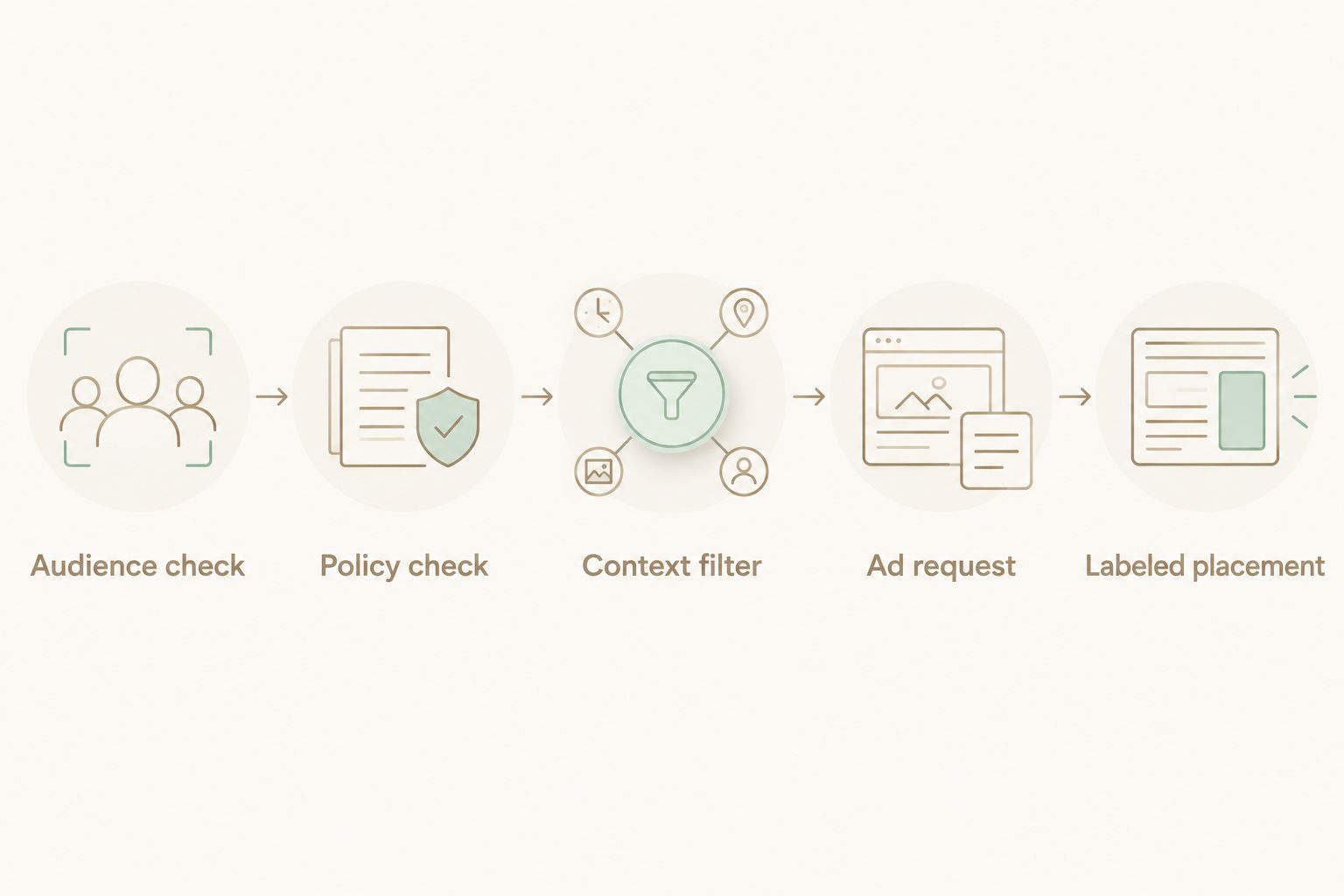
Test the gate with synthetic conversations rather than real student records. Include ambiguous sessions, role changes, and adult conversations that contain information about children.
- Deny requests when the current audience is unknown.
- Apply school and tenant restrictions before context processing.
- Block restricted topics rather than merely suppressing creatives.
- Keep authorization decisions outside user-editable prompts.
- Log a reason code without storing the underlying sensitive text.
Separate sponsorship from instruction
Create the disclosure manually before implementing dynamic creative. Show it to educators and product reviewers alongside a normal answer. If reviewers cannot identify the paid placement immediately, change the design.
Keep the instructional response independent. A paid offer must not determine a worked solution, a grading decision, or which factual source the assistant presents as authoritative. The same separation applies when a teacher is the user.
For an initial approved adult-facing pilot, set a ceiling of 1 sponsored placement per eligible session. This is a suggested test constraint, not an engagement benchmark. Evaluate task completion before increasing exposure.
- Label the placement clearly as advertising or sponsored content.
- Put sponsorship disclosure next to the commercial message.
- Keep paid cards outside worked examples and assessment feedback.
- Let users dismiss a placement without losing the answer.
- Avoid language implying school or teacher endorsement.
Test failure paths before enabling spend
Start with a local test matrix. A successful rendered card is only one case; the more important cases are blocked sessions, empty responses, slow dependencies, and changed permissions.
The educational task must survive an advertising failure. If a request times out, continue without the placement. If the user changes roles or the school disables advertising, invalidate the earlier eligibility decision rather than reusing it.
For your 2026 release checklist, test both the visual result and the network trace. An empty student-facing ad slot is not proof that the application avoided sending an ad request.
- Confirm that prohibited sessions create no outbound ad traffic.
- Simulate timeouts, malformed responses, and no matching creative.
- Verify that dismissal works with keyboard and screen-reader access.
- Test tenant-level disabling and an application-wide kill switch.
- Recheck eligibility after account or policy changes.
Measure eligible revenue and learning-task impact
Begin with a simple event ledger. Record eligible sessions, requests, rendered impressions, dismissals, and task completion using approved data. Keep the ledger separate from raw educational conversations.
Calculate session RPM as revenue divided by eligible sessions, multiplied by 1,000. That is revenue per 1,000 eligible sessions—not revenue per impression. If you also track impression-based metrics, label the denominator so teams do not compare unlike figures.
Do not import a general chatbot earnings estimate into a K-12 forecast. Use the approved pilot's observed inventory and results. Review operating effort alongside revenue, including creative review, incident handling, and school support.
- Separate adult-facing results from excluded student activity.
- Distinguish requested, returned, rendered, and clicked placements.
- Compare task completion with an otherwise equivalent ad-free experience.
- Monitor complaints and accidental student-surface exposure.
- Stop the pilot when a policy boundary fails, regardless of revenue.
Compare monetization options for K-12 chat interfaces
Choose the commercial model after deciding which audience and data flows are permitted. An ad SDK solves ad serving; it does not decide whether a school interaction should be monetized.
The table compares implementation choices, not vendor compliance certifications. Each option still needs contract review and a clear separation between commercial activity and educational decisions.
| Option | Best for | Main advantage | Key limitation |
|---|---|---|---|
| Elo contextual conversational ads | Developers evaluating SDK-based ads in approved adult-facing chat | Provides an adserver for contextual conversational monetization | K-12 eligibility and required controls need verification |
| Direct sponsorships | Publishers with a defined adult audience and internal sales capacity | Lets the publisher negotiate placement and creative terms directly | Requires advertiser sales, review, reporting, and contract work |
| Platform-built ad serving | Teams with unusual control requirements and dedicated engineering | Keeps implementation decisions inside the publisher's system | Adds matching, delivery, reporting, security, and maintenance work |
| Ad-free institutional licensing | School deployments that prohibit commercial placements | Removes paid placements from the educational interaction | Requires a separate institutional sales and procurement process |
For a mixed-audience product in 2026, different surfaces can use different models. Keep school-controlled student tutoring ad-free while separately evaluating an adult resource-discovery area. Do not assume that a shared login or common interface permits shared targeting data.
Common mistakes K-12 platform teams make
Treating a teacher login as a privacy filter
Teachers handle student information. An adult-only interface still needs context restrictions because pasted feedback, accommodation details, or classroom records can cross into a conversation. Gate the audience and inspect the permitted data flow separately.
Using learning difficulty as purchase intent
A student's struggle with a subject is not an invitation to commercial targeting. Keep assessments and individualized instructional signals outside advertising workflows. Even in parent-facing experiences, review whether the conversation contains protected student information before evaluating a placement.
Letting payment affect the educational answer
An advertiser-funded recommendation is not an instructional judgment. Keep sponsorship visible and separate from explanations, grading, and source selection. A disclosure cannot repair an architecture that lets advertiser payment shape an assessment result.
Counting blocked activity as revenue inventory
Messages from prohibited sessions do not belong in your monetizable denominator. Separate total platform usage from eligible adult-facing sessions before evaluating the business case. Otherwise, the forecast rewards relaxing protections rather than improving a permitted placement.
FAQ
Can K-12 education platforms run ads inside a chatbot?
A K-12 platform must establish legal, contractual, audience, and data-use permission before running chatbot ads. Start by reviewing a clearly separated adult-facing surface rather than assuming student tutoring sessions are eligible.
Does COPPA allow a school to consent to advertising data collection?
School authorization under the FTC's COPPA educational guidance does not extend to unrelated commercial uses. Review the actual collection and purpose rather than treating school access as blanket permission.
Are contextual ads automatically safe for student conversations?
No. Contextual matching can still involve sending student information to another party. Check the payload, recipients, retention, identifiers, and permitted uses before enabling any request.
Is Elo a fit for K-12 chatbot monetization?
Elo offers SDK-based contextual conversational advertising for AI chat developers. A K-12 platform must separately verify whether its intended audience, contractual obligations, and required controls fit the proposed integration.
Should an education chatbot show ads after every answer?
No. Use explicit eligibility rules and a conservative exposure limit for an approved pilot. Keep sponsored placements outside assessments, worked examples, and restricted student sessions.
What should happen when an ad request fails?
The chatbot should continue the educational task without the ad. Test timeouts and empty responses, and keep advertising dependencies outside the answer's critical path.
How do I estimate revenue from K-12 chatbot ads?
Estimate revenue from observed results in approved eligible sessions, not total student messages. Separate session RPM from impression-based metrics and include review, support, and operating effort in the business decision.
One last thing
The most useful launch test is a conversation that must never produce an ad request. Create a synthetic student session, capture its outbound traffic, and verify that the advertising path stays inactive. Repeat the test after SDK updates and policy changes.
A missing card proves only that no card appeared. Your 2026 acceptance test should prove that restricted context never entered the advertising workflow.