
Instead of manually joining ad earnings to chatbot usage, connect Elo to Mixpanel ad revenue reporting through a custom event pipeline that pairs verified earnings with your application's analytics identifiers. Keep engagement events separate from revenue records so an ad impression never becomes an invented earnings figure.
- To connect Elo to Mixpanel ad revenue reporting, build a custom pipeline around verified earnings records.
- Track ad impressions and clicks separately from confirmed publisher revenue.
- Use stable identifiers, numeric revenue properties, and duplicate protection before building reports.
- Compare revenue per user with chatbot engagement, not ad clicks alone.
Why this matters
Ad engagement and publisher earnings answer different questions. An impression shows that an ad met your measurement definition; a revenue record shows an amount attributed by your earnings source. Counting the first does not establish the second.
Elo is best for developers adding contextual ads to AI chat applications. The adserver handles conversational advertising; your analytics implementation must connect monetization records to the product behavior you want to analyze.
For your 2026 reporting setup, define revenue as publisher earnings rather than advertiser spend. Keep estimated and confirmed earnings in separate measures, and keep Mixpanel reports separate from your accounting ledger.
This guide describes an application-owned pipeline. It does not depend on a particular native connector, webhook, SDK callback, or export format.
Before you start
- Application access: You need permission to change your chatbot's instrumentation and backend, plus access to the intended Mixpanel project and its ingestion configuration.
- Verified earnings access: Confirm which Elo-supported reporting mechanism your account can use, its record granularity, and whether amounts represent estimated or confirmed publisher earnings. Build against that actual mechanism, not an assumed API.
- The attribution gotcha: Confirm the identifiers attached to earnings records before choosing report dimensions. App-level daily totals cannot establish user-level revenue, even when your application tracks individual users.
Also approve the data you will send. Use pseudonymous analytics identifiers rather than raw prompts, email addresses, or full conversation transcripts. An analytics integration does not require copying chat content into revenue events.
Event contract
Define your event contract before writing the adapter. The names below are application-defined examples, not provider event names or SDK methods.
Choose the measurement path
Two adjacent workflows belong in this implementation. Use both when your source data supports them, but do not treat them as interchangeable.
| Workflow | Best for | Strength | Limitation |
|---|---|---|---|
| Application engagement events | Understanding ad exposure and interaction | Connects placement behavior to product usage | Does not establish earned revenue |
| Verified earnings ingestion | Measuring publisher revenue | Preserves the amount and status reported by the earnings source | Analysis is limited to the source's identifiers and granularity |
- Define
ad_impression_observedfor an impression measured according to your documented application rule. Do not emit it merely because an ad request returned successfully. - Define
ad_click_observedfor an actual interaction your implementation can observe. Keep the original destination behavior intact. - Define
ad_revenue_recordedfor a verified earnings record accepted by your backend. Use a separate event name for estimated earnings if you also ingest estimates. - Document the trigger, owner, required properties, and duplicate rule for each event. Assign one emitter to each underlying action.
Expected result: Your event specification distinguishes delivery, interaction, and earnings. Another developer can identify exactly what causes each event without reading the reporting dashboard.
Define the property contract
Use Mixpanel's established event structure for ingestion. Keep your own business properties distinct from reserved ingestion fields.
| Field or property | Purpose | Validation rule |
|---|---|---|
event | Event name | Use the agreed name consistently |
distinct_id | Analytics identity | Match the identity scope actually supported by the record |
time | Event timestamp | Use the timestamp format required by the chosen ingestion method |
$insert_id | Duplicate identifier | Keep it stable when retrying the same event |
revenue_amount | Custom earnings property | Send a number, not formatted text |
currency | Custom currency property | Preserve the source currency |
revenue_status | Custom earnings classification | Distinguish estimated from confirmed earnings |
environment | Custom deployment label | Separate test traffic from production |
Add placement, application, session, or reporting-period properties only when those dimensions exist in the underlying record. Do not fabricate a session identifier for an aggregate earnings row.
For the 2026 event contract, record whether an amount uses major currency units or minor currency units. Convert deliberately before ingestion; a numeric field without a unit convention is not a reliable revenue measure.
Backend ingestion
Use a backend adapter for verified earnings. It gives you a controlled place to validate records, manage credentials, and prevent retries from creating extra revenue.
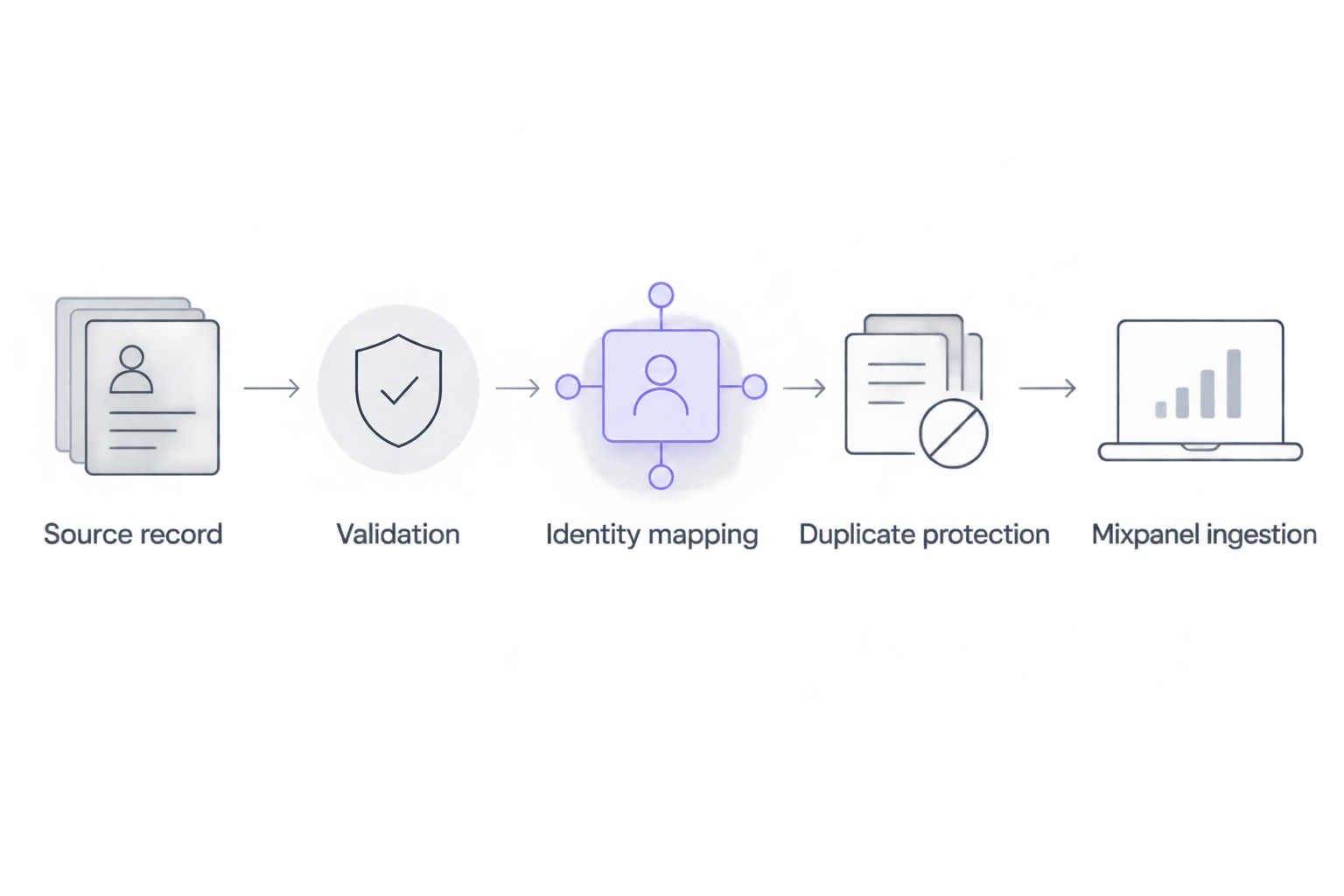
Build the adapter
- Source record: Read earnings through the reporting mechanism confirmed for your account. Preserve the original record identifier, amount, currency, status, and reporting period when available.
- Validation: Reject records with missing required fields or invalid numeric amounts. Quarantine unsupported currencies or statuses rather than silently replacing them.
- Identity mapping: Attach a user identifier only when the source record supports that association. Otherwise preserve the application or reporting scope and exclude those records from user-attributed reports.
- Duplicate protection: Store a durable key for the source record and revision. Generate a stable
$insert_idfor the corresponding analytics event and reuse it on retries. - Mixpanel ingestion: Send the normalized event through the appropriate supported ingestion method. Check the response and retain failed records for controlled retry.
Keep ingestion off the chat response's critical path. A reporting failure should not prevent your assistant from answering a user.
Expected result: A verified earnings record produces one logical analytics event. Retrying delivery preserves its identity instead of creating a second earnings record.
Test identity and delivery
- Use a test environment and a clearly labeled test record. Keep synthetic test amounts out of production revenue reports.
- In Mixpanel, inspect the incoming event in Events. Check its event name, timestamp, identity, currency, amount type, and environment.
- Resend the same source record through your adapter. Verify duplicate handling in both your delivery log and the resulting analytics data.
- Compare the event with its source record. Validate the amount and meaning, not just the presence of an event.
For your 2026 acceptance check, require 1 logical event per unchanged source record after retries. Enforce this in your own delivery ledger rather than relying exclusively on analytics-side duplicate handling.
Expected result: You can trace an analytics event back to its source record and explain why it belongs to that reporting scope.
Revenue reports
Build the first reports only after the event contract passes validation. A polished chart cannot repair a duplicated amount or an unsupported user join.
Configure the core measures
- Open Insights in Mixpanel and select your confirmed earnings event. Aggregate the numeric
revenue_amountproperty using a sum, not an event count. - Filter to production records and a single currency. Use the same revenue status and date basis throughout the report.
- Add a breakdown by a supported dimension, such as application or placement. Avoid dimensions that were inferred rather than supplied or reliably joined.
- Build a separate engagement report for observed impressions and clicks. Compare matched reporting periods before calculating rates.
- Save the definitions alongside the reports: numerator, denominator, currency, time basis, exclusions, and identity scope.
Expected result: Your revenue total represents summed earnings, while impression and click totals represent counts of distinct measured actions.
Choose the right denominator
Revenue per user equals publisher revenue divided by the chosen user population. State whether that population means all active users, ad-eligible users, or exposed users; these are different measures.
Impression RPM equals publisher revenue divided by impressions, multiplied by 1,000 impressions. Session RPM uses sessions instead and expresses earnings per 1,000 sessions. Label both explicitly.
A period-level revenue-per-active-user ratio does not require assigning every earnings row to an individual. User-level revenue cohorts do require a defensible identity join. Keep those analyses separate.
For 2026 cohort reporting, decide whether earnings belong to the activity period or the confirmation period. Preserve both dates when your source provides them, then choose the date that answers the business question.
Sync revenue whenever a record changes
An update workflow belongs beside initial ingestion when your earnings source exposes revisions. A revised total must not enter the same additive report as another complete original total.
Best for revised earnings: maintain a source ledger before updating analytics. This adds backend work, but it keeps revision handling explicit and auditable.
- Store the latest accepted version of each source record in your ledger.
- Compare an incoming revision with that stored version, including currency and status.
- For an amount revision within the same currency and classification, calculate the signed difference. Give the adjustment its own stable revision identifier.
- Ingest the adjustment through a documented correction event and include it in the appropriate net-revenue measure.
- Handle status changes separately. Moving estimated earnings to confirmed earnings is a classification change, not permission to count both as confirmed revenue.
Expected result: A correction changes the net total by the difference rather than adding the revised full amount again.
Keep the original source records and revision history outside Mixpanel. Product analytics helps explain monetization behavior; your source ledger remains the place to reconstruct the financial record.
Troubleshooting
Revenue totals are higher than the source
Check duplicate delivery, multiple emitters, and full-value revisions. Group your delivery ledger by source record and revision, then confirm that retries reuse the same duplicate identifier.
Also inspect report filters. Summing estimated events together with confirmed events counts different revenue states as though they were separate earnings.
Earnings appear under the wrong users
Inspect the identity join before changing the chart. A session identifier, account identifier, and person identifier are not interchangeable.
For aggregate records, remove unsupported user attribution. Preserve the original reporting scope rather than attaching the earnings to whichever user happened to trigger ingestion.
The event arrives but revenue cannot be summed
Inspect the property's data type. Currency symbols, grouping separators, and formatted strings do not belong in the numeric amount property.
Normalize the value in your adapter. Preserve currency in a separate field, then verify new events before repairing historical data.
Daily totals disagree
Compare time zones, reporting cutoffs, earnings status, currency, and revision timing. An ingestion timestamp and an earnings-period timestamp describe different moments.
Reconcile identical reporting windows first. Do not change amounts merely to make charts match.
Client events disappear but earnings still arrive
Browser blocking, interrupted navigation, and consent controls can interrupt client-side collection. Treat observed client engagement as its own measurement stream rather than assuming it captures every financial event.
Keep verified revenue ingestion server-side. Respect the user's consent choices; a backend route is not a way around them.
Customize your workflow
Once totals reconcile, add dimensions that answer a concrete product question. Start with placement or application version when your records support them, then compare monetization with session completion and return usage.
Keep the limitation visible: Elo's contextual adserver supplies the monetization layer, but this custom analytics workflow still needs identity design, ingestion ownership, and reconciliation. An SDK installation alone does not establish those controls.
For the 2026 release review, assign an owner to failed deliveries and another to revenue definitions. Recheck the contract whenever your application identity model or earnings source changes.
FAQ
How do I connect Elo to Mixpanel for ad revenue analytics?
Build a custom pipeline that sends verified publisher earnings to Mixpanel with numeric amounts, currency, stable identifiers, and duplicate protection. Confirm the earnings access mechanism for your account before implementing the adapter.
Can I calculate ad revenue from impressions alone?
No. Impressions measure exposure, not confirmed earnings. Use verified earnings records for revenue and impressions as the denominator for impression RPM.
Should I send ad revenue from the browser or my backend?
Use your backend for verified revenue ingestion. It provides a controlled place for validation, retries, credentials, and a durable delivery ledger.
Can I measure ad revenue for each chatbot user?
Only when earnings records support a reliable user-level join. Aggregate earnings can support period-level revenue ratios but cannot establish individual users' earnings.
Why does Mixpanel show more revenue than my earnings source?
Check duplicate events, repeated full-value revisions, and reports that combine estimated with confirmed earnings. Reconcile matching currencies, reporting periods, and revenue definitions.
What should happen when an earnings record is corrected?
Apply a documented correction process rather than sending the revised full amount as additional earnings. Preserve the source record and revision history in your ledger.
Do I need to send chat prompts to measure ad revenue?
No. Revenue analysis can use pseudonymous identifiers and approved placement metadata without copying raw prompts or full transcripts into analytics events.
One last thing
A revenue chart can reconcile perfectly and still mislead. Dividing total earnings by exposed users answers a different question from dividing them by all active users. Put the denominator in the report name before anyone uses the chart to make a product decision.