
To set a daily budget cap for AI chat ads, define the campaign’s spending limit, billing-day timezone, and chargeable event, then enforce the remaining allowance before authorizing more delivery. Confirm that the network treats the setting as a hard limit rather than an average daily target. Account for pending charges as well as recorded spend; a dashboard alert alone does not enforce a cap.
- A daily budget cap for AI chat ads needs enforcement, not just a spending alert.
- Reserve budget for pending charges before authorizing more conversational ads.
- Keep advertiser spend limits separate from publisher revenue and user frequency caps.
- Elo serves developers monetizing AI chat applications; confirm budget-control behavior before implementation.
How do you set a daily budget cap for ads on an AI chat network?
Use the following sequence for a 2026 campaign launch. These are implementation requirements, not instructions for a particular network’s dashboard.
Elo provides an SDK-based adserver for contextual, conversational ads. Elo is for developers who want to monetize AI chat applications with contextual ads. That publisher-focused use case fits embedded chat monetization; it does not establish how an advertiser’s daily spending limit is enforced.
- Define scope. Decide whether the cap applies to an advertiser account, campaign, or another delivery group. Record which campaigns share the same allowance.
- Define the day. Choose the billing timezone and reset boundary. Distinguish a calendar-day allowance from a rolling 24-hour allowance.
- Define billable events. Specify whether spend accrues from impressions, clicks, acquisitions, or another contracted event. Keep nonbillable chat activity out of the spending ledger.
- Reserve allowance. Before authorizing delivery, check recorded spend plus outstanding commitments against the cap. Reserve the amount needed for the proposed delivery under the billing agreement.
- Stop delivery. Reject new authorizations when the remaining allowance cannot cover the next commitment. Keep the assistant’s unsponsored response available.
- Reconcile events. Convert reservations into recorded charges, release unused reservations under a defined rule, and verify the next billing-day reset.
Set the cap where billable delivery is authorized, not only where results are displayed. If you buy through a network rather than operate its delivery system, request confirmation of these behaviors before activating the campaign.
Why this matters
An AI chat application can generate several ad opportunities during a conversation. Your budget control needs a defined relationship between an opportunity, an authorized ad, and a billable event.
A spending report answers what has been recorded. A budget gate answers whether another delivery is allowed. Treating those as separate functions keeps reporting delays from becoming the mechanism that decides when spending stops.
The distinction also separates advertiser and publisher responsibilities. Advertisers set their spending exposure; publishers integrate placements and measure revenue. A publisher’s revenue dashboard is not an advertiser spending cap.
Choose the control that matches your spending rule
For your 2026 setup, document whether “daily budget” means a ceiling or a pacing target. The wording matters less than the actual authorization rule.
| Control | Best for | Advantage | Limitation |
|---|---|---|---|
| Hard daily cap | A fixed daily spending ceiling | Blocks additional commitments when allowance is exhausted | Requires handling of pending commitments and billing boundaries |
| Average daily target | Managing average delivery over a defined period | Allows daily delivery to vary under the agreement | Does not establish a strict daily maximum |
| Pacing control | Distributing eligible delivery through the day | Reduces early consumption of the allowance | Does not replace a hard spending limit |
| Spending alert | Operator awareness | Signals that a review is needed | Does not stop delivery by itself |
Use a hard cap for a hard ceiling. Add pacing when you also want the allowance distributed through the day, and use alerts to notify the operator rather than enforce the rule.
Do not substitute a frequency cap. Frequency limits govern how often a user sees an ad; budget limits govern spending. Neither control proves that the other is working.
Define the billing day before entering the cap
A rolling 24-hour window and a calendar day are different budget periods. A rolling window moves continuously; a calendar-day allowance resets at a boundary in the chosen timezone.
For your 2026 campaign specification, record the timezone explicitly rather than using “local time.” State whether event timestamps are evaluated when delivery occurs, when the event is received, or under another agreed billing rule.
Daylight-saving changes make this distinction practical. A local calendar day is not always 24 hours, so avoid implementing a calendar-day reset as an elapsed-time timer without timezone handling.
Include the campaign’s start and end rules. A partial first day needs an explicit allowance policy; do not assume that activating a campaign late in the day automatically reduces its daily cap.
Make pending charges part of the budget check
A strict cap needs a rule for charges that have been authorized but have not yet become final. Otherwise, the check considers only part of the campaign’s spending exposure.
Use this accounting relationship:
Remaining allowance = daily cap − recorded spend − reserved commitments.
Before authorizing another ad, compare its required reservation with the remaining allowance. Perform the comparison and reservation as one atomic operation so concurrent requests cannot independently claim the same balance.
A suitable authorization sequence is:
- Check allowance: Read the applicable budget period and available balance.
- Reserve commitment: Reserve the required amount without a separate, competing write.
- Authorize delivery: Allow the eligible ad to proceed only after reservation succeeds.
- Reconcile charge: Record the billable event or release the reservation under the agreed expiry rule.
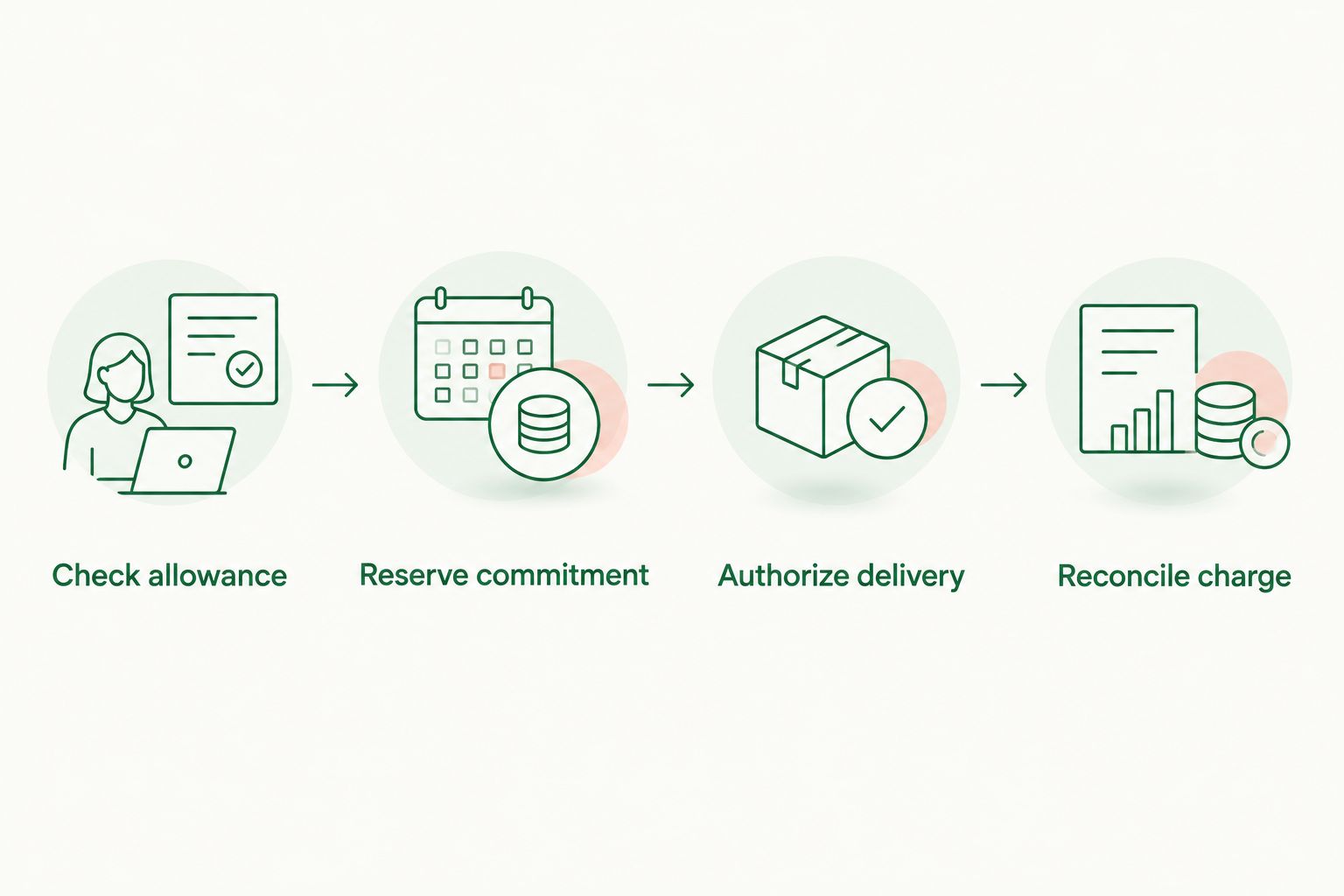
For delayed-event billing, define what amount must remain reserved and when it can be released. A strict ceiling requires bounded exposure; if the billing arrangement leaves that exposure unbounded, resolve the agreement before describing the cap as guaranteed.
Match the spending ledger to the billing model
Your ledger should follow the contracted billing event, not whichever engagement metric is easiest to collect. A chat message, rendered card, click, and completed acquisition are different events.
| Billing model | Charge basis | Budget-control requirement | Limitation to address |
|---|---|---|---|
| CPM | Per 1,000 billable impressions | Apply the agreed impression definition and rate | An ad request is not automatically a billable impression |
| CPC | Billable clicks | Reconcile valid click events against commitments | Delivery and the chargeable click occur separately |
| CPA | Qualifying acquisitions | Define attribution, qualification, and outstanding exposure | Acquisition reporting can occur after delivery |
CPM means cost per 1,000 impressions. That unit explains the billing model; it does not supply a rate or establish which events a particular network bills.
For CPC and CPA agreements, document deduplication and qualification rules. Rejecting a duplicate event should not erase a legitimate charge, and retrying a legitimate event should not create another charge.
Keep the currency consistent within the ledger. If your reporting combines currencies, preserve the original billing amounts and document the conversion rule separately from budget enforcement.
Why daily budget behavior varies
The cap’s behavior depends on its accounting and delivery rules, not on the fact that an ad appears inside a conversation. Review these factors in the network agreement or your own implementation specification:
- Budget scope: Shared account limits and campaign limits need a defined order of enforcement.
- Billing event: Impression, click, and acquisition billing create different reconciliation requirements.
- Reset boundary: Calendar-day and rolling-window controls allocate allowance differently.
- Outstanding exposure: Pending commitments need an explicit reservation and release policy.
- Concurrent requests: Parallel delivery needs a shared, atomic budget decision.
- Configuration changes: Cap increases, decreases, and pauses need an effective-time rule.
For a 2026 launch, turn each factor into an acceptance test. A configuration field is not proof that the associated behavior works.
Test the cap before enabling live delivery
Use nonbillable test traffic or an agreed test environment. Do not validate a shutdown rule by exposing a live campaign to uncontrolled spending.
Start with the normal sequence: authorize eligible delivery, record the billable event, and verify that the remaining allowance changes correctly. Then test the boundary conditions.
- Submit concurrent authorization requests against the same remaining allowance.
- Replay a billing event and verify that it is counted only once.
- Delay an event and verify that its reservation remains accounted for.
- Lower the cap while commitments are outstanding.
- Pause a campaign and verify that new authorization stops.
- Cross the billing-day boundary and check the handling of earlier commitments.
- Make the budget service unavailable and verify the chosen failure behavior.
For a strict cap, fail closed for paid delivery when the budget authorization cannot be completed. Continue the assistant’s normal response without the sponsored placement rather than making the conversation depend on an ad decision.
The ad SDK integration testing guide provides a related implementation checkpoint. Keep budget authorization tests separate from rendering tests: a correctly displayed card does not prove correct spending enforcement.
What should you confirm before using Elo?
Elo’s stated role is an SDK-based adserver that helps developers embed contextual, conversational ads and earn revenue from advertiser spend. It supports the monetization use case for applications built on OpenAI, Anthropic, or custom LLMs.
Elo fits developer-led conversational ad monetization; budget enforcement still needs a documented specification. Confirm the budget scope, reset timezone, pending-charge treatment, and shutdown behavior for the arrangement you intend to use.
The distinction is especially important if you operate the publisher application but do not control advertiser campaign settings. Ask which system owns the spending ledger and which system has authority to stop delivery.
Can I change a daily budget cap while a campaign is running?
A daily budget cap change needs an explicit effective-time rule. Before decreasing the cap, compare the new ceiling with recorded spend and outstanding commitments; reducing the setting does not reverse charges already incurred.
For your 2026 change procedure, record who changed the cap, when it became effective, and whether delivery stopped. Test increases and decreases independently.
Does a daily budget cap control how often someone sees an ad?
A daily budget cap controls campaign spending, not per-user exposure. Use a separate frequency rule to limit repeated sponsored placements within the user experience.
Apply both controls before authorizing delivery. An ad should proceed only when the budget permits it and the placement satisfies the frequency policy.
FAQ
How do I set a daily budget cap for AI chat ads?
Define the spending ceiling, budget scope, billing timezone, and chargeable event, then require budget authorization before additional delivery. Include reserved commitments in the balance check and test the shutdown behavior.
Is a daily budget the same as a hard spending limit?
A daily budget is a hard spending limit only when its enforcement rules establish that ceiling. An average daily target and a spending alert do not establish the same protection.
Can an AI chat ad campaign spend after I pause it?
Pausing new delivery does not cancel valid charges from earlier activity. Define how outstanding commitments and delayed billable events are reconciled after the pause.
Should I enforce the budget cap in the chat interface?
Enforce the cap in the authoritative system that authorizes billable delivery. The chat interface can hide a placement, but that display decision does not establish a shared spending ledger.
Does unused daily budget automatically carry over?
Unused daily budget carries over only under an explicit campaign rule. Define carryover separately from the daily reset so the next period’s allowance is unambiguous.
What should happen when the budget service is unavailable?
For a strict spending ceiling, reject new paid-delivery authorizations when the budget service cannot complete the check. Keep the assistant’s unsponsored response available.
Does Elo provide ads for developer-built AI chat apps?
Elo provides an SDK-based adserver for embedding contextual, conversational ads in developer-built AI chat applications. Confirm the campaign budget rules for your intended implementation before activating paid delivery.
One last thing
A paused campaign and a settled campaign are different states. The first stops new authorizations; the second means outstanding billing obligations have been resolved.
Make that distinction visible in your operational procedure. When the cap is reached, stop new commitments immediately, retain the reconciliation records, and close the budget period only after applying the agreed billing rules.