
Instead of manually turning web research into ad-targeting tags, build a server-side workflow that converts Parallel web data into minimal conversation context, checks ad eligibility, and hands approved context to your ad integration. This 2026 guide separates retrieval, targeting, and rendering so a failed enrichment request never has to stop the chat response.
- Build parallel web data contextual ad targeting through an application-owned adapter, not an assumed native connector.
- Elo is best for AI chat developers who want SDK-based contextual ad monetization.
- Use web evidence to clarify conversation intent, not to create unsupported user attributes.
- Keep ad eligibility, sponsored rendering, and event measurement separate from answer generation.
Why this matters
A retrieved page describes a source. It does not automatically describe what your user wants. If someone asks how accounting software works, a page mentioning enterprise procurement does not establish enterprise buying intent.
Elo provides an SDK-based adserver for contextual, conversational ads in AI chat applications. Your application still needs an explicit boundary between retrieved evidence, the current conversation, and the information passed into an ad integration.
Treat this as an adapter architecture, not a claim of a built-in Parallel connector. The field names below describe records you create in your own application; they are not vendor API parameters or dashboard controls.
For a 2026 implementation, make that boundary inspectable. A developer should be able to explain why a turn qualified for advertising without opening the user's entire conversation history.
Before you start
- Access: Have access to your Parallel web-data workflow, your chat application's server code, and the SDK documentation and credentials required by your ad integration. Confirm the actual request and response contracts before implementing the adapter.
- Materials: Prepare representative conversations, retrieved-source fixtures, a staging environment, and an application-controlled sponsored placement. Include irrelevant results, unavailable services, and conversations that must not receive ads.
- The gotcha: Retrieved web content is untrusted input. Keep instructions found inside pages out of your system instructions, eligibility rules, and credential handling. A page that says to ignore earlier instructions must remain source text, not become executable policy.
Decide who owns each failure before writing the integration. Retrieval failures belong to enrichment handling; policy exclusions belong to eligibility handling; empty ad responses belong to delivery handling. None should silently become a successful impression.
Configuration unit: Conversation trigger
Capture intent
- Select the server-side point where the current user turn and required conversation context are available. Trigger enrichment only when external evidence helps interpret that turn.
- Assign a turn identifier and a context revision. These are application-owned identifiers used to associate asynchronous work with the right conversation state.
- Create an internal
intent_summarycontaining the task the user actually expressed. Keep observed intent separate from any category inferred from web results. - Run an initial eligibility check before requesting enrichment. Exclude turns your application policy prohibits from advertising, including sensitive contexts you have designated as ineligible.
- Send a minimized retrieval request through your existing web-data integration. Remove credentials, unnecessary identifiers, and private transcript details before anything leaves your application.
Expected result: A qualifying turn produces an enrichment job associated with its context revision. An excluded turn continues through the normal answer path without requesting an ad.
Do not equate a commercial word with commercial intent. A developer debugging payment code and a founder shopping for payment software can mention the same category while needing different responses.
Keep your trigger tied to the user's task. Run retrieval because evidence is needed, not merely because a monetizable noun appeared.
Choose the retrieval path
These are application design options, not advertised Parallel or adserver features. Choose based on whether the current task needs fresh evidence.
| Retrieval path | Best for | Advantage | Limitation |
|---|---|---|---|
| Request-time enrichment | Turns requiring current external evidence | Evidence is retrieved for the active task | Adds a dependency to the enrichment path |
| Cached enrichment | Repeated tasks with reusable evidence | Avoids repeating equivalent retrieval work | Requires expiration and context-isolation rules |
For your 2026 launch, select a default and document the exception. Do not reuse cached targeting context across users merely because their queries share a keyword. Shared source evidence and private conversation state need separate storage boundaries.
Configuration unit: Evidence adapter
Normalize evidence
- Read the actual response returned by your Parallel integration. Map its documented structure into your application record rather than assuming field names from an unrelated example.
- Preserve source references and record when your application retrieved the evidence. Separate retrieval time from any publication date stated by the source.
- Extract only facts relevant to the current task. Retain supporting evidence for each proposed category; discard unrelated page topics and embedded instructions.
- Create an internal
context_summarythat combines explicit conversation intent with relevant source evidence. Do not add demographic, financial, health, or other personal attributes inferred from a page topic. - Apply a freshness rule appropriate to the task. When evidence fails that rule, refresh it or continue without enrichment instead of presenting stale context as current.
Expected result: The adapter returns a compact, traceable context record or an explicit unusable-evidence outcome. Downstream code never has to interpret raw pages to decide whether an ad request is allowed.
The process has distinct boundaries: Capture intent, Normalize evidence, Check eligibility, Request ad, and Measure delivery. Keep those boundaries visible in code and logs.
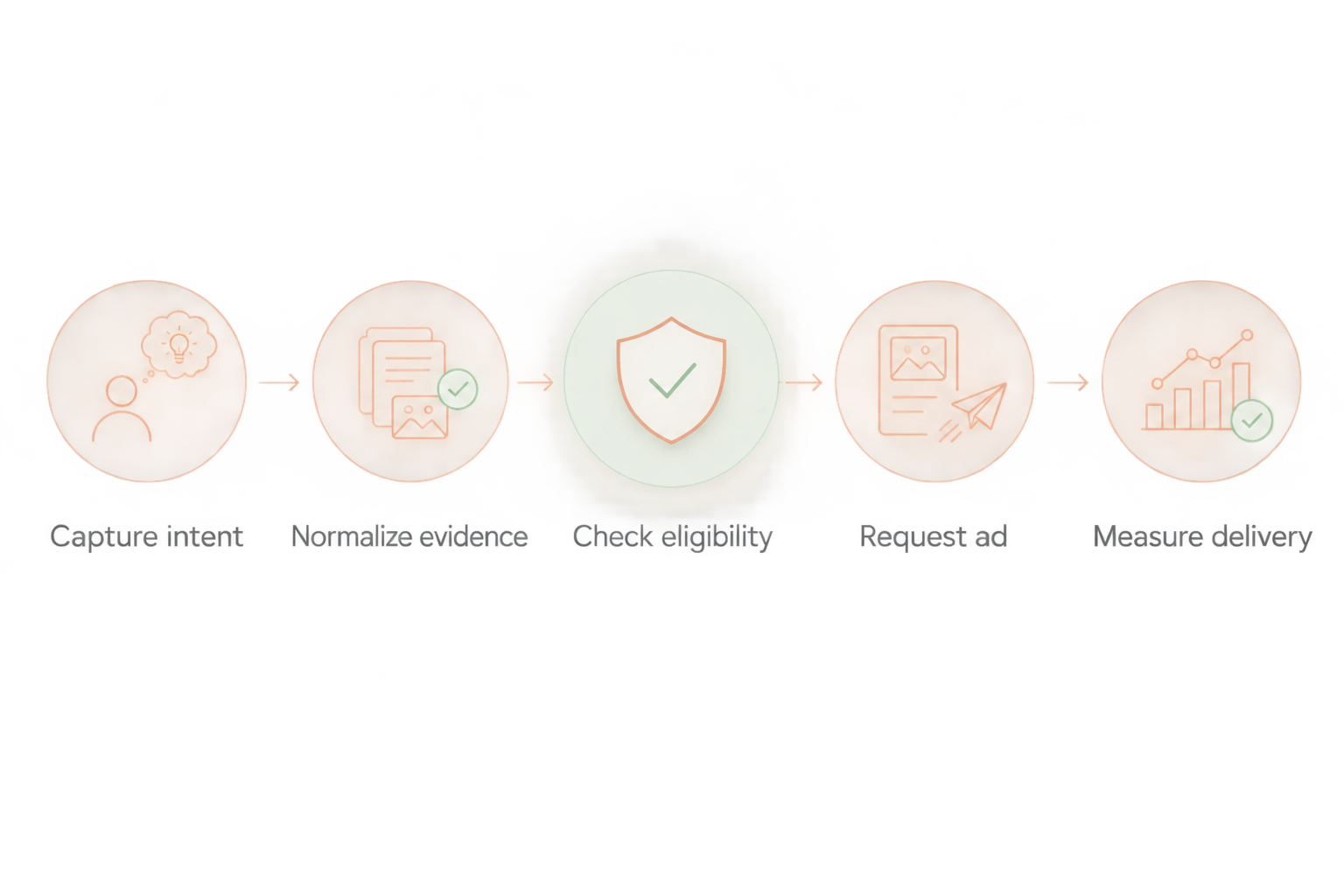
An evidence record is useful only if it preserves the distinction between observation and inference. Store the user's expressed task separately from source-derived categories so a reviewer can identify where each targeting decision originated.
Configuration unit: Ad handoff
Check eligibility
- Evaluate the normalized context against your application-owned advertising rules. Require a permitted task, usable evidence where enrichment is required, and a placement that is allowed for the current user state.
- Define an explicit no-ad outcome. Use it for excluded contexts, ambiguous intent, unusable evidence, and any other condition your policy rejects.
- Map approved context into the fields actually supported by the installed SDK. If the integration does not accept a proposed enrichment field, do not invent a parameter or put it into an unrelated field.
- Keep private source evidence inside your application unless the integration genuinely requires it and your data-handling rules permit transmission.
Expected result: The handoff produces either a documented SDK request or a no-ad decision with an internal reason. Raw retrieval output never becomes an ad request by default.
Elo's contextual ad SDK gives chat developers an ad-serving integration; the evidence adapter and eligibility rules described here remain application responsibilities. Do not treat the SDK as a replacement for your own privacy review, source validation, or placement rules.
Request ad
- Invoke the supported SDK flow using the installed version's documentation. Keep credentials that require server-side protection out of browser bundles and client-visible logs.
- Associate the pending result with the turn identifier and context revision. Discard a result if the conversation has moved to a different task before rendering.
- Render accepted sponsored content in a clearly identified advertising placement. Keep the sponsored label visible and separate from the assistant's factual answer.
- Handle an empty result or integration error without fabricating a recommendation. Continue the answer and leave the placement unfilled.
Expected result: A valid ad result reaches the intended turn's sponsored placement. Errors, exclusions, and stale results leave the chat usable without displaying a substitute ad.
For the 2026 release, verify the placement in the actual chat interface. A successful server response does not prove that the user saw the creative or its disclosure.
Configuration unit: Delivery verification
Measure delivery
- Record separate application states for eligibility, request initiation, response receipt, rendering, and interaction. These are your diagnostic states, not assumed vendor event names.
- Use documented SDK measurement hooks where provided. Do not report every received ad response as an impression; follow the integration's actual measurement contract.
- Prevent duplicate processing for the same placement and turn. Check both server retries and client rerenders.
- Run at least 6 staging cases: relevant evidence, irrelevant evidence, retrieval failure, excluded context, empty ad response, and a topic change while work is pending.
- For each case, verify the answer path, eligibility reason, rendered placement, and recorded events. Confirm that diagnostic logs exclude raw private transcripts and secrets.
Expected result: Your test record explains why an ad was displayed or suppressed and distinguishes delivery problems from targeting problems.
Set 3 release gates: correct context mapping, safe failure behavior, and accurate delivery measurement. These are acceptance criteria, not promised performance results.
Keep the 2026 baseline tied to deployed application and SDK versions. When a version changes, rerun the same fixtures so differences are attributable rather than anecdotal.
Second workflow: Refresh context when the task changes
Best for: multi-turn assistants where users refine or replace a task. A user can move from researching a category to comparing vendors, or abandon the topic entirely. Reusing the original targeting summary ignores that change.
- Detect a material task change in your application. Do not refresh merely because another token or partial response arrived.
- Advance the context revision and invalidate pending ad results associated with the superseded task.
- Reuse source evidence only when its subject, freshness, and access boundaries still fit the new task. Otherwise, request new evidence.
- Rebuild the context summary and repeat eligibility checks before making another ad request.
- Apply your placement-frequency rules independently. A context refresh should not automatically create another visible advertising opportunity.
Expected result: Follow-up turns use the active task's context, while outdated asynchronous results cannot appear beside a newer answer.
This variant adds state-management work. Use it when conversation changes justify that work; a simple assistant with isolated requests needs fewer moving parts.
Troubleshooting
Ads follow a page topic instead of user intent
Inspect the intent summary and evidence mapping separately. Remove source-derived categories that lack a connection to the expressed task, then rerun the irrelevant-evidence fixture. A source mentioning a category is not sufficient targeting justification.
An older ad appears after the user changes topics
Check context revisions at render time, not only when requests start. Reject pending results associated with an obsolete revision and prevent automatic insertion into the newest message container.
The answer waits for advertising dependencies
Inspect whether answer generation shares an awaited dependency chain with enrichment or ad delivery. Give the ad path an application-defined deadline and a no-ad fallback; do not delay the answer to fill a placement.
Events increase when the interface rerenders
Trace the placement identifier through retries, component remounts, and measurement callbacks. Deduplicate application processing and follow the SDK's measurement rules rather than adding another impression call to every render.
Enrichment completes but no ad appears
Check the stages in order: normalized evidence, eligibility outcome, supported request mapping, response, then rendering. Distinguish an empty response from an exception; neither proves that the evidence adapter failed.
Customize your workflow
Start with a single task category and a single sponsored placement. Expand only after you can trace targeting decisions and suppression reasons through the full workflow.
For more detail on the context boundary, read how to match ads to conversation context in an LLM app. Keep answer evidence and ad eligibility separate as the application grows.
Bring a sample normalized record, your placement design, and your failure-path tests to an Elo integration discussion. Confirm supported SDK inputs before expanding the adapter.
Review your ad integration
Discuss the context handoff, sponsored placement, and SDK requirements for your chat application.
FAQ
How do I build parallel web data contextual ad targeting?
Build an application-owned adapter between web retrieval and your ad integration. Normalize relevant evidence, check advertising eligibility, map only supported SDK inputs, and measure delivery separately from retrieval.
Does this workflow require a native Parallel and Elo connector?
No. The workflow uses your application's server-side adapter to connect retrieval output with a documented ad SDK flow. Confirm the supported inputs for the installed SDK before implementing the mapping.
Should I send the entire conversation to the ad integration?
Use the minimum context required by the documented integration and permitted by your data-handling rules. Remove secrets and unnecessary personal details before transmitting information outside your application.
What happens when web retrieval fails?
Continue the chat answer through its normal failure-handling path and skip enrichment-dependent advertising. Do not manufacture targeting evidence to keep the ad placement filled.
Can I refresh targeting when the user changes topics?
Yes, through application-owned context revision handling. Recheck eligibility for the new task and discard pending ad results associated with the previous revision.
Does a successful ad response count as an impression?
Do not count a successful response as an impression by default. Follow the SDK's documented measurement contract and distinguish response receipt from rendering and measured delivery.
One last thing
A correctly suppressed ad is a successful workflow outcome. Add a negative assertion to every failure-path test: the chat still works, no unsupported sponsored content appears, and no impression is recorded merely because a request ran.
That check catches a different class of defect than testing whether an ad can load. Keep both in the release process.