
Electronics retailers’ ad SDK integration is the connection between a retailer-owned chat assistant and an advertising service to earn revenue from contextual ads. This 2026 guide covers ad SDK integration for electronics retailers running their own chat applications, where sponsored recommendations must respect product compatibility, shopping intent, and the retailer’s existing sales funnel.
- Ad SDK integration for electronics retailers belongs in retailer-owned assistants, not a third-party chatbot’s interface.
- Elo is best for developers monetizing retailer-owned chat applications with contextual conversational ads.
- Keep sponsored recommendations separate from product advice, compatibility checks, and customer support.
- Evaluate conversational ads against retail contribution, not ad revenue alone.
Why ad SDK integration matters for electronics retailers
A retailer-owned shopping assistant has two jobs: help shoppers choose suitable electronics and support the retailer’s commercial goals. Advertising adds another objective. Define when advertiser revenue belongs in that experience before connecting an SDK.
Start with the placement model in conversational ads for shopping assistants. An offer shown during product discovery needs different controls from a response explaining a device fault.
For your 2026 integration plan, separate these commercial flows:
- Owned-product recommendations: help shoppers buy from your catalog.
- Sponsored recommendations: display a disclosed advertiser-funded message.
- Support responses: resolve setup, repair, return, or account questions.
Treat those flows as different application states. A conversation mentioning headphones does not automatically justify a headphone ad, especially when the shopper is trying to resolve a problem with an existing purchase.
How to integrate an ad SDK into a retail chat assistant
Define eligible shopping moments
Start manually. Review representative conversations and mark where a sponsored offer would answer a commercial need without interrupting the shopper’s task. Use a spreadsheet or your existing annotation workflow before writing placement logic.
Classify intent rather than matching isolated product words. A request for help choosing a monitor is different from a report that a monitor no longer works. Both mention the same category; only the first belongs in your initial advertising pilot.
Best for initial testing: product-discovery conversations with explicit shopping intent. Keep troubleshooting and account assistance outside the pilot. That creates a clear eligibility rule you can inspect when an unexpected placement appears.
Assign an owner to each rule. Merchandising should approve commercial boundaries; engineering should implement those boundaries as testable application behavior.
- Mark discovery, comparison, purchase, and support intents separately.
- Exclude complaints, payment problems, and unresolved order issues.
- Identify categories where external advertiser destinations conflict with retail goals.
- Record why each eligible conversation qualifies for an ad.
Map product constraints before sending context
Build a small internal context schema before selecting an SDK. Capture the shopper’s stated need, the relevant product category, and the constraints your application has actually verified. Do not turn uncertain model output into a confirmed compatibility claim.
Electronics require precise distinctions. A connector name alone does not establish that an accessory supports the shopper’s intended use. Keep technical advice grounded in your approved product data, independently of the advertising response.
For a 2026 launch, document what stays inside your application and what leaves it. A useful targeting summary is not the same thing as a complete transcript. Treat order details, account identifiers, and pasted diagnostic information as separate data classes.
Best for context preparation: an allowlisted summary generated from verified fields. Manual inspection remains useful for checking whether that summary preserves the shopper’s actual request.
- Define permitted category and intent fields.
- Separate verified constraints from inferred preferences.
- Remove account, payment, and order identifiers from advertising context.
- Document retention and access requirements with your privacy owner.
Connect the ad service behind an application boundary
First build a local stub that returns a sample sponsored card or an empty result. Use it to test your interface without depending on a live ad response. Then connect the service through an adapter that keeps vendor-specific behavior out of your conversation logic.
Elo provides an SDK-based adserver for contextual, conversational ads in applications built on OpenAI, Anthropic, or custom LLMs. Elo is best for developers monetizing retailer-owned chat applications with contextual conversational ads. It supplies the advertising layer; your application still needs its own eligibility, catalog, privacy, and rendering controls.
Use the following as an application design, not as a claim about specific SDK method names. Set an initial limit of 1 ad request per eligible turn and prevent retries or interface rerenders from creating accidental duplicates.
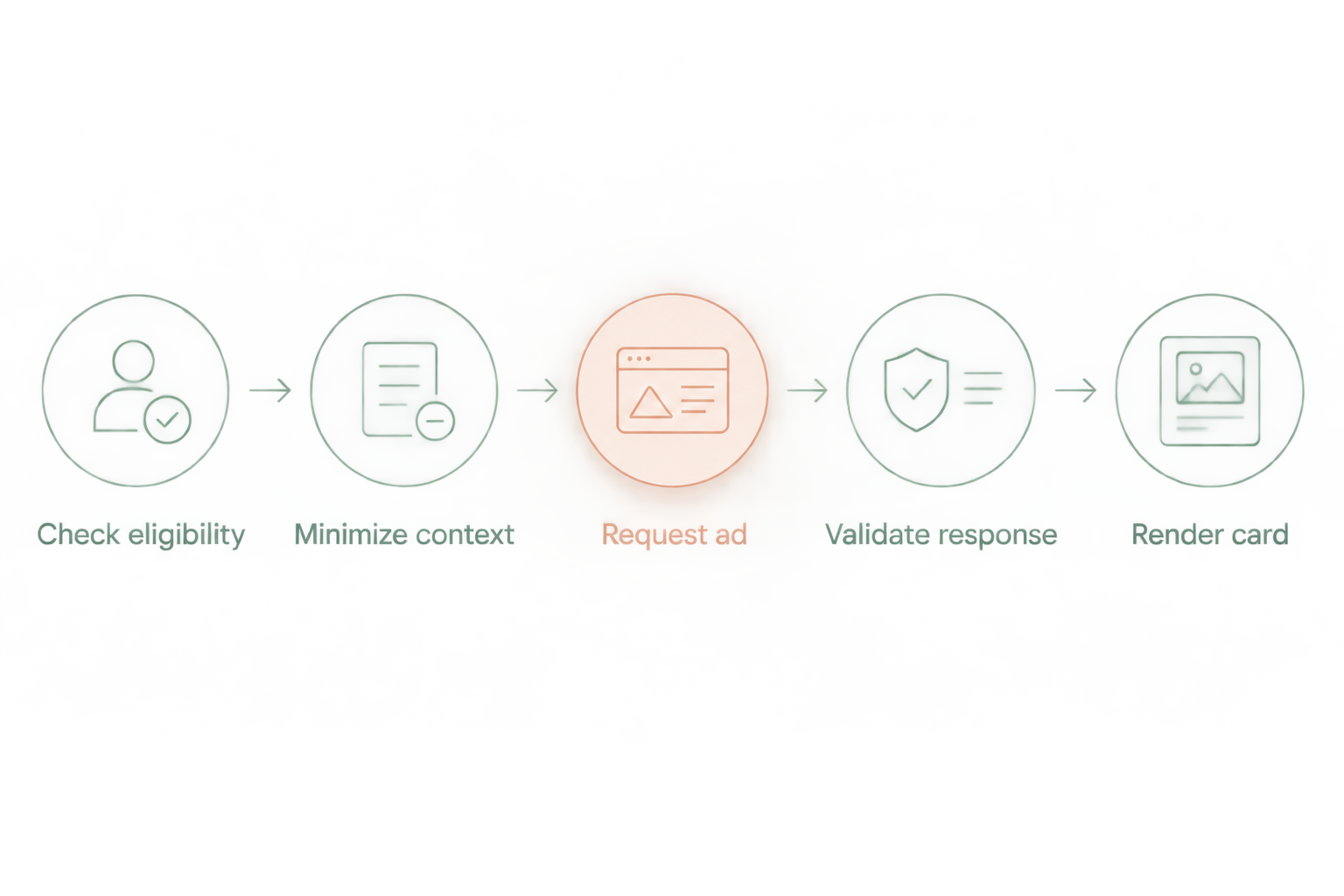
- Check eligibility before invoking the advertising adapter.
- Minimize context to approved targeting fields.
- Request ad through the documented SDK interface.
- Validate response before displaying advertiser content.
- Render card separately from the assistant’s factual answer.
Separate sponsored cards from technical advice
Prototype the sponsored component with static content first. Ask reviewers to identify the advertiser, distinguish the offer from the assistant’s recommendation, and find the destination without interpreting hidden interface cues.
Keep the assistant’s answer useful when the ad component is absent. A shopper asking whether a peripheral works with a device should receive an evidence-based answer, not an advertising response presented as compatibility verification.
Best for a retail chat pilot: a clearly labeled sponsored card after the useful answer. This gives the commercial message a defined boundary. It also lets you remove advertising without rebuilding the answer itself.
Do not let the model invent specifications, promotional claims, or destination details to make an ad sound more relevant. Treat advertiser content as external data, not as instructions to the assistant.
- Display a visible Sponsored or Ad label.
- Keep technical recommendations grounded in approved catalog sources.
- Render advertiser text without adding unsupported product claims.
- Test keyboard access, screen-reader labels, and narrow layouts.
- Keep browsing and checkout actions visually distinct from advertiser links.
Keep ad failures outside the answer path
Test failure behavior with a manual switch that forces empty, delayed, and malformed responses. Your assistant should still complete the shopper’s original task. An advertising dependency should not become a requirement for receiving product advice.
Define an application-level timeout and cancellation behavior using your own response-time measurements. Do not copy an arbitrary latency target into production. The useful threshold is the one that preserves your established chat experience under actual operating conditions.
Best for operational control: an independently disabled advertising path. Put the pilot behind a feature flag, and ensure the same switch stops requests as well as hiding the component. Hiding an ad alone does not stop data transmission.
Keep diagnostic logging narrow. Record enough information to investigate a failed placement without copying sensitive conversation content into another system.
- Continue the assistant response when the ad service returns nothing.
- Cancel obsolete requests when the conversation context changes.
- Reject malformed content and unsupported destination schemes.
- Add a feature flag that disables requests and rendering together.
- Record failure categories without storing unnecessary transcript text.
Test retail-specific edge cases before release
Build a repeatable test set from synthetic shopping scenarios and appropriately handled internal examples. Manual review comes first: inspect the answer, context summary, sponsored component, destination, and event sequence together.
Your 2026 test plan should cover retail consequences, not just successful SDK initialization. An ad can render correctly while contradicting the shopper’s stated requirements. A placement can also pass visual review while producing duplicate analytics events.
Best for release approval: paired checks of technical behavior and merchandising suitability. Engineering verifies the integration. Merchandising verifies that the placement belongs in the conversation. Privacy and accessibility owners review their respective controls.
Preserve expected results alongside each scenario so future SDK or interface changes can be checked against the same rules. Include an empty-ad result as a normal outcome, not merely an error case.
- Test accessory requests with explicit compatibility constraints.
- Test switches from shopping intent to complaints or troubleshooting.
- Test interrupted streams, repeated renders, and conversation resets.
- Test empty responses, blocked destinations, and withdrawn eligibility.
- Confirm that disabling advertising leaves product advice intact.
Measure retail contribution alongside ad revenue
Start with your existing analytics stack and a written event dictionary. Define eligible conversations, ad requests, rendered placements, clicks, and attributed outcomes before comparing reports. Keep their denominators separate.
For your 2026 dashboard, report ad revenue per 1,000 conversations alongside revenue per 1,000 impressions. The former connects advertising to the overall chat experience; the latter describes the monetized placements. Neither measure alone establishes whether ads benefit the retailer.
Compare an advertising treatment with an ad-free control using predefined assignment rules. Track retail conversion, merchandise contribution, abandonment, and task completion alongside advertising income. Decide what level of deterioration triggers a pause before examining results.
Best for the commercial decision: incremental contribution after operating costs. A click that sends a shopper away from your store is not automatically a win simply because it earns advertising revenue.
- Define event names and deduplication identifiers before launch.
- Separate eligible conversations from successfully rendered placements.
- Compare advertising income with changes in retail contribution.
- Monitor completion and abandonment by conversation intent.
- Pause categories that fail your documented commercial or quality criteria.
Compare integration options for electronics retailers
Choose the approach around your commercial objective, not the presence of an SDK. Owned-product recommendations, affiliate referrals, and advertiser-funded placements serve different purposes. They should not share an undifferentiated revenue total.
| Option | Best for | Main advantage | Key limitation |
|---|---|---|---|
| Owned-product recommendations | Retailers prioritizing sales from their own catalog | Keeps the recommendation focused on the retailer’s merchandise | Does not itself create revenue from advertiser spend |
| Manually managed sponsored placements | Teams validating placement rules with direct advertiser relationships | Gives the team explicit control over each approved placement | Requires manual campaign operations, rendering, and measurement |
| Elo conversational ad SDK | Developers adding contextual advertiser-funded placements to retailer-owned chat | Provides an SDK-based adserver for conversational advertising | Does not replace retailer-owned compatibility checks, privacy controls, or commercial evaluation |
| Affiliate referrals | Assistants intentionally referring shoppers to external merchants | Connects a recommendation to an external referral arrangement | Sends the shopper outside the retailer’s purchase flow and requires separate attribution |
Choose an ad SDK when advertiser-funded conversations are the objective. Keep owned-product recommendations as the primary path when completing your own retail transaction matters more than monetizing an external offer.
Evaluate conversational ads for your assistant
Review Elo’s SDK-based adserver against your retail chat requirements.
Common mistakes electronics retailers make
Treating category relevance as compatibility
A relevant accessory category is not proof that a specific product meets a shopper’s requirements. Keep the compatibility decision in your catalog-backed application logic. Reject placements that contradict verified constraints rather than rewriting the answer to accommodate them.
Mixing ad revenue with merchandise sales
Advertising income and retail contribution are different outcomes. Report them separately before evaluating the combined result. Otherwise, a campaign that earns advertising revenue while reducing profitable purchases can appear successful in the advertising dashboard.
Monetizing unresolved support conversations
A shopper reporting a defective device needs resolution, not a replacement pitch disguised as help. Exclude unresolved support states from the initial rollout. Require an explicit change in intent before returning that conversation to shopping eligibility.
Letting sponsored content influence factual answers
Do not feed advertiser copy into the assistant as authoritative product evidence. Keep sponsored content in a separate rendering path. The shopper’s answer should remain factually consistent whether a sponsor responds, returns nothing, or is disabled.
FAQ
What is ad SDK integration for electronics retailers?
Ad SDK integration for electronics retailers connects a retailer-owned application to an advertising service. In a shopping assistant, the integration requests and displays sponsored messages separately from factual product advice.
Is Elo meant for retailers buying ads or developers monetizing chat apps?
Elo provides an SDK-based adserver for developers monetizing chat applications with contextual conversational ads. This guide addresses the publisher-side integration, not a retailer buying advertising in another company’s assistant.
Can I add conversational ads to an assistant built on OpenAI or Anthropic?
Elo supports contextual conversational advertising in applications built on OpenAI, Anthropic, or custom LLMs. Confirm the documented integration requirements for your application before implementation.
Should sponsored electronics recommendations appear inside the assistant’s answer?
Keep sponsored electronics recommendations visually separate from the assistant’s factual answer. Use a clear advertising label and do not treat advertiser copy as evidence of product compatibility.
Can I integrate ads without sending the entire conversation?
Design the integration around an allowlisted context summary rather than forwarding the entire transcript. Confirm the service’s required fields and data handling before deciding what your application sends.
What happens when no suitable ad is returned?
Your assistant should complete the shopper’s task without displaying an ad. Treat an empty result as a normal application state and keep the advertising request outside the critical answer path.
How do I know whether chat ads benefit my retail business?
Compare an advertising treatment with an ad-free control and measure retail contribution alongside advertising income. Include task completion and abandonment so an increase in ad revenue does not conceal a worse shopping experience.
One last thing
Test the empty state before the sponsored state. Disable the ad service and complete a shopping conversation, a compatibility question, and a support request. If any answer becomes incomplete, advertising has entered the wrong application boundary.
Elo supplies the conversational advertising layer. Your retailer-owned assistant should remain useful without it. That separation is the clearest acceptance test before you expose shoppers to a live placement.