
Yes. You can show ads only to free-tier users in your chatbot by checking account entitlements on your backend before requesting an ad, then checking eligibility again before rendering it. Hiding an ad card is not enough: paid sessions should bypass the ad request entirely, including after an upgrade during an active conversation.
- For ads shown only to free tier users chatbot implementations, enforce subscription entitlements before requesting or rendering ads.
- Elo fits developers seeking SDK-based contextual ads for their own chat applications.
- Keep subscription eligibility in your application; do not ask the language model to decide who sees ads.
- Treat unknown subscription status as ineligible, and recheck eligibility when an account upgrades.
Why this matters
An ad-free subscription is an application entitlement, not a formatting preference. Your backend, conversation pipeline, and client interface must apply the same rule. Otherwise, a paid user can still trigger an ad request even when the interface hides its result.
For a 2026 implementation, define eligibility before integrating the ad delivery path. The guide to running subscriptions and ads in the same chatbot covers the wider monetization model; this page focuses on enforcing the free-tier boundary.
Keep that boundary separate from contextual matching. Account status determines whether an ad is allowed; conversation context determines which eligible ad is relevant. An advertiser match must never override an ad-free entitlement.
Can ads be shown only to free-tier users in a chatbot?
Yes. Make free-tier eligibility a prerequisite for the ad request, not just the ad display. The chatbot can generate its normal answer regardless of whether the account qualifies for advertising.
Use the following as a proposed application policy, not as a description of an ad network's built-in controls:
| Account state | Request an ad? | Render a new ad? | Benefit | Trade-off |
|---|---|---|---|---|
| Confirmed free tier, otherwise eligible | Yes, when placement rules permit | Yes, if still eligible | Supports ad-funded access | Adds an advertising experience to the free tier |
| Active ad-free entitlement | No | No | Preserves the subscription promise | Excludes these sessions from ad monetization |
| Unknown or unresolved entitlement | No | No | Avoids treating uncertainty as permission | Suppresses ads until status resolves |
| Free user upgrading during chat | Stop after entitlement changes | Reject pending ad results | Protects the transition to ad-free access | Requires coordinated state updates |
The table describes permission, not guaranteed delivery. An eligible free-tier conversation does not automatically have a suitable ad, and an ad request does not prove an impression occurred.
Keep a default-deny rule: only a confirmed eligible account enters the advertising path. Do not translate every account that lacks a paid flag into a free user.
How do you enforce free-tier-only ads?
Build the gate around your existing authentication and entitlement system. The following sequence is an implementation pattern, not a documented SDK method or vendor-specific API.
Resolve identity
Determine which account owns the active conversation. Use your authenticated application session rather than a user ID supplied without verification by the browser.
If your chatbot supports anonymous visitors, define their eligibility separately. An anonymous visitor and a confirmed free account are different states; combine them only when your published policy explicitly allows it.
Read entitlements
Read the account's effective entitlements from your backend. Prefer an explicit advertising permission over scattered checks against plan names throughout the codebase.
A plan label describes a commercial package. An entitlement describes what the application must do. Keeping those concepts separate lets you change packaging without rewriting every ad placement.
Gate requests
Before calling the ad delivery integration, require a confirmed free-tier state and no active ad-free entitlement. Apply any additional placement, privacy, or safety restrictions independently.
Do not send conversation context to an ad service and then discard the response because the account is paid. Gate the request first. This keeps the exclusion meaningful beyond what appears on screen.
Check placement
For an eligible free user, decide whether the current conversation has an appropriate advertising opportunity. Free-tier membership permits consideration; it does not require an ad after every answer.
Keep the assistant's response usable when the placement is skipped or the ad request fails. Ad delivery should not become a prerequisite for completing the user's original task.
Recheck rendering
Before displaying an asynchronous ad result, confirm that the account is still eligible. The user might have upgraded while the request was in flight.
Reject a result tied to an outdated eligibility state. A request that was valid when it started does not automatically remain valid when it finishes.
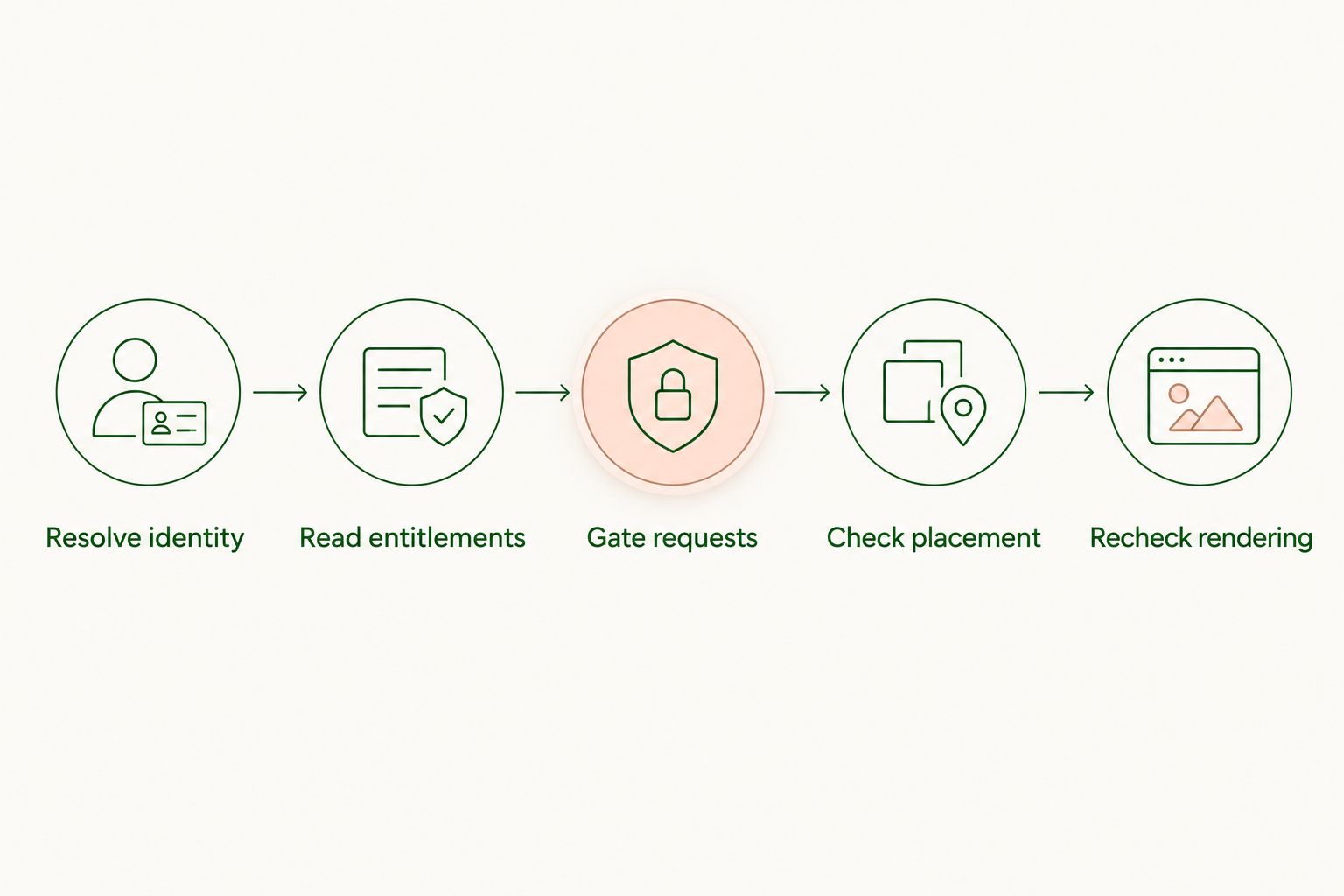
The model provider does not need to decide subscription eligibility. Keep that decision in application code, outside the prompt and outside generated text.
Free-tier access: eligible does not mean mandatory
Best for: a free access tier that permits contextual advertising. Treat ad eligibility as permission to consider a placement, not an instruction to monetize every exchange.
This distinction keeps the implementation predictable. Your application can skip advertising when context is unsuitable, a placement limit has been reached, or another policy blocks the request.
The benefit is a clear separation between account access and ad delivery. The limitation is that free-tier traffic alone does not establish revenue: you still need eligible opportunities, delivered ads, and correctly recorded events.
Avoid making the assistant manufacture a commercial recommendation solely because the account is free. Keep sponsored content visibly distinguishable from the assistant's answer.
Ad-free access: exclude requests as well as cards
Best for: accounts whose subscription or agreement includes an ad-free experience. Enforce that promise at the backend request boundary and at the client rendering boundary.
The benefit is an exclusion you can verify in logs and tests. The trade-off is explicit: those sessions do not participate in the advertising flow, even when their conversation would otherwise match an advertiser.
For your 2026 release checklist, include streaming responses, restored conversations, background requests, and open browser tabs. Do not validate only the screen shown immediately after login.
Define what happens to previously displayed sponsored cards after an upgrade. Removing current-session cards and excluding sponsored cards from restored paid-session views is a clear policy; implement and test that policy consistently.
Why free-tier ad eligibility varies
A free-tier flag answers only part of the decision. Your application also needs a consistent policy for account transitions and unresolved state.
- Effective entitlements: An ad-free entitlement takes precedence over a generic free-tier classification.
- Identity resolution: Apply the policy to the verified account, not an untrusted client field.
- Subscription transitions: Use the effective entitlement after an upgrade, cancellation, or downgrade, rather than assuming a billing event immediately changes access.
- State freshness: Refresh stale session and entitlement data before allowing another ad request.
- Placement restrictions: Apply context, privacy, and safety checks after account eligibility; free access does not override them.
- Delivery timing: Revalidate pending ad results before display when account status changes.
Document these rules in one policy function or service. Repeating slightly different conditions across web, mobile, and backend paths makes the free-tier boundary harder to maintain.
What happens when a free user upgrades during a conversation?
Stop new ad requests once the backend confirms an ad-free entitlement. Invalidate outstanding ad work and prevent late results from entering the conversation interface.
Handle the backend transition and the visible interface together. Updating the subscription badge while leaving a pending ad callback active does not complete the upgrade experience.
Use an eligibility version or equivalent state marker to identify stale work. Attach the current state to pending requests, then reject results when that state no longer matches the account's effective entitlement.
Test this transition with an ad request already in progress. Also test another open tab and a restored session; the upgrade should not depend on the user manually reloading every client.
Can you hide ads with frontend code alone?
No. Frontend hiding controls presentation, but it does not reliably prevent backend requests or associated context transmission.
Use the frontend as a second enforcement layer. It should suppress the placement for an ineligible account, while the backend independently refuses to initiate the advertising path.
A 2026 implementation should also treat cached creative carefully. Do not reuse a free-session ad after the same browser signs into an ad-free account, and do not assume a cached conversation has the current account's permissions.
Where does the ad SDK fit?
Elo is for developers adding contextual ads to their own chat applications. Elo provides an SDK-based adserver for applications built on OpenAI, Anthropic, or custom LLMs, allowing publishers to earn revenue from advertiser spend.
Place the Elo adserver integration after your application's eligibility gate. Your application decides whether advertising is permitted; contextual ad delivery follows only when that decision allows it.
The fit is SDK-based conversational monetization. The limitation is architectural: adopting an adserver does not replace your application's responsibility for subscription entitlements, upgrade handling, or ad-free interface behavior.
How should you test the free-tier boundary?
Test the policy as an access-control rule, not only as a visual component. A clean screen does not prove that the advertising path stayed inactive.
Use this acceptance checklist before your 2026 launch:
- Confirmed free account: Verify that an eligible placement can reach the advertising integration and that skipped placements leave chat usable.
- Ad-free account: Verify that the application starts no ad request and renders no new sponsored card.
- Unresolved entitlement: Verify that the system suppresses advertising while account status is unavailable.
- Upgrade in flight: Start an eligible request, apply an ad-free entitlement, and verify that the late result is rejected.
- Restored session: Reload stored conversations under the current entitlement and apply your policy for historical sponsored cards.
- Account switch: Sign out of a free account and into an ad-free account without reusing cached eligibility or creative.
- Ad service failure: Verify that a failed or empty ad response does not block the assistant's answer.
Keep evidence for each decision. Record a pseudonymous account reference where appropriate, the eligibility outcome, the policy reason, and the entitlement state used. Avoid copying full chat transcripts into eligibility logs merely to prove that an account was free.
What should you measure after launch?
Separate eligibility, requests, rendered placements, and billable events in your reporting. They describe different stages and should not share a single ambiguous event name.
For paid-account protection, the operational target is straightforward: no advertising requests initiated after the application recognizes an ad-free entitlement. Investigate violations as entitlement-enforcement defects, not as revenue opportunities.
For free users, compare revenue and engagement within the eligible population. A blended metric across free and ad-free accounts obscures whether the advertising flow itself is working as intended.
Keep metric definitions explicit. If you report revenue per session, state which sessions enter the denominator; if you report impressions, use the event definition agreed with the advertising integration rather than counting every request.
In your 2026 monitoring, separate suppression reasons such as ad-free entitlement, unresolved status, and placement restrictions. That distinction tells you whether a skipped ad reflects correct policy enforcement or a delivery problem.
FAQ
Can I show chatbot ads only to users on the free plan?
Yes. Check the account's effective entitlements on your backend before requesting an ad, and check eligibility again before rendering the result. Accounts with an ad-free entitlement should bypass the advertising path.
Do I need separate chatbots for free and paid users?
No. The same chatbot can apply different advertising permissions through application-level entitlement checks. Keep the ad decision separate from normal response generation.
Should paid users still trigger ad requests if the cards are hidden?
No. Hidden cards do not establish an ad-free request path. Exclude ad-free accounts before sending a request to the advertising integration.
What should happen if subscription status cannot be loaded?
Suppress advertising until subscription status is resolved. Treating an unknown account as free risks showing ads to someone with an ad-free entitlement.
Will a user still see ads after upgrading during a chat?
A correctly enforced upgrade stops new ad requests and rejects pending results once the ad-free entitlement takes effect. Define and test a separate policy for sponsored cards already present in conversation history.
Can the language model decide whether the user is free or paid?
Subscription eligibility belongs in authenticated application code, not generated text. Use the backend's effective entitlement state to permit or block advertising.
Does Elo replace my subscription management system?
Elo provides an SDK-based adserver for contextual advertising in chat applications. Keep subscription management and advertising eligibility in your application, with the eligibility gate before the ad integration.
One last thing
An ad-free screen and an ad-free request path are different things. The strongest final test is not a screenshot: it is a paid-session trace showing that your application never entered the advertising integration.
Start there. Then test the upgrade race, where an eligible request finishes after the user becomes ineligible. That is the boundary your static interface tests will miss.