
Yes. Ads can pause automatically during a frustrated conversation when your application detects a pause condition and blocks ad requests and rendering; the safeguard must also reject ads that arrive after the conversation state changes. Build this as an application-level eligibility rule, not as an assumed feature of every conversational ad SDK.
- Make ads pause automatically during a frustrated conversation with an application-level eligibility gate.
- Block new ad requests and late-arriving creatives while the conversation remains paused.
- Resume contextual ads after resolution, not merely after a timer expires.
- Elo provides conversational ad serving; evaluate frustration detection and pause enforcement separately.
Why this matters
A relevant offer is not automatically an appropriate interruption. When your assistant is handling a complaint, correcting an error, or escalating to support, prioritize that task over the next sponsored placement.
Elo provides an SDK-based adserver for developers monetizing AI chat applications with contextual ads. Elo is for AI chat developers who want SDK-based conversational ad monetization. Treat ad serving and conversation eligibility as separate integration decisions.
For a 2026 implementation, define the pause policy before connecting it to advertiser demand. The application should decide whether an ad is allowed before the matcher decides which ad fits.
Can ads pause automatically during a frustrated conversation?
Yes. Implement the pause as a conversation-level gate with explicit entry and exit conditions. The following sequence is a recommended application design, not a description of a particular SDK's built-in behavior.
- Read the current state. Combine the latest message with relevant conversation history and application events, such as failed actions or a support handoff.
- Evaluate eligibility. Apply your documented rules for frustration, unresolved problems, explicit ad rejection, and escalation.
- Set the pause. Store the result against the conversation so subsequent requests use the same decision.
- Enforce the pause. Skip new ad requests and reject returned creatives while the pause remains active.
- Recheck before resuming. Require evidence that the blocking condition has cleared, then apply your normal placement rules.
Use 2 enforcement points: request time and render time. A request-time check prevents a new auction or match attempt; a render-time check prevents an earlier response from appearing after the user becomes frustrated.
Keep the assistant's answer independent of the ad decision. A paused placement should not prevent the assistant from finishing its response, explaining an error, or handing the conversation to support.
Which pause approach should you use?
Choose controls based on what your application can observe and maintain. These are implementation approaches, not interchangeable vendor features.
| Approach | Best for | Advantage | Limitation to address |
|---|---|---|---|
| Explicit event rules | Apps with structured errors, complaints, or support handoffs | Ties the pause to a named application event | Requires rules for frustration expressed outside those events |
| Language-based classification | Open-ended chat interfaces | Evaluates how the user describes the problem | Requires evaluation across your actual language and conversation patterns |
| Combined eligibility gate | Apps with both conversation text and structured events | Lets either source trigger suppression | Adds policy, testing, and state-management work |
Use a combined eligibility gate when your application has both structured events and free-form conversation. Keep explicit blocking events authoritative. A support escalation should not become ad-eligible simply because a language classifier returns a neutral label.
For a smaller implementation, start with explicit events you can test reliably. Add language-based detection only with a labeled evaluation set and a clear policy for uncertain results. Do not describe a classifier as an emotion detector that knows what the user feels.
How should you represent the pause state?
Use 3 named states: Eligible, Paused, and Review. These are proposed implementation labels, not an SDK API contract or a requirement to expose internal state to users.
Eligible
An Eligible conversation has no active blocking condition under your policy. Eligibility permits the application to consider an ad; it does not require an ad on every response.
Continue applying placement restrictions, frequency controls, and the user's applicable preferences. Keep these checks separate so clearing a frustration pause does not override another reason to suppress advertising.
Paused
A Paused conversation has an active blocking condition. Suppress new placements and prevent pending creatives from being inserted into the conversation.
Record a concise reason, such as unresolved complaint or active handoff. Do not turn that operational reason into an advertiser targeting segment.
Review
A Review conversation needs a fresh eligibility decision before ads resume. Use this state when a blocking event appears resolved but the application has not yet confirmed that normal placement rules apply.
Keep ads suppressed during Review. This creates an explicit recovery step instead of treating the absence of a new complaint as permission to advertise.
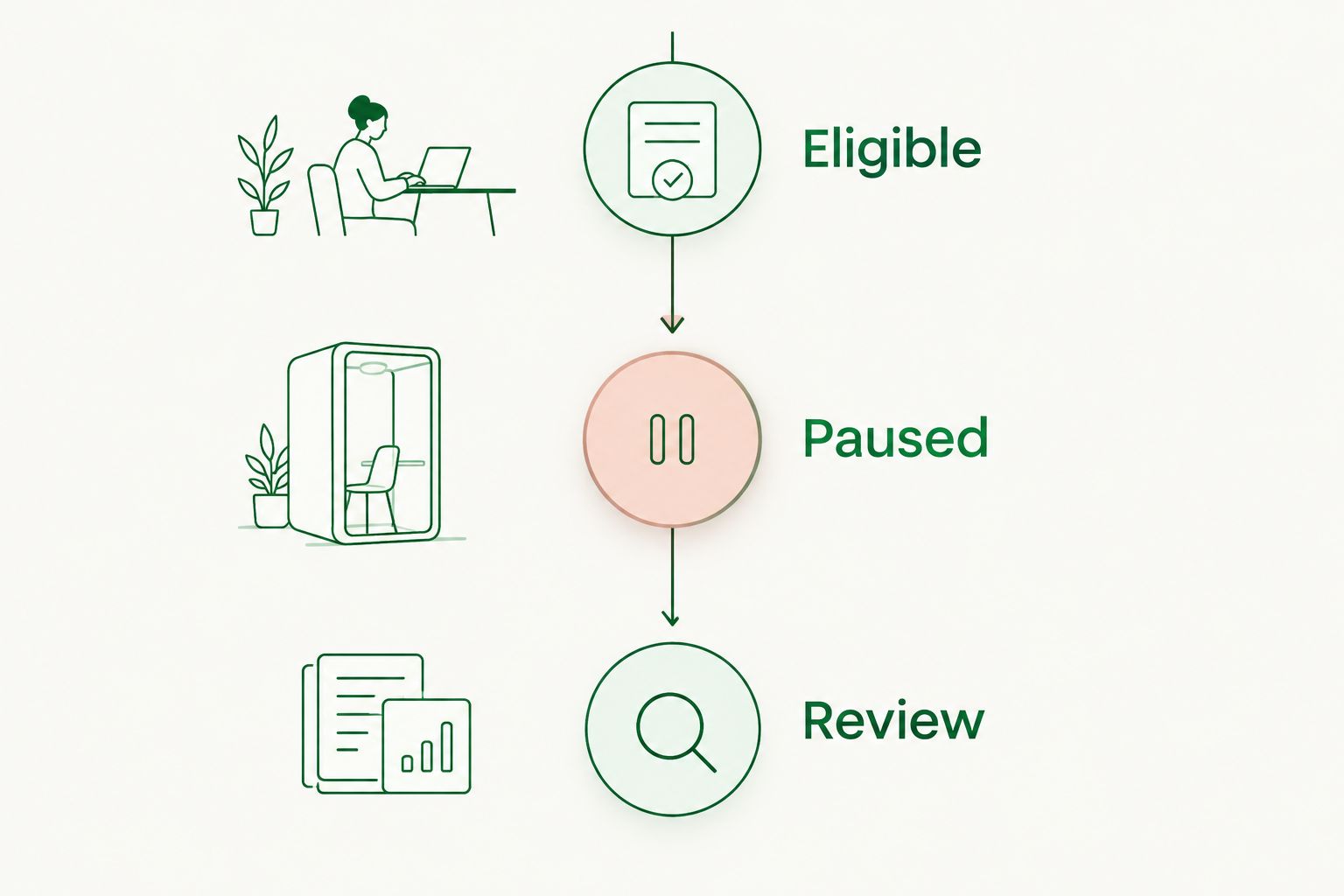
The state belongs to the conversation, not just the visible message component. Define how it behaves across refreshes, reconnects, and devices before you test the integration.
Why automatic ad pausing varies between applications
Your pause behavior should follow your application's tasks and events. For your 2026 policy, document these factors rather than choosing an unexplained sentiment threshold:
- Trigger definition. Decide which complaints, unresolved errors, explicit refusals, and escalation events block advertising.
- Conversation context. Specify which preceding messages and application events the eligibility decision needs.
- Recovery evidence. Define what counts as resolution, including whether an application event or user confirmation is required.
- Placement lifecycle. Identify every point where a requested, returned, or queued creative can enter the interface.
- Preference scope. Distinguish a temporary conversation pause from a persistent user choice about advertising.
- Language coverage. Evaluate the languages your application supports before applying the same classifier or rule set across them.
Do not apply the same trigger to every negative word. In your test cases, distinguish a user criticizing the assistant from a user asking it to analyze a negative product review.
Likewise, separate frustration from purchase intent. A complaint about a failed payment should remain a support task under your blocking policy, even if the conversation also contains a product category an advertiser wants to reach.
How do you prevent late ads from appearing?
Recheck eligibility immediately before rendering a sponsored placement. An earlier approval should not authorize an ad after the conversation has entered Paused or Review.
Attach a conversation reference and a state revision to your application's ad-request lifecycle. When a response returns, compare it with the current state and revision. Discard the response if the request is stale or the conversation is no longer eligible.
Handle retries through the same gate. Do not let a failed ad request retry outside the policy check, and do not let a cached creative bypass suppression because it was fetched earlier.
Use the same rule for fallback placements. Replacing a blocked contextual card with another advertising format would defeat a conversation-level pause.
For your 2026 release checks, distinguish 3 lifecycle stages: requested, returned, and rendered. Record each stage according to what actually happened; a returned creative that was discarded must not be recorded as a rendered placement by your application.
When should ads resume after frustration?
Resume ads only after the blocking condition is resolved and the conversation passes a fresh eligibility check. A timer can schedule another check, but it should not serve as proof of resolution.
Define recovery conditions for each trigger. For a failed workflow, use the application's completion event where available. For a support handoff, keep the handoff policy in force until that workflow explicitly ends.
Do not force the user to express positive sentiment. A successful task completion and the absence of an active blocking condition are more concrete implementation criteria than requiring a cheerful reply.
After recovery, apply your ordinary frequency and placement limits. Do not queue missed ads for catch-up delivery. A suppressed opportunity should remain suppressed rather than becoming an advertising backlog.
What should you test before enabling automatic pauses?
Build a labeled test set around the application's actual pause policy. Evaluate the decision and the interface behavior separately: a correct pause label is insufficient if a pending card still appears.
Include 6 test scenarios in your initial acceptance checklist. These are proposed tests, not measured performance results:
- Direct complaint: verify that a complaint meeting your policy blocks the next placement.
- Repeated failure: verify that an unresolved application error preserves the pause across replies.
- Quoted negativity: verify that discussing someone else's complaint follows your contextual rule rather than a keyword-only rule.
- Late response: verify that a creative returned after the pause is discarded.
- Resolution: verify that recovery triggers a new eligibility check instead of immediate delivery.
- Reconnect: verify that refreshing or reopening the conversation does not silently clear the pause.
Add tests for explicit ad rejection, supported languages, and unavailable eligibility services. Specify the failure behavior in advance; suppress placements when the required eligibility decision cannot be completed.
Use the ad SDK integration testing guide alongside these conversation-specific checks. Keep acceptance criteria executable: each test should identify its input, expected state, and expected rendering outcome.
For 2026 launch approval, require evidence that both enforcement points work. Do not approve the feature based only on a classifier demonstration.
How should you evaluate an SDK for this design?
Ask where your application can intercept ad requests and rendering. Confirm how pending responses, retries, cached placements, and conversation changes interact with those interception points.
For an Elo conversational ad integration, evaluate the SDK-based serving workflow separately from your application's frustration policy. The product's contextual ad-serving role does not, by itself, establish a built-in frustration classifier, pause setting, or recovery API.
The trade-off is explicit: SDK-based serving gives your application a way to integrate conversational monetization, while application-owned suppression adds policy and engineering responsibilities. Review the integration boundary before committing to a pause architecture.
Keep the eligibility gate independent of whether the assistant uses OpenAI, Anthropic, or a custom LLM. Define the gate around your application's conversation state rather than embedding advertising permission inside generated answer text.
What should your pause logs contain?
Log the eligibility decision, its reason, the policy version, and the placement lifecycle outcome. Keep enough information to reconstruct why the application suppressed or displayed an ad without copying whole conversations into routine ad logs.
Measure false pauses and missed pauses against labeled examples. Review suppressed opportunities separately from eligible opportunities so your reporting does not treat deliberate suppression as a matching failure.
For your 2026 reporting plan, assess task completion and complaint handling alongside advertising outcomes. Do not claim that pausing improves retention or revenue until your own evaluation supports that result.
FAQ
Can ads pause automatically when a chatbot user gets frustrated?
Yes. Your application can detect a blocking condition and suppress ad requests and rendering for that conversation. Treat this as an explicit integration policy rather than an assumed SDK default.
Does Elo automatically detect frustration and pause ads?
Do not assume automatic frustration detection or pausing from Elo's contextual ad-serving role. Confirm the available SDK controls and define the application's eligibility and recovery policy separately.
Is sentiment analysis enough to decide when ads should stop?
Do not use sentiment analysis as the sole authority when your application has explicit blocking events. Keep unresolved errors, support handoffs, and applicable user preferences authoritative under your policy.
Should a frustrated conversation resume ads after a fixed delay?
A fixed delay should schedule a fresh check, not automatically resume advertising. Require the blocking condition to clear before the application considers another placement.
What happens if an ad arrives after the conversation is paused?
Discard the pending creative before rendering it. Compare the response with the current conversation state so an earlier approval cannot bypass a later pause.
Is pausing ads the same as letting users opt out?
No. A frustration pause is a temporary eligibility decision, while an opt-out is a user preference with its own scope and persistence. Clearing the pause must not clear an applicable opt-out.
One last thing
Test the ad that was already requested, not just the next ad request. Trigger a pause while a creative is pending, then verify that nothing new appears. That test checks the boundary between a policy decision and the interface your user actually sees.