
Yes. An AI chatbot can show ads and pass app store review when the ads, data handling, purchase flows, and chatbot itself meet the store’s rules; contextual placement does not exempt your app from privacy, disclosure, or content requirements.
- AI chatbot ads app store review permits advertising, not undisclosed sponsorship or prohibited tracking.
- Apple reviews ad behavior and third-party SDK data practices, not just the chatbot’s answers.
- Google Play’s ads and AI-generated content policies apply separately.
- Elo suits developers seeking an SDK-based adserver for contextual, conversational ads.
Can an AI chatbot show ads and still pass app store review?
Ads are not a blanket disqualifier. The implementation is what you must defend. Apple’s App Review Guidelines address advertising explicitly, and Google Play has policies for apps that display ads. Neither framework gives conversational advertising an exemption from the rules applied to other app formats.
For a 2026 submission, start with the stores’ published policies rather than an ad network’s approval. Apple’s App Review Guidelines, particularly the advertising and privacy provisions, cover the iOS app. Google Play’s Ads, User Data, and AI-Generated Content policies cover the Android implementation. Check their current wording before submission.
Use the following comparison to separate review requirements from design choices. For placement details, see how to disclose sponsored ads in an AI chatbot.
| Review area | Apple App Store | Google Play | What you should prepare |
|---|---|---|---|
| Advertising | Advertising must meet the App Review Guidelines | Ads are treated as part of the app and must follow Play policies | A visible ad label and a working placement |
| Data handling | Privacy disclosures and tracking rules apply to SDK behavior | User Data and Data safety requirements apply to SDK behavior | A documented data flow |
| Chatbot content | Safety requirements depend on the app’s content and functionality | AI-generated content requirements apply to covered apps | Working safety and reporting controls |
| Digital purchases | In-app purchase rules apply, subject to relevant exceptions | Payments rules apply, subject to relevant exceptions | An explanation of what each purchase unlocks |
| Review access | Reviewers need access to the app’s functionality | Reviewers need access to restricted functionality | Credentials and reproducible instructions |
This is a preparation framework, not an approval guarantee. A compliant ad placement cannot compensate for a broken login, prohibited chatbot content, or inaccurate privacy disclosures.
Why this matters
A chatbot puts advertising beside text users expect to be an answer. That creates a practical disclosure problem: an offer can look like the assistant’s independent recommendation unless your interface separates the two.
Your SDK integration also changes the app’s data flow. A conversation sent to an ad matcher is a disclosure to another service, even when the placement is contextual rather than based on a persistent advertising identifier. Review the payload, not the targeting label.
For your 2026 release, treat monetization as a change to the app’s interface, privacy documentation, and testing plan. Do not treat it as an isolated component that only the ad provider needs to explain.
What should you check before submitting an ad-supported chatbot?
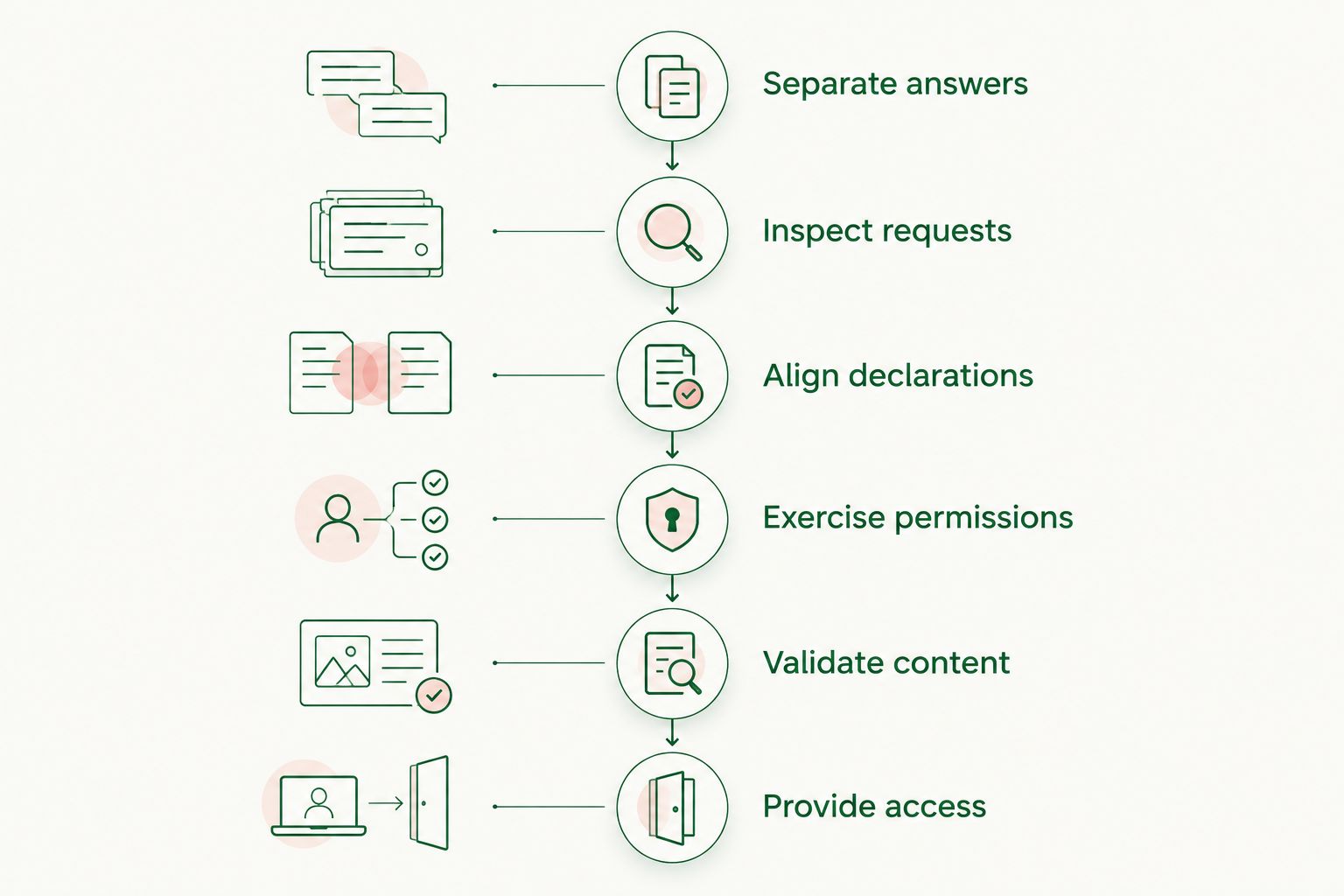
Use these 6 submission checks to make the integration inspectable. They are engineering recommendations, not a store-prescribed checklist or a promise of approval.
Separate answers from sponsorship
Render the assistant’s answer and the sponsored placement as distinct interface elements. Use a clear label such as Sponsored or Ad where the user encounters the commercial content, not only in a settings page or privacy policy.
A native card fits the conversation without needing to impersonate the assistant. Its advantage is contextual placement; its limitation is that you still need an unmistakable commercial boundary. Do not let generated prose disguise a paid placement as neutral advice.
Inspect the ad request
List every field sent to the adserver: message text, inferred topic, identifiers, device information, and event metadata. Inspect actual network requests rather than relying only on the names of SDK methods.
Send the minimum context needed for the placement you are implementing. A topic summary avoids transmitting unrelated conversation content, but it is still data you must classify and disclose accurately. Do not assume a summary is anonymous merely because it omits the full transcript.
Align declarations with behavior
Map the SDK’s collection and sharing behavior to Apple’s privacy disclosures and Google Play’s Data safety form. Include third-party SDK activity; the publisher remains responsible for what the app does.
Also inspect retention and downstream use. The relevant question is not just what leaves the device, but who receives it and what happens afterward. Your privacy policy, consent interface, and store declarations should describe the same implementation.
Exercise permission states
On iOS, determine whether your implementation performs tracking under Apple’s definition. If it does, App Tracking Transparency requirements apply. Contextual targeting alone does not settle that question; identifiers, measurement, and downstream data combinations matter too.
Test 3 permission states where applicable: not requested, granted, and denied. Confirm the app respects each state. Refusing tracking permission must not be treated as permission to fingerprint the user through another mechanism.
Validate content controls
Check both the chatbot’s outputs and the advertisements it can display. The assistant and the ad system introduce separate content paths; filtering one does not establish that the other is safe.
For Android, Google Play’s AI-Generated Content policy requires covered apps to provide an in-app mechanism for reporting or flagging offensive generated content. Do not assume an advertiser-report button satisfies the chatbot reporting requirement, or vice versa. Make each control’s purpose clear.
Give reviewers reproducible access
Provide working credentials if login is required, explain where ads appear, and describe the steps needed to reach the placement. If a placement depends on conversation context, supply an example prompt that demonstrates the intended flow.
Keep 2 review records ready: a placement screenshot and a data-flow inventory. These are preparation artifacts, not mandatory documents for every submission. They help you explain what the reviewer sees and what the SDK sends.
Why app store review outcomes vary
The same ad format can sit inside very different applications. A general-purpose assistant, a child-directed chatbot, and an app handling sensitive conversations do not present the same policy questions.
These factors determine what you need to examine:
- Audience: Child-directed distribution brings additional restrictions. Apple’s Kids Category and Google Play’s Families policies require separate assessment before adding advertising.
- Conversation content: Health, financial, and other sensitive information changes the privacy analysis. A relevant offer does not justify forwarding everything the user disclosed.
- SDK behavior: Collection, tracking, sharing, and measurement determine your obligations. The word contextual does not describe all those operations.
- Placement behavior: Clear labels, predictable navigation, and controls that do what they say matter. A conversational format is no defense for deceptive interaction.
- Purchase destination: An advertiser’s external offer and a purchase unlocking your app’s digital functionality raise different payments questions.
- Review access: Login barriers, unavailable placements, and incomplete instructions prevent reviewers from inspecting the functionality you submitted.
For a 2026 submission, document those factors for the actual build. A policy assessment for an earlier integration does not describe a changed payload, a new audience, or a different checkout flow.
Are contextual ads exempt from Apple’s tracking permission?
No. Contextual ads are not automatically exempt from App Tracking Transparency. Apple’s definition of tracking concerns how data is linked and shared for advertising or advertising measurement, not simply whether a placement matches the current conversation.
A design that uses conversation context without cross-company tracking differs from one that joins chat activity to third-party profiles. Inspect the entire chain, including attribution and analytics components. SDK documentation is evidence to examine, not a substitute for checking the requests your app actually sends.
Apple’s privacy rules also address sharing personal data with third parties, including third-party AI services. Distinguish the model provider from the adserver in your data inventory. Permission or disclosure for one recipient does not automatically describe another recipient’s use.
For your 2026 build, separate tracking analysis from general privacy analysis. An integration that does not perform tracking still has data-handling obligations.
Can an ad link open an external purchase page?
An external advertiser destination is not automatically the same as an external checkout for your app’s digital features. Evaluate what the user is buying and what the transaction unlocks.
Do not use an advertising card as a disguised route around the store’s payment requirements. If the destination sells access, credits, or other digital functionality consumed in your chatbot, assess the applicable payments rules and exceptions for the storefront and distribution program involved.
For a third-party advertiser offer, inspect the destination and the transition from chat to browser. Make the commercial action explicit. Avoid a card that looks like a chat control but opens a purchase flow instead.
Can a native ad card look like part of the assistant’s answer?
A native ad can match the interface without hiding its sponsorship. Visual consistency and commercial disclosure are separate decisions.
Choose the format by the interaction you can explain clearly:
| Placement option | Best for | Advantage | Limitation |
|---|---|---|---|
| Labeled native card | Contextual offers beside an answer | Separates commercial content from generated text | Requires clear labeling and destination handling |
| Labeled sponsored text | Compact chat layouts | Uses little interface space | Can be mistaken for independent advice if attribution is weak |
| Separate banner | Explicitly separate advertising space | Creates a distinct commercial area | Offers less room to explain conversational relevance |
These are design trade-offs, not approval rankings. No format guarantees review success. Choose the placement whose sponsorship remains obvious during normal use, including scrolling, accessibility interaction, and returning from an advertiser destination.
Test that boundary after generated text changes. A label that is clear in a static mockup can become ambiguous when the assistant adds an introduction or repeats the advertiser’s claim in its own voice.
Where an SDK-based adserver fits
Elo suits developers seeking an SDK-based adserver for contextual, conversational ads. It serves developers of AI chat applications built on OpenAI, Anthropic, or custom LLMs and lets them earn revenue from advertiser spend.
Elo addresses the advertising integration. The benefit of Elo’s conversational adserver is its fit with chat monetization; the boundary is that your app still owns its interface, disclosures, permissions, and review submission. An adserver is not an app store approval mechanism.
Evaluate Elo against your implementation’s data and display requirements before release. Ask for the information needed to document requests, recipient behavior, and measurement. Then verify the behavior in your build rather than inferring compliance from the category of product.
FAQ
Can my AI chatbot show ads on iOS?
Yes, an AI chatbot can show ads on iOS when the app and its advertising comply with Apple’s App Review Guidelines. Ad disclosure, SDK data handling, tracking, content, and purchase flows remain part of that assessment.
Will contextual ads guarantee that my chatbot passes review?
No, contextual ads do not guarantee app store approval. The store assesses the app’s implementation, including functionality unrelated to advertising.
Do I need Apple’s tracking permission for every chat ad?
No, Apple’s tracking permission requirement depends on whether the implementation performs tracking under Apple’s definition. Inspect identifiers, data sharing, attribution, and downstream use rather than deciding from the ad format alone.
Does my ad SDK belong in Google Play’s Data safety form?
Your Data safety declarations must account for relevant data collection and sharing by third-party SDKs. Match the declarations to actual app behavior and the applicable form definitions.
Can I send a user’s entire conversation to an ad matcher?
Conversation sharing must meet applicable privacy, consent, platform, and contractual requirements. Minimize the request payload and examine sensitive content, recipients, retention, and downstream use before sending it.
Can I keep ads hidden until after app store approval?
Do not hide functionality from reviewers or use a post-approval switch to introduce deceptive behavior. Give reviewers access and explain how the submitted advertising flow works.
Can a chatbot for children use the same ad setup as an adult app?
Do not assume an adult-app advertising setup is suitable for a child-directed chatbot. Assess Apple’s Kids Category requirements and Google Play’s Families policies separately before selecting SDKs and data flows.
One last thing
Test the empty ad response, not just the successful placement. Your assistant should still answer when there is no suitable advertisement, the ad request fails, or a privacy choice prevents an optional advertising operation.
For the 2026 release, make that failure path visible in your test plan. Keep ad matching separate from answer generation so a monetization failure does not become a broken conversation. This is an engineering recommendation, not a prediction about revenue or review timing.