
Yes, conversational ads can work inside an in-app WebView when the ad integration supports that embedded runtime and the app handles rendering, navigation, and measurement correctly. A successful mobile-browser test does not establish WebView compatibility; validate the SDK, storage behavior, and click flow inside the actual app before release.
- Conversational ads in app webview are feasible; validate the embedded runtime, not just the mobile browser.
- Android WebView and iOS WKWebView need separate integration tests for rendering, navigation, and lifecycle behavior.
- Elo provides an SDK-based adserver for contextual chat ads; confirm WebView compatibility before choosing an integration path.
- Keep sponsored cards separate from assistant answers, and keep chat usable when ads fail.
Can conversational ads work inside an in-app WebView?
Yes. The deciding factor is the integration contract, not whether the chat screen lives inside a native app. A WebView can render web content and run JavaScript when configured to do so. Your ad integration still needs to function within the permissions, network rules, and lifecycle of that container.
For developers evaluating an SDK-based adserver, Elo provides contextual, conversational ads for chat applications built on OpenAI, Anthropic, or custom LLMs. That product description establishes the use case, not a WebView compatibility guarantee.
Choose the architecture around the chat interface you already own:
| Integration approach | Best for | Advantage | Limitation |
|---|---|---|---|
| Web-rendered ads | Apps whose chat interface already runs inside a WebView | Keeps the card and conversation in the same web layout | Requires a web-compatible integration and embedded-runtime testing |
| Native-rendered ads | Apps with a native conversation interface | Gives the app direct control over layout and lifecycle | Requires a supported native integration or a documented rendering contract |
| Web/native bridge | Apps that deliberately split responsibilities between web and native code | Lets the web chat request specific native actions | Adds message validation, ownership, and duplicate-event risks |
These are architectural choices, not interchangeable SDK modes. Confirm which approach the provider supports before implementing one.
Why this matters
A conversational ad has more work to do than appear on screen. It must match an eligible moment, disclose sponsorship, open its destination, and produce valid measurement without disrupting the chat.
For a 2026 release, treat WebView support as a release requirement rather than a visual check. A card that renders correctly can still have a broken destination, an exposed credential, or a duplicated impression event.
Your assistant must remain usable when the ad request fails. Keep answer generation independent of the advertising path. An unavailable ad should leave you with a working conversation, not a stalled response or an empty loading indicator.
Web-rendered ads: keep the integration inside the chat
Best for: a web-based chat interface embedded in your app. If your conversation already uses web components, a web-rendered card keeps sponsorship labels, scrolling, and responsive layout within that interface.
Start by checking the SDK's documented runtime requirements. Confirm its initialization method, required network destinations, browser API dependencies, and handling of embedded environments. Do not assume a browser SDK is supported merely because the WebView executes JavaScript.
Check the card during a streaming response. Adding content above the viewport can move the user's reading position; adding content near the composer can compete with typing. Reserve a deliberate placement instead of injecting an offer wherever the DOM happens to allow it.
The advantage is shared layout ownership. The limitation is shared failure exposure: navigation, storage, or script-loading problems inside the WebView also affect the ad integration.
Native-rendered ads: keep ownership in the app
Best for: a native chat interface with native navigation and lifecycle management. Use native rendering when the supported integration gives your application a documented way to request and display an ad.
Do not scrape a web card or reconstruct an advertiser's creative from undocumented responses. The integration contract should establish which fields you can render, which disclosures you must preserve, and how the provider expects events to be reported.
Native ownership gives you direct control over the card's layout, accessibility, and destination handling. It also makes the application responsible for preserving the creative and measurement requirements rather than relying on a web component to do that work.
For a 2026 architecture review, distinguish a supported native integration from a custom renderer. They create different maintenance obligations even when the resulting cards look similar.
Web/native bridge: define a narrow boundary
Best for: a web chat that needs specific native actions. A bridge can pass a click action or application state between the embedded page and the host app. It should not become an unrestricted channel for arbitrary commands.
Define the allowed messages and validate their payloads. Restrict which trusted content can invoke native handlers, and avoid exposing privileged operations to pages reached through advertiser navigation.
Assign each action to an owner. If the WebView reports the click, the native layer should not independently report the same click unless the integration explicitly requires both signals.
The benefit is controlled coordination. The drawback is additional state: the web page and native host can disagree after reloads, redirects, or application backgrounding. Choose a bridge because you need that boundary, not because it looks like a shortcut.
Why WebView integration behavior varies
Different host configurations create different integration conditions. Check these factors against the SDK requirements and your own application settings:
- JavaScript configuration: A JavaScript-dependent integration needs scripting enabled and its required APIs available.
- Network policy: HTTPS, origin rules, content security policy, and platform transport restrictions affect resource loading.
- Storage behavior: Cookie and web-storage configuration affect integrations that depend on persistent state.
- Navigation ownership: The host app decides how external destinations, redirects, and new-window requests are handled.
- Application lifecycle: Backgrounding, recreation, and reloads change when initialization and cleanup occur.
- Bridge permissions: Any native message handler creates a security boundary that needs validation and restricted access.
Your 2026 test matrix should reflect the operating systems and app configurations you actually support. A desktop browser result answers a different question.
How do you integrate conversational ads into a WebView?
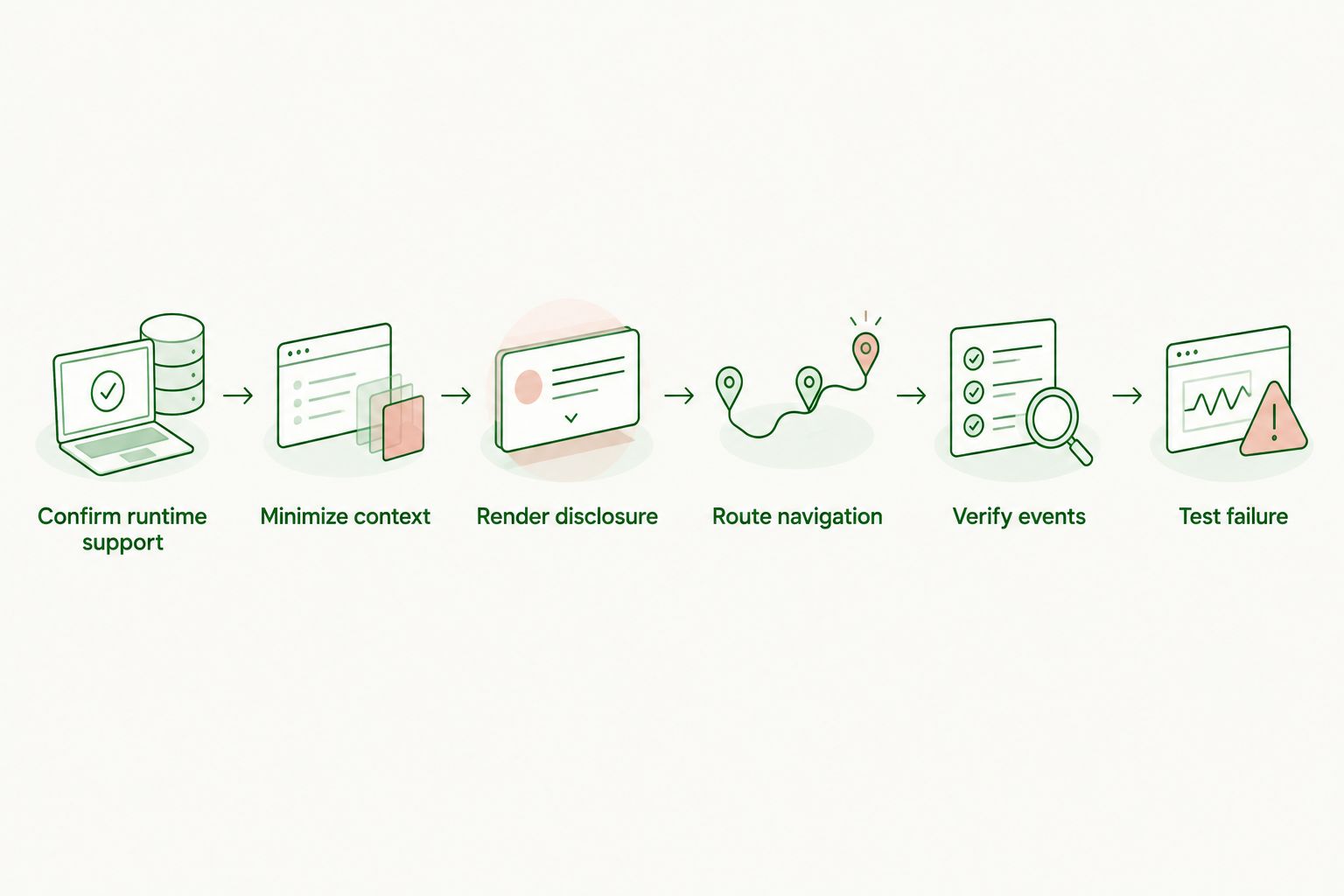
Use a staged implementation. Establish runtime support first, then connect context, rendering, navigation, and measurement; otherwise, a broken click flow gets mistaken for an ad-serving problem.
1. Confirm runtime support
Identify the actual container: Android WebView, iOS WKWebView, or another embedded runtime. Record the app's relevant configuration and compare it with the SDK's documented requirements.
Ask explicitly about WebView support, initialization, storage dependencies, external navigation, and reporting. A general statement that an SDK supports web applications is not enough to establish support for your embedded configuration.
2. Minimize context
Define the information an ad request needs before sending conversation data. Use the narrowest permitted context that represents the eligible topic, and exclude credentials or unrelated private content.
Keep ad selection separate from the assistant's factual answer. Sponsored material should not silently become evidence for the model or alter an answer presented as independent advice.
3. Render disclosure
Place the sponsored card in a predictable location and make the sponsorship visible before interaction. Do not rely on a destination page to reveal that the recommendation is paid.
Test long copy, text resizing, keyboard visibility, and scrolling. The card should remain understandable without covering the composer or being mistaken for the assistant's own answer.
4. Route navigation
Decide where advertiser destinations open and preserve the chat's state when the user leaves. Handle redirects and new-window requests intentionally rather than accepting the container's default behavior.
Validate destinations and prevent untrusted pages from inheriting privileged bridge access. Keep navigation separate from billing logic: opening a destination is an action, not proof of a completed conversion.
5. Verify events
Follow the provider's definitions for impressions, clicks, and conversions. A successful request, a rendered card, and a visible card are distinct states; do not collapse them into the same event.
Document which layer emits each event. Test reloads, repeated taps, and background transitions for duplicates, then compare application logs with the reporting system available to your integration.
6. Test failure
Simulate offline behavior, request errors, empty responses, and interrupted navigation. The application should remove stalled ad UI and continue the conversation without retrying indefinitely.
Test cleanup when the WebView is destroyed or reloaded. Reinitialization should not leave old listeners attached or allow a stale response to update a different conversation.
The implementation sequence keeps each responsibility visible:
What should you measure before launch?
Measure delivery states separately from revenue. Your 2026 launch review should distinguish requests sent, eligible responses received, cards rendered, impressions reported, clicks reported, and destination-opening failures.
Use the reporting definitions attached to your integration. An ad request is not an impression, and a click is not necessarily a conversion. Name your dashboard metrics so another developer can tell exactly what happened.
Normalize revenue only after choosing a clear denominator:
- CPM: Advertiser cost per 1,000 impressions. Use the applicable impression definition.
- Impression RPM: Publisher revenue per 1,000 impressions. State whether the revenue figure is gross or net.
- Session RPM: Publisher revenue per 1,000 sessions. Define a session consistently before comparing results.
CPM and publisher RPM are not interchangeable. Session RPM also answers a different question from impression RPM: it describes monetization across sessions, including sessions that did not produce an ad impression.
Compare ad-enabled chat behavior with a clearly defined baseline. Track answer delivery, chat errors, destination failures, and user continuation alongside monetization. More ad activity does not establish a better chat experience.
Do conversational ads need third-party cookies in a WebView?
No. Contextual selection does not inherently require third-party cookies. An ad can be selected using the permitted topic of the current conversation rather than cross-site browsing history.
That does not prove a particular SDK is cookie-independent. Inspect its documented storage, attribution, consent, and identification requirements. Contextual selection and conversion attribution are separate responsibilities.
Should advertiser links open outside the WebView?
Use external navigation when it provides the destination behavior your application needs. Opening outside the chat separates the advertiser journey from the assistant interface, but your application still needs to preserve conversation state.
An embedded destination is another option, not an automatic improvement. It requires deliberate handling of redirects, authentication, back navigation, and the boundary between untrusted content and native capabilities.
Does a working card mean the integration is ready?
No. Rendering proves rendering, not the full advertising flow. Validate disclosure, event ownership, navigation, and failure handling before enabling the integration for users.
Treat SDK upgrades and host-app changes as reasons to rerun those checks. For 2026 maintenance planning, keep the integration test attached to the release process rather than to the original implementation ticket.
FAQ
Can conversational ads run inside an Android WebView?
Yes, conversational ads can run inside an Android WebView when the integration supports its runtime and configuration. Test script execution, resource loading, navigation, and measurement in the actual app.
Can conversational ads run inside an iOS WKWebView?
Yes, conversational ads can run inside an iOS WKWebView with a compatible integration. Verify the provider's requirements and test lifecycle, storage, and destination handling separately from Android.
Is a WebView integration the same as a mobile-browser integration?
No, a WebView integration also depends on the host application's configuration and lifecycle. A card working in a mobile browser does not establish compatibility inside the app.
Does Elo support my specific WebView configuration?
Confirm your specific WebView configuration with Elo before implementation. Its SDK-based adserver serves contextual chat ads, but the architecture choice requires a documented runtime contract.
Should I send the whole conversation with every ad request?
Send only the permitted context required by the integration. Exclude credentials and unrelated private content, and keep sponsored material separate from the assistant's factual answer.
Can I count an ad request as an impression?
No, an ad request is not an impression. Follow the provider's impression definition and distinguish request, render, and visibility states in your application logs.
What should happen when a conversational ad fails to load?
The chat should continue without the ad. Clear stalled ad UI and prevent the advertising failure from blocking answer delivery.
Should I use a native bridge for every conversational ad?
No, use a native bridge only when the supported architecture needs native actions or state. Validate messages and assign event ownership so the bridge does not create duplicate reporting or privileged access.
One last thing
Test the return journey, not just the outgoing click. Open an advertiser destination, background the app, return to the conversation, and confirm that the answer, composer, and ad state remain coherent. A broken return path turns a functioning ad into a broken chat session.
Elo's contextual adserver is built for developers monetizing chat applications. For a WebView implementation, make documented compatibility and end-to-end testing the gate before rollout.