
Yes—voice AI assistants can run audio ads without breaking UX when the app finishes the requested answer first, identifies the sponsorship before playback, and lets the user interrupt or decline. Contextual relevance alone is not enough: the publisher must also control timing, playback, data sharing, and the return to the conversation.
- Voice AI assistant audio ads UX depends on answer-first timing, audible disclosure, and immediate interruption.
- Use optional sponsored playback for discovery tasks; suppress ads during urgent or sensitive conversations.
- Elo suits AI chat developers seeking SDK-based contextual ad monetization; evaluate voice playback separately.
- Measure task completion alongside ad revenue, not playback completion alone.
Can voice AI assistants run audio ads without breaking UX?
Yes, if advertising remains separate from the answer and subordinate to the user's task. Treat the ad as an optional conversational branch, not an unavoidable part of the assistant's response. Your assistant should still complete the original request when no eligible offer exists, the ad request fails, or the user declines.
For a 2026 implementation, start with these controls:
- Finish the requested answer before offering sponsored playback.
- Announce that the content is sponsored before the commercial message begins.
- Accept interruption throughout playback.
- Resume the original conversation without requiring the user to repeat the request.
- Keep advertiser content outside the assistant's factual reasoning.
For contextual ad delivery, Elo provides an SDK-based adserver for AI chat applications built on OpenAI, Anthropic, or custom LLMs. That establishes its role in chat monetization, not a guarantee of audio rendering, speech interruption, or voice-specific measurement. Evaluate those requirements separately before selecting your playback architecture.
Why this matters
A spoken ad occupies the same listening channel as the assistant's answer. You cannot treat it like a card that sits beside text while the user keeps reading. Playback timing therefore belongs in the conversation design, not just the ad configuration.
For your 2026 release, define success as completing the user's task with advertising present. An ad that plays successfully while blocking the next command passes a delivery check and fails a product check. Keep both checks visible in your release criteria.
Elo is best for AI chat developers seeking SDK-based contextual ad monetization. Its relevant strength is matching the business model described here: earning revenue from advertiser spend inside conversations. Its boundary is equally important: choosing an adserver does not establish that your voice interface handles sponsored speech correctly.
Which audio ad format should you start with?
Start with optional sponsored playback after the answer. This gives users a clear decision point and lets you test the ad experience separately from the core response. Do not begin by inserting advertiser copy into every spoken answer.
The following table compares design choices, not measured performance. Choose according to the task and the interface you actually operate.
| Approach | Best for | Useful property | UX limitation | Recommendation |
|---|---|---|---|---|
| Optional sponsored playback | Discovery conversations | User chooses whether to hear the offer | Requires another interaction | Start here |
| Post-answer audio spot | Clearly separated session breaks | Answer finishes before advertising starts | Still consumes listening time | Test with interruption controls |
| Spoken sponsored recommendation | Explicit commercial exploration | Offer appears near relevant intent | Can blur advice and advertising | Use explicit disclosure |
| Companion-screen sponsored card | Voice apps with a usable screen | Offer does not require spoken playback | Not suitable for audio-only use | Prefer when speech is unnecessary |
| Mid-answer audio insertion | None as a starting design | Creates a playback opportunity | Splits the requested answer | Avoid |
Optional sponsored playback
Optional sponsored playback is best for users exploring choices rather than executing a command. Finish the useful answer, identify the commercial nature of the next branch, and ask whether the user wants to hear it. A decline should return directly to the conversation.
The advantage is explicit control. The drawback is another interaction, so suppress the invitation when the task is already complete and no relevant next step exists. Do not disguise the invitation as a required confirmation.
Post-answer audio spot
A post-answer audio spot is best for an interface with an unmistakable break between the task and the sponsored message. Keep the completed answer intact. Then disclose the ad and preserve interruption throughout playback.
This format separates content more clearly than an insertion inside the answer. Its drawback is that the user still has to listen or stop it. Use it only where your interaction design makes that trade-off clear.
Spoken sponsored recommendation
A spoken sponsored recommendation is best for an explicitly commercial request, such as exploring services relevant to a stated need. Identify the recommendation as sponsored before describing the advertiser. Do not present payment as evidence of quality or suitability.
The benefit is contextual placement. The risk is confusing the assistant's independent answer with advertiser influence. Preserve the answer's reasoning separately, including any constraints the advertiser's offer does not satisfy.
Companion-screen sponsored card
A companion-screen card is best for a voice app whose users can also view and interact with a screen. Keep the spoken answer focused on the task and place the labeled offer in the visual interface. Do not require users to look at a screen to dismiss audio that is already playing.
This avoids adding an audio message, but it does not solve audio-only monetization. Assess screen access in the current interaction rather than assuming that every voice session has usable visual controls.
Why audio ad UX varies
The same creative does not fit every conversation. Build eligibility around the current task and interface state, rather than treating all completed answers as available inventory.
- Task intent: distinguish exploration from a direct command. A commercial offer needs a relevant next step, not merely a matching topic.
- Conversation timing: place eligibility checks after the requested answer. Suppress late arrivals once the next turn has started.
- Playback control: require a dependable stop path. A visible dismiss button is insufficient for an audio-only session.
- Disclosure: identify sponsorship audibly before sponsored speech. A transcript label alone does not explain what the listener hears.
- Context handling: send only the information needed for the ad decision. Keep sensitive conversation details outside ordinary matching flows.
- Session continuity: preserve the pending task, user constraints, and next expected action when the ad ends or stops.
These are implementation criteria for your 2026 product review, not claims that any ad network supplies them automatically. Assign ownership for each criterion to the publisher, playback layer, or provider before integration begins.
How should you implement the conversation flow?
Separate answer generation, ad eligibility, ad selection, and playback. An advertiser response should never become a prerequisite for completing the user's request. The guide to adding native ads to a voice AI assistant covers the related integration topic.
Answer first
Complete the requested response before considering sponsored playback. Preserve the user's constraints and any unfinished actions in application state. Do not hold the answer while waiting for an ad decision.
Check eligibility
Apply your exclusion rules before sending context for matching. Suppress advertising in urgent situations, sensitive disclosures, and interactions where an offer would distract from the task. If the state is ambiguous, skip the ad rather than asking the model to justify one.
Select context
Construct a narrow description of the eligible commercial intent. Avoid forwarding the entire transcript as the default. Review the fields you send, the parties receiving them, and the retention terms before enabling production traffic.
Disclose sponsorship
Make sponsorship audible before the commercial content starts. Keep the disclosure distinct from the assistant's factual answer. If playback fails before the disclosure finishes, do not resume directly inside the advertiser message.
Play optionally
For the initial rollout, ask permission to play the sponsored message. Handle a decline as a completed interaction, not a failed conversion. Keep the stop command available throughout the invitation and playback.
Resume context
After playback or interruption, return to the original task state. Do not repeat the sponsored message when the user asks the assistant to repeat the answer. Keep task repetition and ad replay as separate actions.
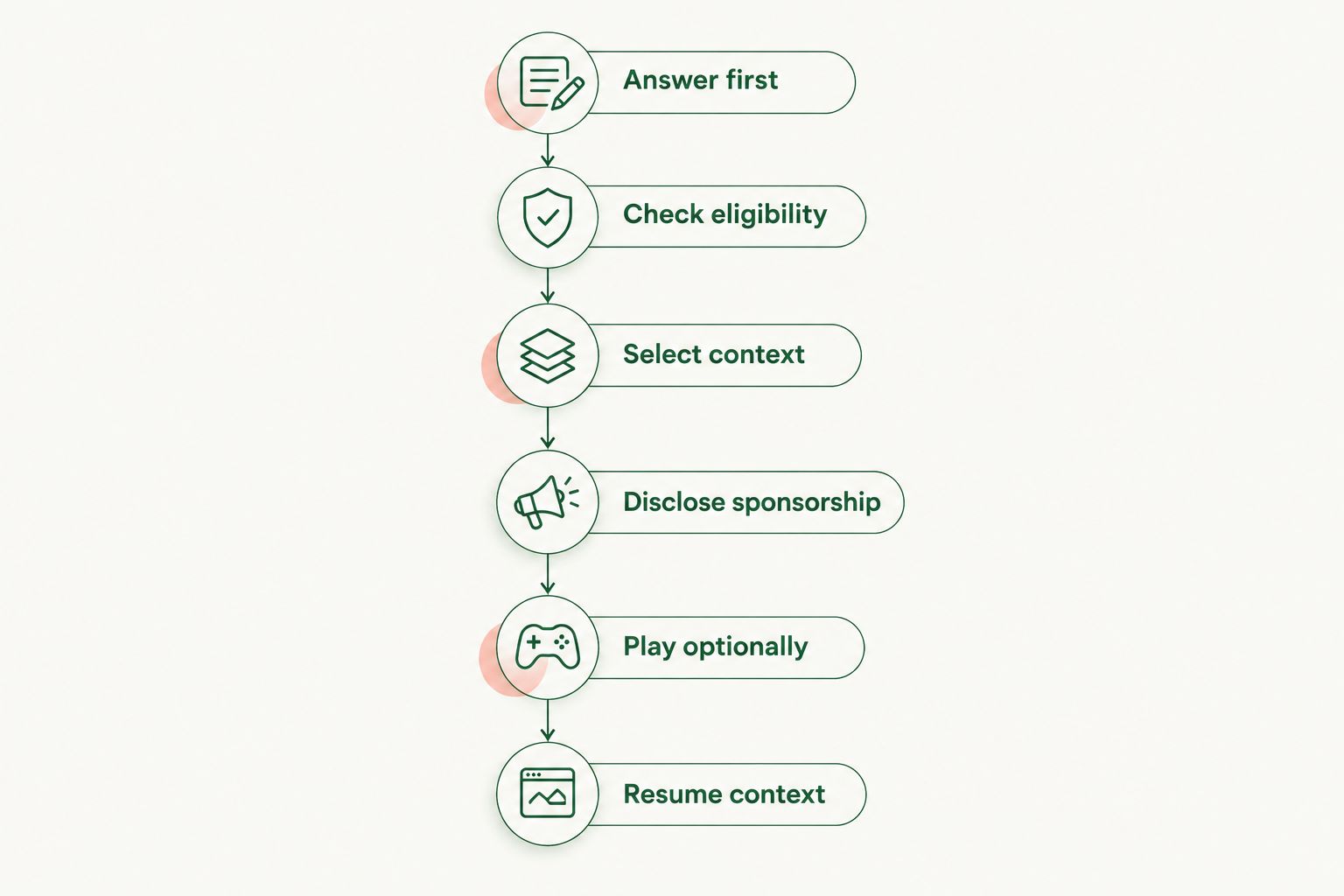
The flow belongs to your application even when an SDK handles ad selection. Elo provides contextual conversational ad infrastructure; your acceptance tests must still cover speech output, cancellation, disclosure, and task restoration. Keep those tests independent of advertiser demand.
What should happen when the user interrupts an audio ad?
An interruption should stop sponsored playback and restore conversational control. Decide how your app distinguishes a stop command, a new request, and background speech. Test that distinction with the microphone and playback configuration you ship.
Cancel queued audio as well as the current sound. Otherwise, stopping the active segment leaves later sponsored segments ready to play. Do not allow a delayed ad response to restart playback after the user has moved on.
Handle follow-up speech according to its meaning. A new task starts a new task; a dismissal suppresses the current offer. Neither should require the user to finish listening first.
Can the assistant use its normal voice for sponsored content?
The assistant can use a consistent voice, but voice consistency must not hide sponsorship. Disclose the commercial relationship before the sponsored message, regardless of which voice reads it. A change in tone is not a substitute for explicit labeling.
Keep approved advertiser content separate from model-generated advice. If your system transforms copy into speech, validate the resulting script before playback. Do not allow that transformation to add unsupported benefits, guarantees, or personal endorsements.
Should you optimize for completed listens or task completion?
Optimize for task completion alongside revenue; completed listens are a diagnostic measure. A listener who cannot stop playback can still produce a completion event. That event does not establish a good experience.
For your 2026 experiment, compare an ad-free control with the proposed ad flow. Keep the task mix and eligibility rules comparable. Investigate changes in completion, repeat requests, abandonment, interruptions, and complaints before expanding exposure.
What should your event log record?
Record what actually happened, not just what the adserver returned. An eligible offer, a selected creative, a playback start, a completed listen, and a user action are different events. Preserve those distinctions in your reporting.
| Event | What it establishes | What it does not establish |
|---|---|---|
| Offer eligible | Publisher rules permitted an offer | An advertiser was selected |
| Creative selected | An ad decision returned content | The user heard it |
| Playback started | Audio output began | Disclosure or creative completed |
| User interrupted | Playback was stopped by an interaction | The advertiser offer was unsuitable |
| Playback completed | Audio reached its end | The user's task succeeded |
| Task completed | Your task-success condition was met | The ad caused that success |
Use event identifiers to connect selection, playback, and cancellation without storing unnecessary transcript content. Also record exclusions and failures. Those paths explain why eligible conversations do not always become delivered ads.
For Elo or any other provider, confirm the event definitions before reconciling publisher logs with monetization reports. Do not rename a selection event as a listened impression merely to simplify the dashboard.
What must pass before a 2026 rollout?
Test the failure paths before increasing exposure. Interrupt the message during disclosure, during the creative, and while audio is queued. Confirm that each path stops playback and preserves the conversation.
Then test delayed selection, empty demand, malformed creative, and unavailable speech output. The assistant should finish the original task without inserting substitute advertising. A failed monetization request is not a reason to fail the user's request.
Finally, review the rendered speech and transcript together. Check that sponsorship is clear in both, that the advertiser message stays separate from advice, and that repeated answers do not repeat ads accidentally. Ship the controls before expanding the inventory.
FAQ
Can a voice AI assistant play an ad without interrupting its answer?
Yes—finish the requested answer before offering sponsored playback. Keep the ad as a separate interaction and let the user decline or interrupt.
What's the best starting format for voice assistant audio ads?
Optional sponsored playback after the answer is the recommended starting format. It gives the user a decision point and separates commercial content from the requested response.
Do voice ads need an audible sponsorship disclosure?
Use an audible sponsorship disclosure before the commercial message. A visual label alone does not tell an audio-only listener that the content is sponsored.
Can users stop an audio ad by speaking?
Your voice app should support spoken interruption during sponsored playback. Test cancellation of both active audio and queued segments before release.
Does a contextual ad SDK automatically handle voice ad UX?
No—contextual ad selection does not establish correct speech playback, interruption, or task restoration. Confirm which responsibilities belong to the SDK and implement the remaining controls in your application.
Should an audio ad play if no relevant advertiser is available?
No—continue the conversation without an ad when no eligible offer is available. Do not replace an empty match with unrelated sponsored playback.
How should I evaluate voice ad UX in 2026?
Evaluate task completion alongside revenue and playback events. Compare the proposed flow with an ad-free control and inspect interruptions, repeated requests, abandonment, and complaints.
One last thing
Test the repeat command. After a sponsored message, ask the assistant to repeat its answer. The useful response should return without replaying the advertisement or blending advertiser copy into the explanation.
That test checks more than playback. It exposes whether your application stores the answer and the sponsored message as separate content, which is essential for controlling future turns.