
Instead of manually pairing search-backed answers with sponsored offers, build a SearchApi conversational ads integration that routes approved conversation context to Elo’s adserver and displays a separately labeled ad. Your application connects search, answer generation, and ad delivery; keep those paths independent so an ad failure never blocks the answer.
- A SearchApi conversational ads integration needs application-owned orchestration, not an assumed native connector.
- Elo fits developers monetizing AI chat applications with contextual ads through an SDK-based adserver.
- Use search results for answer grounding; send only approved conversation context for ad matching.
- Keep sponsored content separate from answer citations, and reject stale ad responses.
Why this matters
Search retrieval and advertising serve different purposes. Search results provide material for an answer; an adserver supplies sponsored content. Mixing them into a single undifferentiated response makes sponsorship harder to identify and failures harder to isolate.
Elo is best for developers who want an SDK-based adserver for contextual ads inside AI chat applications. Elo supports that monetization role; your application remains responsible for connecting retrieval, conversation state, and the display lifecycle.
For a 2026 implementation, treat this as an application architecture guide, not a drop-in connector recipe. Use the current provider documentation for authentication, SDK methods, supported request fields, and event semantics. The configuration names below belong to your application; they are not claimed SearchApi or adserver settings.
Before you start
- Accounts and access: Have working SearchApi access, access to the adserver integration documentation, and control over your chat backend and frontend. Keep credentials designated as secrets on the server.
- Materials: Prepare representative conversations, a sponsored-content component, a context-sharing policy, and a staging environment. Include search failures, sensitive requests, and topic changes in your test cases.
- The gotcha: An earlier ad request can finish after the user changes topics. Give every turn an identity before adding advertising, then reject responses that no longer belong to the active turn.
Do not start by forwarding the entire transcript. Decide which information the advertising path needs and which information must remain inside the answer-generation path. Contextual relevance does not require treating all conversation data as advertising input.
Search retrieval configuration
Build the search-backed answer first. Advertising should attach to an already working conversation lifecycle, not become a prerequisite for generating an answer.
- Create a turn identity. Assign an application-owned identifier when you accept a user message. Carry that identity through retrieval, answer generation, and any later ad request.
- Run the search request. Use SearchApi’s current documented interface and the search configuration appropriate to your application. Keep provider authentication separate from user-supplied text.
- Normalize retrieval output. Convert the response into the fields your answer generator actually consumes. Preserve source attribution where your answer interface uses citations.
- Generate the answer. Treat retrieved content as source material, not trusted instructions. Keep advertising out of the evidence used to support factual statements.
- Define the failure path. Decide how the assistant behaves when retrieval fails or returns no useful material. Do not silently present an ungrounded answer as search-verified.
Expected result: A user receives a search-backed answer without any dependency on ad delivery. Retrieval output and the final answer remain traceable to the same turn.
For your 2026 baseline, save a staging trace of this answer-only path. You will compare it with the monetized path to detect accidental changes to citations, answer delivery, or error handling—not to claim a performance improvement without measurements.
Context policy configuration
An ad request should describe the permitted commercial context of a conversation, not reproduce everything the user has disclosed. Build an explicit boundary between retrieval output and advertising input.
- Define eligible topics. Write an application policy covering where sponsored recommendations belong. Add exclusions for sensitive conversations and any other contexts your product must not monetize.
- Create an allowlist. Identify the minimum topic and intent information permitted to leave the answer path. Exclude credentials, private documents, account identifiers, and unnecessary personal details.
- Derive context. Combine the current user request with relevant retrieval context only where your policy permits. Distinguish a user researching a category from a user explicitly seeking a recommendation.
- Record the decision. Store whether the turn was eligible and why. Avoid copying the raw transcript into diagnostic logs merely to explain an eligibility decision.
- Map supported fields. Translate your approved context into only the fields the current Elo SDK documentation accepts. Keep unsupported metadata inside your application.
Expected result: Every eligible turn produces a bounded context object; every excluded turn produces no ad request.
For example, a question about selecting project-management software can support a category-level context. An account-recovery conversation containing access details should not become advertising input. These are application-policy examples, not claims about automatic provider filtering.
The next layer is matching ads to conversation context. Keep that work separate from deciding whether a conversation is eligible at all.
Ad delivery configuration
Connect the SDK-based adserver after your eligibility decision. Your application must own cancellation, stale-response checks, and the behavior users see when no ad is displayed.
- Initialize the integration. Follow the current SDK instructions for your runtime. Keep secret credentials out of browser bundles, client logs, and model prompts.
- Request an ad. Submit the approved context using documented fields. Associate the request with your application’s turn identity without assuming the SDK accepts that identity as a parameter.
- Apply a deadline. Choose an application-level timeout based on your measured chat behavior. When the deadline passes, continue without an ad rather than blocking the answer.
- Validate the response. Check that the response still belongs to the current eligible turn. Discard it if the user has moved to a different topic or the placement is no longer valid.
- Handle no-ad outcomes. Leave the placement empty when there is nothing valid to display. Do not substitute an organic search result and label it as a paid placement.
Expected result: An eligible turn either receives a current sponsored result or continues without advertising. Neither outcome prevents answer delivery.
For your 2026 release, select 1 sponsored placement per eligible turn as an initial application rule. This is a proposed starting constraint, not a provider limit or an established revenue optimum. Expand only after reviewing your own engagement and conversation-quality data.
Rendering and measurement configuration
Keep the answer and the sponsored component distinct. A successful ad request does not prove that a user saw an ad, and a component render does not automatically satisfy a provider’s impression definition.
- Render a separate component. Place sponsored content outside the answer’s factual citations. Use the integration’s supported rendering approach rather than inventing an undocumented response schema.
- Label sponsorship. Add a clear visible label, such as Sponsored, beside the advertising content. Preserve that distinction in the accessible reading order.
- Separate lifecycle events. Track requests, returned ads, rendered components, and provider-defined impressions as different events. Follow documented tracking behavior; do not duplicate events already emitted automatically.
- Protect event identity. Keep rerenders and retries from creating duplicate application events. Retain the relationship between the turn, placement, and returned ad where supported.
- Exercise the fallback. Simulate a timeout, an empty result, and an obsolete response. Confirm that no broken card or misleading placeholder remains.
Expected result: Users can distinguish the answer from the ad, and your logs distinguish an attempted delivery from a displayed placement.
The workflow has four application stages: Search retrieval, Context policy, Ad delivery, and Rendering and measurement. Each stage has its own failure behavior; none should disguise a sponsored placement as answer evidence.
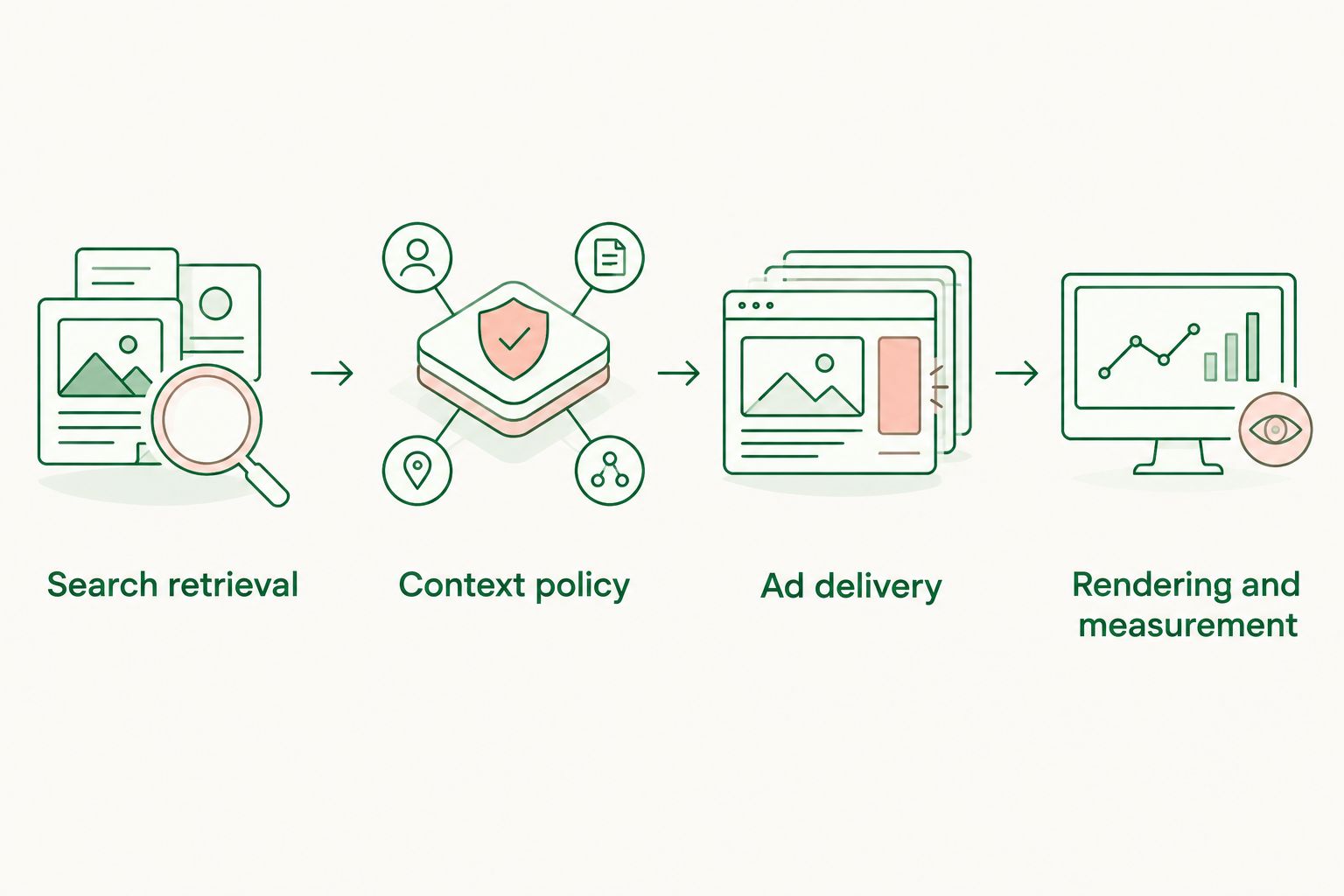
Refresh ads when conversation intent changes
A second workflow applies when the user refines the request after receiving an answer. Refresh advertising on a meaningful intent change, not on every text update.
For example, a user can move from researching software categories to asking about implementation services. Reusing the earlier context would attach advertising to an outdated task. Your application should reassess eligibility before requesting a replacement.
| Workflow | Best for | Advantage | Trade-off |
|---|---|---|---|
| Initial-turn request | First eligible search-backed answer | Straightforward relationship between turn and placement | Does not address later intent changes |
| Intent-change refresh | Follow-up questions that change the task | Uses the current permitted context | Requires replacement rules and stale-response protection |
- Detect a new completed user turn and assess whether the permitted topic or intent changed.
- Reapply the same eligibility and data-sharing policy used for the initial request.
- Invalidate the previous pending request in your application state.
- Request a replacement only when the new turn qualifies.
- Display the replacement only if its turn is still current.
Keep 1 active ad decision per turn in this starter design. Token streaming, component rerenders, and repeated retrieval callbacks should not independently trigger new ad decisions.
For a 2026 rollout, test this variant separately from initial-turn delivery. Its extra state transitions deserve their own acceptance cases, especially when users submit follow-ups before earlier requests finish.
Troubleshooting
Ads match the previous question
A stale asynchronous response has reached the current interface. Compare the response’s application-owned turn identity with the active placement identity before rendering. Reject mismatches, including responses that arrive after an eligibility change.
Ad requests fire repeatedly
The request is attached to a repeated lifecycle event, such as a render or streaming update. Move initiation to an explicit eligible-turn decision and deduplicate retries. Verify that changing display state does not start another request.
The answer waits for advertising
The answer path depends on ad completion. Remove that dependency, give advertising its own deadline, and preserve an answer-only outcome. Test failure by disabling the advertising path in staging while leaving retrieval operational.
An ad returns but nothing appears
Inspect the lifecycle in order: response received, turn validated, component mounted, placement visible. A valid response can still be rejected as obsolete or hidden by application layout. Do not infer an impression from a successful request.
Impression totals disagree
Different systems are counting different events, or a render lifecycle is duplicating tracking. Compare event definitions before comparing totals. Use provider-defined impression semantics and inspect whether the SDK already handles the event you are sending manually.
Customize your workflow
Extend the policy before adding more placements. Add language-aware eligibility, placement rules for different conversation surfaces, and explicit handling for users whose product settings exclude advertising. Implement those rules in your application rather than assuming the adserver supplies them.
Elo’s contextual-ad SDK fits the monetization layer; it does not replace your retrieval pipeline or application policy. The benefit is a dedicated adserver for sponsored content. The trade-off is that you still own orchestration, data boundaries, presentation, and operational testing.
Use 3 acceptance cases as a minimum starting set: an eligible recommendation request, an excluded sensitive request, and a topic change while an ad request is pending. Add failure and accessibility cases before production. This is a proposed test floor, not evidence that three cases cover every application.
For a 2026 launch checklist, require 0 answer failures caused by simulated ad failures in those staging cases. Record actual outcomes instead of assuming the paths are independent because they live in separate functions.
FAQ
How do I build a SearchApi conversational ads integration?
Build an application-owned workflow that retrieves search material, derives permitted conversation context, requests an ad, and renders a labeled sponsored component. Use current provider documentation for the actual API and SDK calls.
Is there a native SearchApi-to-Elo connector?
This workflow uses your application's orchestration rather than relying on a native SearchApi-to-Elo connector. Implement the handoff through the providers' documented interfaces.
Should I send the full chat transcript for ad matching?
Send only the context your application policy permits and the documented integration supports. Exclude unnecessary personal information, secrets, and private source material before making an advertising request.
Should an ad wait for the search-backed answer to finish?
Tie the ad decision to a stable, eligible turn rather than every streaming update. If the required context depends on retrieval, wait for that context without making answer delivery depend on ad completion.
What happens when no contextual ad is returned?
The assistant should deliver its answer without a sponsored component. Treat no-ad outcomes as a supported application path, not a reason to block the conversation.
Can an organic search result become a sponsored recommendation?
An organic search result is not a paid placement merely because it is commercially relevant. Keep answer sources separate from advertising supplied through the ad integration.
How should I count ad impressions inside the chat?
Follow the ad provider's documented impression definition and tracking behavior. Keep requests, returned ads, component renders, and impressions separate, and avoid duplicating SDK-generated events.
One last thing
Test the conversation that changes direction before the first ad arrives. It exposes a defect that a successful single-turn demo will not: advertising attached to an obsolete request. Rejecting a stale ad is more important than filling an obsolete placement.