
Instead of manually turning shopping results into promotional cards, build your serper shopping ad integration around separate retrieval and ad-serving paths: Serper supplies shopping context, and your application displays sponsored content only when an authorized ad source returns it. This 2026 workflow keeps product discovery, advertiser attribution, and conversational ads separate.
- A serper shopping ad integration needs separate product retrieval and sponsored ad decisions; search results alone do not establish sponsorship.
- Elo serves developers monetizing AI chat applications through an SDK-based contextual adserver.
- Keep organic shopping results independent of sponsored product cards, including when no ad is returned.
- Use application-owned orchestration, explicit sponsorship labels, and verified event handling before production deployment.
Why this matters
Shopping retrieval is not an ad-serving decision. A product appearing in a search response does not establish that your application has an advertiser relationship, permission to reuse every asset, or a payable impression.
Elo provides an SDK-based adserver for developers embedding contextual, conversational ads in AI chat applications. Elo is for AI chat developers who want an SDK-based contextual adserver to monetize conversations through advertiser spend.
The workflow below is an application architecture, not a claim that Serper and Elo have a native connector. Keep vendor-specific requests, response fields, and event methods inside adapters implemented against their current documentation.
For a 2026 implementation, define the boundary before writing the renderer: retrieval helps answer the user; advertising supplies a separately identified commercial placement. Neither path should silently impersonate the other.
Before you start
- Access and documentation: Have Serper account access, the credentials required for shopping retrieval, and your selected adserver's current integration documentation. Confirm supported ad formats and permitted context inputs before building the adapter.
- Application control: You need server-side request handling, a chat renderer you can modify, and a development environment with application logs. Store secret credentials outside browser-delivered code; use client-side credentials only when the provider explicitly documents them as safe to expose.
- The gotcha: Do not assume retrieved shopping items are eligible sponsored inventory. Confirm content-use rights, advertiser attribution, click destinations, and event requirements before rendering anything as a sponsored product card.
No vendor dashboard fields or buttons are prescribed here. The configuration names below describe responsibilities in your application; they are not SDK methods or settings to copy into a provider console.
Shopping intent gate
- Define shopping eligibility. Trigger product retrieval when the current conversation contains a product-discovery task. A request to compare running shoes qualifies; a request to explain a running injury does not establish shopping intent.
- Extract explicit constraints. Carry forward the product category, intended use, requested attributes, language, and geographic context the user actually supplied. Do not manufacture missing preferences or infer sensitive characteristics for ad targeting.
- Build the retrieval query. Convert those constraints into a concise shopping query. Keep the user's original task available to the assistant so query shortening does not erase the reason behind the request.
- Assign a turn identity. Associate retrieval and ad work with the conversation turn that initiated it. Reject responses whose turn is no longer active rather than attaching old recommendations to a new question.
- Define the no-shopping branch. Answer informational requests without forcing product retrieval or a commercial placement. Make the branch explicit in your orchestration rather than relying on the renderer to hide irrelevant cards.
Expected result: A shopping request produces a bounded query and a current-turn reference. An informational request produces an answer without being routed through the shopping workflow.
Use deliberately different development fixtures. A general product request, a request with a required feature, and a non-shopping question should take visibly different branches in your application logs. These fixtures verify routing; they do not establish commercial performance.
Shopping response adapter
- Call Serper from your application backend. Use the shopping request format in the current Serper documentation. Keep authentication and request construction inside the adapter instead of scattering them across chat components.
- Inspect the actual response. Build mappings from documented fields and captured development responses. Do not assume every result includes an image, merchant identity, or a usable destination.
- Normalize the usable content. Create an internal shopping-item representation containing only the fields your interface needs and your usage permissions allow. Preserve source attribution separately from any advertising attribution.
- Validate external destinations. Accept only destination schemes your application permits. Render retrieved text as text, not executable markup, and handle image-loading failures without breaking the answer.
- Keep organic ranking independent. Use shopping information to support the user's task. Do not let a later advertising response silently rewrite the organic result order or turn an unsupported product claim into assistant advice.
Expected result: Your application receives normalized shopping content that remains useful without an ad response. Missing optional content does not stop the assistant from answering.
For the 2026 release, retain a sanitized response fixture with your adapter tests. Compare new responses against the assumptions your parser makes, not against an imagined universal shopping schema. Treat an unexpected structure as a handled retrieval failure, not permission to guess field meanings.
Sponsored decision adapter
Serper and an adserver have different jobs. Use Serper for shopping retrieval and Elo for contextual ad serving; your application owns the orchestration between them. A direct shopping-result import, shared identifier, or matching product catalog is not assumed by this design.
| Component | Best for | Benefit in this workflow | Limitation or trade-off |
|---|---|---|---|
| Serper shopping retrieval | Supplying shopping context for the assistant's answer | Gives the retrieval path a defined responsibility | A retrieved item does not establish publisher revenue or sponsorship rights |
| Elo contextual adserver | Developers adding conversational ads through an SDK | Separates monetization from product retrieval | Requires SDK integration; shopping-result ingestion and exact product matching need verification |
| Application orchestration | Keeping retrieval, ads, and conversation state consistent | Gives you explicit eligibility and fallback behavior | You own the adapters, state management, and integration tests |
- Define the advertising boundary. Decide which shopping tasks are eligible for a sponsored placement under your application policy and provider requirements. Exclude unsupported categories before making an ad request.
- Prepare permitted context. Use the adserver's documented context format. Minimize the information sent; do not forward the entire conversation merely because it is available in memory.
- Implement the documented SDK path. Follow the provider's actual initialization, request, and rendering contract. Do not invent a method that accepts Serper results or assume an external product identifier is an adserver identifier.
- Validate the returned placement. Require the creative information, destination, disclosure, and tracking data needed by the documented format. Do not fill missing sponsored fields using unrelated shopping-result content.
- Handle no fill explicitly. Display 0 sponsored cards when no eligible ad is returned. Keep the organic answer intact rather than relabeling a search result to occupy the empty slot.
Expected result: Your application either receives an eligible sponsored placement through a documented integration or continues without one. Product retrieval alone never creates an advertising event.
The handoff has distinct responsibilities:
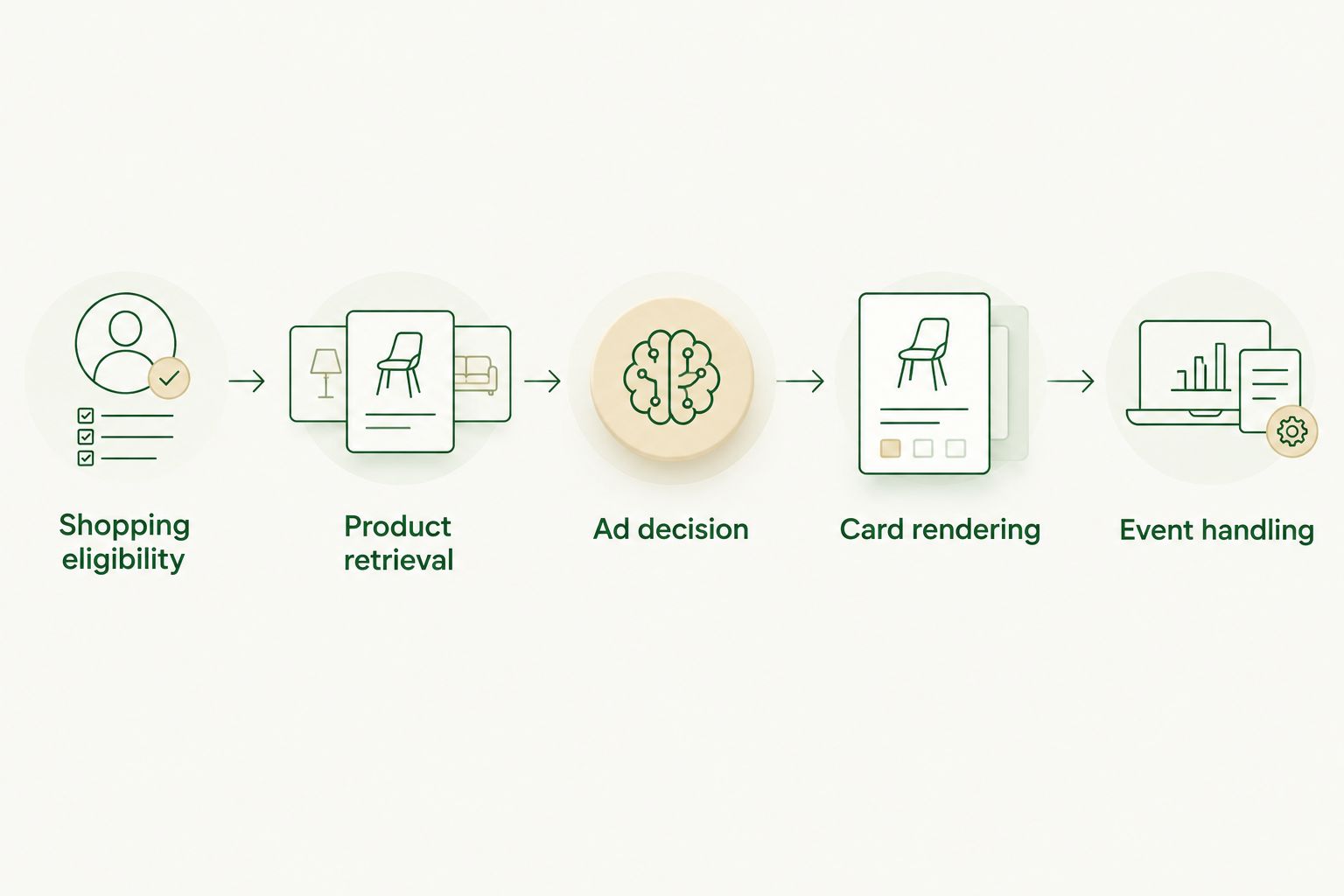
Keep the failure boundaries equally distinct. A retrieval error belongs to the shopping adapter; an empty ad response belongs to the monetization path. Separate logs let you diagnose either without treating every missing card as the same problem.
Card rendering and event handling
- Reserve a separate placement. Start with a maximum of 1 sponsored card per eligible turn as an application policy, not a provider limit. Keep the assistant's answer readable whether that placement is filled or empty.
- Display the sponsorship disclosure. Use a clear label such as Sponsored beside the placement. Keep it visible without requiring a tap or hover, and do not style paid content as an independent assistant verdict.
- Preserve creative integrity. Render the authorized creative through the supported format. Do not ask the language model to invent product specifications, merchant endorsements, or benefits to make the card fit the conversation.
- Bind events to the displayed placement. Follow the provider's documented impression and click handling. An ad request, a returned creative, and a displayed card are different states; do not count them interchangeably.
- Guard against duplicate reporting. Where your application owns event emission, permit at most 1 initial impression event per display instance under the provider's counting rules. Do not report again simply because a component rerenders; legitimate later displays follow the provider's rules.
- Keep navigation faithful. Use the authorized click destination or supported click handler. Do not replace it with an organic shopping URL while retaining the sponsored attribution.
Expected result: The user can distinguish the answer from the advertisement, and event reporting follows the placement actually displayed.
Before the 2026 production release, exercise empty responses, delayed responses, navigation away from the turn, and repeated renders. Record the expected state transitions in tests. A card that looks correct in a screenshot can still report incorrectly when asynchronous responses arrive out of order.
Refresh cards when shopping intent changes
A second workflow handles follow-up requests. When the user changes a required feature or intended use, rebuild the shopping context instead of leaving a previously relevant card attached to the new answer.
- Mark the previous turn's pending retrieval and ad work as obsolete.
- Recompute the current constraints from the follow-up and relevant earlier context.
- Run retrieval and advertising eligibility again using the updated task.
- Replace the placement only with a response belonging to the current turn.
- Keep earlier conversation history readable without treating restored cards as new impressions unless the provider's rules require it.
Best for: shopping assistants with iterative product discovery. The benefit is relevance to the latest request; the trade-off is additional state management and request handling.
Use a deliberate refresh trigger. Refreshing on every streamed token creates unnecessary work and makes response ordering harder to control. Your 2026 test plan should cover a follow-up arriving while the previous ad request is still pending.
Troubleshooting
A shopping result appears as sponsored without an ad decision
Your renderer is treating retrieval and advertising as the same content type. Separate their internal representations and require authorized ad metadata before showing a sponsorship label or emitting an ad event.
The card answers the previous question
An older asynchronous response reached the interface after the user changed the task. Check its turn identity before rendering and discard obsolete responses. Apply the check to both retrieval and advertising callbacks.
Impression totals increase when the component rerenders
Event emission is attached to component execution rather than the provider's display lifecycle. Use the supported SDK handler, or guard application-owned reporting with a stable display-instance identity. Check history restoration and development rerender behavior separately.
Shopping results render but the sponsored slot stays empty
Trace the advertising path independently: eligibility decision, SDK initialization, request completion, and response validation. An empty slot is not proof that shopping retrieval failed. Keep the answer visible and inspect the documented no-fill or error outcome.
A card's destination does not match its attribution
The application has combined an organic destination with sponsored tracking data. Stop rendering that placement and fix the mapping at the adapter boundary. Keep authorized creative, destination, and event metadata together throughout the rendering lifecycle.
Customize your workflow
Expand only after the basic path passes its tests. Add locale handling, category-specific eligibility, placement limits, and reporting dimensions as application policies rather than assuming they are provider features.
Start with matching ads to conversation context when refining the handoff between shopping intent and ad eligibility. Keep your organic recommendation criteria independent of the commercial decision.
Measure separate stages: eligible turns, ad requests, returned placements, displayed placements, and valid engagement events. Calculate revenue metrics only from the appropriate reporting source; neither the number of shopping results nor the number of requests establishes revenue.
FAQ
What is a Serper shopping ad integration?
A Serper shopping ad integration combines shopping retrieval with a separate advertising workflow in your application. Retrieved products support discovery; an authorized advertising source supplies sponsored placements and their event requirements.
Does a Serper shopping result automatically earn publisher revenue?
No. A retrieved shopping result does not by itself establish a payable publisher event. Revenue attribution requires an applicable commercial arrangement and its documented tracking rules.
Can I send Serper results directly into Elo?
This workflow does not establish a direct Serper-to-Elo connector or shopping-result ingestion API. Implement only the context inputs and SDK behavior supported by the current integration documentation.
Should sponsored product cards replace organic recommendations?
Keep sponsored product cards separate from organic recommendations in this workflow. Users should be able to identify paid placements without losing the assistant's independent answer.
What should happen when no sponsored product card is returned?
Keep the organic answer and omit the sponsored card. Do not convert an ordinary shopping result into an advertisement to fill the space.
How do I stop duplicate impression events?
Follow the ad provider's display and event lifecycle rather than reporting on every component render. Where your application emits events, bind reporting to a stable display instance and test repeated renders.
When should a shopping assistant refresh its sponsored card?
Refresh eligibility when the user changes the shopping task or its relevant constraints. Discard responses associated with obsolete turns so an earlier request cannot overwrite the current placement.
One last thing
Test the empty sponsored slot before the filled one. Disable the advertising response and confirm that product discovery, the assistant's answer, and navigation still work. That test verifies the architectural boundary: ads monetize the conversation without becoming a dependency for answering it.