
Instead of manually translating search results into ad categories, build a Serper search contextual ad targeting pipeline that extracts the current task, filters sensitive context, and requests a contextual ad through your adserver integration. Keep search evidence separate from sponsored content so monetization never becomes a source for the assistant’s answer.
- Serper search contextual ad targeting needs an application-owned adapter between search results and the adserver.
- Elo fits developers monetizing AI chat applications with SDK-based contextual, conversational ads.
- Use the current user task to interpret search results; retrieved text must not control ad eligibility.
- Render sponsored content separately and let the assistant answer when an ad request fails.
Why this matters
A search result describes a page. It does not establish the user’s intent, authorize data sharing, or identify a paid placement. Treating those signals as interchangeable creates targeting and attribution errors.
Elo provides an SDK-based adserver for developers monetizing chat applications built on OpenAI, Anthropic, or custom LLMs. Elo is best for AI chat developers who need SDK-based contextual ad monetization. Serper supplies search context in this workflow; your application owns the connection between retrieval and monetization.
For your 2026 implementation, define that boundary before adding ad requests. The architecture below uses application-owned processing stages, not a claimed native connector between the services.
Before you start
- Access: Have Serper API access, a server-side chat handler, and the current integration instructions and credentials required for your Elo setup. Keep secret credentials out of browser bundles and conversation logs.
- Application controls: Provide a separate sponsored-content component, an eligibility policy, and staging logs that omit raw conversation text. Decide which contexts must never produce an ad request.
- The gotcha: Search snippets are untrusted third-party content. Never let snippet instructions override your system prompt, trigger tools, or authorize advertising. Search rank also does not establish sponsorship.
Complete an independent search request and an independent ad integration check before joining the systems. This separates credential or account problems from errors in your context adapter.
Search trigger configuration
Define the eligible turn
- Put the trigger in your server-side orchestration layer, after the application decides that the user’s task requires search. Do not trigger advertising on every streamed token or partial tool response.
- Assign an internal identifier to the accepted conversation turn. Preserve it across retrieval, context processing, and placement decisions so asynchronous work stays attached to the correct request.
- Apply your application’s eligibility rules before preparing advertising context. Exclude contexts your policy prohibits and stop the ad branch when the user’s account settings require it.
- Derive the search query from the current task. Remove credentials, account identifiers, and unnecessary personal details before the query leaves your server.
Expected result: An eligible turn produces a search task associated with the correct conversation. An excluded turn continues through the assistant without entering the advertising branch.
Normalize the search response
- Execute the Serper search through your server-side integration. Use the request fields and authentication requirements in the current Serper documentation rather than copying an unrelated SDK example.
- Parse the response into an application-owned search record. Retain the result title, destination, and snippet when present; handle missing values explicitly.
- Validate destination formats before retaining them. Treat retrieved text as data, not as executable instructions or trusted application configuration.
- Mark failed retrieval separately from a successful response containing no usable results. Those conditions require different debugging, even when both end without an ad.
Expected result: Downstream processing receives normalized search data or an explicit retrieval outcome. It never receives an unchecked response blob as advertising context.
Context adapter configuration
Build the intent record
- Extract the user’s current task before interpreting the results. A request to explain backup concepts is not the same task as a request to compare backup services.
- Use relevant search evidence to refine that task, not replace it. Discard result text that introduces unrelated products, unrelated locations, or unsupported assumptions about the user.
- Create an internal context record with fields such as
task_summary,topic,constraints,evidence_refs, andeligibility_reason. These are proposed application fields, not Serper or Elo API parameters. - Remove sensitive details again after extraction. A generated summary can repeat information that an earlier filter missed.
Expected result: The adapter produces a short, reviewable description of the task, supported by relevant evidence and an explicit eligibility decision.
For example, a developer asking for help comparing deployment services creates a different context from a developer debugging a failed deployment. Both searches can mention the same vendors. Your adapter should preserve the difference between evaluating a service and repairing an existing setup.
Keep processing boundaries explicit
Use separate stages for Search evidence, Intent record, Eligibility gate, and Ad request. Give each stage a defined input and output. This makes a wrong-category placement traceable without exposing the entire conversation in your logs.
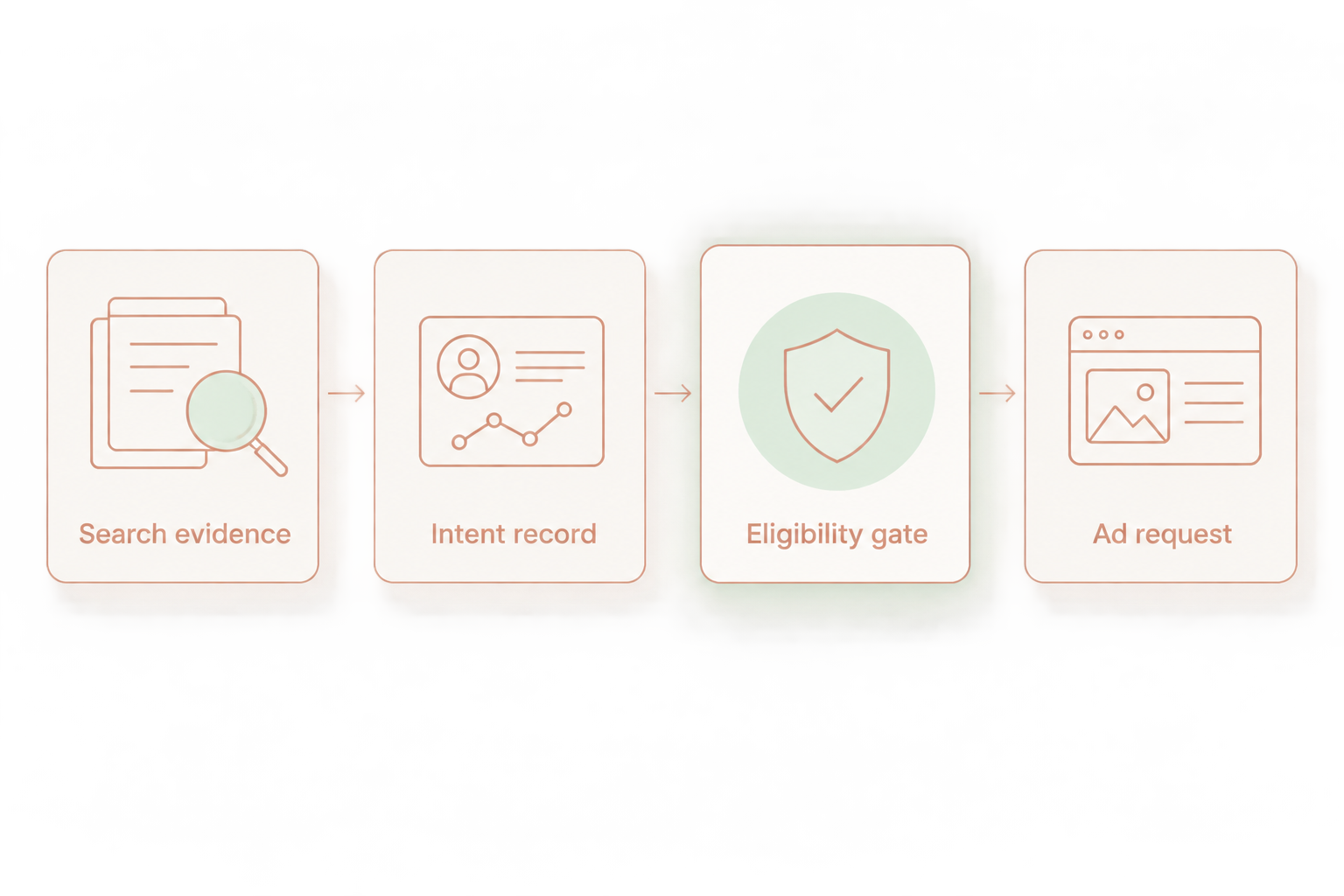
For the 2026 release, version the extraction rules alongside the application code. Record the version used for each decision so a later prompt change does not erase the explanation for an earlier targeting outcome.
The adapter’s benefit is control; its cost is maintenance. You own schema validation, sensitive-context filtering, and regression tests. Adding an ad SDK does not remove those responsibilities.
Ad request and placement configuration
Map the adapter to the adserver
- Inspect the current adserver integration contract. Map your internal context only to documented inputs; do not send the proposed field names above as though they were supported API parameters.
- Connect the application’s context adapter to the documented Elo SDK integration. Keep the assistant’s answer-generation path independent from the advertising result.
- Add an application-owned deadline to the advertising branch. Select its duration from your measured response-time budget rather than assuming a universal latency target.
- Preserve the turn identifier when the request resolves. Discard the result if the user has moved to a different task or the original placement is no longer relevant.
Expected result: An eligible context reaches the adserver through documented integration points. Failure, delay, or an empty response does not block the assistant’s answer.
Render and measure the placement
- Render supported sponsored content in a dedicated component. Do not rewrite an organic search result into an advertisement or fabricate advertiser copy from a snippet.
- Display a visible Sponsored label beside the placement. Keep the label attached when the component moves or updates.
- Leave answer citations connected to the evidence used for the answer. A sponsored destination must not become a citation merely because it appeared beside the response.
- Follow the SDK’s documented measurement behavior. Distinguish a request, a returned ad, and a rendered placement in your application logs; do not count a request as an impression.
Expected result: The user can distinguish the answer, its sources, and the advertisement. Your logs distinguish processing outcomes without claiming revenue from an unrendered response.
Before the 2026 production release, run 3 test turns: an eligible commercial task, an informational task excluded by your policy, and a task containing sensitive context. Confirm the expected outcome for each rather than checking only whether a component appears.
Refresh targeting when the task changes
An adjacent workflow refreshes context after a meaningful follow-up. A user can move from comparing services to troubleshooting one service. The earlier commercial context should not survive that change automatically.
Choose the trigger deliberately:
| Workflow | Best for | Benefit | Trade-off |
|---|---|---|---|
| Search-completion trigger | Initial search-backed answers | Clear association between retrieval and context | Misses later intent changes unless retriggered |
| Task-change trigger | Multi-turn evaluation conversations | Reassesses the user’s latest task | Requires change detection and stale-result handling |
- Compare the latest task with the task attached to the existing context record. Ignore cosmetic rewrites that leave the actual request unchanged.
- Run retrieval again only when the new task requires fresh evidence. Do not repeat a search solely because the interface rerendered.
- Reapply eligibility before requesting another placement. A previously eligible conversation can enter an excluded context.
- Reject pending responses associated with the previous task. Refreshing context must not let an older request overwrite the newer decision.
Expected result: The ad branch follows the current task rather than accumulating stale intent from conversation history.
Test with 2 consecutive turns that change the user’s goal. Delay the earlier response deliberately and confirm that the application discards it. This checks the race condition directly.
Troubleshooting
The placement matches a result, not the user’s task
The adapter is treating retrieved text as the primary intent signal. Make the latest user task the starting point, then retain only search evidence relevant to that task. Inspect the context record before changing the ad integration.
The same placement appears repeatedly
Check whether streaming callbacks, tool retries, or client rerenders trigger duplicate requests. Keep an application-owned deduplication record tied to the turn and placement opportunity. Do not assume a transport retry represents a new advertising opportunity.
An old ad appears after a follow-up
A pending response is resolving after the task has changed. Compare its turn identifier with the active task before rendering. Cancel pending work where possible, but keep the final relevance check even when cancellation exists.
Search succeeds but no sponsored content renders
Trace eligibility, context validation, the ad request outcome, and component rendering separately. An empty ad response is not proof that search failed. Keep the answer visible and avoid inserting an unrelated result to fill the space.
Reporting disagrees with application logs
Check whether the application counts requests while reporting counts another event. Inspect duplicate listeners, navigation events, and rerenders before changing attribution logic. Follow documented SDK event handling rather than manually recreating events with guessed names.
Customize your workflow
For your 2026 iteration plan, improve the adapter before expanding placement frequency. Review false-positive eligibility decisions, irrelevant context summaries, stale responses, and sensitive-text leakage. Each points to a different part of the pipeline.
Keep 2 measurement layers: application decision logs and documented ad delivery events. The first explains why your software requested or suppressed advertising; the second records what the advertising integration actually reported. Neither substitutes for the other.
For a deeper implementation pattern, use the guide to matching ads to conversation context in an LLM app. Preserve the same separation between task interpretation and ad delivery when you expand to additional assistant workflows.
FAQ
How do I build Serper search contextual ad targeting?
Connect server-side search to an application-owned context adapter, apply an eligibility policy, and map the approved context to your adserver’s documented integration. Render sponsored content separately from the answer and its citations.
Does Serper search automatically make a result a sponsored ad?
No. A retrieved result is search evidence, not proof of a paid placement. Use the advertising integration to obtain sponsored content rather than relabeling organic results.
Is this a native Serper and Elo integration?
This guide describes an application-owned adapter, not a native connector. Use the current documentation for each service to implement its side of the workflow.
Should I send the whole conversation for contextual targeting?
Do not make full-conversation sharing the default. Extract the minimum task context needed, remove sensitive details, and confirm that any external processing matches your privacy obligations.
Can an ad influence the assistant’s search citations?
Keep ad selection separate from citation selection. The assistant’s citations should identify evidence supporting its answer, not destinations selected because they are sponsored.
What should happen when the advertising request fails?
The assistant should continue without the advertisement. Record the failure separately from search errors and do not manufacture a replacement placement.
How should I test this workflow before launch?
Test eligible, excluded, sensitive, and changing-task conversations. Include delayed responses and duplicate callbacks so the checks cover relevance, suppression, and asynchronous rendering.
One last thing
A correct search result can still produce an incorrect ad context. Test whether the adapter preserves negation: a user asking for alternatives to a service is not asking to buy that service.
Add that case to your 2026 regression suite. It tests the actual targeting decision, not just whether search and rendering work.