
Instead of manually translating Tavily search results into advertising categories, build an application-side workflow that extracts current intent, checks eligibility, and requests a contextual ad separately from answer generation. This 2026 guide shows where search ends, where your targeting logic starts, and how to connect that boundary to Elo, an SDK-based adserver for conversational ads.
- Build tavily search contextual ad targeting around current user intent, not copied search results.
- Elo is best for developers monetizing AI chat applications with SDK-based contextual ads.
- Keep Tavily retrieval, application eligibility checks, and sponsored rendering separate.
- Reject stale responses and let the assistant answer when advertising fails.
Why this matters
A search result describes a page. An advertising decision needs to reflect what the user wants now. Those signals overlap, but they are not interchangeable.
Consider a user researching project management tools. Retrieved pages can mention task tracking, documentation, recruiting, and accounting. Passing every mentioned category into targeting introduces topics the user never requested.
Use the conversation to establish intent. Use search to clarify that intent, not replace it. Keep sponsored content outside the evidence used to write the answer.
The 2026 architecture below is an application-side integration pattern. Its field names are proposed internal fields, not Tavily request parameters or Elo SDK methods. Map the final handoff to the documented interface for the SDK version you install.
Before you start
- Access and ownership: Have Tavily access, the ad SDK integration materials and credentials required for your application, and permission to change backend orchestration and chat rendering. Keep credentials in the environment required by each provider's documentation.
- A context contract: Decide which conversation details your application permits in advertising requests. Define exclusions, disclosure copy, and behavior when no ad is returned before adding the placement.
- The gotcha: out-of-order responses. Search and ad requests can finish after a new message arrives. Assign a turn identifier before either starts, and check that identifier before rendering. A relevant ad for the previous question is still wrong for the current one.
Do not begin with dashboard switches or copied SDK calls. First establish the application boundary. Then implement provider-specific calls against current documentation.
Search and advertising responsibilities
Tavily and the adserver have different jobs. Your application connects them without treating organic retrieval as advertising inventory.
| Component | Best for | What belongs here | Limitation or trade-off |
|---|---|---|---|
| Tavily search | Retrieving web context for the assistant | A search query tied to the current task | Retrieved text is not a verified advertising instruction |
| Application orchestration | Eligibility and context control | Intent extraction, exclusions, turn checks, and timeout handling | Your team owns implementation and testing |
| Elo contextual adserver | Monetizing AI chat conversations | The contextual ad integration supported by its SDK | Search-to-ad mapping still needs application-side implementation |
The integration is not a direct search-results-to-ad conversion. It is a controlled handoff between retrieval, application policy, and advertising.
Current-turn search context
Start the 2026 workflow with a stable identity for the user turn. Do not identify a request only by its conversation: several turns can share a conversation while expressing different needs.
- Create the turn record. Assign an application-owned
turn_idand capture the current user request. Keep any conversation identifier separate. - Build the search query. Include the task and relevant constraints. Remove secrets and unrelated personal details before anything leaves your application.
- Run the Tavily search. Use the request structure supported by your installed client or API version. Preserve the association between the request and
turn_id. - Normalize the response. Retain the source information needed by the assistant. Separately extract a short task summary for the advertising eligibility stage.
- Reject stale work. If the active turn has changed, prevent the old response from starting an advertising decision for the new turn.
Expected result: Every accepted search response belongs to an identifiable user turn. Search evidence and advertising context occupy separate application objects.
For an implementation test, send 2 messages in quick succession: first ask about project management software, then ask for help drafting a resignation letter. Delay the first response deliberately. The application must not attach the first task's advertising context to the second task.
This is a test procedure, not a concurrency limit. The same identity check must work regardless of how many requests are in flight.
Intent and eligibility rules
Your targeting boundary should produce a compact description of the user's task. It should not reproduce the conversation or summarize every retrieved page.
- Define the context fields. In your own code, use fields such as
intent_summary,topic,explicit_constraints, andeligibility. These names describe your internal contract only. - Separate evidence from inference. Record whether a constraint came from the user or from retrieved material. Do not turn a website's audience description into a fact about the user.
- Apply exclusions first. Block prohibited contexts and remove disallowed data before constructing a provider request. Include sensitive-topic handling in your application's policy review.
- Choose an eligibility outcome. Use explicit application states such as
eligible,ineligible, andinsufficient_context. Only the eligible path proceeds to advertising. - Keep an explanation. Store a concise reason code for debugging. Avoid copying raw conversation content into logs merely to explain a decision.
Expected result: Each completed evaluation produces an eligibility outcome and a minimal context summary. An ambiguous topic results in no advertising request rather than a guessed category.
A task about comparing team collaboration tools supports a task-level software context. A retrieved page mentioning healthcare customers does not establish that the user works in healthcare. Preserve that distinction.
Recommend 1 advertising eligibility decision per completed user turn as your starting design. This is an application rule, not a provider limit. It prevents individual search snippets from independently triggering placements.
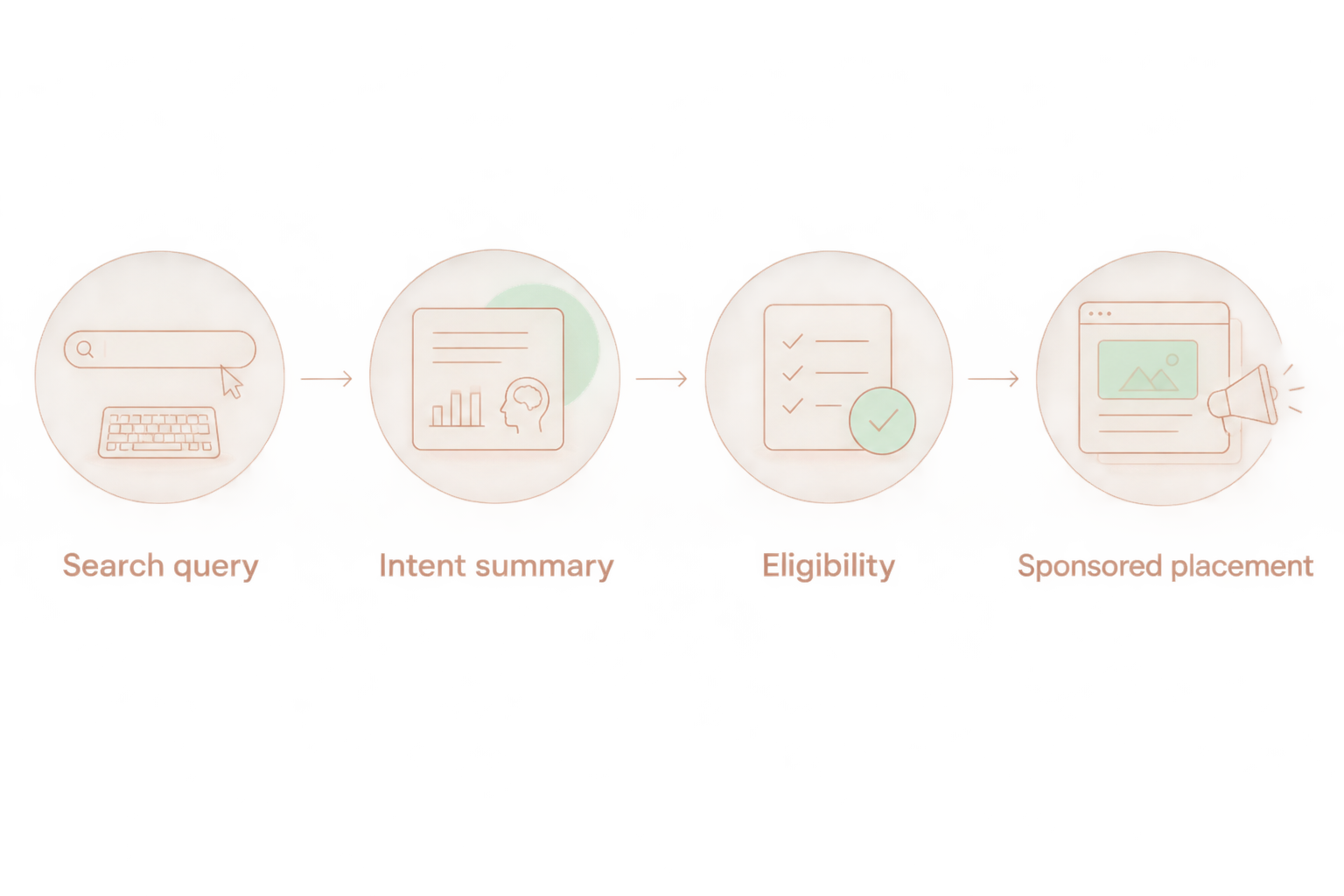
Ad handoff and sponsored placement
The application should pass approved context into the ad integration, not fabricate targeting fields that the provider does not accept. Confirm the supported input structure before implementing this boundary.
- Map the approved context. Translate your internal object into the SDK's documented inputs. If a desired category or exclusion has no supported field, enforce it in your application instead of sending an invented parameter.
- Start the ad request independently. Keep advertising errors outside the assistant's answer-generation failure path. An unsuccessful ad request must not erase a valid answer.
- Attach the turn identity. Preserve
turn_idin your request orchestration so the response can be checked before display. Do not assume the adserver accepts that field. - Render through the supported integration. Keep the sponsored placement visibly distinct from the assistant's sourced answer. Do not ask the model to disguise advertising as its independent recommendation.
- Handle an empty result. Leave the advertising placement absent when no usable response arrives. Never convert an organic search result into a paid placement as a fallback.
Expected result: The user receives the answer whether or not advertising succeeds. A sponsored placement appears only after application checks pass and a valid response returns for the active turn.
Elo contextual ads let developers monetize conversations through advertiser spend. The trade-off is implementation ownership: your application still needs context controls, disclosure, rendering checks, and failure handling.
For a deeper treatment of the mapping boundary, read how to match ads to conversation context.
Event records and release checks
For your 2026 release, make the workflow inspectable without making raw chat transcripts your default debugging artifact. Record transitions and identifiers first.
- Create application event names. Track search completion, eligibility completion, ad request completion, and placement rendering. These are your events, not claimed SDK callbacks.
- Distinguish response from impression. Receiving an ad response does not establish that the user saw an ad. Use the integration's documented measurement behavior rather than counting backend responses as displayed impressions.
- Exercise 3 test cases. Run an eligible request, an excluded request, and a stale-response request. Check both the chat interface and application logs.
- Simulate dependency failures. Make search and advertising fail independently. Confirm that each error follows the intended fallback path without duplicating placements.
- Review retained data. Check that logs contain the identifiers and reason codes needed for diagnosis, not credentials or unnecessary personal content.
Expected result: A developer can trace a placement back to an eligible turn and distinguish an attempted request from a rendered placement.
Do not publish a revenue-per-conversation claim from this test. Integration checks establish behavior, not earnings. Measure commercial performance only after the relevant reporting and measurement definitions are clear.
Refresh targeting when the user changes intent
A second workflow handles follow-up messages. Instead of treating the first search as permanent context, reevaluate advertising eligibility when the user changes the task or adds a meaningful constraint.
| Workflow | Best for | Advantage | Trade-off |
|---|---|---|---|
| Search-completion targeting | Search-led research turns | Uses context already retrieved for the answer | Depends on successful retrieval for that path |
| Intent-change targeting | Follow-up questions that change the task | Keeps the decision aligned with the latest message | Requires explicit refresh and stale-response logic |
- Compare the follow-up request with the current task summary.
- Identify whether the user changed the objective, category, or a material constraint.
- Invalidate pending advertising work tied to the previous intent.
- Search again only when the answer needs new retrieval. Reevaluate eligibility regardless.
- Request a new placement only if application policy permits it.
Expected result: A shift from comparing software to troubleshooting an existing tool does not automatically inherit the previous advertising decision.
Do not refresh advertising on every streamed token. Use a completed turn or another deliberate application event. For a 2026 launch, document that trigger alongside placement frequency rules so rendering behavior remains predictable.
Troubleshooting
The ad topic follows a retrieved page, not the user
Inspect how intent_summary is constructed. A broad search result can introduce unrelated categories. Require the summary to describe the user's task, and preserve whether each constraint came from the user or the web.
An old ad appears after a follow-up message
Check turn identity at response acceptance and immediately before rendering. Cancelling a request alone is insufficient: a completed response can already be waiting in application state. Clear or invalidate that state when intent changes.
Search works, but the advertising handoff fails
Inspect the actual provider request after application mapping. Remove unsupported fields and check configuration against the installed SDK documentation. Do not assume that your internal topic or eligibility fields are accepted provider parameters.
Advertising errors stop the assistant's answer
Separate error handling for answer generation and monetization. Return the valid answer even if the advertising branch fails. Log a concise failure reason without exposing credentials or raw request contents to the user.
Reports show more requests than displayed placements
Compare request completion with rendering and measurement events. Empty responses, stale turns, navigation, and rendering failures represent different outcomes. Do not combine them under a single impression counter.
Customize your workflow
Expand context quality before expanding request volume. Add explicit user constraints, improve exclusion rules, and review examples where the application rejected ambiguous intent.
Keep model selection outside this boundary. The same application-side design separates retrieval, eligibility, and advertising whether your chat application uses OpenAI, Anthropic, or a custom LLM. Provider-specific SDK instructions still govern the final implementation.
Before scaling a 2026 deployment, review the complete path from message arrival to placement removal. Verify that a new turn invalidates old context and that an unavailable advertising response leaves the answer intact.
Discuss your contextual ad integration
Review an SDK-based monetization path for your search-enabled chat application.
FAQ
How do I build tavily search contextual ad targeting?
Retrieve search context, extract the current task in your application, apply eligibility rules, and pass approved context into a documented ad integration. Keep search evidence separate from sponsored rendering.
Is Tavily search itself an ad-targeting workflow?
No. In this workflow, Tavily supplies search context, while your application handles eligibility and the advertising handoff. A retrieved page is not automatically an advertiser or a sponsored recommendation.
Can I connect Tavily directly to Elo without application logic?
Use an application-side handoff for this workflow. Map approved context to Elo's documented SDK inputs rather than assuming a direct connector or inventing request parameters.
Should I send the entire chat transcript to the adserver?
Use only the context permitted by your application policy and required by the documented integration. Remove unrelated personal information and secrets before constructing an advertising request.
What happens when the user changes topics during a request?
Invalidate advertising work associated with the previous intent. Check the active turn again before rendering so a delayed response cannot attach to the wrong question.
Should an ad failure stop the chatbot response?
No. Keep advertising failure handling separate from answer generation so a valid assistant response still reaches the user. Leave the placement absent when advertising fails.
Does a completed ad request count as an impression?
A completed request alone does not establish a displayed impression. Follow the integration's documented measurement rules and distinguish request completion from rendering in application logs.
One last thing
A useful targeting system knows when not to request an ad. Add a regression test where the search result is commercially relevant but the user's actual task is not. Passing that test proves your application is following intent rather than harvesting keywords.